'/%3e%3c/g%3e%3c/svg%3e)

The Best Gmail Alternatives for Power Users in 2026
The best Gmail alternatives for power users in 2026 are Dove, Canary Mail, Shortwave, Mimestream, HEY, ProtonMail, and Spark, ranked by job, not features.
April 21, 2026

If you want the short version: Dove, Canary Mail, Shortwave, Mimestream, HEY, ProtonMail, and Spark are the options worth looking at in 2026. Most of them sit on top of your existing Gmail account. A couple replace Gmail outright. Figuring out which path you actually want is most of the decision.
Gmail isn’t broken. It just stops scaling at the point a power user most needs it to hold up. Filters sprawl past fifty rules. Priority Inbox misses threads that matter. Search gets sluggish once you’re into six figures of messages. Labels quietly turn into a second job.
At a certain volume, you don’t need another filter. You need a different relationship with your inbox.
Key Takeaways
A lot of “Gmail alternatives” writing blurs two very different jobs. Clients that layer on top of Gmail (Dove, Canary Mail, Shortwave, Mimestream, Spark) are not the same product as services that replace Gmail (HEY, ProtonMail).
For AI-driven triage on a Gmail account, Dove is the pick. Every email gets sorted into Focus, Noise, or Done automatically, with no rules to maintain.
For privacy-first work, Canary Mail is a mature client with PGP, HIPAA-compliant SecureSend, and optional AI you can ignore if you want to.
Mimestream is still the best native macOS experience for keyboard-first users who don’t want AI in the loop.
Vanilla Gmail is fine if your volume is low and you lean heavily on Google search across Drive and Calendar.
Where Gmail Breaks for Power Users
Gmail works fine for most people. Power users tend to hit three specific failure modes.
Filter sprawl. You start with a handful of rules. Two years later there are eighty of them, half forgotten, several overlapping. Every new sender becomes a small decision: write another filter, or let it pile on? Neither option is good.
Triage blindness. Priority Inbox was a clever idea in 2011. It ranks by frequency and interaction history, not by what the message actually says. A one-line “please confirm by EOD” from a brand-new client can sit below the seventh reply in a logistics thread. You start missing things, and then you start over-checking because you know you miss things.
Search drag. Gmail search is fast until it isn’t. Past roughly 100,000 messages, queries slow down. Across three or four accounts, you’re back to tab-switching. Power users notice this long before anyone else does.
Most people who’ve run a heavy Gmail account for a few years eventually audit their filters and discover that a big chunk of them haven’t fired in a year, while another chunk is catching mail they actually wanted to see. Deleting the lot of them tends to feel uneventful. That’s usually the moment you realize filter maintenance was theater.
Gmail added Gemini in 2025, and for light use it’s genuinely handy. For power users, it’s a better assistant inside the same inbox model. The shape of the inbox hasn’t changed.
Two Paths: A Better Gmail Client vs. Replacing Gmail
Before picking a tool, pick a path.
Path 1: Keep your Gmail address. Add a smarter client. You stay inside Google Workspace. Calendar, Drive, and SSO don’t move. You just change what sits in front of the inbox. Dove, Canary Mail, Shortwave, Mimestream, and Spark all live here.
Path 2: Leave Gmail entirely. You migrate to a different provider, take a different address, and rebuild around a different philosophy. HEY and ProtonMail are replacements, not clients.
Most power users want path one. They aren’t unhappy with their email address. They’re unhappy with how the inbox feels at 9am on a Tuesday. Treating those as the same problem is why most “Gmail alternatives” articles are frustrating to read.
Want to try a smarter Gmail client before committing? Try Dove. Setup takes a couple of minutes. Your Gmail account stays right where it is.
Best Gmail Client for AI Triage: Dove
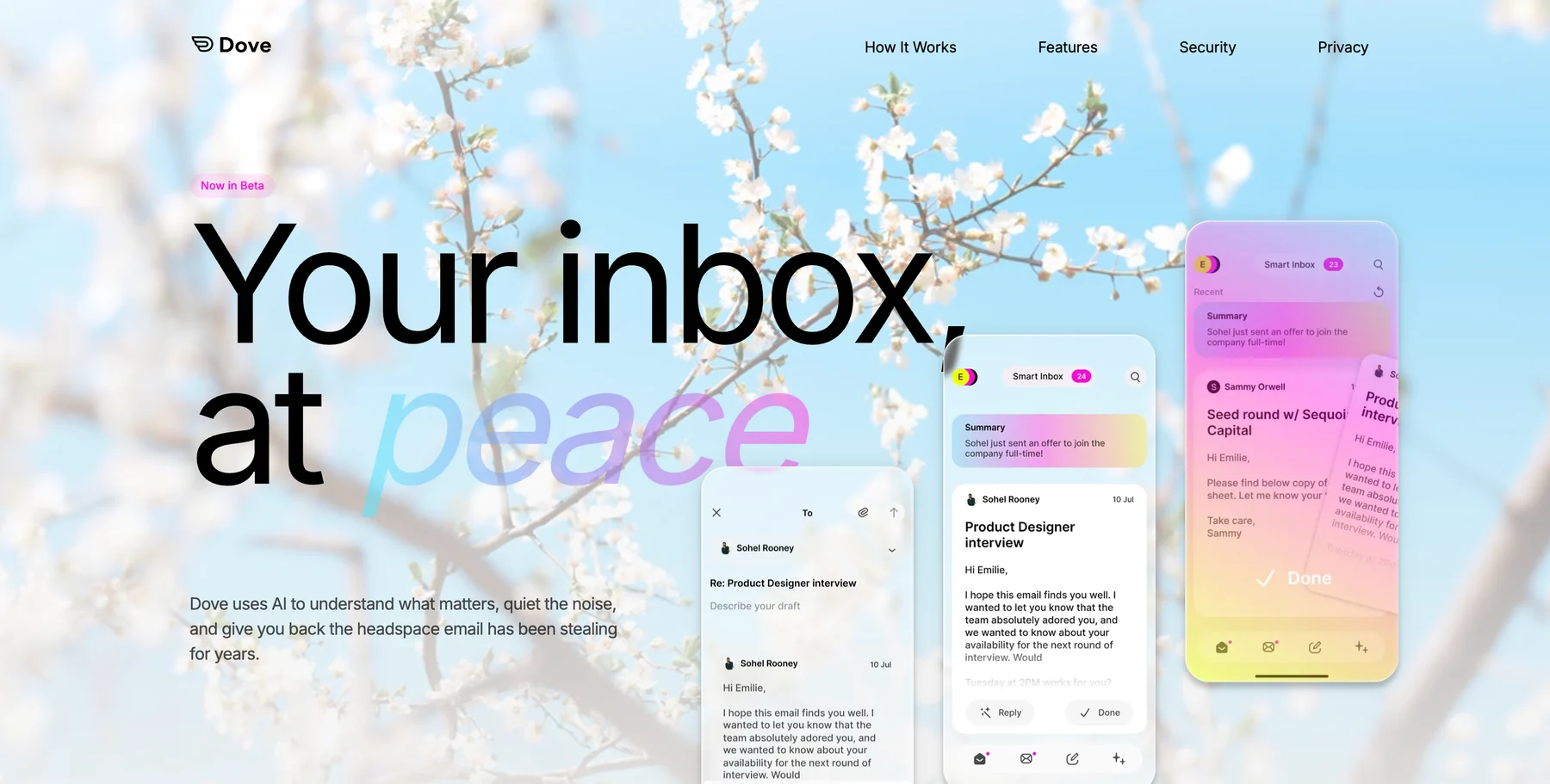
Dove is an AI-native email client built around one simple idea: every message is Focus, Noise, or Done. There’s no “maybe later” pile and no folders you have to groom.
Here’s how Dove triages Gmail:
Focus is a real person with a real ask. Open it.
Noise is marketing, bulk, newsletters, anything that doesn’t need you. Forget it.
Done is handled. Off your plate.
Dove sorts by reading the content, not just the sender. That’s what separates it from Priority Inbox. A one-line “can you confirm pricing before 5pm” from a brand-new domain goes into Focus. The seventh “thanks!” in a cc’d thread goes into Noise. You didn’t write a rule for either, and you don’t have to maintain one.
Two features matter most if you’re a heavy Gmail user:
Wingman opens a Focus email and reads the full thread before you do. It surfaces changed terms, buried action items, and overdue follow-ups. If a vendor quietly moved from Net 30 to Net 15 in paragraph four of a long reply, Wingman flags it.
Daily Tasks scans your Focus inbox in the morning and builds a prioritized list. You stop re-reading threads just to remember what you owe whom.
Dove works with your existing Gmail account. There’s no migration and no address change. You connect, let it learn your patterns through onboarding, and by day two it’s already further along than filters you spent two years tuning.
Who this fits: 80+ emails a day, multiple accounts, tired of maintenance. Founders, operators, consultants, recruiters.
Where it isn’t right yet: If you need on-device encryption for compliance reasons, or PGP-to-PGP exchange with external parties, Canary Mail is a better fit. Dove is built for AI-first triage, and that work happens in the cloud.
Best Privacy-Forward Gmail Alternative: Canary Mail
Canary Mail sits in a different spot. It’s a mature, privacy-first email client with PGP encryption built in, HIPAA-compliant SecureSend for regulated industries, and AI (Copilot) as an optional layer on top of a traditional client rather than as the foundation.
If Dove is “AI-native from day one,” Canary is “power-user email client with AI available when you want it.” Two different bets on what a user wants from an account.
Canary tends to be the right pick when:
You handle regulated data (healthcare, legal, finance) and need compliant send.
You want PGP without a clunky workflow.
You run a lot of accounts and want a unified inbox with proper folders.
You want AI help on reply drafting and thread summary, but you want to decide what’s important yourself.
Canary Mail runs on iOS, Android, macOS, and Windows.
A way to think about it: use Dove when you want AI to carry the weight of triage. Use Canary when you want a solid traditional client with AI on tap. Plenty of people run both, with Dove on a high-volume work account and Canary on accounts that have tighter privacy requirements.
Best Gmail-Native AI Companion: Shortwave
Shortwave is built specifically on Gmail. It doesn’t support other providers. That constraint is also what lets it go deep.
The product leans into AI summaries, natural-language search, scheduled send, and snoozing. It’s the closest thing to “Superhuman-plus-AI, Gmail only.” The UI is polished, the keyboard shortcuts are dense, and summaries are good. Triage is less opinionated than Dove’s, which means more of the decisions stay with you.
Who this fits: Gmail-loyal power users who want better AI but prefer to keep the familiar Gmail surface area.
Tradeoff: It’s a premium client, and there’s no multi-provider support if you’re running Outlook or iCloud alongside Gmail.
Best Native Gmail Experience on Mac: Mimestream
Mimestream is the quiet favorite of Mac power users. It’s a true native Mac app built on Gmail’s API rather than IMAP, so labels, filters, and categories behave the way they do in the Gmail web UI.
There’s no AI layer, and the team has been pretty clear there won’t be one. That’s the point. Power users who want a clean Mac client with fast search, proper keyboard handling, and no surprises pick Mimestream precisely because it doesn’t try to decide anything on their behalf.
Who this fits: Keyboard-first macOS users who love Gmail’s data model and dislike Gmail’s web UI. Developers, writers, researchers.
Where it isn’t right: Mobile-first users (Mimestream is desktop-only) and anyone looking for AI-driven triage.
Best Gmail Replacement for a Clean Break: HEY
HEY is a replacement, not a client. You take a hey.com address and rebuild your email life inside 37signals’ opinionated model. The Screener decides who gets through to you at all, the Imbox holds mail from people you’ve approved, and the Feed and Paper Trail absorb newsletters and receipts.
HEY doesn’t connect to your Gmail account. That’s deliberate. The view behind it is that Gmail-style inboxes can’t be fixed by putting something on top of them. You have to start over.
Who this fits: People who want to migrate off Google, who like the idea of approving senders before they can reach you, and who are ready for a different philosophy of inbox management.
Who it frustrates: Anyone who needs to keep their gmail.com address, anyone with a long list of accounts to consolidate, and anyone who leans hard on third-party integrations.
Going to HEY is a reset, in the same way moving apartments is a reset. You stop getting a lot of mail you’d meant to unsubscribe from. You also miss some legitimate mail for a week while you screen new senders. Both are on-brand for the product.
Best Privacy-First Gmail Replacement: ProtonMail
ProtonMail gives you a @proton.me address with end-to-end encryption by default, under Swiss jurisdiction. It’s the clearest choice if you want maximum privacy and are willing to give up tight Google integration to get it.
Proton shipped Proton Scribe and other AI features through 2025, keeping the AI story narrower and more privacy-respecting than most competitors. Expect less AI than Dove or Shortwave, and more encryption than either.
Who this fits: Journalists, activists, privacy-conscious professionals, and anyone whose threat model justifies leaving Google.
Where it isn’t right: Power users who live in Google Docs, Calendar, and Meet. Leaving Gmail in that case just fragments the rest of your workflow.
Best for Shared Inboxes and Team Email: Spark Mail
Spark is the pick when email is team work rather than solo work. Shared inboxes, delegated drafts, comments on messages, team-wide templates. It connects to Gmail (and other providers) and layers a collaboration model on top.
Who this fits: Founders and ops leads coordinating customer or partner email across a small team. Agencies. Sales teams that aren’t on a dedicated CRM yet.
Should You Stay on Gmail.com?
The honest answer most roundup articles skip: if you get fewer than about 40 emails a day, you lean on Google search across Drive, Calendar, and Gmail, and you’re a Workspace admin with vendor-review constraints, vanilla Gmail with Gemini is probably enough.
You don’t need a power-user tool until the tool you have starts costing you time. If Gmail is costing you ten minutes a day, any alternative is a rounding error. If it’s costing you an hour, the math looks different.
The clearest signal that you’ve outgrown Gmail: you keep rules you never audit, you miss client emails you shouldn’t miss, and you’ve opened your inbox at 10pm to “just clear a few things” more than a couple of times this month.
Sound like you? Try Dove. Connect your Gmail account. See what the inbox looks like when triage is already done.
How to Choose, in One Paragraph
If you want AI to make triage decisions on your existing Gmail account, go with Dove. If you want a proven traditional client with strong privacy and optional AI, go with Canary Mail. If you want Gmail-native AI inside the familiar Gmail UI, go with Shortwave. If you want a beautiful Mac client and no AI, go with Mimestream. If you want to leave Google for an opinionated take on email, go with HEY. If you want to leave Google for maximum privacy, go with ProtonMail. If email is fundamentally a team sport for you, go with Spark.
Frequently Asked Questions
What’s the best Gmail alternative for power users in 2026?
For high-volume Gmail users who want AI to handle triage automatically, Dove is the top pick. It sits on top of your existing Gmail account and sorts every message into Focus, Noise, or Done with no rules or filters to maintain. For privacy-first work, Canary Mail is the most mature option.
Can I keep my Gmail address and use a different email app?
Yes. Dove, Canary Mail, Shortwave, Mimestream, and Spark all connect to a Gmail account through standard authentication. Your address, calendar, and Drive don’t move. You’re changing the client, not the provider.
Is there a Gmail alternative with better AI than Gemini?
Dove and Shortwave both go further than Gemini inside Gmail today. Dove focuses on automatic triage (Focus, Noise, Done) and thread analysis through Wingman. Shortwave focuses on summarization and natural-language search. Gemini is closer to an assistant layer; Dove and Shortwave are closer to redesigned inboxes.
What do heavy email users use instead of Gmail?
Among founders, operators, recruiters, and consultants, the common picks in 2026 are Dove (AI triage), Canary Mail (privacy plus optional AI), Shortwave (Gmail-native AI), and Mimestream (native Mac, no AI). The right choice depends on whether you want automation or tighter manual control.
Which Gmail alternative works best on Mac?
Mimestream if you want a true native Mac client with no AI. Canary Mail if you want a mature multi-platform client with optional AI. Dove if you want AI triage across Mac, iOS, Android, Windows, and web.
Is it worth leaving Gmail entirely in 2026?
For most power users, no. The usual move is to keep the Gmail account and put a smarter client in front of it. Leave Gmail entirely only if you have a specific reason: privacy requirements Google can’t meet, a deliberate philosophical reset (HEY), or a preference for Swiss jurisdiction (ProtonMail).
The Bottom Line
The best Gmail alternative isn’t the one with the most features. It’s the one that matches the job you actually want done.
If you want to keep your Gmail account and stop drowning in it, a smarter client is the answer. Dove handles triage for you. Canary Mail gives you a proven privacy-first client with AI on demand. Shortwave and Mimestream cover the Gmail-native and Mac-native corners.
If you want to leave Google, HEY and ProtonMail are the two clear paths, and they point in very different directions.
Most power users don’t need a new email address. They need a new relationship with the inbox they already have.
Try Dove. Connect your Gmail account. In a couple of minutes, your inbox is already triaged. By day two, Dove has a sense of what matters to you. No migration, no new address, no filter maintenance.
Your inbox, at peace.
More from Dove
Recent posts

July 1, 2026
Best Airmail Alternatives in 2026
The best Airmail alternatives in 2026 compared. See platform support, pricing, strengths, and weaknesses for Dove, Canary Mail, Spark Mail, Mimestream, Edison Mail, Shortwave, Outlook, and Apple Mail.
June 30, 2026
Best Spike Alternatives in 2026
The best Spike alternatives in 2026 compared. See platforms, pricing, strengths, and weaknesses for Dove, Canary Mail, Shortwave, Spark, Missive, and Superhuman.

June 26, 2026
Best Zoho Mail alternatives in 2026
The best Zoho Mail alternatives in 2026, compared by platform, AI, pricing, strengths, and weaknesses. See how Dove, Canary Mail, Proton Mail, Fastmail, and Google Workspace stack up.