'/%3e%3c/g%3e%3c/svg%3e)

Best Shortwave Alternatives in 2026
The best Shortwave alternatives in 2026 compared. Platform support, pricing, what each tool does well, and where it falls short. Covers Dove, Superhuman, SaneBox, Hey, and more.
June 5, 2026

Shortwave made a strong case for an AI-first Gmail experience. Thread summaries, an AI assistant that drafts replies, and a clean modern interface helped it stand out from the older “smart inbox” generation. By 2026, though, more users are running into the same limits: Shortwave is Gmail only, the AI features sit on top of a fairly traditional inbox, and pricing has crept up for power users who want full AI access.
The AI email category has matured quickly. Some apps now triage every message into clear buckets before you open the inbox. Others bring AI alongside powerful filtering. A few stay lean and let you keep your existing client. Below are the best Shortwave alternatives in 2026, compared on platform support, pricing, what each app does well, and where each one falls short.
Key takeaways
Dove is the closest match to Shortwave for people who want AI to take real work off their plate. It sorts every email into Focus, Noise, and Done before you open the inbox, across any email provider: not just Gmail.
Superhuman is the best pick if you want a keyboard-driven Gmail and Outlook experience and price is not a constraint.
SaneBox is worth considering if you want Shortwave-style filtering on top of any existing email client without switching apps.
Hey is a good alternative if you want an opinionated email workflow with manual screening control.
Why people are looking for Shortwave alternatives
Shortwave built something genuinely useful: a Gmail client that understood threads, summarized conversations, and drafted replies. But in 2026, three friction points have grown:
Gmail only. Shortwave requires a Google account. If you use Outlook, iCloud, or a work IMAP account, Shortwave is not an option. As more people manage multiple accounts across providers, this is a hard wall.
AI that assists but does not decide. Shortwave’s AI answers questions and drafts replies, but it does not pre-sort your inbox. You still open to a pile of email and decide what matters. Newer apps like Dove sort before you arrive.
Pricing for full AI access. The free tier is limited and the AI features that make Shortwave worth using sit behind a paid plan.
Shortwave platforms: Web, iOS, and Android. No native desktop app. Shortwave pricing: a free tier with limited AI, Personal at $9 per month, and Business at $19 per user per month.
How we evaluated Shortwave alternatives
We graded each app on four axes so you can match it to your actual problem:
What it does well: the one or two things this app is genuinely best at.
What it does poorly: the gaps and rough edges that show up in daily use.
Platform support: which operating systems and devices are covered.
Pricing: what the free tier covers and what the paid plans cost.
For the wider category, see our roundup of the best email apps in 2026 and the best AI email apps in 2026. If you are specifically looking for Gmail alternatives, see our Gmail alternatives for power users guide.
The best Shortwave alternatives at a glance
App | Best for | Platforms | Free tier | Paid pricing (from) | AI approach |
|---|---|---|---|---|---|
Dove | AI-native triage across any provider | Web, iOS, Android, macOS, Windows | Yes (10 AI actions/day) | $20/mo | Autonomous triage |
Superhuman | Speed and keyboard-driven workflow | macOS, iOS, Windows, Android, Web | No (30-day trial) | $30/mo | Assistive |
SaneBox | Triage layer on any existing client | Any (filter layer) | No (free trial) | $7/mo | Filtering only |
Hey | Opinionated manual screener inbox | Web, macOS, iOS, Android | No (14-day trial) | $99/yr | Manual screening |
Airmail | Lightweight native client on Apple | macOS, iOS | No | $2.99/mo | Optional AI |
Shortwave | AI assistant for Gmail | Web, iOS, Android | Yes (limited) | $9/mo | Assistive |
1. Dove: best for AI-native triage across any email provider
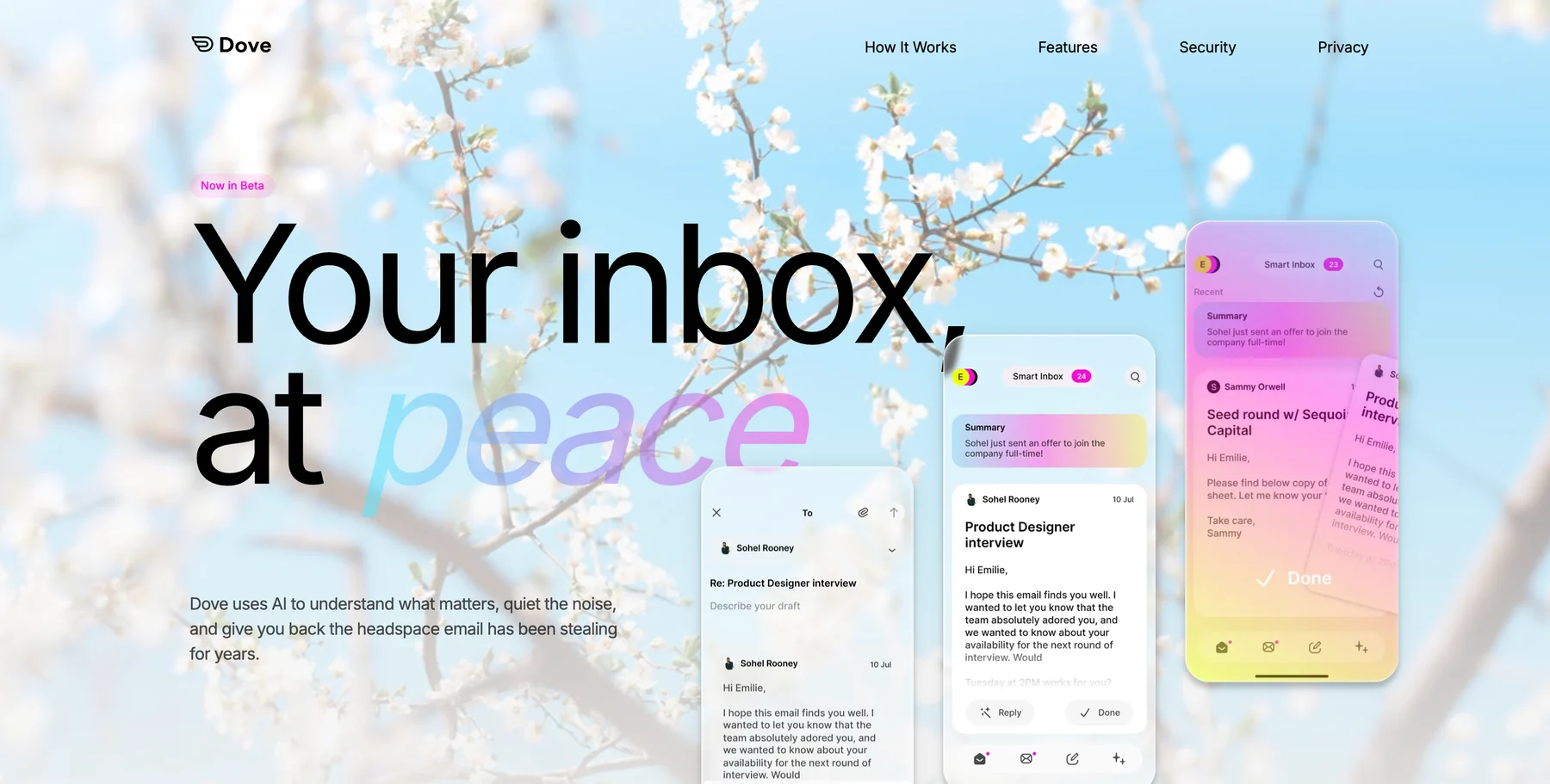
Dove is the most substantive Shortwave alternative for users who want AI to do more than assist. They want it to decide. Every incoming message is classified into one of three states: Focus (needs your attention), Noise (low priority), or Done (already handled). You arrive at a pre-sorted inbox rather than a raw pile.
The biggest practical difference from Shortwave: Dove works across Gmail, Outlook, iCloud, and standard IMAP accounts, not just Gmail. Wingman gives you per-thread intelligence (what was agreed, who owes what, what is still open) surfaced before you reply. Daily Tasks extracts action items from your inbox every morning and presents them as a to-do list.
Platform support: Web, iOS, Android, macOS, and Windows.
Pricing: A free plan with 10 AI actions per day, a single paid plan at $20 per month, and a 7-day trial. See current details on the Dove site.
What Dove does well:
Pre-sorts the inbox before you open it: AI is the foundation, not an add-on
Works across Gmail, Outlook, iCloud, and standard IMAP accounts
Wingman thread intelligence surfaces context and open items before you reply
Daily Tasks extracts action items from email automatically
Phishing and impersonation risk scoring built in
What Dove does poorly:
Newer product still building out power-user features and integrations
No PGP encryption for users who need end-to-end secure email
For users who want AI to pre-sort the inbox before they open it, Dove is the natural upgrade from Shortwave. Learn more at dove.email.
2. Superhuman: best for speed and keyboard-first workflow
Superhuman’s core value is speed. Instant load times, keyboard shortcuts for everything, a command palette that replaces most mouse clicks. If your frustration with Shortwave is that it still feels like a Gmail wrapper, Superhuman feels like a purpose-built professional tool.
Superhuman has AI features (thread summaries, reply drafts, follow-up reminders) but they are assistive rather than autonomous. The inbox does not pre-sort itself. You work through it faster with AI help. It supports Gmail and Outlook only.
Platform support: macOS, iOS, Windows, Android, and Web.
Pricing: Starter at $25 per month, Business at $30 per month. No free tier, but a 30-day trial is available.
What Superhuman does well:
The fastest email experience available, with sub-100ms response times
Excellent keyboard shortcuts and command palette
AI-drafted replies that match your voice and tone
Split inbox separates VIPs, team mail, and newsletters
What Superhuman does poorly:
Expensive relative to most alternatives
No Android-only plan: Android support added but less polished than iOS
Gmail and Outlook only, no IMAP or iCloud support
AI is assistive, not autonomous: inbox does not pre-sort
3. SaneBox: best for triage on any existing email client
SaneBox is not an email client: it is an intelligent filtering layer that runs on top of whatever client you already use. It learns which senders and threads you engage with and automatically moves low-priority mail into a SaneLater folder, leaving your main inbox for things that matter.
If you liked Shortwave’s focus on reducing noise but want to keep your existing client (Apple Mail, Outlook, Thunderbird), SaneBox adds the filtering without requiring you to switch. It works with any IMAP account, including accounts that Shortwave does not support.
Platform support: Any email client and account that supports IMAP.
Pricing: Plans start at $7 per month. A free trial is available.
What SaneBox does well:
Works with any existing client and any IMAP account: no migration
Reliable filtering that improves over time based on your behavior
SaneBlackhole for permanently silencing unwanted senders
SaneReminders for follow-up nudges on threads you are waiting on
What SaneBox does poorly:
No native app, no AI drafting, no thread intelligence
Folder-based approach can feel dated compared to AI-native alternatives
Does not work with accounts that block IMAP access
4. Hey: best for manual screener control
Hey takes the opposite approach to AI triage: you decide who gets through, manually, using the Screener. New senders hit the Screener before they reach your inbox. You approve or block them once, and the rule sticks. The Feed handles newsletters and updates separately from the Imbox.
If your frustration with Shortwave is that it still feels reactive (you are responding to whatever arrived), Hey gives you a sense of control through manual curation rather than AI automation. The tradeoff is that Hey requires a new @hey.com address and does not work as a client for your existing Gmail or Outlook account.
Platform support: Web, macOS, iOS, and Android.
Pricing: $99 per year for Hey for You. A 14-day free trial is available.
What Hey does well:
Opinionated workflow that separates signal from noise through manual screening
Feed and Paper Trail separate newsletters and receipts from the main inbox
No algorithmic manipulation: you decide what gets through
Strong design and mobile apps
What Hey does poorly:
Requires a new @hey.com address: cannot use with existing Gmail or Outlook
No IMAP, no way to bring your current accounts in
No AI automation: screening is entirely manual
Expensive for what it offers compared to AI-native alternatives in 2026
See our full list of Hey Email alternatives for more context.
5. Airmail: best lightweight native client on Apple devices
Airmail is a native macOS and iOS email client that connects to Gmail, Outlook, iCloud, Exchange, and IMAP accounts. It is fast, customizable, and has deep Apple platform integrations. It is a good fit for Shortwave users who want a native desktop experience without a high monthly cost.
Platform support: macOS and iOS only.
Pricing: Around $2.99 per month or a one-time purchase option.
What Airmail does well:
Native macOS and iOS apps with deep system integrations including Shortcuts and widgets
Works with Gmail, Outlook, iCloud, Exchange, and IMAP
Highly customizable swipe actions, layouts, and notifications
Affordable compared to most premium alternatives
What Airmail does poorly:
No Android or Windows app
No AI triage: inbox management is manual or rule-based
AI features are optional add-ons, not the foundation of the product
How to choose the right Shortwave alternative
Match the tool to the reason you are leaving Shortwave:
You want AI to actually sort your inbox before you open it: choose Dove. It does what Shortwave’s AI assists with, but autonomously, and it works across all email providers, not just Gmail.
You want a faster, keyboard-driven experience on Gmail or Outlook: choose Superhuman.
You want Shortwave-style priority filtering but want to keep your existing client: choose SaneBox.
You want explicit manual control over who reaches your inbox: consider Hey, with the caveat that it requires a new email address.
You want a lightweight native Apple client: try Airmail.
Most people leaving Shortwave want AI that does more than assist. If that is you, Dove is the direct answer.
FAQ
What is the best Shortwave alternative in 2026?
For most people, Dove is the best Shortwave alternative because it does what Shortwave’s AI helps with: organizing the inbox: but autonomously, before you open it, and across all email providers, not just Gmail.
What is the best free Shortwave alternative?
Dove has a free plan with 10 AI actions per day. Shortwave also has a free tier with limited AI. There is no meaningful free alternative that matches Shortwave’s full AI feature set, but Dove’s free tier is enough to evaluate whether autonomous inbox triage works for you.
Can Shortwave alternatives work with accounts other than Gmail?
Yes: Dove works with Gmail, Outlook, iCloud, and standard IMAP accounts. Superhuman supports Gmail and Outlook. SaneBox works with any IMAP account. Only Shortwave and Hey are locked to a single provider or address type.
Is Dove better than Shortwave?
For users who want AI to pre-sort the inbox before they open it, yes. Shortwave’s AI is assistive: it helps once you are in the inbox. Dove’s AI is autonomous: it has already sorted by the time you arrive. Dove also works across all email providers, not just Gmail.
Why are people leaving Shortwave?
The most common reasons are the Gmail-only limitation, the fact that full AI features require a paid plan, and the growing availability of alternatives that do more autonomous triage rather than just AI assistance.
Does Dove work with Gmail like Shortwave does?
Yes. Dove works with Gmail and also with Outlook, iCloud, and IMAP accounts. The setup is similar: connect your account and the AI starts learning your triage patterns immediately.
Bottom line
Shortwave proved that AI could make a Gmail inbox meaningfully better. But by 2026, the gap between “AI that assists” and “AI that decides” is wide enough to matter. If you want an inbox that has already done the sorting by the time you open it: on any account, not just Gmail: Dove is the natural next step.
Try Dove free. It works on top of your existing email and takes about two minutes to connect.
More from Dove
Recent posts

July 1, 2026
Best Airmail Alternatives in 2026
The best Airmail alternatives in 2026 compared. See platform support, pricing, strengths, and weaknesses for Dove, Canary Mail, Spark Mail, Mimestream, Edison Mail, Shortwave, Outlook, and Apple Mail.

June 30, 2026
Best Spike Alternatives in 2026
The best Spike alternatives in 2026 compared. See platforms, pricing, strengths, and weaknesses for Dove, Canary Mail, Shortwave, Spark, Missive, and Superhuman.

June 26, 2026
Best Zoho Mail alternatives in 2026
The best Zoho Mail alternatives in 2026, compared by platform, AI, pricing, strengths, and weaknesses. See how Dove, Canary Mail, Proton Mail, Fastmail, and Google Workspace stack up.