'/%3e%3c/g%3e%3c/svg%3e)

Best AI Email Apps in 2026
The best AI email apps in 2026 compared. See platforms, pricing, strengths, and weaknesses for Dove, Superhuman, Shortwave, Canary Mail, Spark, and more.

The best AI email apps in 2026 don’t just summarize threads or draft replies — they change what your inbox is for. Dove triages every message into Focus, Noise, and Done so threats and noise never compete for your attention. Superhuman uses AI to draft, schedule, and remind. Shortwave rebuilds Gmail around an AI assistant. Canary Mail keeps AI on-device for power users who care about privacy.
We tested seven AI email apps across what they actually do well, where they fall short, which platforms they support, and how much they cost. If you’re tired of an inbox that feels like a second job, this is the shortlist.
Key Takeaways
Dove is the best AI-native inbox if your real problem is overload, phishing, and noise — not slow typing.
Superhuman is the fastest keyboard-first email app, but it’s expensive and only works on Gmail/Outlook.
Shortwave is the strongest pure AI assistant for Gmail power users who want chat, summaries, and smart bundles.
Canary Mail is the best AI email app for privacy-conscious users — AI runs on-device and works with any account.
Spark and Notion Mail are good lightweight AI options if you want triage without paying premium pricing.
How we evaluated AI email apps
Not every “AI email” app does the same thing. Some focus on writing replies. Some focus on triage. Some focus on threat detection. We graded each app on four axes:
What it does well — the one or two things this app is genuinely best at.
What it does poorly — the gaps, missing features, or rough edges that show up in daily use.
Platform support — which OS and devices the app actually runs on (not just where it claims to).
Pricing — published prices in May 2026, including free tiers where they exist.
For background on the broader category, see our full roundup of the best email apps in 2026. For a privacy-first comparison, see the best email apps for privacy.
The best AI email apps at a glance
App | Best for | Platforms | Free tier | Paid pricing | AI runs |
|---|---|---|---|---|---|
Dove | AI-native triage and threat detection | Web, iOS, Android, macOS, Windows | Beta (free) | TBD | Cloud |
Superhuman | Speed and keyboard-first power users | macOS, Windows, iOS, Android, Web | No | $30/month | Cloud |
Shortwave | AI assistant for Gmail | Web, iOS, Android | Yes (limited) | From $9/month | Cloud |
Canary Mail | Privacy-first AI for any account | macOS, iOS, Android, Windows | Yes | Growth $36/year, Pro+ $100/year | On-device |
Spark Mail | Team email with AI assist | macOS, iOS, Android, Windows | Yes | Premium from $6/month per user | Cloud |
Notion Mail | Notion users who want a simple AI inbox | macOS, Web | Yes | Bundled with Notion AI add-on | Cloud |
SaneBox | Adding AI triage to your existing client | Works with any IMAP client | 14-day trial | From $7/month | Cloud |
1. Dove: best for AI-native triage and threat detection
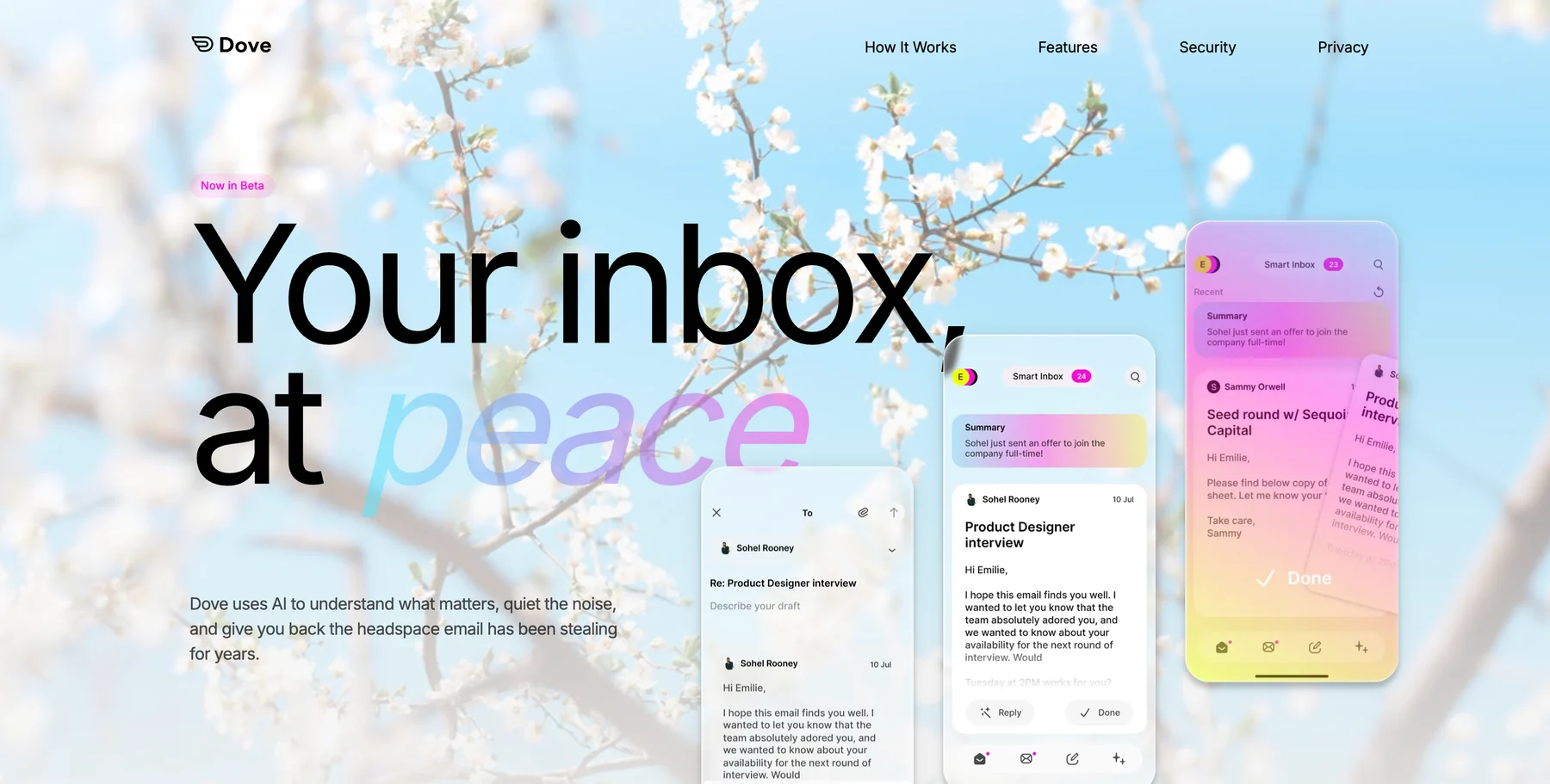
Dove is built around a single idea: your inbox shouldn’t be one undifferentiated stream. Every incoming email is scored for risk and importance, then sorted into Focus (needs your attention), Noise (junk, newsletters, threats), or Done (handled). Phishing attempts and impersonation attacks get quarantined automatically into Noise before you ever see them.
That’s a meaningful split from clients that bolt AI onto a traditional inbox. Dove’s Wingman feature reads thread context to flag risks buried deep in long conversations, and the AI keeps learning from what you reply to, what you archive, and what you ignore.
Platform support: Web, iOS, Android, macOS, Windows.
Pricing: Currently in beta with free access. Pricing has not been announced.
What Dove does well:
AI triage into Focus, Noise, and Done is the foundation, not a feature
Automatic risk scoring with phishing and impersonation detection
Wingman thread intelligence catches threats buried in long replies
Works with your existing Gmail, Outlook, iCloud, or IMAP accounts
Cross-platform from day one — no missing OS
What Dove does poorly:
Still in beta, so some features are actively shipping
Pricing not yet announced
Not an end-to-end encrypted email provider; pair with Canary Mail for PGP if encryption is critical
If your real problem is volume and threats — not how fast you can type — Dove is the right starting point. Learn more about how Dove’s triage system works.
2. Superhuman: best for speed and keyboard-first power users
Superhuman has been the high-end email app of choice for executives and founders for years, and the 2026 release leans hard into AI. Auto Drafts writes replies in your voice. Auto Summarize compresses long threads into a few lines. Reminders and follow-ups are automated based on who you’re talking to.
But the value of Superhuman has always been its speed and keyboard shortcuts, not the AI. If you want an inbox you can drive entirely from the keyboard with sub-100ms response times, nothing else feels the same.
Platform support: macOS, Windows, iOS, Android, Web.
Pricing: $30/month per user. No free tier. New users go through an onboarding session before getting access.
What Superhuman does well:
Fastest, most polished keyboard-driven experience on the market
AI-written replies in your voice are surprisingly accurate
Split inbox separates VIPs, team, news, and marketing automatically
Built-in read receipts, scheduled send, snooze, and follow-up reminders
What Superhuman does poorly:
$30/month per user is the most expensive consumer email app
Only works with Gmail and Outlook — no IMAP, no iCloud, no other providers
AI features are good but not differentiated from Shortwave or Dove
Onboarding is slow by design (it’s part of the value proposition)
For more context, see our review of the best Superhuman alternatives.
3. Shortwave: best AI assistant for Gmail
Shortwave was built by ex-Google engineers as a Gmail rebuild around an AI assistant. The standout feature is the AI Assistant chat: you ask questions about your inbox in natural language (“what’s the latest on the Q2 contract?”) and it pulls context from across your threads to answer.
Shortwave also bundles related messages automatically, summarizes long threads, and suggests replies. If you live in Gmail and want the strongest AI layer on top, Shortwave is currently the best dedicated answer.
Platform support: Web, iOS, Android. No native macOS or Windows apps — desktop users run the web app.
Pricing: Free tier with basic features and limited AI usage. Personal at $9/month for full AI assistant access. Business at $19/month per user.
What Shortwave does well:
AI Assistant chat is the most useful AI inbox feature available today
Smart bundles auto-group related threads (receipts, newsletters, calendars)
Search is genuinely good thanks to AI-powered ranking
Built specifically for Gmail, so the integration is tight
What Shortwave does poorly:
Gmail only — no Outlook, iCloud, or IMAP support
No native desktop app, only the web app
Free tier limits AI features quickly
Less useful for users with multiple non-Gmail accounts
4. Canary Mail: best AI email app for privacy
Canary Mail comes from Cartasec, the same Singapore team behind Dove. It’s a privacy-first email client that bundles PGP end-to-end encryption with on-device AI processing. Unlike most AI email apps, Canary Mail’s AI Copilot runs locally on your phone or computer — your email content never leaves the device for AI features.
Because Canary Mail is a client (not a provider), it works with your existing Gmail, Outlook, iCloud, or any IMAP account. You don’t need a new email address to get encryption and AI together.
Platform support: macOS, iOS, Android, Windows. No web client.
Pricing: Free tier with core features. Growth at $36/year (AI Copilot, advanced productivity). Pro+ at $100/year (SecureSend, advanced security). Lifetime options also available.
What Canary Mail does well:
AI Copilot runs entirely on-device, so email data never leaves your machine
PGP encryption built into a polished, modern interface
SecureSend lets you send encrypted messages to anyone, including non-PGP recipients
Works with any existing email account — no new address required
Power-user features: read receipts, snooze, pin, bulk cleaner, templates, 1-click unsubscribe
What Canary Mail does poorly:
No web client; you must install a native app
No Linux support
AI features are a paid add-on, not the architectural foundation
Advanced security features require the Pro+ tier
Canary Mail and Dove are positioned differently. Canary Mail is privacy-first with AI as an option. Dove is AI-first with security baked in. Many users pair them — see the privacy email app guide for the full picture.
5. Spark Mail: best for team email with AI assist
Spark by Readdle has been a popular cross-platform email client for years. The 2026 version added AI features: AI Compose for writing replies, AI Reply for one-click drafts, and AI Summarize for long threads. Spark also has a unique Smart Inbox that groups newsletters, notifications, and pinned messages separately.
The differentiator is team email. Spark lets multiple people share an inbox, draft replies together, and assign messages — features most consumer AI email apps don’t offer.
Platform support: macOS, iOS, Android, Windows. Web app available for Spark Premium users.
Pricing: Free tier with core features and limited AI usage. Premium at $6/month per user (annual billing) for full AI features and team collaboration. Premium Pro at $13/month per user for advanced features.
What Spark does well:
True cross-platform with the same interface on every OS
Team features (shared inbox, collaborative drafts) work well for small teams
Smart Inbox grouping is automatic and customizable
Pricing is reasonable compared to Superhuman
What Spark does poorly:
AI features are good but not best-in-class compared to Dove or Shortwave
Free tier limits AI usage, push notifications, and email accounts
Past privacy concerns around storing OAuth tokens on Readdle servers (since addressed, but worth noting)
Some power-user shortcuts feel less refined than Superhuman
6. Notion Mail: best for Notion users who want a simple AI inbox
Notion Mail launched in late 2024 as part of Notion’s expansion beyond docs. It’s a clean, minimal Gmail client that ties into your existing Notion workspace — you can drag emails into pages, create tasks from messages, and use Notion AI to draft replies or summarize threads.
It’s not the most feature-rich AI inbox, but for people already using Notion as their main work surface, the integration is genuinely useful.
Platform support: macOS, Web. No iOS or Android apps yet (mobile is on the roadmap).
Pricing: Free with a Notion account. Notion AI add-on at $10/month per user unlocks AI compose, summarize, and inbox actions.
What Notion Mail does well:
Tight integration with Notion pages, databases, and tasks
Clean, distraction-free UI that matches Notion’s design
Notion AI for drafting and summarizing is competent
Free for basic use if you already pay for Notion
What Notion Mail does poorly:
Gmail only — no Outlook, iCloud, or IMAP support
No mobile apps yet
Limited compared to dedicated AI clients like Dove or Shortwave
AI features require the separate Notion AI subscription
7. SaneBox: best for adding AI triage to your existing client
SaneBox is the oldest tool on this list. It’s not a new email app — it’s a service that sits on top of your existing email account (Gmail, Outlook, iCloud, any IMAP) and adds AI-powered triage. Low-priority messages get moved to a SaneLater folder. Newsletters go to SaneNews. Senders you ignore go to SaneBlackHole.
If you don’t want to switch email apps, SaneBox is the easiest way to add AI triage to whatever you already use — including Apple Mail, Outlook, or Thunderbird.
Platform support: Works with any IMAP-based email client on any platform. No app of its own; configuration is via web.
Pricing: 14-day free trial. Snack at $7/month (or $59/year) for one feature. Lunch at $12/month for all core features. Dinner at $36/month for everything plus advanced filters.
What SaneBox does well:
Works with any email client — no need to switch apps
Adds AI triage to clients that don’t have it (Apple Mail, Thunderbird, Outlook)
Long track record (founded in 2010) with a stable, no-frills product
Strong privacy posture — only metadata is processed
What SaneBox does poorly:
No native client of its own — relies on whatever app you already use
Pricing adds up quickly compared to bundled AI clients
Triage is rule-based with AI on top, not deeply AI-native
No AI compose, summarize, or chat features
How to choose the right AI email app
App | Strongest at | Weakest at | Choose if… |
|---|---|---|---|
Dove | AI triage and threat detection | E2E encryption | Your real problem is overload and threats |
Superhuman | Speed and keyboard control | Price ($30/month) | You live in your inbox and want the fastest one |
Shortwave | AI chat for Gmail | Non-Gmail accounts | You’re a Gmail power user who wants the strongest AI |
Canary Mail | On-device AI with PGP | No web client | You want AI without sending email content to a server |
Spark Mail | Cross-platform team email | Best-in-class AI | You need team email with AI assist at a fair price |
Notion Mail | Notion integration | Mobile, non-Gmail | You already live in Notion and use Gmail |
SaneBox | Adding triage to any client | No app of its own | You don’t want to switch from Apple Mail or Outlook |
The split is straightforward. If your real problem is volume and threats, Dove’s AI triage is the right starting point. If your problem is typing speed, Superhuman. If you live in Gmail and want chat-style AI, Shortwave. If you need encryption with AI on the side, Canary Mail. If you don’t want to switch clients at all, SaneBox.
For a broader comparison that goes beyond AI, see our roundup of the best email apps in 2026. If overload is the real issue, the strategies in how to manage too many emails pair well with any of these tools.
Frequently Asked Questions
What is the best AI email app in 2026?
The best AI email app depends on what your inbox problem actually is. Dove is the best choice if you want AI-native triage that automatically sorts mail into Focus, Noise, and Done while also catching phishing and impersonation threats. Superhuman is the fastest keyboard-first inbox if you live in email all day. Shortwave is the strongest AI assistant for Gmail power users. Canary Mail is the best AI email app for privacy because its AI Copilot runs entirely on your device.
Are AI email apps safe to use?
Reputable AI email apps are safe, but the way they handle your data varies. Most cloud-based AI email apps (Superhuman, Shortwave, Spark, Notion Mail, Dove) process email content on their servers in order to power AI features. Canary Mail is the exception — its AI runs on-device, so email content never leaves your phone or computer. Always read the privacy policy and check whether the app is SOC 2 certified before connecting your work email.
Can I use an AI email app with my existing Gmail or Outlook account?
Yes, in most cases. Dove, Canary Mail, Spark, and SaneBox all work as clients on top of your existing Gmail, Outlook, iCloud, or IMAP account — you keep your current email address. Superhuman supports Gmail and Outlook only. Shortwave and Notion Mail are Gmail-only. None of these apps require you to migrate to a new email provider.
Do AI email apps work on iPhone, Android, Mac, and Windows?
Coverage varies by app. Dove, Spark, and Canary Mail support all major platforms (iOS, Android, macOS, Windows). Superhuman covers macOS, Windows, iOS, Android, and the web. Shortwave is web, iOS, and Android (no native desktop). Notion Mail is currently macOS and web only. Always check the app’s website for the latest platform support before subscribing.
What is the difference between AI triage and AI compose in an email app?
AI triage automatically sorts incoming mail by importance, urgency, and risk — for example, Dove’s Focus, Noise, and Done categorization. AI compose helps you write replies, either by drafting from scratch (Superhuman’s Auto Draft) or expanding short notes into full messages (Shortwave’s AI Reply). Triage saves you time on the inbound side; compose saves time on the outbound side. The best AI email apps offer both, but most users feel the impact of triage more in daily use.
Is there a free AI email app?
There are several with free tiers. Dove is currently free during beta. Spark and Shortwave both offer free plans with limited AI usage. Canary Mail’s free tier includes core email features without AI. Notion Mail is free if you have a Notion account, though AI features require the Notion AI add-on. Superhuman, SaneBox, and the paid tiers of Shortwave and Spark do not have free options beyond a trial.
Your inbox shouldn’t be a second job
AI email apps in 2026 fall into two camps: tools that make you faster at processing email, and tools that make you process less email in the first place. Superhuman, Shortwave, and Spark help you write and reply faster. Dove, Canary Mail, and SaneBox help you see less of what doesn’t matter.
The right answer depends on which problem you actually have. If you spend hours typing replies, get a faster client. If you spend hours wading through noise, get a smarter triage layer. Either way, the worst option is keeping a default Gmail or Outlook setup and hoping it gets better on its own.
More from Dove
Recent posts

June 19, 2026
Best Email Apps for Teachers in 2026
The best email apps for teachers in 2026, compared by platform, AI, pricing, strengths, and weaknesses. See how Dove, Canary Mail, Gmail, Outlook, and Spark stack up for the classroom inbox.

June 18, 2026
Best Email Apps for Students in 2026
The best email apps for students in 2026, compared by platform, AI, pricing, strengths, and weaknesses. See how Dove, Canary Mail, Gmail, Outlook, Spark, and Proton Mail handle deadlines, .edu accounts, and scam emails.

June 17, 2026
Best Email Apps for Doctors in 2026
The best email apps for doctors in 2026, compared by platform, AI, pricing, strengths, and weaknesses. See how Dove, Canary Mail, Gmail, Outlook, Hushmail, and Proton Mail handle patient messages, referrals, and HIPAA needs.