'/%3e%3c/g%3e%3c/svg%3e)

Best Superhuman Alternatives in 2026, Ranked by Workflow
The best Superhuman alternatives in 2026 are Dove, Canary Mail, Shortwave, HEY, and Spark. Compare by workflow, not just features, and pick the right fit.
April 20, 2026

The strongest Superhuman alternatives in 2026 are Dove, Canary Mail, Shortwave, HEY, and Spark. The right one depends on how you actually work. Dove if you want AI to triage your inbox for you. Canary Mail if privacy comes first. Shortwave if you basically live in Gmail. HEY if you want fewer strangers showing up uninvited. Spark if your team writes email together.
Superhuman made speed feel like a feature back in 2017. Speed is table stakes now. The more useful question is whether your email app can tell what deserves your attention, catch something buried deep in a thread, keep your data where it belongs, or work the way your team actually works.
None of those are about shortcuts. So instead of another feature tour, we ranked these apps the way people actually pick one: by the daily rhythm of the job.
Key Takeaways
Dove is the pick if you want AI to triage every message into Focus, Noise, or Done before you open the inbox.
Canary Mail fits privacy-first professionals who need PGP, HIPAA-grade send, and AI that stays on their terms.
Shortwave wins for Gmail loyalists who want AI summaries and thread bundling inside the interface they already know.
HEY suits minimalists who like screening every new sender at the door.
Spark works for small teams who draft and review email together rather than in Slack.
Why People Are Leaving Superhuman in 2026
Superhuman is a fast, good-looking Gmail client with strong opinions about keyboard shortcuts. People leave for a handful of recurring reasons.
Price is the obvious one. Paying a premium subscription for a client that mostly speeds up sending is harder to justify when AI-native apps are doing more of the actual thinking.
The AI gap is the deeper one. Superhuman has added AI features, but what sits underneath is still a traditional inbox with shortcuts on top. That is a different product category from an app that decides what you should read.
Fit is the last one. Superhuman was built for a specific persona: high volume, fast hands, devoted to Inbox Zero. If that isn’t you, the app can start to feel like a tool you’re paying to admire.
Each pick below fixes one of those mismatches better than Superhuman does. None fix all three, which is why the right answer depends on you.
How We Ranked These Apps
We looked at five workflows professionals actually run all day:
AI-native triage, where you want the app to decide, not just sort.
Privacy-first power use, where encryption and control are the baseline.
Gmail-heavy summarization, where you live in Gmail and want an AI co-pilot.
Minimalist screening, where you want a gate between strangers and your attention.
Team collaboration, where your inbox is a shared workspace.
Each pick is the strongest option for one of those workflows. If none of them match your day, a default Gmail or Outlook client with a good AI extension is probably the honest answer.
Want to skip ahead? See how Dove’s three-state triage works.
1. Dove, Best for AI-Native Triage
If your real problem is the morning sorting ritual, where you stare at 80 unread messages and try to figure out which ones matter, Dove is the Superhuman alternative built for that exact moment.
Dove sorts every incoming email into one of three states automatically: Focus (this needs you), Noise (this doesn’t), or Done (already handled). There is no middle bucket and no “maybe later” pile that quietly becomes a second backlog. The AI makes the call, and it learns from what you do next.
The point isn’t to make you faster at sorting. It’s to remove the sorting step, so when you open the inbox you go straight to the handful of messages that actually need a reply.
Three features do most of the lifting.
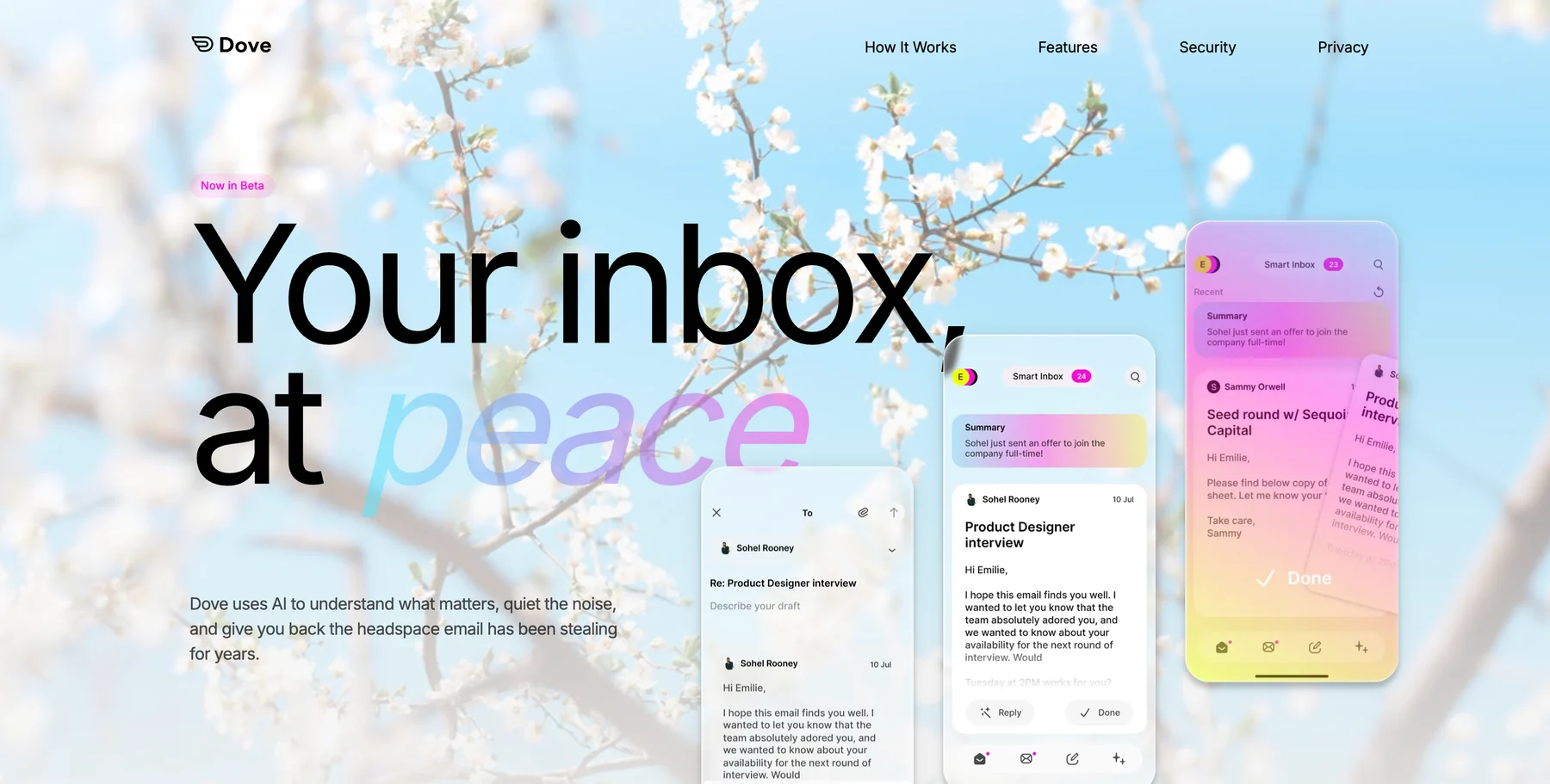
Wingman reads the full thread before you reply. It surfaces what you might have missed: a payment term that shifted in paragraph four, action items scattered across fourteen messages, a request that went quiet two weeks ago.
AI Assist is a conversational agent that lives inside the inbox. Ask something like “what did the landlord say about the lease?” and it pulls a synthesized answer from every relevant email. It replaces a lot of search, filtering, and archive digging.
Daily Tasks pulls a prioritized to-do list out of your Focus emails each morning, so you stop re-reading threads to remember what you owe people.
Where Dove pulls ahead of Superhuman: AI that commits to a call instead of nudging you toward one. Risk scoring on every incoming message. Cross-platform coverage across iOS, Android, macOS, Windows, and web, with server-side classification that syncs instantly. Built by the team behind Canary Mail, which has been doing email at scale for years.
Where Superhuman still wins: Raw keyboard-shortcut speed for people who write hundreds of messages a day. Dove is fast, but Superhuman is tuned for a different kind of job.
Best for: PMs, ops leads, consultants, and anyone whose inbox demands a full triage shift before the actual workday starts.
2. Canary Mail, Best for Privacy-First Power Users
Canary Mail is Dove’s sibling product: same company, different philosophy. Dove is AI-native from the ground up. Canary Mail is a mature email client where privacy is the foundation and AI bolts on carefully, only when you want it.
If encryption, local processing, and tight control over what leaves your device matter more than an AI-first workflow, Canary is the alternative worth looking at.
The feature set runs wide. PGP encryption is built in. SecureSend handles HIPAA-grade workflows. On-device AI is available for people who don’t want anything shipped to the cloud. Read receipts, send-later, snooze, unified inbox across accounts, and Copilot as an optional assistant round it out.
Where Canary pulls ahead of Superhuman: Actual encryption, not just TLS. HIPAA-ready workflows. A traditional email client that has been used at scale for years, with AI layered in on the user’s terms. Available on Mac, Windows, iOS, and Android.
Where Superhuman still wins: A narrower, more opinionated surface that feels faster out of the box. Canary is a full client, so there’s more surface area to learn. Usually that’s a feature, occasionally it’s a cost.
Best for: Legal, healthcare, finance, consultants handling sensitive client data, and anyone who wants a serious traditional email client with AI as a choice rather than a premise.
3. Shortwave, Best for Gmail-Heavy AI Summarizers
Shortwave sits on top of Gmail and is built for people who like Gmail and want AI layered over it. The interface is familiar, the shortcuts are Gmail-flavored, and the new layer is the AI: thread summaries, AI-powered search, and a chat-style assistant that answers questions about your mail.
If you’ve tried to leave Gmail before and drifted back because muscle memory is real, Shortwave is probably the most honest Superhuman alternative for you. It doesn’t try to replace Gmail. It wraps it.
Where Shortwave pulls ahead of Superhuman: Better AI summarization for long threads. A more usable free tier. Native to Google accounts, so you don’t have to worry about losing any Gmail-only features.
Where Superhuman still wins: Polish and speed. Shortwave’s AI is strong, but the rest of the app feels less finished. Superhuman is the better-looking product if that matters to you.
Best for: Gmail power users who want AI help without changing clients, people who read more email than they write, and anyone whose threads regularly run past ten replies.
4. HEY, Best for Minimalist Screening
HEY, from the team at 37signals, is the most philosophically different option on this list. Its bet is that the real problem isn’t triage at all. It’s that strangers have access to your inbox in the first place.
The signature feature is the Screener. The first time a new sender emails you, HEY asks whether to let them in. Say no and you never hear from them again. That single decision wipes out an entire category of inbox noise before it even starts.
HEY also splits your mail into three lists that map to how people actually use email. The Imbox holds real messages. The Feed is for newsletters you scroll like social. The Paper Trail collects receipts and confirmations you might need later.
Where HEY pulls ahead of Superhuman: An opinionated design that prevents overload rather than managing it. No AI hallucinations, because there’s almost no AI in the product.
Where Superhuman still wins: It works with your existing email address. HEY wants you on a @hey.com address or HEY for Work, which is a bigger commitment than most switchers are ready for.
Best for: Solopreneurs, creators getting inbound from strangers all day, and anyone who wants the door to their inbox locked by default.
5. Spark, Best for Team Email Collaboration
Spark, from Readdle, has quietly become one of the best email clients for small teams. The feature that matters is private collaboration on email threads. You can draft a reply, leave it as a shared draft, tag a colleague to review it, and resolve comments without the customer ever seeing the back-and-forth.
For agencies, customer-facing teams, and small companies where “wait, who’s replying to this?” is a daily question, Spark pulls a lot of coordination out of Slack and back into the thread itself.
Spark also has a capable personal client, with a smart inbox, AI writing assist, and cross-platform sync. The reason to pick it over Superhuman, though, is the team layer, not the solo one.
Where Spark pulls ahead of Superhuman: Shared drafts, team comments, assignment, and unified team inboxes. A free tier that is actually useful.
Where Superhuman still wins: Single-user speed and polish. Spark is strong on its own, but the team features are the whole point.
Best for: Small teams, agencies, customer support groups, and anyone tired of pasting draft replies into Slack for a sanity check.
Quick Comparison: Which Superhuman Alternative Fits You?
Workflow | Pick | Why |
|---|---|---|
AI decides what matters | Dove | Focus / Noise / Done triage, Wingman thread analysis, Daily Tasks |
Privacy and encryption first | Canary Mail | PGP, HIPAA-grade SecureSend, optional AI |
Gmail + AI summaries | Shortwave | Wraps Gmail, strong AI, familiar shortcuts |
Minimalist screening | HEY | Screener, Imbox / Feed / Paper Trail, opinionated |
Team collaboration | Spark | Shared drafts, team comments, unified inboxes |
Ready to see the difference? Try Dove. Setup takes a couple of minutes, and the AI starts learning your patterns right away. No migration, works alongside your current provider.
How to Pick the Right Superhuman Alternative for Your Workflow
A few questions make the choice easier.
What do you want the AI to do? If the answer is “decide what I read,” Dove. If it’s “summarize long threads,” Shortwave. If it’s “help me write faster, otherwise stay out of the way,” Canary’s Copilot or Superhuman itself. If it’s “nothing, please,” HEY.
How much does privacy weigh? If it weighs a lot, Canary Mail is the only serious pick on this list. The others are fine on standard TLS, but they don’t put encryption and on-device processing at the baseline.
Are you working alone or on a team? Solo workflows have five good options. Team workflows narrow to Spark quickly. Some teams run Dove for individual inboxes and Spark for shared mailboxes, which is a perfectly reasonable combination.
Talk to enough people switching away from Superhuman and a theme shows up: they don’t actually want faster email. They want less of it. These apps deliver less in different ways. Some cut the noise at the source. Others make the pile that remains less painful to work through.
If speed of writing is your real bottleneck, Superhuman is still a strong answer. For most professionals in 2026, the bottleneck has moved somewhere else.
FAQ
What is the best Superhuman alternative in 2026?
For most professionals, Dove. It replaces the manual triage routine with AI classification into Focus, Noise, and Done, reads full threads before you reply, and pulls a daily task list straight out of your Focus emails. Canary Mail is the strongest pick for privacy-first users, and Shortwave is the best option if you’re committed to Gmail.
Is there a free alternative to Superhuman?
Yes. Shortwave, HEY, and Spark all have free tiers, and Canary Mail has a free version. Pricing shifts, so check the current tiers on each product’s site before you commit.
Which Superhuman alternative has the best AI?
Dove has the most complete AI stack: automatic triage, thread analysis (Wingman), a conversational agent (AI Assist), and auto-generated daily tasks. Shortwave has strong summarization for long threads. Superhuman has AI features, but they sit on top of a traditional inbox rather than driving it.
Can I use a Superhuman alternative with my existing email address?
Yes, for four of the five. Dove, Canary Mail, Shortwave, and Spark connect to existing Gmail, Outlook, or IMAP accounts without migration. HEY is the exception. It uses @hey.com addresses or its HEY for Work product.
Is Superhuman still worth it in 2026?
For a specific user, yes. High-volume senders who live on keyboard shortcuts and value raw speed will still get their money’s worth. For most professionals, the question has shifted. It used to be “is this client fast enough?” These days it’s “is this client smart enough?” On that axis, Superhuman is no longer the obvious pick.
The Takeaway
Superhuman set a real standard for what a fast email client feels like, and the rest of the category caught up. What’s interesting now is a different question. Not how quickly you can clear 200 emails, but whether you should be reading all of them in the first place.
Dove answers that by triaging every message into Focus, Noise, or Done before you open the app. Canary Mail answers it with privacy-first fundamentals and AI as an opt-in. Shortwave answers it by making Gmail smarter. HEY answers it by closing the door on strangers. Spark answers it by turning team email into a shared space.
Your inbox isn’t going to fix itself. If the Superhuman model stopped fitting your day, pick the workflow that does and let the app do the work.
Try Dove → Setup takes about two minutes. The AI starts learning immediately. No credit card, no migration, works alongside your current email app.
More from Dove
Recent posts
July 1, 2026
Best Airmail Alternatives in 2026
The best Airmail alternatives in 2026 compared. See platform support, pricing, strengths, and weaknesses for Dove, Canary Mail, Spark Mail, Mimestream, Edison Mail, Shortwave, Outlook, and Apple Mail.
June 30, 2026
Best Spike Alternatives in 2026
The best Spike alternatives in 2026 compared. See platforms, pricing, strengths, and weaknesses for Dove, Canary Mail, Shortwave, Spark, Missive, and Superhuman.

June 26, 2026
Best Zoho Mail alternatives in 2026
The best Zoho Mail alternatives in 2026, compared by platform, AI, pricing, strengths, and weaknesses. See how Dove, Canary Mail, Proton Mail, Fastmail, and Google Workspace stack up.