'/%3e%3c/g%3e%3c/svg%3e)

Best Email Apps for Students in 2026
The best email apps for students in 2026, compared by platform, AI, pricing, strengths, and weaknesses. See how Dove, Gmail, Outlook, Spark, and Proton Mail handle deadlines, .edu accounts, and scam emails.

Student inboxes are genuinely messy in ways most people outside college do not appreciate. In a single folder you are managing professor announcements, assignment instructions, group-project threads, financial aid and billing notices, registration deadlines, club and society blasts, internship alerts, and an endless stream of promotions from every site that ever got your school address. Miss one message and you are looking at a moved exam, a late fee, or an internship offer that expired while it sat unread.
There is also a risk most roundups ignore entirely. Students are a favorite target for email scams. Fake scholarship offers, bogus financial aid updates, phishing emails dressed up as your university IT department, job postings that look too good to be real. A .edu address offers zero protection. So the right email app is not just about a clean interface. It needs to sort out what actually requires your attention, catch deadline information buried deep in threads, keep all your accounts together, and stop the scam before you ever click it.
This guide covers the best email apps for students, with honest notes on platform support, pricing, and real trade-offs. Dove and then we get into the strongest mainstream and privacy-focused alternatives.
Key takeaways
Dove is the strongest overall pick for students. It is AI-native, sorting every message into Focus, Noise, and Done, reading long assignment and group-project threads, and scoring messages for scams and phishing before they reach you. Free plan available; Pro is $20/month.
Gmail and Outlook are the familiar defaults, often handed to you by your school for free, but they organize rather than triage and ship only basic native scam warnings.
Spark suits students who want a free, polished inbox across all their devices, and Proton Mail fits anyone who wants a free private personal address alongside their .edu account.
The deciding factors for students are automatic triage, deadline-aware thread intelligence, easy multiple-account support, and built-in scam protection, all at a price a student budget can handle.
What students should look for in an email app
Before the list, it helps to name what actually matters when your inbox doubles as your deadline tracker, job board, and billing department.
Triage that decides, not just files. Between forty new messages you need to know which one is your advisor confirming a deadline, without reading all forty between classes.
Deadline-aware thread intelligence. Due dates, room changes, and submission rules hide inside long announcement and group threads. A good app pulls them out so nothing slips.
Easy multiple-account support. Most students carry a .edu address plus a personal one, and maybe a work or club account. They should all live in one view.
Scam and phishing protection. Fake scholarship, financial aid, and job emails should get flagged before you hand over a login or a payment.
Free or genuinely cheap. The app has to do real work without a real bill, or a small one.
Cross-platform that keeps up. Student email happens on a phone between classes, a laptop in the library, and sometimes a shared campus computer. The experience has to follow you.
The best email apps for students at a glance
The table below is the fast version. Each app gets a closer look further down.
Email app | Platforms | AI approach | Starting price | Strengths for students | Watch-outs |
|---|---|---|---|---|---|
iOS, Android, macOS, Windows, Web | AI-native (triage is the foundation) | Free plan (10 AI actions/day); Pro $20/month, 7-day trial | Sorts mail into Focus, Noise, and Done automatically, reads threads, extracts deadlines and follow-ups, scores messages for scams and phishing | Newer app, smaller third-party integration list today | |
Gmail | Web, iOS, Android (desktop via browser) | Light AI in paid Workspace tiers | Free personal; often free through your school | Familiar, reliable, huge app ecosystem, generous free storage, usually provided by universities | Noisy by default, no real triage, basic native scam warnings |
Outlook | Windows, macOS, iOS, Android, Web | Copilot AI on paid Microsoft 365 | Free personal account; often free via school Microsoft 365 | Strong calendar for class schedules, common on campus, solid rules | Cluttered for busy inboxes, best AI gated behind paid plans |
Spark | iOS, macOS, Android, Windows, Web | Built-in AI assist and smart inbox | Free plan; Premium from about $8/month | Free, polished, syncs across every device, snooze and send later | Best collaboration and AI features sit on the paid plan; triage is lighter than Dove |
Proton Mail | Web, iOS, Android, macOS, Windows | No built-in AI focus (privacy-first) | Free tier; Mail Plus about $4/month | End-to-end encryption, a free private personal address, strong privacy | Free tier is storage-limited; no real triage; separate from your .edu mail |
Pricing is approximate and changes often, so check each provider for current rates before you commit.
1. Dove: best AI-native inbox for students
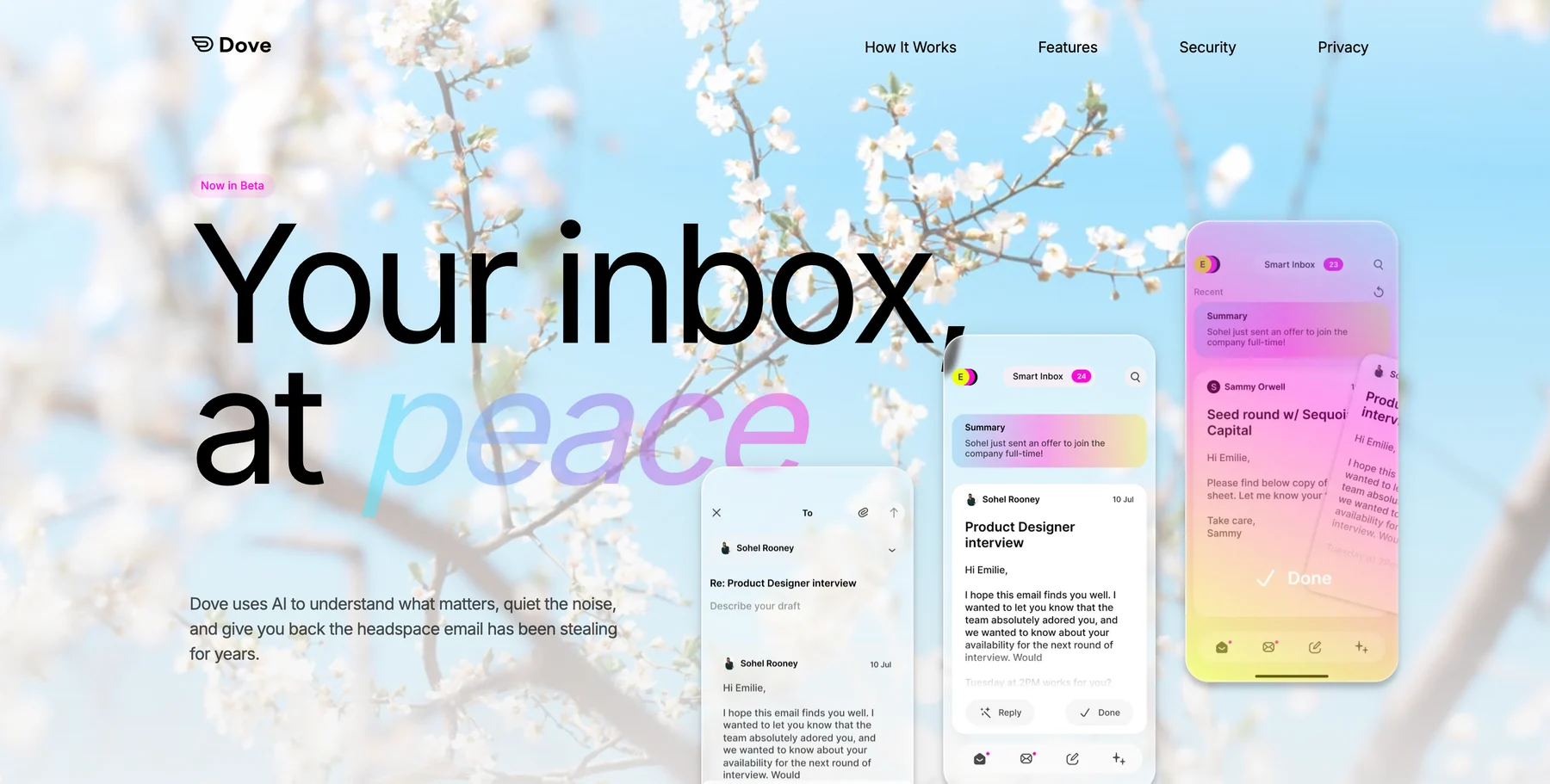
Dove is an AI-native email app, which makes it the cleanest fit for a student drowning in announcements, deadlines, and promotions. The AI is not a sidebar feature bolted onto a traditional client. It is the foundation, so every message gets read and sorted the moment it lands.
Each incoming email lands in one of three states: Focus (needs you, like a professor confirming an exam time), Noise (does not need you, like a club newsletter), or Done (already handled). When you open a Focus message, Wingman reads the whole thread and flags deadlines, submission rules, and overdue items before you reply. That matters when a due date or a room change is buried deep in a long group-project chain. AI Assist lets you talk to your inbox in plain language to search, archive, and draft, which comes in handy when you are firing off a question to a TA between lectures. Every morning, Daily Tasks turns your Focus mail into a ranked list so no deadline or reply goes cold.
The standout for student life is Dove’s security scoring, which quarantines suspicious messages before they reach you. Given how often fake scholarship, financial aid, and job scams target students, that is a meaningful safety layer. If you want to go deeper on staying safe, our guide on how to protect yourself from phishing emails covers the topic in detail.
Platforms: iOS, Android, macOS, Windows, and Web, with server-side classification that syncs instantly across every device. Triage you do on your phone shows up on the library laptop.
What it does well: Automatic triage that actually makes decisions, deadline-aware thread intelligence through Wingman, follow-up extraction through Daily Tasks, and built-in security scoring that catches scams. It also brings your .edu, personal, and work accounts into one calm view, and the interface stays deliberately quiet, which matters during exam weeks when your attention is already spread thin.
Where it falls short: Dove is the newest app on this list. It connects to fewer third-party tools today, and some traditional power-user shortcuts are still being built out.
Pricing: Dove has a free plan with core inbox features and 10 AI actions per day across unlimited accounts, so you can connect your existing inbox at no cost. The Pro plan is $20/month with a 7-day free trial and unlocks unlimited AI, daily tasks, meeting detection, and one unified inbox across Gmail, Microsoft, and IMAP.
Best for: Students who want the inbox to triage mail, surface deadlines, and flag scams without having to manage it themselves.
Want to try Dove? Connect your existing inbox and let it triage your next assignment thread.
2. Gmail: the familiar free default
Gmail is where most students already live, and a lot of universities hand it out for free through Google Workspace for Education. It is reliable, connects to nearly every study and productivity tool, and the storage on a school account is usually generous. Google Docs, Drive, and Calendar are one tap away, which is where a lot of coursework already lives anyway.
Platforms: Web, iOS, and Android, with desktop access through the browser.
What it does well: Rock-solid delivery, the broadest app ecosystem, powerful search, and labels and filters you can tune to your own system. Most students already have an account, and the school edition is free.
Where it falls short: Out of the box it is noisy. Gmail sorts into broad tabs but does not truly triage what needs you, native scam and phishing warnings are basic, and students who need more structure end up building fragile filter rules by hand. For ways to work around that, our guide on how to manage too many emails covers the practical options.
Pricing: Free for personal Gmail, and usually free through your school. Google Workspace for paid use starts around $7/user/month.
Best for: Students who want a dependable, widely supported inbox and are comfortable adding structure themselves or layering another tool on top.
3. Outlook: best for campuses on Microsoft 365
Outlook is everywhere schools have standardized on Microsoft 365, and many students get it included at no cost. Its calendar is genuinely strong, which matters when your semester is a grid of lectures, labs, office hours, and assignment deadlines. Scheduling, rules, and the connection to Word, Excel, and Teams are the real reasons students stick with it.
Platforms: Windows, macOS, iOS, Android, and Web.
What it does well: Excellent calendar and scheduling for class timetables, solid rules and categories, and tight integration with the Microsoft 365 documents many courses require. Copilot AI is available on paid plans, and a lot of schools include Microsoft 365 at no cost.
Where it falls short: The interface gets cluttered fast under a busy inbox, triage is manual, and the better AI features sit behind pricier Microsoft 365 tiers. It organizes your mail, but it does not decide what needs you first.
Pricing: Free with a personal Outlook account, and often free through a school Microsoft 365 license. Paid Microsoft 365 starts around $6.99/month for personal use.
Best for: Students on campuses that run Microsoft 365 who lean on calendar and document integration.
4. Spark: best free polished inbox across devices
Spark rebuilt the inbox around a smart inbox view, a clean design, and email templates. For students, the free plan is generous, it looks good on a phone, and it syncs reliably across a laptop, tablet, and phone. The smart inbox pushes notifications and newsletters out of the way so the threads that matter are easier to spot.
Platforms: iOS, macOS, Android, Windows, and Web.
What it does well: A polished, free inbox that works on every device, reusable templates for repeated email types, snooze, send later, and a built-in AI assist for writing. It handles multiple accounts in one place too.
Where it falls short: The most valuable collaboration and AI features sit on the paid plan, and the triage is lighter than a dedicated AI-native client. It groups your mail, but it does not decide what needs you the way Dove does.
Pricing: Free plan available. Premium starts around $8/month for individuals.
Best for: Students who want a free, well-designed inbox that syncs cleanly across all their devices.
5. Proton Mail: best free private personal address
Proton Mail is the privacy pick. It offers end-to-end encryption and a free tier, which makes it a popular choice for a private personal address that sits alongside the .edu account your school controls. For students who care about who can read their mail, it is a strong, low-cost option. If privacy is your main concern, our roundup of the best email apps for privacy in 2026 compares it against the field.
Platforms: Web, iOS, Android, macOS, and Windows.
What it does well: End-to-end encryption, a privacy-first reputation, and a free tier that covers a basic private address. Paid plans add storage, custom domains, and extra aliases.
Where it falls short: The free tier is storage-limited, there is no real triage or deadline intelligence, and it lives entirely separate from the school mail most coursework flows through. It keeps your personal mail private rather than making a busy student inbox calmer.
Pricing: Free tier with limited storage. Mail Plus starts around $4/month, with student-friendly bundles available at times.
Best for: Students who want a free, private personal address to keep separate from their school account.
How to choose the right email app as a student
If you want the inbox to handle sorting, read threads for deadlines, and flag scams on its own, an AI-native client like Dove is the strongest fit, and it has a free plan with Pro at $20/month, which suits a student budget. For more options in that category, our roundup of the best AI email apps in 2026 covers the field. If your real problem is sheer volume during exam season, our guide on how to build an email triage system that sticks goes deeper into the process side.
If privacy is your top concern and Proton Mail covers a free private personal address. If you are sticking with whatever your school provides, Gmail and Outlook are dependable but plan on adding structure yourself, and Spark is a polished free upgrade on top of either. Almost every student runs a .edu address plus a personal one, so it is worth checking our guide to thebest email apps for multiple accountsbefore you settle.
Learn more about how Dove turns a noisy inbox into Focus, Noise, and Done.
Frequently asked questions
What is the best email app for students in 2026?
For most students who want more than a basic inbox, Dove is the strongest pick because it is AI-native: it triages every message into Focus, Noise, or Done, reads threads to surface deadlines and submission rules, builds a daily follow-up list, and scores messages for scams. It also has a free plan, with Pro at $20/month. If privacy is the priority with optional AI you turn on only when you want it.
Is there a free email app that is good for students?
Yes. Dove has a free plan that includes its core triage, thread intelligence, and security features, with 10 AI actions per day, and Pro is $20/month if you want unlimited AI. Gmail and Outlook are free and are often provided by your school at no cost, Spark has a generous free plan that works across every device, and Proton Mail offers a free private personal address. The difference is that Dove actually triages your inbox for you, while the others mostly organize and leave the deciding to you.
How do email apps help protect students from scams?
Fake scholarship offers, bogus financial aid notices, phishing emails posing as your university IT team, and too-good-to-be-true job postings almost always arrive by email, and a .edu address does not stop them. Apps with built-in security scoring, like Dove, flag and quarantine suspicious messages before they reach you, and encrypted clients like . No app replaces a little caution, but the right inbox catches a lot of attempts early.
What is the best email app for managing a .edu and a personal account together?
Dove and Spark keep your .edu, personal, and any work or club addresses in a single view. Dove goes further by triaging all of them at once into Focus, Noise, and Done, so you are not switching between accounts to figure out what needs you. Our guide to the best email apps for multiple accounts covers the trade-offs in more detail.
How much does Dove cost for students?
Dove has a free plan with 10 AI actions per day, so you can connect your existing school or personal inbox and use its triage, thread intelligence, and security scoring at no cost. The Pro plan is $20/month with a 7-day free trial and unlocks unlimited AI, daily tasks, and meeting detection, which makes it easy to try on a student budget.
The bottom line
For students, a good inbox has to do three things at once: sort mail so the message that actually needs you rises to the top, read long threads so no deadline or submission rule slips through, and flag the fake scholarship or job scam before you act on it. Dove handles all three because triage and security are the foundation, not add-ons, and it has a free plan with Pro at $20/month. If privacy comes first and Proton Mail gives you a free private address. Gmail, Outlook, and Spark remain solid choices, especially when your school hands them to you for free. Figure out which part of student email is actually costing you, and start there.
Try Dove free - works on top of your existing school or personal email, takes 2 minutes to connect.
More from Dove
Recent posts
August 17, 2026
Best Email App for Multiple Accounts in 2026
Juggling more than one inbox? Here is the best email app for multiple accounts in 2026, plus two other ways to fix inbox overwhelm for good.
July 1, 2026
Best Airmail Alternatives in 2026
The best Airmail alternatives in 2026 compared. See platform support, pricing, strengths, and weaknesses for Dove, Canary Mail, Spark Mail, Mimestream, Edison Mail, Shortwave, Outlook, and Apple Mail.
June 30, 2026
Best Spike Alternatives in 2026
The best Spike alternatives in 2026 compared. See platforms, pricing, strengths, and weaknesses for Dove, Shortwave, Spark, Missive, and Superhuman.