'/%3e%3c/g%3e%3c/svg%3e)

Best Email Apps for Multiple Accounts in 2026
The best email apps for managing multiple accounts in 2026 compared. Pricing, platforms, unified inbox support, strengths, and weaknesses for Dove, Canary Mail, Outlook, Thunderbird, and more.

Most people juggle at least two email accounts. A work inbox, a personal Gmail, maybe a side project or a shared team address. The problem is not having multiple accounts. The problem is switching between them fifty times a day without losing track of what actually needs your attention.
The best email apps for multiple accounts in 2026 unify everything into one view, let you reply from the right address, and keep your work and personal email from bleeding into each other. We tested and compared eight email clients on unified inbox support, platform coverage, pricing, and how well each one handles the daily reality of managing three or more accounts.
Key takeaways
Dove is the best choice if you want AI to triage messages from all your accounts into Focus, Noise, and Done before you open the inbox. It costs $20 per month with a 7-day free trial.
Canary Mail is the strongest option for privacy-first users who want PGP encryption across multiple accounts with optional on-device AI. Plans start at $3 per month.
Thunderbird is the best free option with unlimited account support and full IMAP/POP3 compatibility.
Outlook (new) gives you a free, modern unified inbox for Microsoft 365, Gmail, Yahoo, and iCloud accounts on every major platform.
The right app depends on whether you prioritize AI triage, privacy, free pricing, or native platform feel. The comparison table below maps each tool to its strength.
What to look for in a multi-account email app
Not every email client treats multiple accounts the same way. Some merge everything into one timeline. Others keep accounts separated but let you switch quickly. Here is what matters most when you are managing three or more inboxes.
Unified inbox. A single view that pulls messages from all connected accounts into one stream. Without this, you are just switching tabs with extra steps.
Send-as accuracy. When you reply, the app should automatically use the correct sender address for that conversation. Getting this wrong means sending a client email from your personal Gmail.
Per-account settings. Separate signatures, notification preferences, and folder structures for each account. Work email needs different rules than your newsletter subscriptions.
Account type support. Gmail, Microsoft 365, Yahoo, iCloud, and generic IMAP/SMTP. The more protocols the app supports, the fewer accounts get left behind.
Cross-platform sync. If you use a Mac at work and an Android phone, the app should keep all your accounts synced across both without manual setup on each device.
Smart sorting or triage. When three inboxes dump into one view, volume doubles or triples. AI triage or smart categorization helps you find the messages that actually need you.
The best email apps for multiple accounts at a glance
App | Unified inbox | Account types | Platforms | Free tier | Paid pricing | Best for |
|---|---|---|---|---|---|---|
Dove | Yes, AI-sorted | Gmail, Microsoft 365, IMAP | Web, iOS, Android, macOS, Windows | 7-day free trial | $20/month | AI triage across all accounts |
Canary Mail | Yes | Gmail, Microsoft 365, iCloud, IMAP | macOS, iOS, Android, Windows | Yes (limited) | From $3/month | Privacy-first multi-account |
Thunderbird | Yes | IMAP, POP3, Gmail, Microsoft 365, Exchange | macOS, Windows, Linux | Yes (free, open-source) | Free | Free unlimited accounts |
Outlook (new) | Yes | Microsoft 365, Gmail, Yahoo, iCloud | Windows, macOS, iOS, Android, Web | Yes | Microsoft 365 from $6.99/month | Microsoft ecosystem users |
Apple Mail | Yes | iCloud, Gmail, Microsoft 365, IMAP | macOS, iOS | Yes (with Apple devices) | Free (iCloud+ from $0.99/month) | Apple-only users |
Spark Mail | Yes, smart inbox | Gmail, Microsoft 365, iCloud, IMAP | macOS, iOS, Android, Windows | Yes | Premium $5.99/month per user | Team email and collaboration |
Superhuman | Yes | Gmail, Microsoft 365 | macOS, iOS, Android, Windows, Web | 30-day trial | Starter $25/month | Speed-obsessed power users |
eM Client | Yes | Gmail, Microsoft 365, iCloud, IMAP, POP3 | Windows, macOS | Yes (2 accounts) | Pro $49.95 one-time | One-time purchase, no subscription |
What each app does well and poorly
Before the detailed reviews, here is a quick view of strengths and weaknesses.
App | What it does well | What it does poorly |
|---|---|---|
Dove | AI auto-sorts all accounts into Focus/Noise/Done. Phishing detection. Daily tasks view. | No PGP encryption. Newer, smaller integration ecosystem. |
Canary Mail | PGP encryption, SecureSend, optional on-device AI, clean interface. | No web client. No Linux support. |
Thunderbird | Free, open-source, unlimited accounts, full protocol support. | UI feels dated. No mobile app (yet). Setup requires manual configuration. |
Outlook (new) | Free modern client, Copilot AI for 365 users, broad platform support. | Telemetry concerns. Locks you into Microsoft ecosystem. Calendar-heavy, email-second design. |
Apple Mail | Deep OS integration, Mail Privacy Protection, Hide My Email aliases. | Apple platforms only. No smart inbox or AI triage. Basic search. |
Spark Mail | Smart inbox, team email, shared drafts, polished gesture system. | Key features behind paywall. AI feels bolted on. Past data handling concerns. |
Superhuman | Fastest email experience, keyboard shortcuts, AI Auto Drafts, Split Inbox. | $25/month minimum. Gmail and Outlook only. No IMAP support. |
eM Client | One-time purchase, calendar and contacts built in, broad protocol support. | Desktop only. No mobile apps. UI can feel cluttered with many accounts. |
1. Dove: best for AI triage across multiple accounts
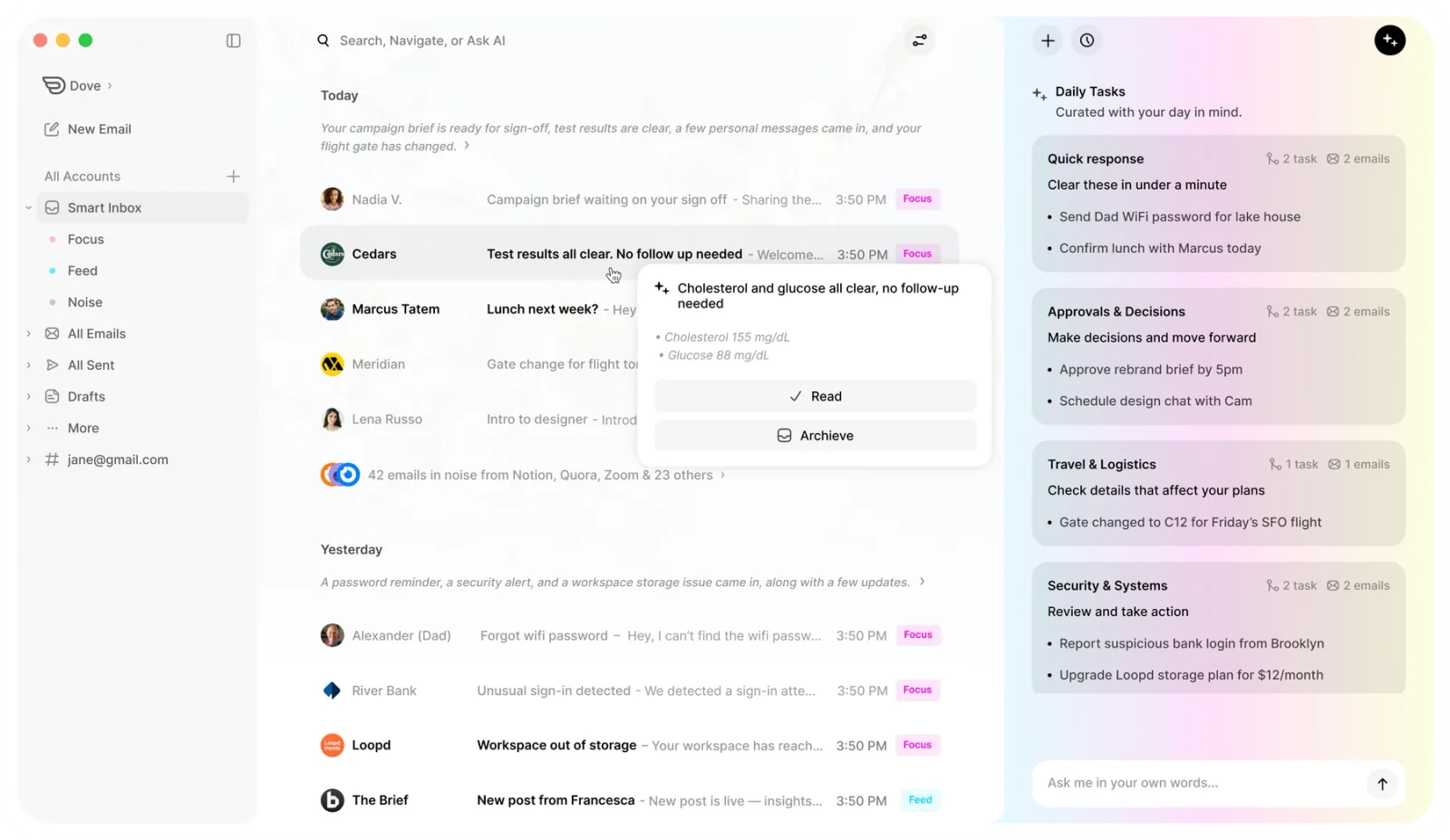
Dove is the strongest pick if your main problem with multiple accounts is volume. When three inboxes dump into one view, you go from 40 unread messages a day to 120. Dove fixes this by sorting every incoming message, from every connected account, into three streams before you open the app.
Focus holds the messages that actually need your attention. Client emails, time-sensitive replies, calendar conflicts.
Noise catches everything that does not need you right now. Newsletters, receipts, social notifications, marketing emails, and anything Dove flags as suspicious.
Done is the archive of handled threads, searchable but out of the way.
The AI triage works across all your connected accounts simultaneously. A work email from your boss and a personal email from your doctor both land in Focus. A promotional email from a SaaS tool on your work account and a shipping notification on your personal account both land in Noise. You do not need to configure rules or filters. Dove learns how you triage and adapts.
Dove also includes a Daily Tasks view that pulls action items, replies you owe, and unconfirmed meetings from all connected accounts into one list each morning. The Wingman feature surfaces buried asks and risks inside long email threads, so you do not miss the one important question hidden in a 15-message chain.
Because Dove is a client and not a provider, you keep your existing email addresses. There is nothing to migrate. You install Dove, sign in with your accounts, and the sorting starts immediately.
Platform support. Web, iOS, Android, macOS, Windows. All accounts sync across every platform.
Pricing. $20 per month with a 7-day free trial. Every feature is included, no AI credit caps, and your data is never used to train models. See Dove pricing for current details.
What it does well.
AI triage into Focus, Noise, and Done works across all connected accounts without manual configuration
Phishing risk scoring catches impersonation and suspicious senders that normal spam filters miss
Daily tasks aggregates action items from every account into one morning checklist
Wingman thread intelligence finds buried asks and risks in long email threads
Flat $20 per month with no per-account charges and no AI credit limits
What it does poorly.
No PGP or end-to-end encryption for outgoing messages
Newer product, so the third-party integration ecosystem is still growing
No Linux client
2. Canary Mail: best for privacy across multiple accounts
Canary Mail is the right choice if you want strong encryption and a privacy-first design across all your connected accounts. Canary supports PGP encryption, SecureSend for sending encrypted messages to anyone (even recipients without PGP), and optional on-device AI that processes your email locally without sending data to external servers.
The unified inbox pulls messages from Gmail, Microsoft 365, iCloud, and IMAP accounts into one view. Per-account signatures, notification settings, and folder structures keep your work and personal inboxes distinct even inside the unified stream. The interface is clean and polished, closer to a premium client like Superhuman than a utility like Thunderbird.
Canary’s optional AI features include smart prioritization, email summaries, and one-click unsubscribe. The AI runs on-device, so your email content stays on your hardware. This matters if you connect sensitive work accounts alongside personal ones.
Platform support. macOS, iOS, Android, Windows. No web client and no Linux support.
Pricing. Free tier with limited features. Growth plan at $3 per month (billed annually at $36 per year). Pro+ plan at $100 per year for full PGP, SecureSend, and advanced features.
What it does well.
PGP encryption and SecureSend work across all connected accounts
Optional on-device AI keeps email data local instead of sending it to cloud servers
Clean, modern interface with per-account settings, signatures, and notification controls
Read receipts, email tracking, and one-click unsubscribe built in
What it does poorly.
No web client, so you cannot check email from a shared or borrowed computer
No Linux support
AI features are useful but optional, not the core triage engine that shapes the whole inbox experience
3. Thunderbird: best free option for unlimited accounts
Thunderbird is the email client that has been around since 2004 and still works. It is completely free, open-source, and supports an unlimited number of IMAP, POP3, Gmail, Microsoft 365, and Exchange accounts. If you do not want to pay anything and you need to manage five, ten, or twenty accounts, Thunderbird handles it without restrictions.
The unified inbox merges all accounts into one chronological stream. You can also view accounts separately, create custom folder views, and set up message filters with granular rules. Thunderbird supports add-ons for calendar integration, contact management, and PGP encryption via OpenPGP (built in since Thunderbird 78).
The trade-off is the interface. Thunderbird looks and feels like a desktop application from 2015. The Supernova redesign in 2023 modernized the layout, but it still lacks the polish of Dove, Canary Mail, or Spark. There is no AI triage, no smart inbox, and no mobile app (though Thunderbird for Android is in development as of 2026).
Platform support. macOS, Windows, Linux. No iOS or Android app yet. No web client.
Pricing. Free and open-source. No paid tier. Funded by donations and the Mozilla Foundation.
What it does well.
Completely free with no account limits, no feature gates, and no ads
Open-source and auditable
Full IMAP, POP3, and Exchange support covers nearly every email provider
Built-in OpenPGP encryption
Deep customization through add-ons and manual filter rules
What it does poorly.
No mobile app, which makes it impractical as a sole email client in 2026
Interface feels dated despite the Supernova redesign
No AI triage, smart sorting, or automated categorization
Initial setup requires manual server configuration for non-mainstream providers
4. Outlook (new): best free option for the Microsoft ecosystem
The new Outlook replaced the legacy Win32 Outlook app and Outlook for Mac with a modern, web-based client that supports multiple account types including Microsoft 365, Gmail, Yahoo, and iCloud. For users already in the Microsoft ecosystem, it is the most natural multi-account option and it is free.
The unified inbox pulls all connected accounts into one view. Microsoft 365 users get Copilot AI features for drafting, summarizing, and prioritizing, though these require a separate Copilot license. The calendar, contacts, and tasks are tightly integrated, which is useful if your workflow revolves around meetings and scheduling as much as email.
Platform support. Windows, macOS, iOS, Android, Web. Full cross-platform coverage.
Pricing. Free for basic use. Microsoft 365 Personal at $6.99 per month or $69.99 per year unlocks 1 TB OneDrive storage, advanced Outlook features, and desktop Office apps. Copilot AI requires an additional license.
What it does well.
Free modern client with genuine multi-account support across every major platform
Deep integration with Microsoft 365 calendar, contacts, and tasks
Copilot AI for drafting and summarizing (for 365 + Copilot subscribers)
Supports Gmail, Yahoo, and iCloud alongside Microsoft accounts
What it does poorly.
Telemetry and data collection concerns for privacy-conscious users
Calendar-first design can feel email-second compared to dedicated email clients
Copilot AI locked behind an expensive add-on license on top of the 365 subscription
Non-Microsoft accounts sometimes feel like second-class citizens in the interface
5. Apple Mail: best built-in option for Apple users
Apple Mail is already on your Mac and iPhone. It supports iCloud, Gmail, Microsoft 365, Yahoo, and generic IMAP accounts in a unified inbox with zero setup friction. For Apple-only users who do not need AI triage or advanced features, it is the simplest path to managing multiple accounts.
Mail Privacy Protection blocks tracking pixels and hides your IP address. Hide My Email (with iCloud+) generates random forwarding addresses so you never have to give out your real email to sign-up forms. These privacy features apply across all connected accounts.
The trade-off is that Apple Mail is basic. There is no smart inbox, no AI sorting, no snooze, and limited search. If you get a lot of email across multiple accounts, Apple Mail gives you a unified view but no help triaging it.
Platform support. macOS and iOS only. No Windows, Android, Linux, or web client.
Pricing. Free with Apple devices. iCloud+ starts at $0.99 per month for Hide My Email and additional iCloud storage.
What it does well.
Zero-friction setup on Apple devices, already installed and ready
Mail Privacy Protection and Hide My Email aliases across all connected accounts
Clean, distraction-free interface with deep OS integration (Handoff, Focus modes, Siri)
No subscription required for core features
What it does poorly.
Apple platforms only, no option for Windows, Android, or web access
No smart inbox, AI triage, or automated categorization
Search is notoriously weak, especially across multiple accounts
Limited customization compared to dedicated email clients
6. Spark Mail: best for team email collaboration
Spark Mail built its reputation on a smart inbox that separates important messages from notifications and newsletters. The unified inbox supports Gmail, Microsoft 365, iCloud, and IMAP accounts, and the gesture-based interface makes triage fast once you learn it.
Spark’s strength for multi-account users is team email. Shared drafts, internal comments on threads, and delegated email let teams collaborate inside the inbox without forwarding chains. The Smart Inbox groups messages into categories (Personal, Notifications, Newsletters) across all connected accounts.
The catch is pricing. Many of the features that made Spark popular, including Smart Inbox customization, team email, and priority sender notifications, now sit behind the Premium plan.
Platform support. macOS, iOS, Android, Windows. No Linux or web client.
Pricing. Free tier with basic features. Premium at $5.99 per month per user (billed annually). Team plans available.
What it does well.
Team email features like shared drafts, comments, and delegation
Smart Inbox categorization works across all connected accounts
Polished gesture-based triage system
Cross-platform with a consistent experience on Mac, iOS, Android, and Windows
What it does poorly.
Best features locked behind Premium subscription
AI features feel added on rather than central to the experience
Past concerns about how Spark handles and stores email data on its servers
The Spark 3 relaunch in 2024 alienated some long-time users
7. Superhuman: best for speed with multiple accounts
Superhuman is the fastest email client on the market. Every interaction is designed around keyboard shortcuts, and the Split Inbox feature lets you separate messages by sender type, account, or custom rules. AI Auto Drafts generate reply suggestions that you can send in one keystroke.
Superhuman supports Gmail and Microsoft 365 accounts. You can connect multiple accounts and switch between them instantly, or use the unified view to see everything at once. The speed advantage is real. If you process hundreds of emails a day across two or three accounts, Superhuman will save you measurable time.
The cost is significant. At $25 per month for the Starter plan, Superhuman is the most expensive option on this list. It also only supports Gmail and Microsoft 365, so IMAP accounts, Yahoo, and iCloud are out.
Platform support. macOS, iOS, Android, Windows, Web. Full cross-platform.
Pricing. 30-day free trial. Starter at $25 per month. Business at $30 per month. Enterprise pricing available.
What it does well.
Fastest email experience available, keyboard-driven workflow with sub-100ms interactions
Split Inbox separates messages by type or account within the unified view
AI Auto Drafts and Instant Reply save significant time on high-volume inboxes
Cross-platform with consistent speed on every device
What it does poorly.
$25 per month minimum makes it the most expensive option
Gmail and Microsoft 365 only, no IMAP, Yahoo, or iCloud support
The speed-first design has a learning curve for users coming from traditional clients
No built-in encryption or privacy features
8. eM Client: best one-time purchase option
eM Client is a desktop email client that supports Gmail, Microsoft 365, iCloud, IMAP, POP3, and Exchange accounts with a one-time purchase price instead of a monthly subscription. If you are tired of paying $10 to $25 per month for an email app, eM Client costs $49.95 once and works indefinitely.
The unified inbox merges all accounts into one view, and the built-in calendar, contacts, and tasks round out the productivity suite. eM Client also supports PGP encryption via a built-in key manager.
The free tier limits you to two email accounts. The Pro license removes that limit and adds commercial use rights.
Platform support. Windows and macOS only. No Linux, iOS, Android, or web client.
Pricing. Free tier with a 2-account limit. Pro license at $49.95 one-time. No recurring subscription.
What it does well.
One-time purchase, no monthly subscription, no recurring cost
Supports nearly every account type including Exchange and POP3
Built-in calendar, contacts, tasks, and PGP encryption
Mature product with years of development and stability
What it does poorly.
Desktop only with no mobile apps, which limits multi-device workflows
Interface can feel cluttered when managing more than four or five accounts
No AI features, smart sorting, or automated triage
Free tier caps you at two accounts
How to choose the right email app for multiple accounts
The right app depends on your primary frustration with multiple accounts.
If your problem is volume: You get too many emails across too many accounts and need help separating signal from noise. Dove is the best fit. The AI triage sorts every message from every account before you open the inbox, so you start with a short Focus list instead of a wall of unread messages.
If your problem is privacy: You want encryption and local data processing across all your accounts. Canary Mail handles PGP, SecureSend, and optional on-device AI across every connected account.
If your problem is cost: You do not want to pay for email. Thunderbird is free, open-source, and handles unlimited accounts. Outlook (new) is also free with multi-account support on every platform.
If your problem is speed: You process hundreds of emails a day and need to move faster. Superhuman is the fastest client available, though at $25 per month.
If your problem is subscriptions: You hate recurring charges. eM Client is a one-time $49.95 purchase with no monthly fees.
Frequently Asked Questions
Can I use one email app for both work and personal accounts?
Yes. Every app on this list supports connecting multiple accounts from different providers. Dove, Canary Mail, Thunderbird, and Outlook all let you add Gmail, Microsoft 365, and IMAP accounts side by side. The unified inbox shows messages from all accounts in one view, and the app automatically uses the correct sender address when you reply.
Do email apps for multiple accounts cost more per account?
No. None of the apps on this list charge per account. Dove is a flat $20 per month regardless of how many accounts you connect. Canary Mail plans cover unlimited accounts. Thunderbird is completely free. The only exception is eM Client’s free tier, which limits you to two accounts, but the $49.95 Pro license removes that limit permanently.
Is it safe to connect multiple accounts to a third-party email app?
It depends on the app’s architecture. Canary Mail processes AI features on-device and supports PGP encryption, so your email data stays local. Thunderbird is open-source and stores everything locally. Dove never uses your data to train AI models. Check each app’s privacy policy and data handling before connecting sensitive work accounts. Apps that store and process email on their own servers (rather than locally or via direct API connections) carry more risk.
What is the best free email app for multiple accounts?
Thunderbird is the best fully free option for desktop users. It supports unlimited accounts, every major protocol (IMAP, POP3, Exchange), and has built-in OpenPGP encryption. For cross-platform free use including mobile, Outlook (new) is the strongest choice, supporting Microsoft 365, Gmail, Yahoo, and iCloud accounts on Windows, macOS, iOS, Android, and the web.
Can I keep my accounts separate instead of using a unified inbox?
Yes. Most multi-account email apps let you toggle between a unified inbox and separate per-account views. Dove, Canary Mail, Thunderbird, Outlook, Spark, and eM Client all support this. You can use the unified view when you want a single timeline and switch to individual account views when you need to focus on one inbox.
Which email app is best for managing five or more accounts?
For five or more accounts, Dove and Thunderbird are the strongest options. Dove’s AI triage becomes more valuable as volume increases, automatically sorting messages from all accounts so you only see what matters in Focus. Thunderbird handles unlimited accounts with no restrictions and lets you create custom folder views and filters for granular organization. eM Client also works well for many accounts on desktop, though the interface can feel crowded beyond four or five.
The bottom line
Managing multiple email accounts in 2026 does not require switching between tabs or juggling separate apps. The best multi-account email clients unify your inboxes, reply from the right address automatically, and give you tools to handle the increased volume.
Dove is the best overall pick because AI triage solves the real problem with multiple accounts, which is not seeing all your email in one place, but figuring out which messages actually need you. Canary Mail is the best choice for privacy-first users who want encryption across all their accounts. And Thunderbird remains the best free option for users who want full control without paying anything.
More from Dove
Recent posts

July 1, 2026
Best Airmail Alternatives in 2026
The best Airmail alternatives in 2026 compared. See platform support, pricing, strengths, and weaknesses for Dove, Canary Mail, Spark Mail, Mimestream, Edison Mail, Shortwave, Outlook, and Apple Mail.

June 30, 2026
Best Spike Alternatives in 2026
The best Spike alternatives in 2026 compared. See platforms, pricing, strengths, and weaknesses for Dove, Canary Mail, Shortwave, Spark, Missive, and Superhuman.

June 26, 2026
Best Zoho Mail alternatives in 2026
The best Zoho Mail alternatives in 2026, compared by platform, AI, pricing, strengths, and weaknesses. See how Dove, Canary Mail, Proton Mail, Fastmail, and Google Workspace stack up.