'/%3e%3c/g%3e%3c/svg%3e)

Best Email Apps for Privacy in 2026
The best private email apps in 2026 compared. See encryption, pricing, platform support, strengths, and weaknesses for ProtonMail, Tuta, Canary Mail, and more.
The best email apps for privacy in 2026 depend on what “privacy” actually means to you. ProtonMail gives you zero-knowledge encryption. Tuta removes all Google dependencies. Canary Mail combines PGP with a modern, full-featured interface. And Dove focuses on AI-powered threat detection that stops phishing before it reaches your inbox.
We tested and compared nine email apps across encryption strength, platform support, pricing, and real-world usability. Whether you want to abandon Gmail entirely or just add a privacy layer on top of your current account, this guide covers both approaches.
Key Takeaways
ProtonMail is still the strongest choice for zero-knowledge end-to-end encryption with a Swiss legal shield.
Canary Mail is the best option for people who want PGP encryption inside a full-featured client with on-device AI.
You don’t always need a new email address. Canary Mail, Dove, and Thunderbird work on top of your existing accounts.
Pricing ranges from free (Thunderbird, Posteo at EUR 1/month) to $100/year (Canary Mail Pro+).
AI and privacy aren’t opposites. Canary Mail runs AI locally on your device, and Dove quarantines phishing threats before you see them.
What “privacy” actually means in an email app
Privacy in email is a spectrum. Not every app solves the same problem, and the right pick depends on which layer matters most to you.
End-to-end encryption (E2E): Only the sender and recipient can read the message. The email provider cannot access your content. ProtonMail, Tuta, and Canary Mail (via PGP) offer this.
Zero-knowledge architecture: The provider stores your data in a form it cannot decrypt, even under legal compulsion. ProtonMail and Tuta use this model.
On-device AI processing: AI features run locally on your phone or computer, so your email data never leaves the device. Canary Mail takes this approach.
Jurisdiction: Where a company is incorporated determines whose laws govern data requests. Switzerland (ProtonMail), Germany (Tuta, Posteo), Belgium (Mailfence), and the Netherlands (Startmail) each have different legal frameworks.
Open-source transparency: Code you can audit yourself. ProtonMail, Tuta, and Thunderbird publish their source code.
Tracking protection: Blocking spy pixels, hiding your IP address, and masking your real email address. Apple Mail’s Privacy Protection and Startmail’s aliases address this layer.
Most people care about one or two of these. If zero-knowledge encryption of stored emails is critical, ProtonMail or Tuta. If you want a privacy-first client that works with your existing Gmail or Outlook account, Canary Mail or Thunderbird. If your main concern is phishing and threat detection, Dove’s AI triage fills that gap.
The best private email apps at a glance
App | Encryption | Platforms | Free tier | Paid pricing | Best for |
|---|---|---|---|---|---|
ProtonMail | E2E, zero-knowledge | Web, iOS, Android, Desktop (via Bridge) | Yes (1 GB) | From EUR 3.99/month | Zero-knowledge encryption, Swiss jurisdiction |
Tuta | E2E, zero-knowledge | Web, iOS, Android, Desktop | Yes (1 GB) | From EUR 3/month | Google-free encrypted alternative |
Canary Mail | PGP E2E, SecureSend | macOS, iOS, Android, Windows | Yes | Growth $36/year, Pro+ $100/year | Privacy-first power users who want AI |
Dove | AI risk scoring, phishing quarantine | Web, iOS, Android, macOS, Windows | Beta (free) | TBD | AI-native security on existing accounts |
Mailfence | PGP + S/MIME | Web | Yes (1 GB) | From $2.75/month | Encrypted productivity workspace |
Startmail | PGP, disposable aliases | Web (IMAP for third-party clients) | No | From $4.99/month | Alias-heavy privacy workflows |
Thunderbird | OpenPGP built-in | macOS, Windows, Linux | Yes (free, open-source) | Free | Open-source transparency, full control |
Apple Mail | Mail Privacy Protection, Hide My Email | macOS, iOS | Yes (with Apple devices) | iCloud+ from $0.99/month | Baseline privacy for Apple users |
Posteo | TLS, S/MIME optional | Web | No | EUR 1/month | Affordable, no-frills privacy |
1. ProtonMail: best for zero-knowledge encryption
ProtonMail is the default recommendation for anyone whose top priority is preventing the email provider itself from reading their messages. Built in Switzerland and operating under Swiss privacy law, ProtonMail uses zero-knowledge encryption so that all stored emails are encrypted with keys only you control.
Messages between ProtonMail users are end-to-end encrypted by default. For recipients on Gmail or Outlook, you can send password-protected messages that expire after a set time. The broader Proton ecosystem now includes a VPN, cloud storage, calendar, and password manager, all bundled under the Proton Unlimited plan.
Platform support: Web app, iOS, Android. Desktop access is available through Proton Bridge, which connects ProtonMail to third-party clients like Thunderbird or Apple Mail via IMAP/SMTP.
Pricing: Free plan (1 GB storage, 1 email address). Mail Plus at EUR 3.99/month billed annually (15 GB, 10 aliases). Proton Unlimited at EUR 9.99/month billed annually (500 GB, all Proton apps included).
Strengths:
Zero-knowledge architecture means Proton cannot access your emails, even under legal compulsion
Swiss jurisdiction sits outside EU and US data-sharing agreements
Open-source clients with independent security audits
Bundled VPN, Drive, Calendar, and Pass under one subscription
Weaknesses:
No native desktop app; Bridge adds friction for desktop users
Search is limited because the encrypted index cannot be searched server-side
Free tier caps storage at 1 GB with a single email address
IMAP only works through Bridge, not directly
2. Tuta: best Google-free encrypted alternative
Tuta (formerly Tutanota) takes a different approach to encrypted email. Instead of using PGP, Tuta built a custom symmetric encryption protocol that encrypts not just the message body but also the subject line. Subject line encryption is rare among major encrypted providers, though it comes with the tradeoff of reduced interoperability.
Based in Germany and fully open-source, Tuta runs its own infrastructure without any Google dependencies. Even push notifications on Android use a custom system instead of Google’s Firebase, making it a genuine Google-free option.
Platform support: Web app, iOS, Android, and dedicated desktop apps for macOS, Windows, and Linux.
Pricing: Free plan (1 GB storage, 1 email address). Revolutionary plan at EUR 3/month (20 GB, 15 aliases, custom domains). Business plans from EUR 6/month per user.
Strengths:
Subject line encryption is unique among major encrypted providers
No Google dependencies at all, including push notifications on Android
Dedicated desktop apps (not just a browser wrapper)
Affordable entry price at EUR 3/month
Weaknesses:
Custom encryption protocol means no PGP interoperability with other encrypted email users
No IMAP or SMTP support, so you cannot use Tuta with third-party email clients
Smaller app ecosystem and fewer integrations than ProtonMail
Search works only on limited metadata unless you use the desktop app
3. Canary Mail: best for privacy-first power users who want AI
Canary Mail is a privacy-first email client from Cartasec, the same Singapore-based team behind Dove. It bundles PGP end-to-end encryption with a full-featured modern email experience, including AI that processes entirely on your device.
The standout privacy feature is SecureSend, which lets you send encrypted messages to anyone, even recipients who don’t use PGP. SecureSend is HIPAA-compliant, making Canary Mail one of the few consumer email clients suitable for healthcare and legal professionals who handle sensitive data.
Because Canary Mail is a client, not a provider, it works with your existing Gmail, Outlook, iCloud, or IMAP accounts. You don’t need a new email address.
Platform support: macOS, iOS, Android, Windows.
Pricing: Free tier with core email features. Growth plan at $36/year (AI Copilot, advanced productivity). Pro+ at $100/year (SecureSend, advanced security). Lifetime purchase options also available.
Strengths:
PGP encryption built into a polished, modern interface
SecureSend for HIPAA-compliant encrypted messaging to anyone
AI Copilot runs on-device, so your email data never leaves your phone or computer
Works with existing email accounts; no new address required
Power-user tools: read receipts, snooze, pin, bulk cleaner, templates, 1-click unsubscribe
Weaknesses:
No web client; requires installing the native app
No Linux support
AI features are an optional add-on, not the architectural foundation
Advanced security features require the Pro+ tier
4. Dove: best for AI-native security and phishing protection
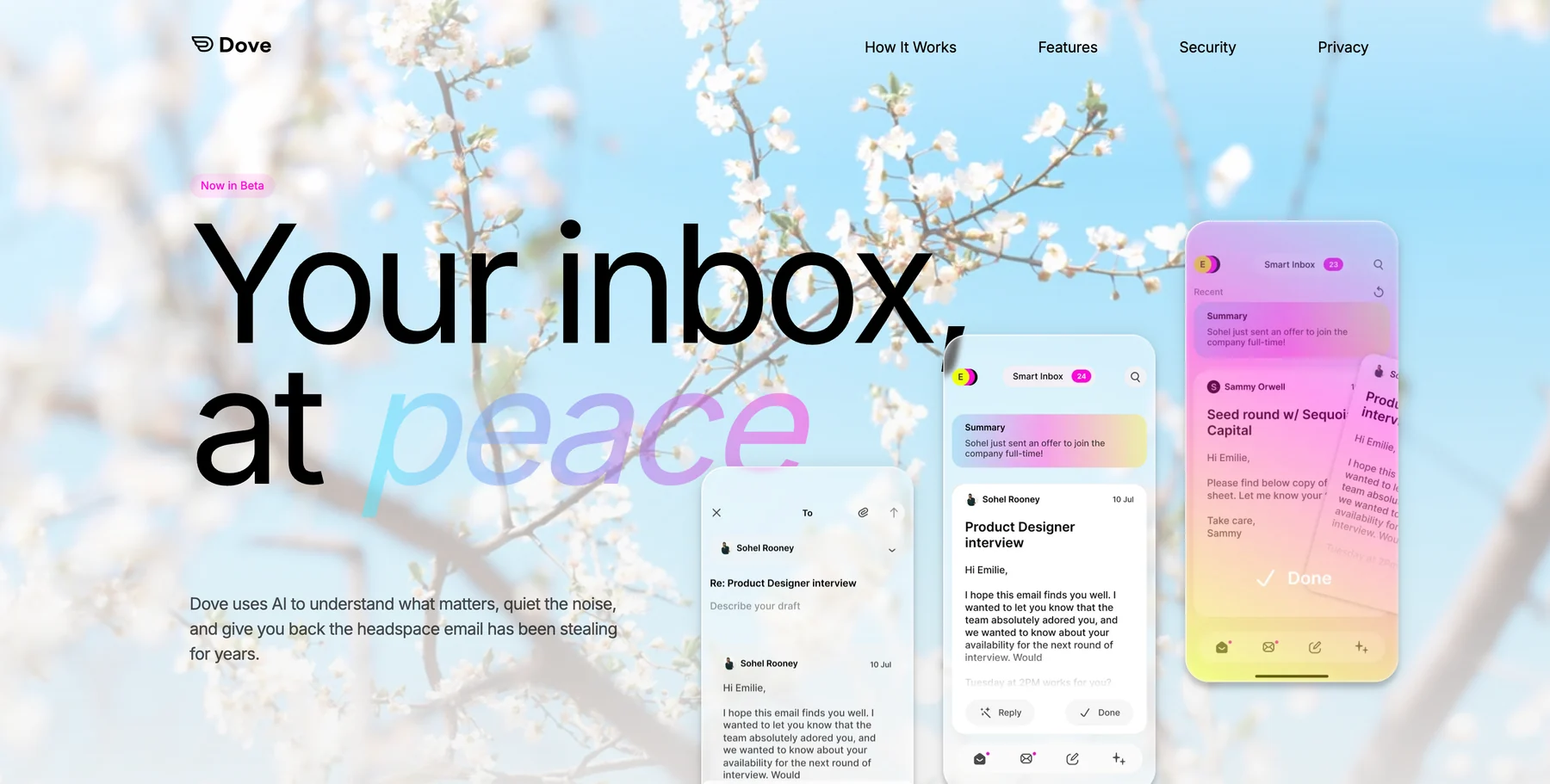
Dove, also from Cartasec, takes a fundamentally different approach. Instead of encrypting messages, Dove focuses on threat detection: every incoming email gets a risk score (Safe, Suspicious, or Dangerous), and phishing attempts, impersonation attacks, and spam are automatically quarantined into Noise before you see them.
Most real-world email breaches come from clicking a phishing link, not from someone intercepting an encrypted message. Dove’s AI triage sorts every email into Focus (important), Noise (junk and threats), and Done (handled), so dangerous messages never compete for your attention alongside legitimate ones.
Dove is not an end-to-end encrypted provider. It works as an AI layer on top of your existing email accounts. If you need both encryption and AI security, pairing Canary Mail’s PGP with Dove’s triage covers both bases.
Platform support: Web, iOS, Android, macOS, Windows.
Pricing: Currently in beta with free access. Pricing has not been announced yet.
Strengths:
Every email gets an automatic risk score with phishing and impersonation detection
AI triage into Focus, Noise, and Done means threats are quarantined by default
Wingman thread intelligence catches risks buried deep in long email threads
Works with your existing email accounts across all major platforms
Weaknesses:
Not an end-to-end encrypted provider; works as a client on existing accounts
Still in beta, so some features are actively shipping
Pricing not yet announced
Learn more about how Dove’s AI triage works, or see Dove in context in our full roundup of the best email apps of 2026.
5. Mailfence: best for an encrypted productivity workspace
Mailfence is a Belgian encrypted email service that bundles PGP and S/MIME encryption with an integrated workspace: documents, calendar, contacts, and groups, all within a single privacy-focused platform. Belgian privacy law is strong, and Mailfence explicitly states it does not scan emails for advertising.
The dual encryption support is notable. Most encrypted providers pick either PGP or a custom protocol. Mailfence supports both PGP and S/MIME, plus digital signatures, giving you flexibility depending on your contacts’ encryption preferences.
Platform support: Web only. No native desktop or mobile apps, though IMAP/SMTP access is available on paid plans for use with third-party clients.
Pricing: Free plan (1 GB email storage). Base plan at $2.75/month (5 GB email, 6 GB documents). Entry plan at $3.85/month (10 GB email, 30 GB documents, IMAP/SMTP access).
Strengths:
Both PGP and S/MIME encryption in one service
Belgian jurisdiction with strong EU privacy protections
Integrated workspace (documents, calendar, contacts) under one encrypted roof
Affordable entry pricing
Weaknesses:
Web only with no native mobile or desktop apps
Interface feels dated compared to modern email clients
Smaller team and slower feature development than ProtonMail or Tuta
Free plan lacks IMAP/SMTP access
6. Startmail: best for alias-based privacy
Startmail comes from the team behind Startpage, the private search engine. Its core feature is unlimited disposable email aliases: unique addresses you can create on the fly, use for signups or one-time communications, and delete when they start attracting spam. This approach protects your real email address without requiring end-to-end encryption for every conversation.
Startmail supports PGP encryption for users who need it, but the alias system is the real differentiator. It’s especially useful for online shopping, service signups, and any situation where you want to give out an email address without revealing your actual one.
Platform support: Web app, with IMAP support for use with third-party email clients like Thunderbird or Apple Mail.
Pricing: No free tier. Personal plan at $4.99/month billed annually (first year discounted to $29.95, renews at $59.95/year). Business plan at $6.99/month billed annually.
Strengths:
Unlimited disposable email aliases for protecting your real address
Dutch jurisdiction with strong privacy law
IMAP support means you can use Startmail with your preferred desktop or mobile client
Built by the Startpage team with a strong track record in privacy
Weaknesses:
No free tier; starts at roughly $30/year
Web app only for the native experience (IMAP covers third-party clients)
Smaller feature set compared to ProtonMail or Tuta
Less well-known, with a smaller user community
7. Thunderbird: best for open-source transparency and full control
Thunderbird is Mozilla’s free, open-source email client with OpenPGP encryption built in since version 78. It gives you complete control over your email setup: every feature is auditable, every plugin is optional, and your data stays on your machine unless you choose otherwise.
As a client, Thunderbird works with any email provider. You can pair it with ProtonMail (via Bridge), Gmail, Outlook, or any IMAP account and add PGP encryption on top. For users who want privacy without switching providers, Thunderbird is the most flexible option.
Platform support: macOS, Windows, Linux. No iOS or Android app yet, though Thunderbird for Android (based on K-9 Mail) is in active development.
Pricing: Free and open-source. Funded by donations and Mozilla.
Strengths:
Fully open-source and independently auditable
OpenPGP encryption built in, no plugins required
Works with any email provider via IMAP/SMTP
Extensive add-on ecosystem for customization
No subscription, no data collection
Weaknesses:
No mobile apps yet (Android version in development)
Interface has improved but still feels less polished than commercial alternatives
Setup requires more technical comfort than a consumer email app
No cloud sync between devices
8. Apple Mail: best baseline privacy for Apple users
Apple Mail is not an encrypted email provider, but it does offer meaningful privacy features that many users already have and underuse. Mail Privacy Protection blocks tracking pixels and hides your IP address from senders. Hide My Email generates random relay addresses so you never have to give out your real address for signups.
For users already in the Apple ecosystem who want better privacy without switching to a dedicated encrypted provider, Apple Mail with iCloud+ is a solid baseline.
Platform support: macOS and iOS only. No Windows, Android, or web access.
Pricing: Apple Mail is free with any Apple device. iCloud+ starts at $0.99/month (50 GB) for Hide My Email, Private Relay, and custom email domain support.
Strengths:
Pre-installed on every Apple device with zero setup
Mail Privacy Protection blocks tracking pixels and hides your IP by default
Hide My Email generates disposable relay addresses
Deep OS integration with Focus modes, notifications, and Siri
Weaknesses:
Apple ecosystem only; no Windows, Android, or web client
No end-to-end encryption for email content
Limited smart features compared to AI-powered clients
No PGP support without third-party plugins
9. Posteo: best for affordable, no-frills privacy
Posteo is a German email service that costs just EUR 1 per month and focuses on the essentials: encrypted storage, anonymous signup (you can pay with cash), and green energy-powered servers. At EUR 12 per year it’s the most affordable paid privacy email available.
Posteo doesn’t offer end-to-end encryption by default, but it encrypts all stored data at rest and supports S/MIME for users who configure it. The service strips IP addresses from outgoing emails and doesn’t log connection metadata.
Platform support: Web interface. IMAP/SMTP/POP3 access for use with any third-party email client.
Pricing: EUR 1/month (4 GB storage). Additional storage at EUR 0.25/GB per month. Additional aliases at EUR 0.10/month each.
Strengths:
Remarkably affordable at EUR 1/month
Anonymous signup with cash payment option
German jurisdiction with strong privacy law
Green energy-powered infrastructure
IP stripping on outgoing emails
Weaknesses:
No end-to-end encryption by default (S/MIME available but requires manual setup)
Web interface only for the native experience (IMAP covers third-party clients)
No mobile apps
Smaller feature set focused on simplicity over power
How to choose the right private email app
App | Key strength | Key weakness | Choose if… |
|---|---|---|---|
ProtonMail | Zero-knowledge E2E encryption | No native desktop app | You want maximum encryption with no compromises |
Tuta | Encrypts subject lines, no Google deps | No PGP interoperability | You want E2E encryption and want to avoid Google entirely |
Canary Mail | PGP + on-device AI + power tools | No web client | You want privacy with a full-featured modern experience |
Dove | AI phishing protection, automatic triage | Not an E2E provider | You want AI-native security on your existing accounts |
Mailfence | PGP + S/MIME encrypted workspace | Web only, dated UI | You need an encrypted workspace with calendar and docs |
Startmail | Unlimited disposable aliases | No free tier | You rely on aliases to protect your real address |
Thunderbird | Open-source, fully auditable | No mobile apps | You want full control and transparency |
Apple Mail | Tracking protection built into the OS | Apple ecosystem only | You’re already in the Apple ecosystem |
Posteo | EUR 1/month, anonymous signup | No E2E by default | You want affordable privacy without complexity |
The specifics matter. If encryption of stored email is non-negotiable, ProtonMail or Tuta. If you want privacy alongside a modern interface, Canary Mail or Thunderbird. If your real concern is phishing threats, Dove’s AI risk scoring is the fastest way to stop them. And if tracking across the web bothers you more than encryption, Apple Mail’s Privacy Protection or Startmail’s aliases handle that without upending your workflow.
For a broader comparison that goes beyond privacy, see our full roundup of the best email apps in 2026.
FAQ
What is the most private email app in 2026?
ProtonMail is the most private email app in 2026 for zero-knowledge end-to-end encryption. Your emails are encrypted with keys only you control, and ProtonMail’s servers cannot read your data even under legal compulsion. Tuta is a close runner-up with the added benefit of subject line encryption. For users who want privacy alongside a full-featured client with AI, Canary Mail offers PGP encryption with on-device AI processing.
Is ProtonMail really private?
Yes. ProtonMail uses end-to-end encryption and zero-knowledge architecture. The company is incorporated in Switzerland, which has strong privacy laws and sits outside EU and US data-sharing agreements. ProtonMail’s client apps are open-source and have undergone independent security audits. The main limitation is that emails to non-ProtonMail users are not E2E encrypted unless you use the password-protected message feature.
Can I use a privacy email app with my existing Gmail or Outlook address?
Yes, if you choose a privacy-focused email client rather than a new email provider. Canary Mail, Dove, Thunderbird, and Apple Mail all work as clients on top of your existing email accounts. They add privacy features like PGP encryption (Canary Mail, Thunderbird), phishing detection (Dove), or tracking protection (Apple Mail) without requiring you to change your email address. ProtonMail, Tuta, and Posteo require you to create a new email address on their platform.
Do private email apps support AI features?
Some do. Canary Mail processes its AI Copilot entirely on-device, so your email data never leaves your phone or computer. Dove uses AI for automatic phishing detection, email risk scoring, and inbox triage. ProtonMail and Tuta don’t offer AI features, which is a deliberate choice: their zero-knowledge architecture means the server cannot process your email content, even for AI purposes.
Are free private email apps safe to use?
The reputable ones are safe within their limitations. ProtonMail’s free tier gives you 1 GB of encrypted storage. Tuta’s free plan offers 1 GB with full end-to-end encryption. Thunderbird is entirely free and open-source. Mailfence offers a free tier with 1 GB. The key is to verify that the free plan is supported by paid tiers or donations, not by advertising or data mining. If a “free” email service has no clear business model, your data is likely the product.
What is the difference between an encrypted email provider and a secure email client?
An encrypted email provider (like ProtonMail, Tuta, or Posteo) hosts your email on their servers and handles encryption at the infrastructure level. You get a new email address on their domain. A secure email client (like Canary Mail, Thunderbird, or Apple Mail) adds encryption and security features on top of an existing email account you already own. Clients work with Gmail, Outlook, iCloud, or any IMAP provider. The choice depends on whether you want to replace your email address entirely (provider) or add privacy features to your current setup (client).
Your inbox, your rules
Email privacy is not a single feature. The right choice depends on whether you need zero-knowledge encryption, PGP for sensitive messages, AI-powered phishing protection, or simple tracking prevention.
For users who want both privacy and modern productivity, Canary Mail offers PGP encryption with on-device AI in a single client. For users whose main threat is phishing and inbox overload, Dove’s AI triage catches dangerous messages automatically. ProtonMail remains the benchmark for encryption strength.
The one approach that doesn’t work is doing nothing. Your inbox won’t secure itself.
More from Dove
Recent posts
June 22, 2026
Best Email Apps for Developers in 2026
The best email apps for developers in 2026, compared by platform support, AI, pricing, strengths, and weaknesses. See how Dove, Canary Mail, Gmail, Outlook, and Superhuman handle a developer's inbox.
June 19, 2026
Best Email Apps for Teachers in 2026
The best email apps for teachers in 2026, compared by platform, AI, pricing, strengths, and weaknesses. See how Dove, Canary Mail, Gmail, Outlook, and Spark stack up for the classroom inbox.
June 18, 2026
Best Email Apps for Students in 2026
The best email apps for students in 2026, compared by platform, AI, pricing, strengths, and weaknesses. See how Dove, Canary Mail, Gmail, Outlook, Spark, and Proton Mail handle deadlines, .edu accounts, and scam emails.