'/%3e%3c/g%3e%3c/svg%3e)

The Best Apple Mail Alternatives for Mac and iPhone in 2026
The best Apple Mail alternatives in 2026 are Dove, Canary Mail, Mimestream, Spark, Mailmate, Newton, HEY, ProtonMail, and Fastmail, ranked by job.
The shortlist for 2026 is Dove, Canary Mail, Mimestream, Spark, Mailmate, Newton, HEY, ProtonMail, and Fastmail. Most Apple Mail users don’t want to leave the Apple ecosystem — they want a better app sitting in front of the same iCloud, Gmail, and Microsoft 365 accounts they already have. Where you land depends on whether you live more on Mac or iPhone, how many accounts you manage, and whether you want AI handling triage or staying out of your way.
Apple Mail isn’t broken. It’s just not keeping up. Apple Intelligence shipped real email features through 2024 and 2025 — Priority, summaries, Smart Reply, the categorized inbox — and they help. But only on recent Apple silicon, and only up to a point. VIPs, Smart Mailboxes, and Rules were designed for a 2010-shaped mailbox. The question isn’t whether Apple Mail is fine — it usually is. It’s whether there’s a smarter app worth running in front of your accounts.
The picks below split into two paths: clients that connect to your existing accounts, and providers that replace iCloud Mail entirely. Most readers want path one. We’ll cover path two briefly for anyone who can act on it.
Key Takeaways
You can usually swap apps without leaving iCloud, Gmail, or Microsoft 365. Hide My Email and iCloud aliases keep working.
Dove is the strongest pick if you want AI to triage every message into Focus, Noise, or Done before you open the inbox, on Mac and iPhone.
Canary Mail fits privacy-forward Apple users who want PGP, secure send, and optional AI on top of iCloud, Gmail, or Exchange.
Mimestream is the Mac-only answer for Gmail users who want a native client that respects Gmail’s actual model.
Replacing iCloud Mail outright (HEY, ProtonMail, Fastmail) is only realistic if you own your domain or your address is fully personal.
Why People Are Looking for an Apple Mail Alternative in 2026
Apple Intelligence is hardware-gated. Priority messages, summaries, Smart Reply, and the categorized inbox are real improvements — when you’re on a Mac with Apple silicon or a recent iPhone Pro. On an Intel MacBook Pro, an M1 that didn’t make the cut for newer features, or anything older than an iPhone 15 Pro, you’re running a materially different version of Apple Mail than the demos show. A lot of the search traffic here comes from people who don’t want to spend $2,500 on new hardware to access features the next user already has.
Summarized is not the same as triaged. Apple’s Priority section is essentially a smarter Focused Inbox — it surfaces what looks important and leaves everything else in one stream. That’s useful at low volume. At high volume it has the same failure mode as Focused Inbox on Outlook: it highlights, but it doesn’t sort. There’s no “this is noise, route it out of my way permanently.” The categorized inbox handles obvious commercial mail, but personal triage still falls on you.
Multi-account management on iPhone is genuinely rough. VIPs don’t learn. Smart Mailboxes need manual setup for every rule. Server-side rules for iCloud Mail still live in the iCloud.com web interface. Running iCloud alongside Gmail and a client’s Microsoft 365 account means tapping across three account views looking for a thread you swore you saw twenty minutes ago. None of it was designed for this.
Two Paths: A Better App vs. Leaving iCloud Mail
These are different decisions, and it’s worth being clear about which one you’re actually making.
Path one: keep your accounts, swap the app. You connect a third-party client to your existing iCloud, Gmail, or Microsoft 365 mailboxes. Hide My Email keeps working. iCloud aliases keep working. Calendar, contacts, and Continuity stay where they are. You’re picking a better front end. For almost everyone, this is the path that’s available.
Path two: leave iCloud Mail entirely. You move your domain (or accept a new address) to another provider — HEY, ProtonMail, Fastmail — and walk away from Apple’s mail stack. Realistic only if you own your domain or your email is fully personal and you’re willing to migrate years of archives.
Most search traffic for “apple mail alternatives” is path one, so that’s where most of this article lives.
One practical note before the picks. iCloud Mail uses standard IMAP and requires an app-specific password for third-party clients, not your main Apple ID password. Generate it once at appleid.apple.com, paste it into your app of choice, and forget about it. Hide My Email forwards work the same as always because they route through iCloud before your client sees anything.
Want to skip ahead? See how Dove’s three-state triage works.
1. Dove, Best for AI-Native Triage on Mac and iPhone
If the problem is the morning sort — staring at 90 unread messages trying to decide which six need a reply today — Dove is built for that.
Every incoming message gets classified into one of three states: Focus (needs you), Noise (doesn’t), or Done (already handled). There’s no “maybe later” pile that turns into a second backlog. The AI commits to a call and adjusts based on what you actually do.
This is different from Apple’s Priority section. Priority highlights what looks important and leaves everything else in one stream. Dove’s classification is contextual and learns from your behavior — when you consistently open newsletters from a particular publication, it picks that up. When you consistently skip “team standup” threads, it picks that up too.
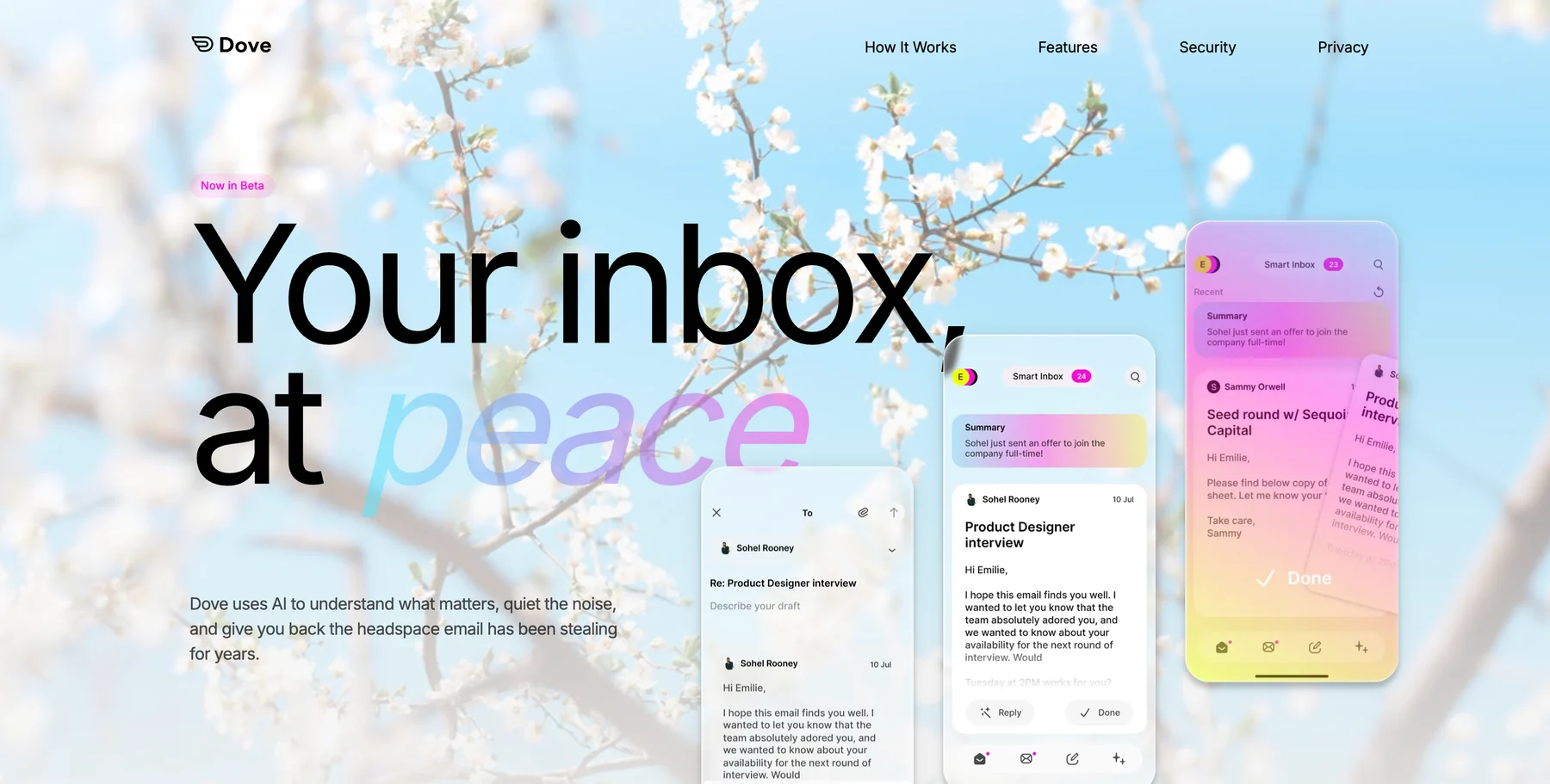
Three features carry most of the load on a heavy inbox.
Wingman reads the whole thread before you reply. It surfaces the things that are easy to miss in a long chain: a payment term that shifted in paragraph four, scattered action items, a question that was never answered.
AI Assist is a conversational layer inside the inbox. Ask “what did the studio quote for the November shoot?” and it pulls a synthesized answer from every relevant message, instead of making you scroll for it.
Daily Tasks turns your Focus emails into a to-do list each morning so you stop re-reading threads to remember what you owe people.
Dove connects to iCloud Mail (via app-specific password), Gmail, Google Workspace, and Microsoft 365. Hide My Email forwards work the same way as in Apple Mail — they route through iCloud upstream of whatever client is reading them. Coverage runs across iOS, Android, macOS, Windows, and web, with the same triage state on every device. It’s built by the team behind Canary Mail, who’ve spent years on email at scale.
The one area Apple Mail holds its own: deep Continuity integration. If iMessage, Handoff, and shared clipboard are load-bearing parts of your workflow, Apple Mail is the most native entry point. Dove sits next to that instead of inside it.
Best for: Apple Mail users running 80+ emails a day across iCloud, Gmail, and work accounts who’ve outgrown VIPs and the Priority section.
Try Dove. Setup takes about two minutes and the AI starts learning right away. Get early access →
2. Canary Mail, Best for Privacy-Forward Apple Users
Canary Mail is the pick when your inbox carries sensitive material and you’d rather have AI available on request than running by default. It’s been on Mac and iPhone for years, and its approach sits naturally alongside the way Apple users already think about privacy.
The core differentiators: native PGP encryption, SecureSend for sensitive outbound, on-device processing for confidential workflows, and read receipts that don’t rely on tracking pixels. These work naturally alongside Hide My Email and iCloud Private Relay.
Canary’s AI is called Copilot, and it assists rather than drives — smart compose, summaries, fast triage on demand. If you want AI when you reach for it rather than working in the background by default, that distinction matters.
It also handles multi-account Apple life well — iCloud, Gmail, and Microsoft 365 in one client, with consistent gestures across Mac and iPhone.
Best for: privacy-aware Apple users, freelancers and consultants juggling two or three work accounts, and anyone in healthcare, legal, finance, or HR handling sensitive material on Apple devices.
If you’d rather the AI make the call on every incoming message by default, Dove is the closer fit.
3. Mimestream, Best Mac-Native Client for Gmail Users
Mimestream is the answer for one specific profile: a Mac user whose primary mailbox is Gmail or Google Workspace.
It’s the only Mac-native client built on Gmail’s actual API rather than IMAP. That sounds like an implementation detail and shows up everywhere in practice. Labels are real labels, not folders emulating labels. Filters are server-side. Snoozes sync. Send-and-archive works the way it does on the Gmail web app. Search uses Gmail’s own syntax, not a slower local index.
The trade-off: there’s no iPhone app. Mimestream is Mac-only by design. If your iPhone email use is light or you’re fine with the Gmail iOS app on the go, that’s workable. If you need the same app on both devices, this isn’t it.
Best for: Mac-heavy Gmail users who want a native client that works with Gmail’s actual model and don’t need iPhone parity.
4. Spark Mail, Best for Workflow and Small Teams
Spark is the cross-device option for small teams and freelancers who work on shared addresses. Smart Inbox, snoozes, scheduled send, comment threads on emails, shared drafts, templates — it behaves more like a collaboration tool than a pure mail client.
The AI features have expanded over the past couple of years — summaries, smart replies, follow-up suggestions — but the app is fundamentally organized around workflow. If your work involves drafting and reviewing email with a few other people, Spark folds that into the same place you read mail.
Coverage spans Mac, iPhone, iPad, Apple Watch, Windows, and Android, which makes it a practical option for anyone who wants one client across everything.
Best for: small teams and freelancers running shared inboxes (hello@, support@, hi@) who want a more collaborative experience than Apple Mail offers.
5. Mailmate, Best for Power Users Who Want Full Control
Mailmate is the keyboard-driven, IMAP-only Mac client for the reader who has opinions about Markdown rendering and SMTP queues. Composition in Markdown, deep filtering with a real query language, mailbox tagging, fast keyboard navigation, signed and encrypted mail.
Mac-only. No iPhone app. The interface is built for speed and doesn’t apologize for the learning curve. For the right person, that’s the point.
Best for: developers, engineers, and writers who want full control over how mail is filed, displayed, and composed — and aren’t looking for iPhone parity.
6. Newton and Edison Mail, Best Lightweight iPhone Picks
If your anchor is the iPhone and you want a calmer feed without a full triage system, Newton and Edison Mail are the lightweight options.
Newton Mail covers read receipts, send later, recap, and a unified inbox across iCloud, Gmail, Microsoft 365, and Yahoo. AI summaries on iOS, consistent across devices.
Edison Mail leads with AI summaries and assistant features on iOS first, with Mac and Android behind it. Good for fast triage without the overhead of a full system.
Best for: iPhone-first users who want a calmer experience than Apple Mail without committing to AI-driven triage.
7. iCloud Mail Replacements (Only If You Own Your Domain or Your Address Is Personal)
This section is path two. If migrating your address isn’t on the table, skip ahead.
HEY (37signals) is opinionated email. The Screener requires you to approve every new sender before their messages reach you. The Imbox / Feed / Paper Trail model is genuinely different from how Apple Mail works and takes some adjustment. It’s a full replacement, not a client layer — you’d be moving off iCloud Mail entirely.
ProtonMail is the privacy-maximalist option. End-to-end encryption, Swiss jurisdiction, encrypted calendar and contacts. Strong when your concern is provider-level access to your mail. Like HEY, it’s a replacement, not a layer on top of iCloud.
Fastmail is the straightforward middle option. Modern IMAP and JMAP, no AI overlay, custom domains, a fast web app, and solid iOS and macOS clients. Less opinionated than HEY, less privacy-focused than Proton, and a reasonable destination if you’re leaving iCloud for your own domain without wanting either of the others.
Best for: solo operators and small studios who own their domain, plus personal-mail users who are fine with a new address and willing to migrate archives.
Should You Stay on Apple Mail?
Sometimes the answer is yes.
You’re on current Apple hardware, Apple Intelligence is doing real work for your inbox, and the volume is manageable enough that Priority catches what matters. No reason to rebuild.
Your inbox is mostly personal, you’re already using Hide My Email and iCloud aliases, and the effort of setting up a new app isn’t worth what you’d gain.
You’re deep in Apple’s broader stack — iMessage, Notes, Reminders, Calendar — and a separate mail client would mean managing two notification surfaces instead of one.
If none of those fit, the case for switching is easy to make.
How to Choose, in One Paragraph
Start with platform mix. Mac and iPhone equally, with AI triage: Dove. Privacy-sensitive inbox, optional AI: Canary Mail. Mac-heavy Gmail user, no iPhone requirement: Mimestream. Small team with shared inboxes: Spark. Full control on Mac, no compromises: Mailmate. iPhone-first, calmer feed: Newton or Edison. Replacements (HEY, ProtonMail, Fastmail) only if you own your domain.
Cross-reference: if Gmail is the main account, the companion piece is Gmail alternatives for power users. If your work mailbox is Microsoft 365, see the Outlook alternatives guide.
Frequently Asked Questions
What’s the best Apple Mail alternative for Mac and iPhone in 2026?
Dove for AI-native triage across iCloud, Gmail, and Microsoft 365. Canary Mail for privacy-forward power users. Mimestream for Mac-heavy Gmail users. Spark for small teams. For most people, the right move is picking a better client, not switching providers.
Is there a better email app than Apple Mail with Apple Intelligence?
Apple Intelligence helps — summaries, Smart Reply, Priority surfacing — but it’s gated to recent Apple silicon and stops short of real triage. Dove and Canary Mail run on every account regardless of hardware, and classify messages instead of just highlighting them.
Can I use a different email app with iCloud Mail and Hide My Email?
Yes. Most third-party clients connect to iCloud Mail over IMAP using an app-specific password from appleid.apple.com. Hide My Email forwards work normally because they route through iCloud before your client sees them.
What’s the best Apple Mail alternative on a Mac that doesn’t support Apple Intelligence?
Dove for AI triage that doesn’t require Apple silicon. Canary Mail for privacy-aware use. Mimestream for Gmail-only Mac users. Mailmate for keyboard-driven full control. All four run on older Macs.
What’s the best Apple Mail alternative for someone who uses Gmail on a Mac?
Mimestream is the native answer — it speaks Gmail’s API directly. Dove fits if you also need iPhone parity and AI triage. Spark fits if the Gmail inbox is shared with a small team.
Should I leave iCloud Mail in 2026?
Rarely, and only if you own your domain or your address is fully personal. iCloud Mail works fine as a provider — the friction is usually with the app in front of it. HEY, ProtonMail, and Fastmail are real options for the right reader and unnecessary overhead for most.
Conclusion
Most Apple Mail users will keep their existing accounts and swap the app — and that’s usually the right call. The search volume for “apple mail alternatives” keeps growing not because Apple Mail is broken, but because inboxes are doing more work than they used to, Apple Intelligence is locked to hardware a lot of people don’t have, and the gap between Apple Mail’s rule-based tooling and what actual AI triage can do has gotten hard to ignore.
If your morning starts with a sorting ritual, that’s the thing worth fixing. Dove removes it by classifying every message, learning from your behavior, and holding the same triage state across Mac and iPhone. Canary Mail keeps you in control with privacy-first defaults and AI you can reach for. The other picks fit specific platforms and team shapes. Pick the one that matches how you actually work.
Ready to try a smarter inbox? Get early access to Dove →
More from Dove
Recent posts

June 17, 2026
Best Email Apps for Doctors in 2026
The best email apps for doctors in 2026, compared by platform, AI, pricing, strengths, and weaknesses. See how Dove, Canary Mail, Gmail, Outlook, Hushmail, and Proton Mail handle patient messages, referrals, and HIPAA needs.
June 16, 2026
Best Email Apps for Accountants in 2026
The best email apps for accountants in 2026, compared by platform, AI, pricing, strengths, and weaknesses. See how Dove, Canary Mail, Gmail, Outlook, Spark, and Superhuman handle client documents, deadlines, and tax-season volume.

June 15, 2026
Best Email Apps for Real Estate Agents in 2026
The best email apps for real estate agents in 2026, compared by platform, AI, pricing, strengths, and weaknesses. See how Dove, Canary Mail, Gmail, Outlook, Spark, and Superhuman handle leads, contracts, and wire-fraud risk.