'/%3e%3c/g%3e%3c/svg%3e)

The Best Outlook Alternatives for Microsoft 365 in 2026
The best Outlook alternatives in 2026 are Dove, Canary Mail, eM Client, Mailbird, Thunderbird, Spark, HEY, and ProtonMail, ranked by job.

The shortlist for 2026 is Dove, Canary Mail, eM Client, Mailbird, Thunderbird, Spark, HEY, and ProtonMail. Most Microsoft 365 users don’t actually want to migrate their mailbox. They want a better app sitting in front of it. Where you land depends on your platform, how many accounts you juggle, and whether you’d rather have AI handle triage or stay out of the way.
Outlook isn’t broken so much as half-rebuilt in public. New Outlook is taking over from classic Outlook for Windows on a schedule nobody asked for. Focused Inbox keeps quietly misclassifying threads. Mail Rules can’t read context. And Microsoft 365 Copilot, the official AI answer, sits behind a per-seat upcharge that plenty of tenant admins haven’t enabled. The real question isn’t whether to leave Microsoft. It’s whether to put a smarter front end on the mailbox you already have.
The piece below splits into two paths: clients that plug into your Microsoft 365 mailbox, and providers that replace it. If you’re inside a corporate tenant, only the first path is open to you.
Key Takeaways
You can usually swap clients without leaving the tenant. Pick one that supports modern OAuth and Microsoft Graph.
Dove is the strongest pick if you want AI to triage every message into Focus, Noise, or Done before you open the inbox.
Canary Mail fits privacy-forward power users who need PGP, secure send, and optional AI on top of Exchange or Microsoft 365.
eM Client and Mailbird are the closest classic-Outlook-style replacements on Windows. Apple Mail and Spark fit Mac users better.
Replacing Outlook outright (HEY, ProtonMail) is only realistic if you own your domain. Otherwise IT owns the decision.
Why People Are Searching for an Outlook Alternative in 2026
A few different pressures are pushing people to look around this year.
The New Outlook rollout is the loudest. Microsoft is pushing organizations through a phased migration from classic Outlook for Windows to the rebuilt client. The new app updates faster but ships with gaps long-time users notice quickly: weaker offline support for some account types, missing PST workflows, narrower add-in coverage, a different rules model. Telemetry concerns and ads inside personal Outlook.com inboxes haven’t helped the mood.
The AI gap sits underneath that. Microsoft 365 Copilot is the official answer and it does real work, but the per-seat cost puts it out of reach for many teams, and a lot of tenants haven’t turned it on. People who tried Copilot for a month and went back are now hunting for a third-party client that can triage email without that surcharge.
The scaling pain is the quietest reason. Focused Inbox is a binary with no middle ground, and on a heavy mailbox it can quietly send important threads to Other for months. Mail Rules don’t read context. Quick Steps are rigid. Categories need manual application. Search through Microsoft Search is uneven on large mailboxes. None of these were designed for an inbox pulling in 100+ messages a day.
Imagine a consultant running three Microsoft 365 tenants for three clients plus a personal address. After a year, she realizes Focused Inbox has been sending one client’s CFO into Other the whole time. He thinks she’s been ignoring him. That isn’t a bug exactly. The tool was built before AI could read intent, and at some inbox volume, that limitation starts costing real relationships.
Two Paths: A Better Microsoft 365 Client vs. Replacing Outlook
Most articles in this category mash together two completely different decisions. They aren’t the same.
Path one: keep Microsoft 365, swap clients. You connect a third-party app to your existing Exchange Online or Microsoft 365 mailbox. Your IT policies, calendar, conditional access, and data residency stay where they are. You’re picking a better front end. For almost everyone in a corporate tenant, this is the only path that’s actually available.
Path two: leave Microsoft entirely. You move your domain off Microsoft 365 to another provider (HEY, ProtonMail, Fastmail, Google Workspace) and give up Teams, SharePoint, and the rest of the stack along the way. Realistic only if you own your domain (consultants, solo operators, small studios) or you’re a small enough team that nothing has been standardized yet.
Most search traffic for “outlook alternatives” is path one, so that’s where most of this article lives. We close with a short path-two section for the readers who can actually act on it.
One technical note before the picks. Microsoft deprecated Basic Auth for Exchange Online a while back. Whatever client you choose has to support modern OAuth and ideally Microsoft Graph. Older roundups still recommend clients that no longer authenticate cleanly against Microsoft 365. Skip those.
Want to skip ahead? See how Dove’s three-state triage works.
1. Dove, Best for AI-Native Triage on a Microsoft 365 Mailbox
If your real problem is the morning sort, the moment when you’re staring at 90 unread messages trying to figure out which six need an answer today, Dove is built for that exact problem.
Every incoming message gets sorted into one of three states: Focus (this needs you), Noise (this doesn’t), or Done (already handled). There’s no “maybe later” pile that turns into a second backlog later. The AI commits to a call and learns from what you do next.
This is a different category from Focused Inbox. Focused Inbox is binary and rule-driven. Dove’s classification is contextual and trained on your actual behavior, so when you keep opening newsletters from a particular publication, it adjusts. When you keep ignoring “team standup” threads, it picks up on that too.
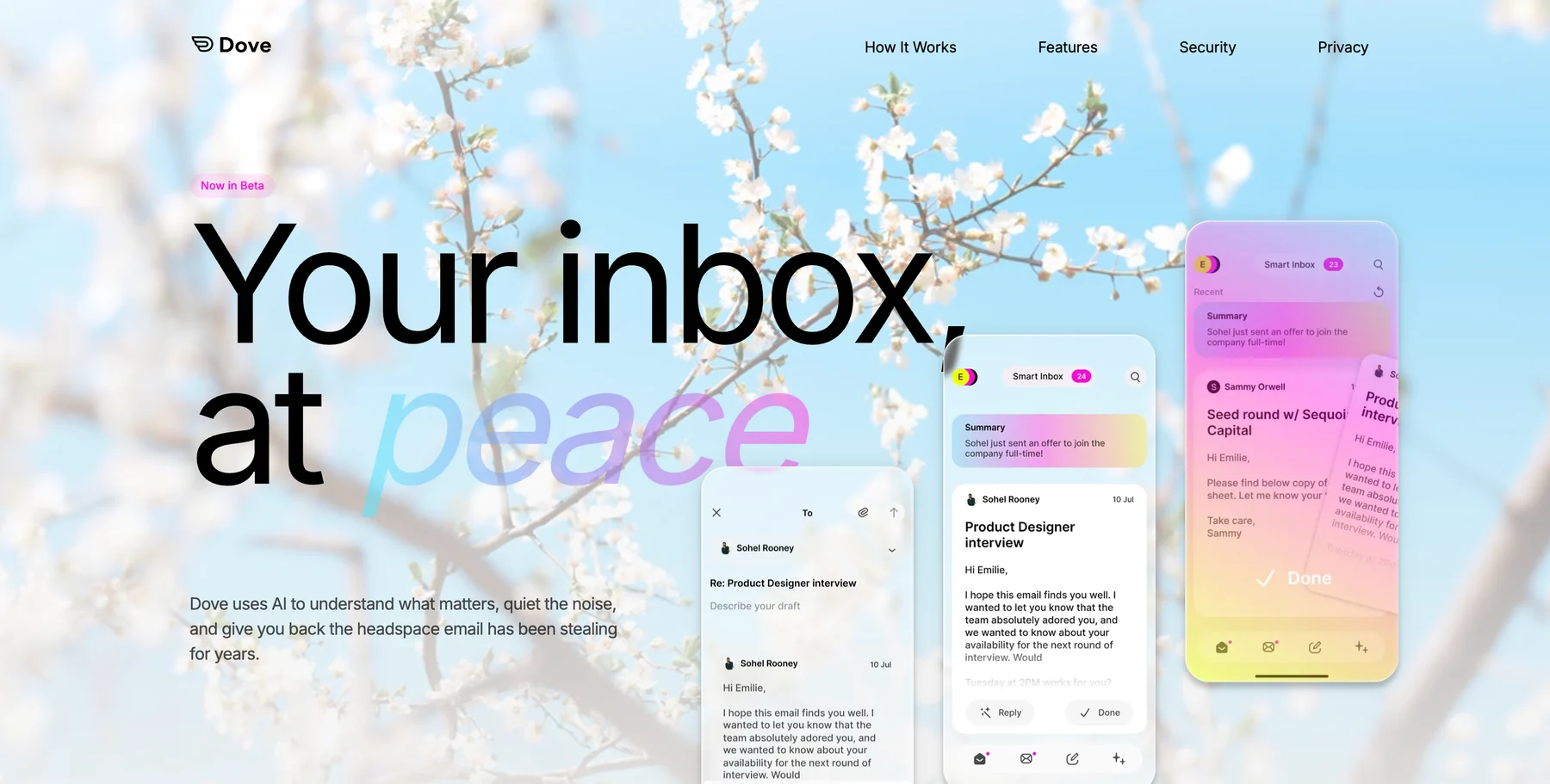
Three features do most of the heavy lifting on a busy Microsoft 365 mailbox.
Wingman reads the whole thread before you reply. It surfaces the things that are easy to miss in a forty-message chain: a payment term that shifted in paragraph four, action items scattered across two weeks, a question that quietly went unanswered.
AI Assist is a conversational layer inside the inbox. Ask “what did legal say about the renewal?” and it pulls a synthesized answer from every relevant email, so you don’t have to scroll for it.
Daily Tasks turns your Focus emails into a prioritized to-do list each morning, so you stop re-reading threads to remember what you owe people.
Where Dove pulls ahead of Outlook: AI that decides instead of suggests, risk scoring on every incoming message, coverage across iOS, Android, macOS, Windows, and web, and server-side classification that syncs instantly. It’s built by the team behind Canary Mail, who’ve been working on email at scale for years.
Where Outlook still wins: the rest of the Microsoft stack. If most of your day lives inside Teams, SharePoint, OneNote, and Planner, Outlook is the most native fit by definition. Dove sits next to that workflow rather than inside it.
Best for: Microsoft 365 power users getting 80+ emails a day who’ve outgrown Focused Inbox.
A note on Microsoft 365 support: Dove supports Microsoft account setup, including Outlook, Office 365, and Hotmail accounts. If your company uses conditional access or admin app approval, confirm the tenant policy before moving your daily workflow.
Try Dove. Setup takes about two minutes and the AI starts learning right away. Get early access →
2. Canary Mail, Best for Privacy-Forward Microsoft 365 Power Users
Canary Mail is the pick when your inbox carries sensitive material and you’d rather have optional AI than AI-first. Canary supports Exchange and Microsoft 365 through modern OAuth and has done so for years.
The privacy stack is the differentiator. Native PGP encryption, SecureSend for sensitive outbound, on-device processing for confidential workflows, and read receipts that don’t rely on tracking pixels. The kind of controls a regulated team actually needs.
Canary’s AI is called Copilot, and it sits next to the inbox rather than driving it. Smart compose, summarization, fast triage on demand. If you want AI as an assistant rather than as the decision-maker, that posture matters.
Best for: HR, finance, healthcare admin, legal ops, and consultants handling sensitive material across multiple tenants. Also a good fit if you run three or four work accounts and want a single fast client.
Where it isn’t right: if you’d rather the AI just make the call on every email by default, Dove is the closer fit. Canary keeps the user in the driver’s seat with AI as backup.
3. eM Client, Best Classic-Outlook Replacement on Windows
eM Client is the Windows option for people who liked classic Outlook and don’t want a redesign forced on them. Calendar, contacts, tasks, notes, Exchange ActiveSync, side-by-side calendar views, deep rules, templates, snoozes. It looks and feels like a mature email client because it is one.
It isn’t flashy. That’s largely the appeal. If you’ve spent years tuning Quick Steps and rules in classic Outlook and the New Outlook reset is the thing pushing you out, eM Client gives you the same shape of workflow without forcing a transition.
Best for: long-time Windows Outlook users who want feature parity on day one, and IT-managed deployments where rule-based automation is the norm.
4. Mailbird, Best Lightweight Outlook Alternative on Windows
Mailbird is the calmer Windows option. Unified inbox across multiple Microsoft 365 and Outlook.com accounts, integrations with Asana, Trello, Slack, WhatsApp, and Google Calendar, and a much lighter UI than Outlook.
The pitch is fewer windows, less noise. If you spend half your day toggling between Outlook, Slack, and a project tool, Mailbird folds them into one pane. It isn’t AI-native, but for a Windows user who wants Outlook’s power without Outlook’s weight, it’s a credible swap.
Best for: Windows users running multiple work accounts who’d rather have one calm pane than three open apps.
5. Thunderbird, Best Open-Source Outlook Alternative
Thunderbird had a quiet decade and then a real renaissance. The Supernova release and the updates that followed brought a redesigned UI, proper Microsoft 365 OAuth, and a faster rendering engine. It’s free, open-source, cross-platform, and extensible.
The trade-off is that you’ll configure more than you would with a polished commercial client. Add-ons fill the gaps Outlook covers natively (calendar, tasks, deep rules), and the UI, while now genuinely competitive, still has a tinkerer’s feel in places.
Best for: privacy-aware users who want full control, IT-friendly deployments, and anyone allergic to subscription pricing.
6. Apple Mail and Spark, Best Mac-Native Outlook Alternatives
Outlook for Mac is the smaller cousin of Outlook for Windows, and a lot of Mac users skip it.
Apple Mail is the simplest answer. It supports Microsoft 365 OAuth natively, looks like the rest of macOS, and gets out of your way. If your only requirement is “show me my Microsoft 365 mailbox in a native Mac app,” Apple Mail is hard to beat. The trade-off is feature depth: rules and templates are basic, and there’s no real AI triage.
Spark Mail is the team-friendly Mac pick. Shared inboxes, comment threads on emails, snoozes, send later, smart inbox, team templates. If your work involves drafting and reviewing email with two or three other people, Spark is closer to a collaboration tool than a mail app.
Best for: Apple Mail if you want native simplicity, Spark if your inbox doubles as a shared workspace.
7. Outlook Replacements (Only If You Own Your Domain)
This section is path two. If your IT department owns the tenant, skip ahead.
HEY (37signals) is opinionated email. The Screener forces every new sender to be approved before their messages reach you. The Imbox / Feed / Paper Trail split is a different model than Outlook’s. It’s a full replacement, not a client, so you’d be moving off Microsoft 365 to use it.
ProtonMail is the privacy-maximalist option. End-to-end encryption, Swiss jurisdiction, encrypted calendar and contacts. Strong if your threat model includes provider-level access. Like HEY, it’s a full replacement, not a layer on top of Microsoft 365.
Best for: solo consultants and small studios who own their domain and can pick their stack. Don’t waste time evaluating these unless you can actually act on them.
Should You Stay on Outlook?
Sometimes, yes. The honest cases:
You’ve spent years tuning Quick Steps and rules in classic Outlook for Windows and the workflow still mostly works. Stay there until it’s deprecated. You don’t owe yourself a rebuild.
Your job lives inside Teams, SharePoint, and Planner. Outlook is the most native point of entry to that stack, and adding a second client doubles your context-switching.
Your tenant has Microsoft 365 Copilot enabled and you’ve actually tuned it. Copilot is solid. If IT has paid for it and rolled it out, run that experiment first before adding a third-party client.
If none of those apply, the case for a smarter client gets stronger fast.
How to Choose, in One Paragraph
Start with the constraint. If you’re on a corporate Microsoft 365 tenant, you’re picking a client. If your inbox is more than 80 messages a day and you want AI making the call, pick Dove. If you handle sensitive material and want optional AI, pick Canary Mail. On Windows and you liked classic Outlook? eM Client. On Windows and you want a calmer multi-account inbox? Mailbird. On Mac, Apple Mail for simplicity or Spark for team workflows. If you can’t pay for any of this, Thunderbird. Replacements (HEY, ProtonMail) only if you own your domain.
Cross-reference: if you’re a Gmail-side reader, the companion piece is Gmail alternatives for power users, which covers the same ranking on the other half of the market.
Frequently Asked Questions
What’s the best Outlook alternative for Microsoft 365 users in 2026?
Dove for AI-native triage, Canary Mail for privacy-forward power users, eM Client or Mailbird for Windows-native workflows, Apple Mail or Spark on Mac. Most readers should pick a client that connects to their existing Microsoft 365 mailbox, not a full replacement.
Can I use a different email app with my work Microsoft 365 account?
Usually yes. Most third-party clients support modern OAuth and Microsoft Graph, which is what Microsoft now requires after retiring Basic Auth. Your IT department can still block specific apps via app consent or conditional access, so check with admin before you migrate.
Is there an Outlook alternative with AI that doesn’t require Microsoft 365 Copilot?
Yes. Dove is built around AI triage. Canary Mail offers Copilot-style AI as an optional layer. Both connect to a Microsoft 365 mailbox without needing Microsoft 365 Copilot enabled in your tenant.
What’s the best Outlook alternative on Windows after the New Outlook rollout?
eM Client for full feature parity with classic Outlook. Mailbird for a lighter, multi-account setup. Thunderbird if you want free and open-source. Dove if AI triage is the actual job.
What’s the best Outlook alternative on Mac?
Apple Mail for native simplicity, Spark for shared inboxes and team workflows, Canary Mail for privacy and multi-account power use, Dove for AI-driven triage.
Is it worth leaving Microsoft 365 entirely in 2026?
Rarely, and only if you own your domain. The Microsoft stack (Teams, SharePoint, calendar, conditional access) is hard to replace piecemeal. Solo operators and small studios can make HEY or ProtonMail work. For anyone inside a corporate tenant, switch the client, not the provider.
Conclusion
Two paths, one decision. Most Microsoft 365 users will keep the tenant and swap the client, and that’s the right call. The reason “outlook alternatives” search volume keeps climbing isn’t that Outlook is bad. It’s that the inbox is doing more work than it used to, and a 2007-shaped tool with a 2025 redesign hasn’t caught up to what AI can do underneath.
If your morning starts with a sorting ritual, the ritual is the thing to remove. Dove removes it by deciding for you, learning from your behavior, and surfacing what’s missing in long threads. Canary Mail keeps you in control with privacy-first defaults and optional AI. The other picks fit specific platforms and team shapes. Pick the one that matches the day you actually have.
Setup takes a couple of minutes. Your inbox doesn’t have to keep stealing your attention.
Ready to try a smarter inbox? Get early access to Dove →
More from Dove
Recent posts

June 17, 2026
Best Email Apps for Doctors in 2026
The best email apps for doctors in 2026, compared by platform, AI, pricing, strengths, and weaknesses. See how Dove, Canary Mail, Gmail, Outlook, Hushmail, and Proton Mail handle patient messages, referrals, and HIPAA needs.

June 16, 2026
Best Email Apps for Accountants in 2026
The best email apps for accountants in 2026, compared by platform, AI, pricing, strengths, and weaknesses. See how Dove, Canary Mail, Gmail, Outlook, Spark, and Superhuman handle client documents, deadlines, and tax-season volume.

June 15, 2026
Best Email Apps for Real Estate Agents in 2026
The best email apps for real estate agents in 2026, compared by platform, AI, pricing, strengths, and weaknesses. See how Dove, Canary Mail, Gmail, Outlook, Spark, and Superhuman handle leads, contracts, and wire-fraud risk.