'/%3e%3c/g%3e%3c/svg%3e)

Best Email Apps for Doctors in 2026
The best email apps for doctors in 2026, compared by platform, AI, pricing, strengths, and weaknesses. See how Dove, Gmail, Outlook, Hushmail, and Proton Mail handle patient messages, referrals, and HIPAA needs.

A doctor’s inbox is rarely just an inbox. It is patient questions and prescription refill requests, referral letters and lab results, scheduling back-and-forth, insurance and billing notices, pharmacy alerts, EHR notifications, and a steady drip of newsletters and CME reminders. All of it lands in the same place, and a single message buried under the noise can be the one a patient is actually waiting on.
There is also a layer of risk that most inbox roundups ignore. Healthcare is one of the most heavily targeted sectors for email fraud and data breaches, and protected health information carries real legal weight. If patient details move through your email, the app has to handle privacy seriously, which for many practices means encryption and a Business Associate Agreement, not just a spam filter. So for doctors, the right app is not only about speed. It has to sort what truly needs you, keep patient information private, surface the request hiding in a long referral thread, and flag the message that is trying to phish credentials or reroute a payment.
This guide ranks the best email apps for doctors by what they actually do, with clear notes on platform support, pricing, and honest trade-offs. Dove and then we cover the strongest mainstream and healthcare-focused options.
Key takeaways
Dove is the strongest overall pick for doctors who want a calmer inbox. It is AI-native, sorting every message into Focus, Noise, and Done, reading long referral and patient threads, and scoring messages for fraud and phishing before they reach you. Free plan available; Pro is $20/month.
Gmail and Outlook are dependable, familiar defaults and can sign a HIPAA Business Associate Agreement on their business tiers, but they organize rather than triage.
Hushmail and Proton Mail are encryption-first options built around privacy, with healthcare or business plans that include a BAA.
The deciding factors for doctors are automatic triage, patient-data privacy, thread intelligence for referrals, and built-in fraud protection.
What doctors should look for in an email app
Before the list, it helps to name what actually matters when your inbox is also a patient-communication channel and a compliance surface.
Triage that decides, not just files. Between patients you need to know which of forty new messages is a worried patient awaiting results and which is a calendar invite, without reading all forty.
Patient-data privacy and compliance. If protected health information passes through your email, you need encryption, secure sending, and, where required, a provider that will sign a Business Associate Agreement.
Thread intelligence for referrals and results. Referral details, dosage questions, and follow-up instructions hide inside long chains. A good app surfaces them so nothing about a patient slips past you.
Fraud and phishing protection. Credential-harvesting and payment-redirection attempts hit clinics constantly, often disguised as a pharmacy, a lab, or a colleague. Suspicious mail should be flagged automatically.
Mobile that keeps up. Plenty of physician email happens on rounds, between rooms, or on call. The phone experience cannot be an afterthought.
Honest pricing. You should know what you pay, what you get, and whether compliance features cost extra.
The best email apps for doctors at a glance
The table below is the fast version. Each app is covered in detail further down.
Email app | Platforms | AI approach | Starting price | Strengths for doctors | Watch-outs |
|---|---|---|---|---|---|
iOS, Android, macOS, Windows, Web | AI-native (triage is the foundation) | Free plan (10 AI actions/day); Pro $20/month, 7-day trial | Sorts patient mail into Focus, Noise, and Done automatically, reads referral threads, surfaces follow-ups, scores messages for fraud and phishing | Newer app, smaller integration list today; not sold as a HIPAA-BAA service | |
Gmail (Google Workspace) | Web, iOS, Android (desktop via browser) | Light AI in paid Workspace tiers | Free personal; Workspace from $7/user/month | Familiar, reliable, huge integration ecosystem, will sign a BAA on Workspace | Noisy by default, no real triage, weak native fraud warnings |
Outlook | Windows, macOS, iOS, Android, Web | Copilot AI on paid Microsoft 365 | Free personal account; Microsoft 365 from $6.99/month | Strong calendar, common in clinics, BAA available on eligible business plans | Cluttered for high-volume inboxes, AI gated behind pricier plans |
Hushmail | Web, iOS, Android (desktop via browser) | No meaningful AI | Healthcare plan from about $11.99/user/month | Built for healthcare, BAA included, encrypted email plus secure web forms for patient intake | Dated interface, light on modern productivity features, no real triage |
Proton Mail | Web, iOS, Android, macOS, Windows | No meaningful AI | Free tier; paid from about $3.99/month | End-to-end encryption, strong privacy track record, BAA on business plans | Encryption-first rather than triage; ecosystem lock-in for full features |
Pricing is approximate and changes often, so confirm current rates and compliance terms with each provider before you commit.
1. Dove: best AI-native inbox for doctors
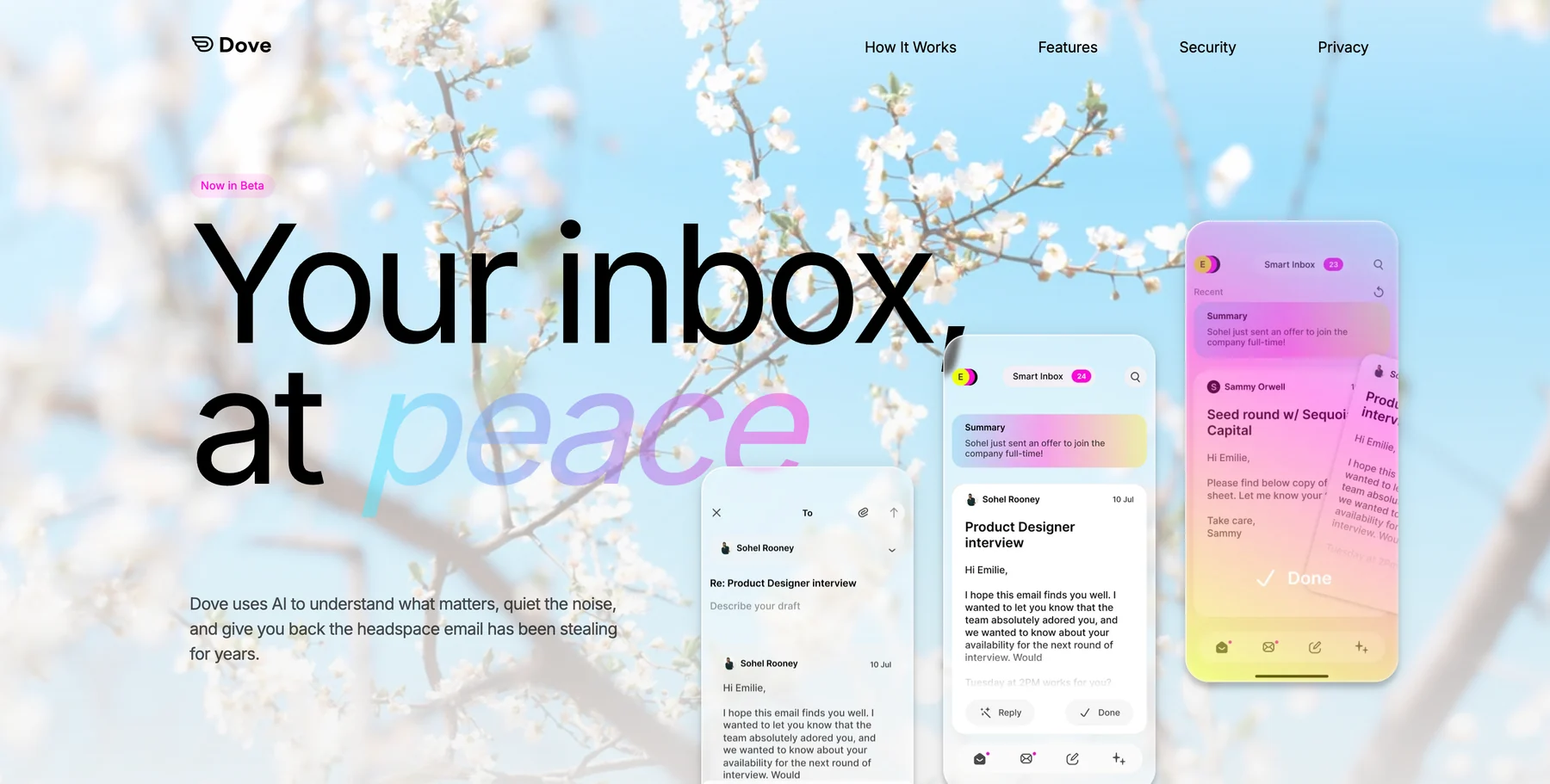
Dove is an AI-native email app, which is the cleanest fit for a physician buried under patient volume between appointments. The AI is not a sidebar feature bolted onto an old client. It is the foundation, so every message gets read and sorted the moment it lands.
Each incoming email is placed into one of three states: Focus (needs you, like a patient replying with a worsening symptom), Noise (does not need you, like an EHR digest), or Done (already handled). When you open a Focus message, Wingman reads the whole thread and points out the question, the requested document, or the follow-up before you reply, which matters when a dosage query or a referral detail is buried in a long chain. AI Assist lets you talk to your inbox in plain language to search, archive, and draft. Every morning, Daily Tasks turns your Focus mail into a ranked list so no patient follow-up goes cold.
For doctors specifically, the standout is Dove’s security scoring, which quarantines suspicious messages before they reach you. Given how often credential-phishing and payment-redirection attacks hit clinics, that is a genuine safety layer rather than a nice-to-have. One honest caveat: Dove is built as a smarter inbox, not as a HIPAA-BAA email host, so for messages that carry protected health information you will still want an encrypted, BAA-backed channel like the ones below. If you want to harden your whole workflow, pair it with our guide on how to protect yourself from phishing emails.
Platforms: iOS, Android, macOS, Windows, and Web, with server-side classification that syncs across every device instantly, so triage you do on your phone shows up on your laptop.
What it does well: Automatic triage that actually decides, thread intelligence through Wingman, follow-up extraction through Daily Tasks, and built-in security scoring that flags fraud. The interface is calm by design, which helps when a clinic day is loud.
Where it falls short: Dove is the newest app here, so it connects to fewer third-party tools today, and it is not marketed as a HIPAA-compliant, BAA-signing service, so it pairs best with an encrypted channel for protected health information.
Pricing: A free plan covers core inbox features with 10 AI actions per day across unlimited accounts, so you can run it at no cost. Pro is $20/month with a 7-day free trial and unlocks unlimited AI, daily tasks, meeting detection, and one inbox across Gmail, Microsoft, and IMAP.
Best for: Doctors who want the inbox to triage patient mail, surface referrals and follow-ups, and flag fraud automatically rather than just hold mail.
Want to try Dove? Connect your existing inbox and let it triage your next patient thread.
2. Gmail (Google Workspace): the familiar default
Gmail is the default for a huge share of doctors, and for good reason. It is reliable, familiar, and connects to nearly every scheduling, document, and practice tool. On Google Workspace, Google will sign a Business Associate Agreement, which is what makes it a defensible choice for a practice handling protected health information, and you also get a custom domain that looks more professional than a free address.
Platforms: Web, iOS, and Android, with desktop access through the browser.
What it does well: Rock-solid delivery, the broadest integration ecosystem, powerful search, labels and filters you can tune, and a BAA on Workspace plans for covered entities. It is the path of least resistance for most clinics.
Where it falls short: Out of the box it is noisy. Gmail sorts into broad tabs but does not truly triage what needs you, the native fraud and phishing warnings are basic, and high-volume doctors end up building fragile filter rules by hand. A signed BAA also does not automatically make every workflow compliant; you still have to configure it correctly. For ways to tame the volume, see our guide on how to manage too many emails.
Pricing: Free for personal Gmail. Google Workspace starts around $7/user/month for Business Starter (billed annually), with Gemini AI bundled and higher tiers adding storage and admin controls.
Best for: Doctors and practices that want a dependable, widely supported inbox with a BAA available and are willing to add structure themselves or layer another tool on top.
3. Outlook: best for practices on Microsoft 365
Outlook is everywhere practices standardize on Microsoft 365, and its calendar is genuinely strong, which matters when your day is appointments, rounds, and review deadlines. Scheduling, rules, shared calendars, and a BAA on eligible business plans are the real reasons clinics stay.
Platforms: Windows, macOS, iOS, Android, and Web.
What it does well: Excellent calendar and scheduling, solid rules and categories, tight integration with the Microsoft 365 documents many practices already use, and BAA coverage on qualifying business plans. Copilot AI is available on paid plans.
Where it falls short: The interface gets cluttered fast under heavy volume, triage is manual, and the better AI features sit behind pricier Microsoft 365 tiers. It organizes, but it does not decide what needs you first.
Pricing: Free with a personal Outlook account. Microsoft 365 starts around $6.99/month for personal use, with business plans adding custom domains, Copilot, and BAA eligibility at higher tiers.
Best for: Doctors and practices already inside the Microsoft 365 ecosystem who lean on calendar and document integration.
4. Hushmail: best healthcare-focused encrypted email
Hushmail built a name for itself in healthcare specifically. Its healthcare plan includes encrypted email and a signed BAA out of the box, plus secure web forms you can put on a practice site for patient intake and consent, which is a genuinely useful touch for solo practitioners and small clinics.
Platforms: Web and mobile apps for iOS and Android, with desktop access through the browser.
What it does well: Purpose-built for healthcare, with encryption, a BAA included on the healthcare plan, and secure online forms for patient communication and intake. Setup is simpler than assembling compliance on top of a general client.
Where it falls short: The interface feels dated next to modern clients, there is no meaningful triage or AI, and the productivity features are thin. You are buying compliance and encryption, not a smarter inbox.
Pricing: The healthcare plan starts around $11.99 per user/month (billed annually) and includes the BAA. Confirm current tiers and storage with Hushmail before committing.
Best for: Solo doctors and small clinics that want a turnkey, healthcare-specific encrypted email with a BAA and patient intake forms.
5. Proton Mail: best for encryption-first privacy
Proton Mail is the privacy purist’s choice, with end-to-end encryption and a strong track record on data protection. For doctors who care most about keeping correspondence private and want a provider that will sign a BAA on business plans, it is a credible option built around security rather than features.
Platforms: Web, iOS, Android, macOS, and Windows.
What it does well: End-to-end encryption by default, a respected privacy reputation, zero-access architecture, and a BAA on Proton’s business plans for covered entities. Encrypted messages to non-Proton recipients are supported through password-protected links.
Where it falls short: It is encryption-first, not triage-first, so there is no AI sorting your inbox and the productivity layer is basic. Getting the full benefit pulls you into Proton’s ecosystem, and external encrypted messaging adds a step for recipients.
Pricing: Free tier with limited storage. Paid plans start around $3.99/month, with business plans that add custom domains and BAA eligibility.
Best for: Privacy-first doctors who want strong end-to-end encryption and a BAA, and do not need an AI inbox.
How to choose the right email app for your practice
If you want the inbox to think for you, sorting patient mail, reading threads for referrals and follow-ups, and flagging fraud, an AI-native client like Dove is the strongest fit, especially given how often phishing targets clinics. Pair it with an encrypted, BAA-backed channel for anything carrying protected health information. For more options in that category, see our roundup of the best AI email apps in 2026, and if your real problem is sheer volume, our guide on how to build an email triage system that sticks goes deeper.
If private, encrypted correspondence is your top concern If you need a turnkey, healthcare-specific service with a BAA, Hushmail and Proton Mail are built for that, while Gmail and Outlook are dependable defaults that will sign a BAA on their business tiers if you are willing to add structure yourself. Many doctors also run separate addresses for clinical, administrative, and personal mail, so it is worth checking our guide to thebest email apps for multiple accountsbefore you settle, along with our roundup of thebest email apps for privacy in 2026.
Learn more about how Dove turns a noisy inbox into Focus, Noise, and Done.
FAQ
What is the best email app for doctors in 2026?
For most doctors who want more than a basic inbox, Dove is the strongest pick because it is AI-native: it triages every message into Focus, Noise, or Done, reads threads to surface referrals and follow-ups, builds a daily list, and scores messages for fraud. For correspondence that carries protected health information, pair it with an encrypted channel. If encrypted, privacy-first email is your priority with optional AI you turn on only when you want it.
Which email apps are HIPAA friendly for doctors?
Gmail (Google Workspace) and Outlook (Microsoft 365) will sign a Business Associate Agreement on their qualifying business plans, and Hushmail and Proton Mail offer healthcare or business plans that include a BAA. A signed BAA is necessary but not sufficient; you still have to configure and use the account correctly. Dove is built as a smarter inbox rather than a BAA-signing host, so many practices run Dove for triage and a BAA-backed encrypted service for protected health information.
How do email apps help protect doctors from fraud?
Credential-phishing and payment-redirection attempts almost always arrive by email, often disguised as a pharmacy, lab, insurer, or colleague. Apps with built-in security scoring, like Dove, flag and quarantine suspicious messages before they reach you, and encrypted clients like Hushmail, and Proton Mail reduce the risk when sensitive information is in transit. No app replaces verifying unusual requests directly, but the right inbox catches a lot of attempts early.
How much does Dove cost for doctors?
Dove has a free plan with core inbox features and 10 AI actions per day across unlimited accounts, so you can start at no cost. The Pro plan is $20/month with a 7-day free trial and unlocks unlimited AI, daily tasks, meeting detection, and one unified inbox across Gmail, Microsoft, and IMAP.
Can I use a regular email app for patient information?
Only with the right safeguards. Sending protected health information generally calls for encryption and a provider that will sign a Business Associate Agreement, which is why many practices use a BAA-backed service for clinical mail. A productivity-focused app like Dove is best used to triage and organize your inbox and flag fraud, alongside an encrypted, compliant channel for the messages that carry patient data.
The bottom line
For doctors, the right inbox has to do three things at once: sort patient mail so the message that needs you surfaces first, keep sensitive information private, and flag the phishing attempt before it reaches you or your staff. Dove is the strongest pick for the first and third because triage and security scoring are the foundation rather than add-ons, and it pairs cleanly with an encrypted, BAA-backed channel for protected health information. If private correspondence is your first concern while Hushmail, Proton Mail, Gmail, and Outlook are solid when a signed BAA is the deciding factor. Match the app to the part of the day that hurts most, and your inbox stops being the thing standing between you and your patients.
Try Dove free - works on top of your existing practice email, takes 2 minutes to connect.
More from Dove
Recent posts
August 17, 2026
Best Email App for Multiple Accounts in 2026
Juggling more than one inbox? Here is the best email app for multiple accounts in 2026, plus two other ways to fix inbox overwhelm for good.

July 1, 2026
Best Airmail Alternatives in 2026
The best Airmail alternatives in 2026 compared. See platform support, pricing, strengths, and weaknesses for Dove, Canary Mail, Spark Mail, Mimestream, Edison Mail, Shortwave, Outlook, and Apple Mail.
June 30, 2026
Best Spike Alternatives in 2026
The best Spike alternatives in 2026 compared. See platforms, pricing, strengths, and weaknesses for Dove, Shortwave, Spark, Missive, and Superhuman.