'/%3e%3c/g%3e%3c/svg%3e)

Best Hey Email Alternatives in 2026
The best Hey Email alternatives in 2026 compared. Platforms, pricing, what each tool does well, and where it falls short. Covers Dove, Superhuman, SaneBox, Fastmail, and more.

Hey Email launched in 2020 with a strong opinion: your inbox should not be a to-do list that other people write for you. The Imbox, the Feed, the Paper Trail, the Screener. It was a genuine rethink of how email could work. A lot of people loved it. And a lot of people have since moved on.
The reasons are familiar by now. $99 per year for a service that requires a new @hey.com address. No IMAP, no way to use Hey’s workflow on your existing Gmail or Outlook account. Limited integrations. And in 2026, the AI email market caught up to the philosophy that Hey pioneered, sorting email by intent rather than arrival time, while letting you keep your own address and your existing accounts.
Key takeaways
Dove is the closest spiritual successor to Hey’s philosophy. AI sorts every message into Focus, Noise, and Done before you open the inbox, across any email provider, with no new address required.
Superhuman is the best pick if you valued Hey’s speed and opinionated design but want a client for your existing accounts.
SaneBox is worth considering if you want Hey-style triage on top of any existing email client without switching apps.
Fastmail is the strongest option if you want Hey’s independence from Big Tech but with standard protocols, custom domains, and IMAP.
Why people are looking for Hey Email alternatives
Hey earned its early adopters by being the first mainstream email service to say “not every email deserves your attention” and build the entire product around that idea. Three things have changed since 2020:
The locked address problem. Hey requires an @hey.com address. You cannot use it as a client for your existing Gmail, Outlook, or work email. For most people, that means running two inboxes or migrating contacts to a new address, neither of which scales well.
AI triage is now the baseline. Apps like Dove now ship AI that sorts, summarizes, and drafts on top of your existing accounts. Hey’s Imbox was the pioneer, but the category moved past manual screening.
The price-to-value gap widened. At $99 per year, Hey is priced like a productivity tool but still requires you to change your email address. Alternatives at the same price point or lower now offer more features without the migration cost.
Hey platforms: Web, macOS, iOS, and Android. Hey pricing: $99 per year for Hey for You, with Hey for Work at $12 per user per month.
How we evaluated Hey alternatives
We graded each app on four axes so you can match it to your actual problem:
What it does well: the one or two things this app is genuinely best at.
What it does poorly: the gaps and rough edges that show up in daily use.
Platform support: which operating systems and devices are covered.
Pricing: what the free tier covers and what the paid plans cost.
For the wider category, see our roundup of the best email apps in 2026 and the best AI email apps in 2026. If privacy is your priority, start with the best email apps for privacy.
The best Hey Email alternatives at a glance
App | Best for | Platforms | Free tier | Paid pricing (from) | AI approach |
|---|---|---|---|---|---|
Dove | AI-native triage across any provider | Web, iOS, Android, macOS, Windows | Yes (10 AI actions/day) | $20/mo | Autonomous triage |
Superhuman | Speed and keyboard-driven workflow | macOS, iOS, Windows, Android, Web | No (30-day trial) | $30/mo | Assistive |
SaneBox | Triage layer on any existing client | Any (filter layer) | No (free trial) | $7/mo | Filtering only |
Fastmail | Independent email with custom domains | Web, iOS, Android | No (30-day trial) | $3/mo | No AI |
Airmail | Lightweight native client on Apple | macOS, iOS | No | $2.99/mo | Optional AI |
Hey | Manual screener inbox | Web, macOS, iOS, Android | No (14-day trial) | $99/yr | Manual screening |
1. Dove: best for AI-native triage across any email provider
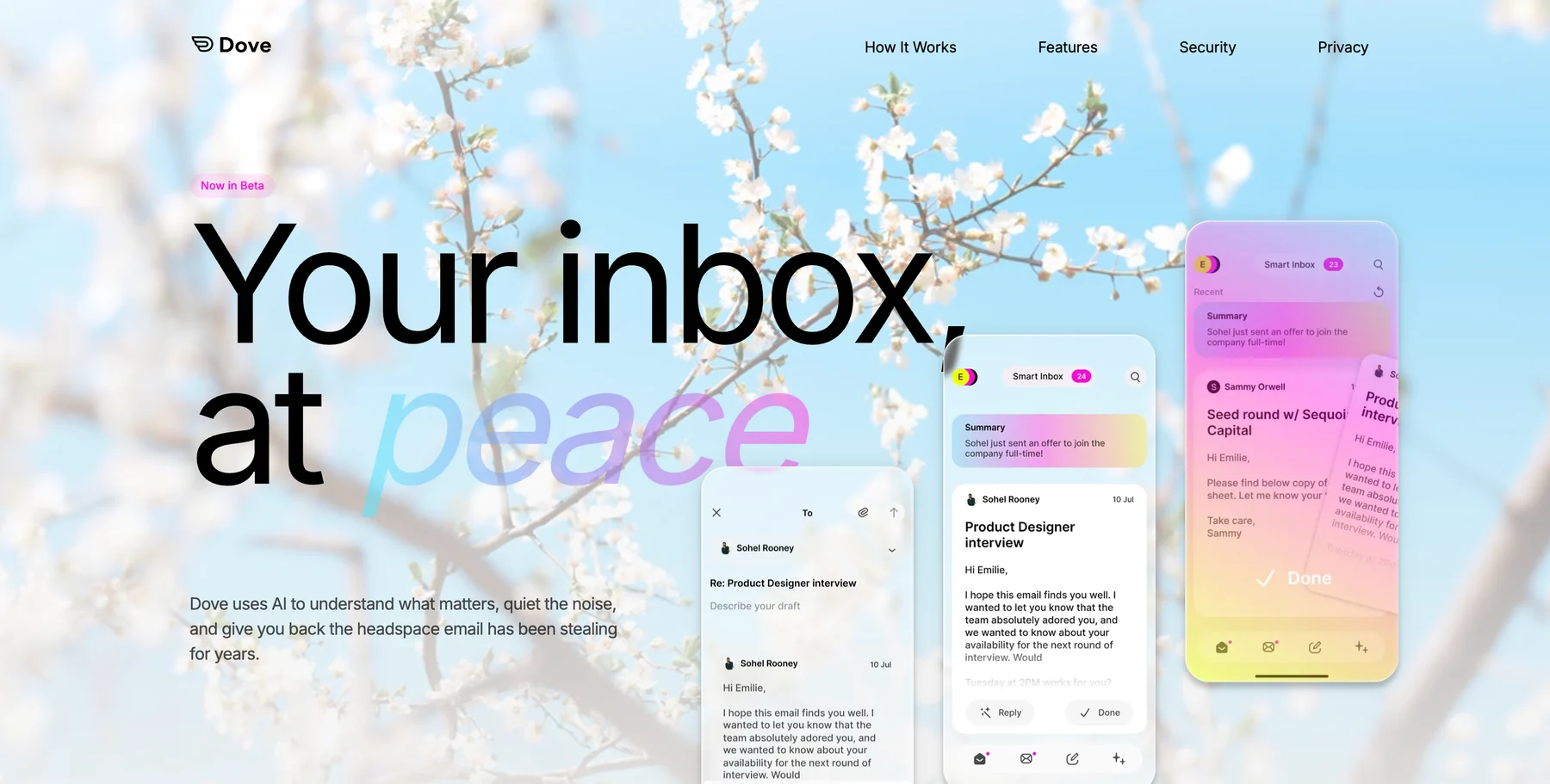
Dove is the most direct spiritual successor to Hey’s core idea. Where Hey sorted email into the Imbox and the Feed manually (you decided what got through), Dove does it automatically. Every incoming message is classified into one of three states: Focus (needs attention), Noise (low priority), or Done (already handled). You open the app to a pre-sorted inbox, not a pile.
The key difference from Hey: Dove works on top of your existing Gmail, Outlook, or iCloud account. No new address required. The AI learns your triage patterns over time, so the sorting improves the longer you use it. Wingman gives you per-thread context (who is involved, what was agreed, what is outstanding) before you reply. Daily Tasks pulls action items out of your inbox and surfaces them as a to-do list each morning.
Platform support: Web, iOS, Android, macOS, and Windows.
Pricing: A free plan with 10 AI actions per day, a single paid plan at $20 per month, and a 7-day trial. See current details on the Dove site.
What Dove does well:
Ambient AI triage requires no manual setup or rules: it learns from how you use email
Three-state inbox eliminates the “what do I do with this” decision on every message
Works across Gmail, Outlook, iCloud, and standard IMAP accounts
Wingman thread intelligence surfaces context before you reply
Daily Tasks extracts action items from email automatically
What Dove does poorly:
Newer product still building out power-user features and integrations
No PGP encryption for users who need end-to-end secure email
If what you liked about Hey was the idea that your inbox should decide what matters, not you, Dove is the natural next step. Learn more at dove.email.
2. Superhuman: best for speed and keyboard-first workflow
Superhuman built its reputation on making email fast. Instant load times, keyboard shortcuts for everything, a command palette that replaces most mouse clicks. If what you loved about Hey was its opinionated design and the sense that someone had thought hard about the interface, Superhuman delivers that same feeling on top of Gmail and Outlook.
Superhuman has added AI features (thread summaries, AI-drafted replies, follow-up reminders) but speed remains the core value proposition. It is not trying to sort your inbox the way Dove or Hey does. It is trying to help you get through it faster once you open it.
Platform support: macOS, iOS, Windows, Android, and Web.
Pricing: Starter at $25 per month, Business at $30 per month. No free tier, but a 30-day trial is available.
What Superhuman does well:
The fastest, most polished keyboard-driven inbox available
AI-written replies that match your voice and tone
Split inbox separates VIPs from everything else
Works on your existing Gmail and Outlook accounts
What Superhuman does poorly:
Expensive relative to most alternatives
AI is assistive rather than autonomous: the inbox does not pre-sort itself
Gmail and Outlook only, no IMAP or iCloud support
3. SaneBox: best for triage on any existing email client
SaneBox is not an email client: it is a filtering layer that sits on top of whatever client you already use. It analyzes your email behavior and automatically moves low-priority messages into a SaneLater folder, keeping your main inbox for things that matter. The result is similar to Hey’s Feed and Paper Trail concept, but it works inside Gmail, Outlook, Apple Mail, or any IMAP client.
If you are leaving Hey because of the locked address but liked the separation of important from unimportant, SaneBox gives you that without switching clients. SaneBlackhole permanently blocks senders you never want to hear from. SaneReminders nudges you on threads that need follow-up.
Platform support: Any email client and account that supports IMAP.
Pricing: Plans start at $7 per month. A free trial is available.
What SaneBox does well:
Works with any existing client and any IMAP account: no migration
Reliable filtering that improves over time based on your behavior
SaneBlackhole for permanently silencing unwanted senders
No app to install, no new interface to learn
What SaneBox does poorly:
No native app, no AI drafting, no thread intelligence
Folder-based approach can feel dated compared to AI-native alternatives
Does not work with accounts that block IMAP access
4. Fastmail: best for independence with standard protocols
Fastmail is what you switch to when you want to own your email again. Custom domain support, IMAP and SMTP, no advertising, no data mining. It does not have Hey’s opinionated triage or AI features, but it is fast, reliable, and has been running without drama since 1999.
If your main frustration with Hey was the @hey.com address requirement and you want your own domain with a provider you can trust, Fastmail is the answer. You can use Fastmail with any email client, including Dove for AI triage on top of it.
Platform support: Web, iOS, and Android.
Pricing: Plans from $3 per month for personal use, with a 30-day free trial.
What Fastmail does well:
Custom domains, standard protocols, excellent deliverability
Privacy-respecting: no advertising model, no data mining
Works with any IMAP client including Dove, Superhuman, and Apple Mail
Calendar, contacts, and file storage included
What Fastmail does poorly:
No AI features, no autonomous triage
No native desktop app: web app only on Mac and Windows
Not trying to solve the overloaded inbox problem
For more privacy-first picks, see the best email apps for privacy.
5. Airmail: best lightweight native client on Apple devices
Airmail is a native macOS and iOS email client that connects to Gmail, Outlook, iCloud, Exchange, and IMAP accounts. It is fast, customizable, and has deep Apple platform integrations including Shortcuts, widgets, and Focus mode support. It is a good fit for Hey users who want a lightweight client without a subscription.
Platform support: macOS and iOS only.
Pricing: Around $2.99 per month or a one-time purchase option. A free tier with limited features is available.
What Airmail does well:
Native macOS and iOS apps with deep system integrations
Highly customizable with swipe actions, layouts, and themes
Works with virtually any email account type
Affordable compared to most premium alternatives
What Airmail does poorly:
No Android or Windows app
No AI triage: inbox management is manual or rule-based
AI features are optional add-ons, not the foundation of the product
How to choose the right Hey alternative
Match the tool to the reason you are leaving Hey:
You want a calmer inbox that triages for you automatically: choose Dove. It does what Hey’s Screener did, but without manual setup, and it works on your existing accounts.
You want the fastest possible keyboard-driven email on Gmail or Outlook: choose Superhuman.
You want Hey-style triage but want to keep your existing client: choose SaneBox.
You are leaving Hey because of the address lock-in and want your own domain: choose Fastmail.
You want a lightweight native Apple client with no subscription pressure: try Airmail.
Most people who tried Hey were really after a quieter inbox, not a new email address. If that is you, an AI-native triage tool like Dove solves the actual problem without the migration cost.
FAQ
What is the best Hey Email alternative in 2026?
For most people, Dove is the best Hey alternative because it does what Hey’s Imbox does: sort email by intent: but automatically, on top of your existing accounts, without requiring a new @hey.com address.
Is there a free Hey Email alternative?
Yes. Dove has a free plan with 10 AI actions per day. Airmail has a limited free tier. There is no meaningful free alternative that matches Hey’s full feature set, but Dove’s free tier is enough to evaluate whether AI triage works for you.
Can I use Hey alternatives with my existing Gmail or Outlook account?
Yes: Dove, Superhuman, and SaneBox all work on top of your existing accounts. Fastmail provides its own accounts but supports custom domains and IMAP. Only Hey requires a new @hey.com address.
What is the best Hey alternative for iPhone?
Dove is available on iOS and works across all major email providers. It is the closest match to Hey’s intent-sorting philosophy on iPhone without requiring a new email address.
Why did people leave Hey Email?
The most common reasons are the @hey.com address requirement, the $99 per year price, the lack of IMAP support for existing accounts, and the availability of AI-native alternatives that offer autonomous triage without the migration cost.
Is Dove similar to Hey Email?
Yes, in philosophy. Both believe your inbox should sort email by intent before you open it. The key difference is Dove works on your existing Gmail, Outlook, or iCloud account: no new address required: and the sorting is automatic rather than manual.
Bottom line
Hey Email deserved credit for proving that an opinionated inbox could work. The Imbox was a real idea, not just a skin. But the @hey.com requirement, the lack of IMAP, and the $99 per year price tag made it a harder sell once the rest of the market caught up with AI-powered sorting on your existing accounts.
Try Dove free. It works on top of your existing email and takes about two minutes to connect.
More from Dove
Recent posts

July 1, 2026
Best Airmail Alternatives in 2026
The best Airmail alternatives in 2026 compared. See platform support, pricing, strengths, and weaknesses for Dove, Canary Mail, Spark Mail, Mimestream, Edison Mail, Shortwave, Outlook, and Apple Mail.

June 30, 2026
Best Spike Alternatives in 2026
The best Spike alternatives in 2026 compared. See platforms, pricing, strengths, and weaknesses for Dove, Canary Mail, Shortwave, Spark, Missive, and Superhuman.

June 26, 2026
Best Zoho Mail alternatives in 2026
The best Zoho Mail alternatives in 2026, compared by platform, AI, pricing, strengths, and weaknesses. See how Dove, Canary Mail, Proton Mail, Fastmail, and Google Workspace stack up.