'/%3e%3c/g%3e%3c/svg%3e)

Best Email Apps for ADHD in 2026
The best email apps for ADHD in 2026, compared by platform support, pricing, what each tool does well, and where it falls short. Dove Spark, and more.

A standard inbox is a slot machine for the ADHD brain. Every new message is a flashing reward cue, every red badge is a small alarm, and the order things appear in has nothing to do with what actually matters. By the time you have scrolled, opened, half-read, and re-flagged the same thread three times, the day is gone and the important reply is still unwritten.
The right email app cannot cure ADHD. It can change how much attention your inbox demands. Apps that pre-sort noise, hide what does not need a decision today, and let you act in one or two clicks turn email from a constant attention tax into a short, contained task.
We compared eight email apps that work well for ADHD users across platform support, pricing, what each tool does well, and what it does poorly. The picks are ordered by how directly they reduce decision load and protect focus, not by brand.
Key takeaways
Dove is the strongest pick for ADHD because it triages every email into Focus, Noise, or Done before you open the app, so most of the inbox is decided for you. Pricing is one plan at $20 per month with a 7-day free trial, plus a free plan with limited AI access.
Spark, Spike, and Hey each take a different angle on the same problem: reducing the number of decisions per inbox visit.
Free apps like Apple Mail, Gmail, and Thunderbird are workable, but only if you commit to setting up filters, labels, and notification rules yourself.
The right pick depends on whether you want the app to triage for you (Dove), help you focus when you choose to engage (Spark), or just stay out of your way (Apple Mail).
What ADHD users actually need from an email app
The ADHD inbox problem is not really about email. It is about attention, working memory, and the cost of switching tasks. A good ADHD email app reduces friction on three specific axes.
Lower decision load. A 200-message inbox forces 200 micro-decisions: open, ignore, archive, reply, snooze, flag. ADHD brains pay a real cost for each one. Apps that triage by default cut that number to a handful.
Calm visual environment. Bright counters, badges, color-coded labels, and busy threads all compete for visual attention. Apps with a quieter UI, a clear hierarchy, and a single dominant thing to look at are easier to stay inside without drifting.
Forgiving recovery. ADHD inboxes oscillate between hyperfocus and total avoidance. The best apps make it easy to come back after a week off without facing a 3,000-message wall: bulk triage, smart unread filters, and clear “this is what matters” views.
The eight apps below each solve at least two of those three. The comparison table is the fast version; the detailed sections explain platform support, pricing, and the specific strengths and weaknesses of each pick.
The best email apps for ADHD at a glance
App | Platforms | Pricing | What it does well | What it does poorly |
|---|---|---|---|---|
Web, iOS, Android, macOS, Windows | $20/month (one plan, 7-day free trial); free plan with 10 AI actions/day | Auto-triages every email into Focus, Noise, and Done so the inbox is decided for you | Single tier may feel pricey if you only want lightweight triage | |
Spark | macOS, iOS, Android, Windows, Web | Free tier; Premium from $4.99/month | Smart Inbox groups newsletters and notifications away from people | Some focus features sit behind the Premium tier |
Spike | macOS, iOS, Android, Windows, Web | Free tier; Solo Pro from $5/month | Conversational chat-style UI reduces visual overwhelm | Threading model takes time to adjust to if you came from Gmail |
Hey | macOS, iOS, Android, Windows, Web | $99/year for personal | The Screener forces every new sender to be approved, killing cold-email noise | Locked to a hey.com address; no IMAP, no third-party clients |
Superhuman | macOS, iOS, Android, Windows, Web | $30/month, or $25/month billed annually | Keyboard-first design and Split Inbox keep you in one motion, one focus | Premium price and a learning curve that can be steep with ADHD |
Apple Mail | macOS, iOS | Free with Apple devices; iCloud+ from $0.99/month | Quiet native interface, no upsells, deep system integration | No built-in triage; you do all the sorting yourself |
Thunderbird | macOS, Windows, Linux | Free, open-source | Fully customizable filters, tags, and views for control freaks | Out-of-the-box experience is busy and not ADHD-friendly without setup |
If you want a recommendation in one line: try Dove first to see what an auto-triaged inbox feels like, and try . The deeper picks help if those two do not fit your specific stack.
1. Dove: best overall for ADHD
Dove is built on the idea that your inbox should be decided before you open it. Every incoming message is sorted into one of three views: Focus for things that need you, Noise for newsletters and updates, and Done for confirmations and receipts. You do not see the full undifferentiated stream by default. That single design choice removes most of the per-message decisions an ADHD brain has to make.
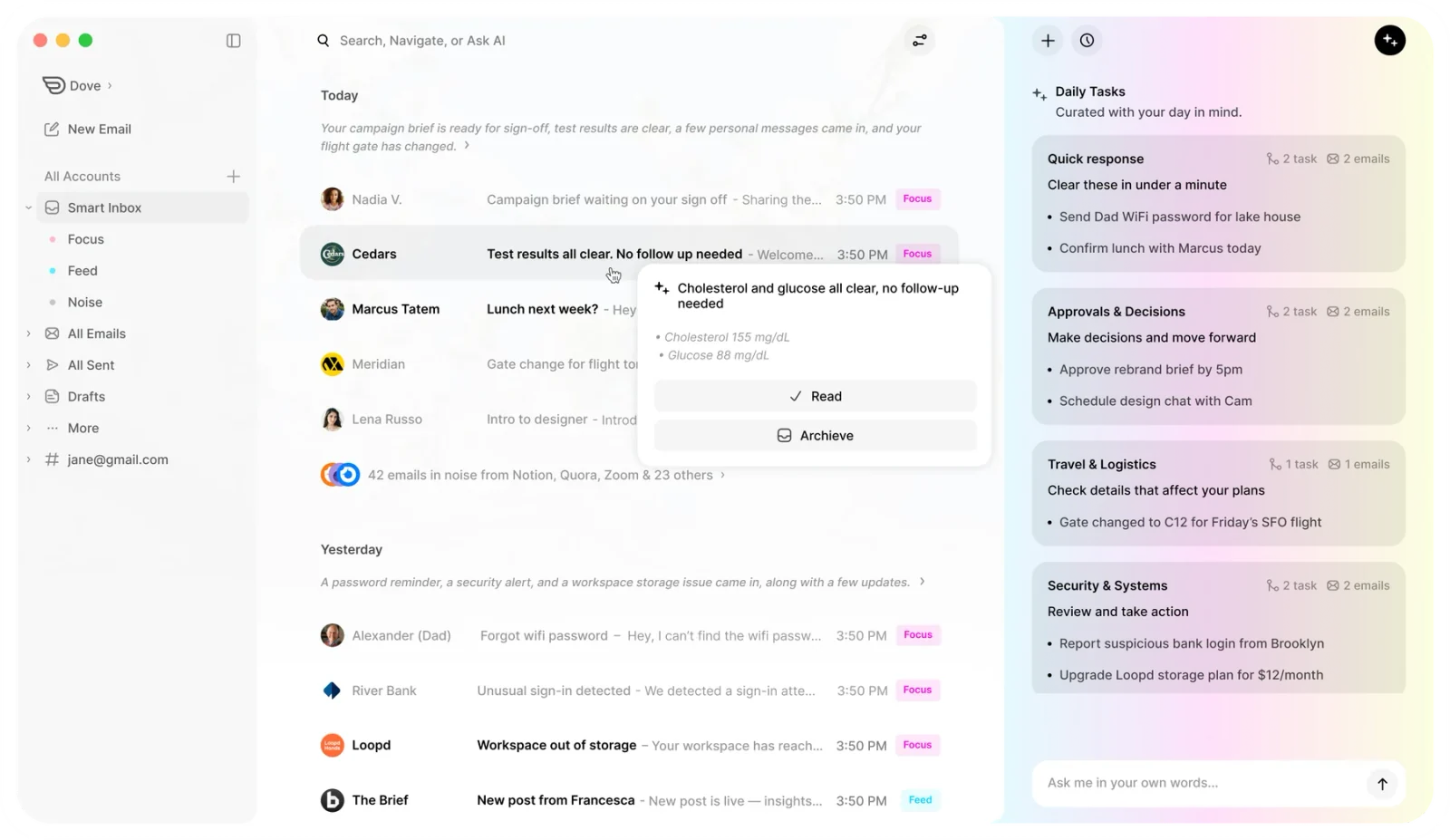
The AI is not just labels. Dove drafts replies in your voice, surfaces tasks that are hidden inside threads, and quarantines phishing attempts before they reach you. If you mostly use email to react to incoming requests, this is the closest an app has come to doing that triage step for you.
Platform support: Web, iOS, Android, macOS, and Windows. One plan covers every device. Works with Gmail, Google Workspace, Microsoft 365, Outlook, and any IMAP provider, so you do not need a new address.
Pricing: One plan, $20 per month, everything included. 7-day free trial (card required, charged on day 8). After the trial, if you do not subscribe you move to the free plan automatically, which keeps core inbox features and gives you 10 AI actions per day across unlimited email accounts.
What it does well:
Auto-triages every email into Focus, Noise, and Done so most decisions are made for you
AI drafts replies, surfaces tasks from inside threads, and flags phishing before it reaches the inbox
Calm, single-column interface that does not shout for attention
Cross-platform on Mac, iOS, Android, Windows, and Web, with one plan that covers them all
What it does poorly:
Single $20/month tier means there is no cheaper paid option if you only want light triage
AI-first design will feel like too much delegation if you prefer manual control
If you want the deeper case for AI-driven inbox management, the best AI email apps in 2026 round-up has a wider comparison, and the piece on how to manage too many emails maps Dove’s Focus/Noise/Done flow onto a working triage routine.
2. Spark: best free Smart Inbox
Spark’s Smart Inbox is the most ADHD-friendly default in the freemium tier. Instead of one undifferentiated list, you see three groups: people, notifications, and newsletters. That alone removes a layer of mental sorting before you start replying. The “Set Aside” feature lets you push something out of view without the friction of a full snooze flow.
The trade-off is that Spark’s strongest focus features, like priority routing and advanced notification rules, sit behind the Premium tier. The free tier is still useful, but the upgrade is what fully turns it into an ADHD-oriented client.
Platform support: macOS, iOS, Android, Windows, and Web.
Pricing: Free tier with Smart Inbox and basic gestures. Premium from $4.99/month (Personal), Teams from $7.99/user/month.
What it does well:
Smart Inbox separates people from newsletters and notifications by default
“Set Aside” and snooze flows are gentle and easy to recover from
Strong cross-platform sync; the iPhone and Mac apps feel like one app
What it does poorly:
Premium tier is required for the most useful focus and routing features
Has gone through ownership and pricing changes; some long-time users have churned
For more on Spark and its closest peers, see the best Spark Mail alternatives in 2026.
3. Spike: best chat-style inbox for visual overwhelm
If a traditional threaded inbox feels visually exhausting, Spike collapses email into a chat-like stream that looks closer to iMessage than to Outlook. Each conversation is a bubble, replies sit inline, and the long header metadata most clients show is hidden by default. For ADHD users who get stuck rereading the same long thread, that simpler visual model can reduce friction noticeably.
Spike also handles tasks, notes, and team channels inside the same app, which is either a strength or a distraction depending on how you work.
Platform support: macOS, iOS, Android, Windows, and Web.
Pricing: Free for personal use. Solo Pro from $5/month. Teams from $7/user/month.
What it does well:
Chat-style UI removes the visual weight of a traditional email thread
Tasks and notes are first-class, so quick captures do not require a separate app
Works with Gmail, Outlook, iCloud, and IMAP without changing your address
What it does poorly:
Threading model takes time to adjust to if you came from Gmail or Apple Mail
Some long-form business email still reads more naturally in a traditional client
4. Hey: best for killing cold-email noise
Hey takes the most opinionated stance of any app on this list. Every new sender has to be approved through the Screener before they can ever reach your inbox. If you say no, that sender never lands again. For ADHD users whose inboxes have been mined for years by marketing lists, the Screener can drop your daily volume by 80% in the first week without losing anything important.
The trade-off is that Hey is locked to a hey.com address with no IMAP and no third-party clients. You are buying into the whole opinion or you are not.
Platform support: macOS, iOS, Android, Windows, and Web.
Pricing: $99/year for the personal plan. Hey for Work starts at $12/user/month.
What it does well:
The Screener gives you full control over who is allowed to interrupt you
The Feed, Paper Trail, and Imbox split groups email by purpose, not just sender
Strong defaults; nothing important needs configuring
What it does poorly:
Locked to a hey.com address; you cannot bring your Gmail or work account in
No IMAP, so no third-party clients and no integrations
Annual-only pricing means a real commitment up front
If the Screener idea is what attracts you but the lock-in is a deal-breaker, the best Hey email alternatives in 2026 round-up covers softer takes on the same model.
5. Superhuman: best keyboard-first speed
Superhuman is built around two things: keyboard shortcuts and a Split Inbox that hides everything except what you actually need to act on. For ADHD users who get a dopamine boost from speed and visible progress, blasting through a triage queue in keystrokes can be unusually satisfying.
The catch is the price and the ramp. Superhuman costs $30/month and expects you to learn its shortcuts. ADHD users can absolutely live in Superhuman, but the first two weeks require some scaffolding to actually make the shortcuts stick.
Platform support: macOS, iOS, Android, Windows, and Web.
Pricing: $30/month month-to-month, or $25/month billed annually. Team plans available.
What it does well:
Keyboard-first design lets you do triage in seconds without leaving the home row
Split Inbox separates important senders so you are not staring at the full stream
AI features for reply drafting and follow-up reminders are built in
What it does poorly:
Premium price; not the right pick if cost is a hard constraint
Learning curve is steep, which is exactly the kind of activation cost ADHD makes harder
The best Superhuman alternatives in 2026 post compares Superhuman against softer-learning-curve options if the price or ramp is the blocker.
6. Apple Mail: best quiet default for Apple users
Apple Mail is the best quiet default if you live on Apple devices and prefer to do your own triage. It is fast, has no upsells, integrates with Reminders and Calendar, and looks visually calmer than Gmail by default. For ADHD users who get distracted by busy UI, the native Apple Mail interface is genuinely restful.
The reason it is not higher is that Apple Mail does almost no triage for you. It will not group newsletters, will not surface tasks, and will not draft replies. If you commit to setting up filters and Focus modes yourself, it is workable. If you want the app to do the heavy lifting, it will not.
Platform support: macOS and iOS only.
Pricing: Free with Apple devices. iCloud+ from $0.99/month adds storage and Hide My Email aliases.
What it does well:
Quiet, native interface with no advertising and no upsells
Mail Privacy Protection blocks tracking pixels by default
Tight integration with Reminders, Calendar, Focus modes, and Hide My Email
What it does poorly:
No built-in triage, prioritization, or AI; you set up everything yourself
macOS and iOS only; no Android, Windows, Web, or Linux support
If you are on Apple but want more help than Apple Mail offers, the best Apple Mail alternatives for Mac and iPhone in 2026 is the natural next read.
7. Thunderbird: best free open-source pick
Thunderbird is the right pick for ADHD users who want full control, fully open-source software, and a free price tag. The catch is that Thunderbird’s default UI is busy. To make it ADHD-friendly, you almost always need to tune the layout, set up tags, build saved searches, and tweak notification rules. The reward is that, once configured, it does exactly what you tell it to and nothing more.
Platform support: macOS, Windows, and Linux. No native iOS or Android app yet; mobile is on the roadmap.
Pricing: Free and open-source.
What it does well:
Fully customizable filters, tags, columns, and views
Open-source and free; no subscription pressure
OpenPGP is built in for encrypted email without add-ons
What it does poorly:
Out-of-the-box experience is visually busy and not ADHD-friendly without setup
No first-party mobile app; Thunderbird on Android is still maturing
If you want the wider context on Thunderbird and open-source clients, see the best Thunderbird alternatives in 2026.
How to choose if you have ADHD
The fastest filter is which axis you most need help on.
You want the inbox to triage itself. Start with Dove. The Focus, Noise, and Done split removes the largest source of friction for ADHD email, which is the constant micro-decision of what to do with each new message.
You want a calm manual flow with privacy.. Encryption by default, optional on-device AI, and a quieter visual environment than mainstream clients.
You want a free option that already does some grouping. Spark’s free tier is the easiest landing place. Spike is the alternative if a chat-style UI feels less heavy than threads.
You want to wall off cold senders. Hey, if you can accept the lock-in. The Screener is unique on this list.
You live on Apple and want quiet defaults. Apple Mail, with Focus modes set up to silence non-critical notifications during work hours.
You want speed and control more than help. Superhuman if budget allows, Thunderbird if it does not.
There are also habits that pair with any of these picks. The email triage system and how to manage too many emails guides cover routines that hold up even on bad attention days.
Not sure which fits you? Try Dove for 7 days free and see what a triaged inbox feels like before deciding anything.
Start free trial →
FAQ
What makes an email app ADHD-friendly?
Three things, in order: low decision load, a calm visual environment, and forgiving recovery. ADHD-friendly apps make most of the per-message decisions for you, do not compete for visual attention, and let you come back after a gap without facing an undifferentiated wall of unread mail.
How much does Dove cost?
Dove is one plan at $20 per month, with a 7-day free trial. If you do not subscribe after the trial, you move to the free plan automatically. The free plan keeps core inbox features and gives you 10 AI actions per day, usable across search, Wingman, summaries, and email drafts, across unlimited email accounts. You can sign up at dove.email.
Is Gmail bad for ADHD?
Gmail is not inherently bad for ADHD, but its defaults are not ADHD-friendly. The unified Primary tab, frequent notifications, red unread badges, and dense thread view all add visual and decision load. With filters, Priority Inbox, and notification tuning it becomes workable, but apps like Dove and Spark are easier to land on because the helpful behavior is the default rather than a project.
What email app should I use if I have ADHD and want something free?
Spark’s free tier is the easiest free starting point because the Smart Inbox grouping is on by default. Dove also has a free plan with 10 AI actions per day, and goes further than Spark by triaging into Focus, Noise, and Done automatically, which removes more decisions per inbox visit. If you want unlimited AI on Dove, the paid plan is $20 per month with a 7-day free trial.
Can I keep my Gmail address and still use one of these apps?
Yes, for most of them. Dove, Spark, Spike, Superhuman, Apple Mail, and Thunderbird all work on top of your existing Gmail, Outlook, iCloud, or IMAP account. Hey is the exception; it requires a hey.com address.
Will any of these apps fix my ADHD?
No. An email app cannot treat ADHD. What it can do is reduce the friction your inbox creates so that email stops being a daily attention drain. That alone is often the difference between an inbox you can manage on a hard day and one you avoid for a week.
Final thought
The wrong email app makes ADHD email harder than it has to be. The right one quietly does the parts your brain finds expensive: sorting, prioritizing, and hiding the noise. If you do nothing else, try Dove for a week and see what a triaged inbox feels like before going back to the default Gmail or Apple Mail flow. Most ADHD users do not realize how much attention a raw inbox was taking until something else carries that load for them.
More from Dove
Recent posts

August 17, 2026
Best Email App for Multiple Accounts in 2026
Juggling more than one inbox? Here is the best email app for multiple accounts in 2026, plus two other ways to fix inbox overwhelm for good.
July 1, 2026
Best Airmail Alternatives in 2026
The best Airmail alternatives in 2026 compared. See platform support, pricing, strengths, and weaknesses for Dove, Canary Mail, Spark Mail, Mimestream, Edison Mail, Shortwave, Outlook, and Apple Mail.
June 30, 2026
Best Spike Alternatives in 2026
The best Spike alternatives in 2026 compared. See platforms, pricing, strengths, and weaknesses for Dove, Shortwave, Spark, Missive, and Superhuman.