'/%3e%3c/g%3e%3c/svg%3e)

Best Spark Mail Alternatives in 2026
The best Spark Mail alternatives in 2026 compared. Platforms, pricing, what each tool does well, and what it does poorly. Dove, Canary Mail, Apple Mail, Spike, Superhuman, and more.

By Phoebe Brown. Last updated May 7, 2026.
Spark Mail used to be the easy recommendation for anyone who wanted a modern, opinionated email client without paying Superhuman prices. The 2024 relaunch of Spark 3, the move to a heavier subscription, and the slow drip of features behind paywalls changed that for a lot of long-time users. If you are reading this, you probably want a calmer inbox, faster triage, and predictable pricing.
The good news is the email app market in 2026 is healthier than it has been in years. AI-native clients like Dove sort your inbox before you open it. Canary Mail keeps PGP encryption in a polished modern client. Mimestream and Apple Mail are quietly excellent for native users. Below are the best Spark alternatives compared on platform support, pricing, what each tool does well, and what it does poorly.
Key takeaways
Dove is the closest thing to a Spark replacement if you want AI to triage Focus, Noise, and Done before you ever open the inbox. It costs $20 per month with a 7-day free trial.
Canary Mail is the best pick for privacy-first power users who want PGP encryption and on-device AI in a polished modern client.
Apple Mail and the new Outlook are both free and fine if you want to stop paying for an email app entirely.
Mimestream is a love letter to native macOS plus Gmail. Spike turns email into chat. Superhuman is still the speed benchmark if money is no object.
The right alternative depends on what you actually used Spark for, smart inbox, calendar, snooze, send-later, or team email. The table below maps each tool to a strength.
Why people are looking for Spark Mail alternatives
Spark earned its reputation between 2018 and 2022 by combining a smart inbox with collaborative drafts and a thoughtful gesture system. Three things changed:
Pricing pressure. Most of the features that made Spark feel premium, including custom snooze timing, Smart Inbox, and team email, sit behind the Premium plan, currently around $7.99 per month or $59.99 per year per user.
AI is now the baseline. Dove, Canary Mail, Superhuman, and the new Outlook all ship AI features that triage, summarize, and draft for you. Spark added AI features in Spark 3, but they are not as opinionated as a triage-first client.
The 2024 relaunch was bumpy. A lot of users disliked the redesigned Spark 3 interface, lost local data during migration, or found that their workflow no longer fit. Searches for “Spark Mail alternative” jumped sharply through 2024 and stayed elevated.
If your reason for leaving Spark is any of those, you have good options. Pick the one whose strengths line up with the part of Spark you actually used.
The best Spark Mail alternatives at a glance
App | Platforms | Free tier | Paid pricing | What it does well | What it does poorly |
|---|---|---|---|---|---|
Dove | Web, iOS, Android, macOS, Windows | 7-day free trial | $20 / month | AI triage into Focus, Noise, Done. Phishing risk scoring. Daily tasks. | No PGP. Newer, so smaller integration ecosystem. |
Canary Mail | macOS, iOS, Android, Windows | Yes | Growth $36 / year. Pro+ $100 / year. | PGP, SecureSend, on-device AI, full power-user toolkit. | No web client. No Linux. |
Apple Mail | macOS, iOS | Free with Apple devices | iCloud+ from $0.99 / month | Built-in tracker blocking, Hide My Email, deep OS integration. | No Windows, Android, or web. No smart triage. |
Edison Mail | iOS, Android, macOS | Yes (with ads) | Edison Mail+ around $14.99 / month | Smart automatic categorization. Receipt and travel views. | Past privacy controversy. UI feels dated. |
Mimestream | macOS, iOS | 14-day free trial | $4.99 / month or $49.99 / year | Native Mac feel, full Gmail label and filter support. | Gmail and Google Workspace only. No Android or Windows. |
Spike | Web, iOS, Android, macOS, Windows | Yes (Personal) | Pro from $5 / user / month | Conversational email, group chat, collaborative notes. | Chat-style UX is divisive. Limited classic email features. |
Superhuman | macOS, iOS, Android, Windows, Web | 30-day trial | Starter $25 / month. Business $30 / month. | Speed, keyboard shortcuts, AI Auto Drafts. | Expensive. Gmail and Outlook accounts only. |
Outlook (new) | Windows, macOS, iOS, Android, Web | Yes | Microsoft 365 Personal $6.99 / month for advanced features | Free, modern UI, Copilot built in for 365 users. | Mailbox bound to Microsoft. Telemetry concerns for privacy users. |
The rest of this article goes through each one in order, with the things Spark refugees usually care about, what platforms it covers, what it charges, what it gets right, and where it falls short.
1. Dove, best for AI-native triage on your existing accounts
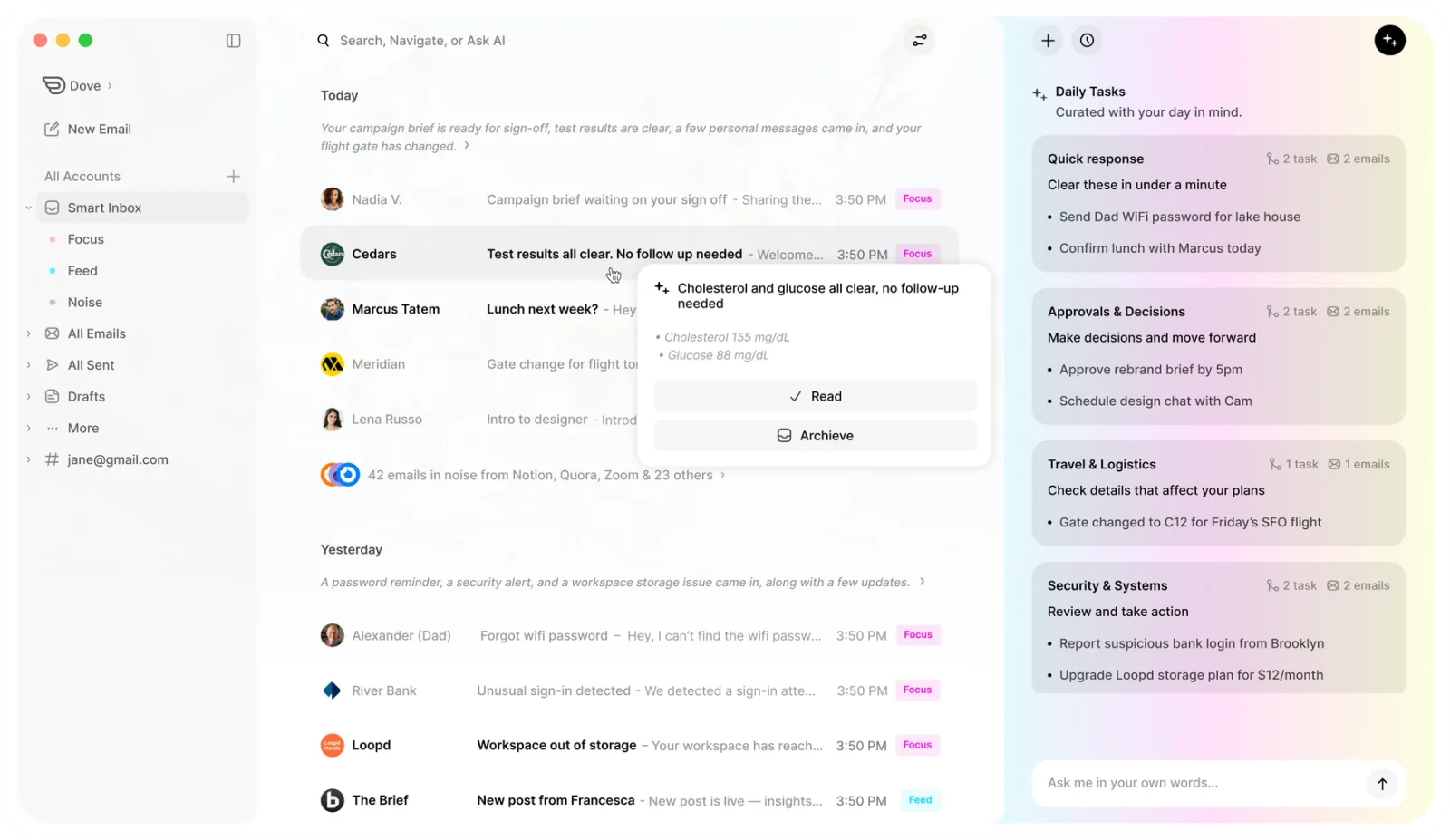
Dove, from Cartasec in Singapore, is the closest thing to a true Spark replacement if you used Spark mainly to fight inbox overload. Dove watches every message land and sorts your inbox into three streams before you even open it.
Focus is the small set of messages that actually need you.
Noise is everything that does not, including newsletters, receipts, social pings, and anything Dove flags as risky.
Done is the archive of handled threads, ready to search but out of the way.
Spark’s Smart Inbox pinned what it thought was important. Dove goes a step further by using AI risk scoring on every message, so phishing, impersonation, and shady senders end up in Noise rather than competing for your attention next to a real client email. There is also a daily tasks view that pulls action items, replies you owe, and meetings you have not confirmed into one short list each morning.
Because Dove is a client and not a provider, you keep your existing Gmail, Microsoft 365, or IMAP address. There is nothing to migrate. You install Dove, sign in, and your inbox starts sorting itself.
Platform support. Web, iOS, Android, macOS, Windows. Synced across all of them.
Pricing. One plan, $20 per month, with a 7-day free trial. Every feature is included, no credit caps on AI, and your data is never used to train models. See Dove pricing for details.
What it does well.
AI triage into Focus, Noise, and Done means triage happens before you open the inbox, not while you are drowning in it.
Risk scoring on every email catches phishing and impersonation that a normal spam filter misses.
Daily tasks surface replies you owe, action items, and meetings into one short list.
Wingman thread intelligence catches asks and risks buried deep in long threads.
One unified flat $20 per month with no AI credit caps, instead of the metered AI pricing common in this category.
What it does poorly.
Dove is not a PGP client. If you need end-to-end encryption for sensitive correspondence, pair it with Canary Mail or use ProtonMail for those threads.
It is the newest tool on this list, so the third-party integration ecosystem is smaller than older clients like Spark or Superhuman.
If Spark’s Smart Inbox is the part you will miss most, start a Dove trial and see how Focus, Noise, and Done compares. For a wider view of where Dove sits in the market, see our roundup of the best email apps of 2026 and the best AI email apps in 2026.
2. Canary Mail, best for privacy-first power users who want AI
Canary Mail, also from Cartasec, is the right pick if you loved Spark’s polish and gestures but you wanted real privacy on top. It is the only modern, full-featured email client that bundles PGP end-to-end encryption with on-device AI, so the AI never sends your email content to a server.
The standout feature is SecureSend, which lets you send encrypted messages to anyone, even recipients who do not use PGP themselves. SecureSend is HIPAA compliant, which puts Canary in a small group of consumer email clients suitable for healthcare, legal, and finance professionals.
Like Dove, Canary works on top of your existing email accounts. You do not need a new address.
Platform support. macOS, iOS, Android, Windows.
Pricing. Free tier with the core email experience. Growth at $36 per year unlocks AI Copilot and advanced productivity. Pro+ at $100 per year adds SecureSend and advanced security. Lifetime purchase options are also available periodically.
What it does well.
PGP encryption built into a polished, modern interface that feels like a 2026 client, not a 2010 one.
SecureSend for HIPAA-compliant encrypted messaging to non-PGP recipients.
AI Copilot processes on-device, so your email content never leaves your phone or computer.
Power-user toolkit, read receipts, snooze, pin, bulk cleaner, templates, 1-click unsubscribe.
Works with Gmail, Outlook, iCloud, and any IMAP account.
What it does poorly.
No web client. You need to install the native app on each device.
No Linux build.
Some advanced security features require the Pro+ tier.
For Spark users who valued thoughtful design and now also want privacy, Canary is the most direct upgrade.
3. Apple Mail, best free baseline for Apple users
Apple Mail is not flashy, but it is the most underrated Spark alternative if you live entirely on Apple devices. The privacy story alone is meaningful. Mail Privacy Protection blocks tracking pixels by default and hides your IP address from senders, and Hide My Email generates random relay addresses so you can sign up for things without giving out your real email.
The 2024 and 2025 updates added smart reply suggestions, summary previews, and improved Focus integration. It is not a triage-first client like Dove, and it is not a chat client like Spike, but it is a calm, fast, native experience.
Platform support. macOS and iOS. No Windows, Android, or web.
Pricing. Free with any Apple device. iCloud+ starts at $0.99 per month for 50 GB and unlocks Hide My Email, Private Relay, and custom email domains.
What it does well.
Pre-installed with zero setup on every Apple device.
Mail Privacy Protection and Hide My Email are excellent privacy primitives.
Deep integration with Focus modes, Siri, and the rest of the Apple ecosystem.
Free if you already own a Mac or iPhone.
What it does poorly.
Apple-only, so it is useless if you ever touch Windows, Android, or work from a borrowed laptop on the web.
No smart triage that compares to Spark’s Smart Inbox or Dove’s Focus, Noise, and Done.
No PGP without third-party plugins.
Search and rules are functional but not best in class.
If you are a die-hard Apple user and Spark felt like overkill, Apple Mail plus iCloud+ is a quietly great free baseline.
4. Edison Mail, best for smart automatic categorization
Edison Mail is one of the original “smart inbox” clients. Its strength is automatic categorization, your inbox surfaces tabs for travel, packages, receipts, subscriptions, and bills, much like Spark’s smart features but more aggressive about extraction.
Edison did go through a privacy controversy in 2020 when it emerged that aggregated, anonymized purchase data was being sold to corporate clients. The company has since changed its policies and offers Edison Mail+ as a paid, privacy-respecting tier, but the history is worth knowing if privacy is a priority for you.
Platform support. iOS, Android, macOS.
Pricing. Free tier supported by ads and optional offers. Edison Mail+ subscription is around $14.99 per month for premium features including verified senders, instant block list updates, and assistant features.
What it does well.
Automatic categorization for travel, receipts, packages, and subscriptions.
Free tier covers the basics.
Useful one-tap unsubscribe and bulk cleanup tools.
What it does poorly.
Past data-sharing controversy still puts off privacy-focused users.
The interface feels dated next to Spark, Dove, or Superhuman.
No PGP, no end-to-end encryption.
Free tier shows ads inside your inbox.
Pick Edison if Spark’s auto-categorization was the feature you used every day and you do not need triage smart enough to push noise out of view entirely.
5. Mimestream, best Gmail-only client for Mac
Mimestream is the rare new email client that decided to do less, on purpose. It is Mac native, Gmail only, and built by ex-Apple Mail engineers. Where Spark abstracted Gmail’s labels into folders, Mimestream embraces labels, multi-select, server-side filters, and Gmail keyboard shortcuts in a fully native macOS shell.
If your Spark setup was 90 percent Gmail and you wanted Apple Mail’s feel with Gmail’s power, Mimestream is the obvious answer.
Platform support. macOS. iOS app is in active beta as of early 2026.
Pricing. 14-day free trial. $4.99 per month or $49.99 per year. One subscription covers multiple Gmail accounts.
What it does well.
Genuinely native macOS experience, fast, quiet, no Electron.
Full Gmail support, labels, filters, send-as, multi-account, Google Workspace.
Excellent keyboard shortcuts that mirror Gmail web.
Privacy-respecting business model, paid app, no ads, no data resale.
What it does poorly.
Gmail and Google Workspace only. No iCloud, IMAP, or Outlook accounts.
macOS only today, the iOS app is still in beta.
No advanced AI triage like Dove or Superhuman.
If Spark felt heavy and you mostly wanted “Apple Mail, but for Gmail,” Mimestream is the most refined option in 2026.
6. Spike, best for conversational email and team chat
Spike is the alternative for people who never really liked email and wanted Spark to feel more like iMessage. It strips away the headers, signatures, and quoted reply blocks and shows messages as a chat thread by sender. On top of that, Spike offers group chat, collaborative notes, voice messages, and shared inboxes for teams.
If your Spark workflow leaned heavily on the team email and collaborative drafts features, Spike is closer to a true replacement than most “email apps” on this list.
Platform support. Web, iOS, Android, macOS, Windows, Linux.
Pricing. Personal plan free for up to 100 emails per day. Pro starts around $5 per user per month billed annually. Business and team plans add shared inboxes and extra collaboration features.
What it does well.
Chat-style email view turns long threads into something readable on a phone.
Group chat, voice notes, and collaborative notes are first-class, not bolt-ons.
Shared inboxes and team email features are stronger than Spark’s.
Cross-platform including Linux.
What it does poorly.
The chat-first UX is divisive. If you actually like classic email layouts, Spike feels alien.
Some traditional email features, including detailed rules and complex filters, are basic.
Free tier has a daily email cap that real users hit quickly.
Spike is the right pick if Spark’s team email and chat-like threads were the parts you valued most.
7. Superhuman, best for premium speed and keyboard-driven workflow
Superhuman is the obvious comparison to Spark Premium for people who care about speed. It is a keyboard-driven, opinionated email client with split inbox, snooze, send-later, read statuses, and AI Auto Drafts that mirrors your tone. AI is now included in every Superhuman plan rather than locked behind an add-on.
It is the most expensive client on this list, but if your time really is worth $30 an hour and Spark’s free tier never felt fast enough, Superhuman is still the gold standard for keyboard-first email.
Platform support. macOS, iOS, Android, Windows, Web.
Pricing. 30-day free trial. Starter at $25 per month. Business at $30 per month. AI features included.
What it does well.
Best-in-class speed and keyboard shortcuts, every action is one key away.
AI Auto Drafts learn your tone and write convincing replies.
Split inbox, snooze, follow-up reminders, and send-later are all polished.
Cross-platform with full feature parity.
What it does poorly.
Most expensive option in this category by a wide margin.
Gmail and Outlook accounts only, no IMAP or iCloud.
The keyboard-first workflow has a real learning curve.
Privacy posture is fine but not a focus, AI features run server-side.
Superhuman is the right answer if Spark Premium felt slow and you have the budget to pay for speed. If you want the same triage-first idea at a lower price, Dove costs $20 per month and includes AI without metering.
8. Outlook (new), best free option for Microsoft and Gmail accounts
The “new Outlook” rolled out across Windows and macOS in 2024 and 2025 is a meaningful improvement over the old Win32 Outlook for personal users. It is free with a Microsoft account, supports Gmail and Yahoo accounts, and includes Microsoft Copilot for users on Microsoft 365 Personal or Family.
If you used Spark on Windows mostly because Outlook felt heavy, the new Outlook is worth a second look. It is much closer to a modern email client than its predecessor.
Platform support. Windows, macOS, iOS, Android, Web.
Pricing. Free for personal use with a Microsoft account. Microsoft 365 Personal at $6.99 per month or $69.99 per year unlocks Copilot in Outlook, premium calendar features, and 1 TB of OneDrive storage.
What it does well.
Free and modern, especially for Gmail or Outlook.com users.
Calendar, contacts, and tasks integration is best-in-class for Microsoft users.
Copilot is genuinely useful for drafting and summarizing if you already pay for 365.
What it does poorly.
Telemetry and data collection are heavier than privacy-first clients.
The new Outlook still requires Microsoft to broker non-Microsoft accounts in some configurations, which has raised privacy concerns for some users.
AI features are gated behind a Microsoft 365 subscription.
The interface still leans Microsoft-flavored, not minimal.
For Windows users who want a free, modern Spark replacement and do not mind Microsoft’s ecosystem, the new Outlook is the easiest move.
How to choose the right Spark alternative
The shortest path is to pick the alternative whose strength matches what you actually used Spark for.
If you used Spark for… | Try this | Why |
|---|---|---|
Smart Inbox, automatic prioritization | Dove | AI triage into Focus, Noise, Done with built-in risk scoring. |
Polish plus privacy | Canary Mail | PGP plus on-device AI in a modern client. |
The free tier, on a Mac or iPhone | Apple Mail | Free, fast, deeply integrated, with built-in tracker blocking. |
Auto-categorized travel and receipts | Edison Mail | Strong auto-categorization with a simple UI. |
A clean Gmail experience on Mac | Mimestream | Native macOS plus full Gmail label and filter support. |
Team email and collaborative threads | Spike | Conversational email plus group chat and shared inboxes. |
Maximum speed, keyboard-driven | Superhuman | Speed benchmark, keyboard shortcuts, AI Auto Drafts. |
A free Windows replacement | Outlook (new) | Free, modern, Copilot for Microsoft 365 users. |
If you cannot decide between the top two, the rule of thumb is simple. If your main pain is volume, install Dove and let AI triage do the work. If your main pain is privacy, install Canary Mail for PGP plus on-device AI. You can also use both, Dove on the accounts where volume hurts and Canary on the accounts where privacy matters most.
For more context on where these tools sit in the broader market, see our full roundup of the best email apps of 2026, the best AI email apps in 2026, and the best email apps for privacy in 2026.
FAQ
Why are people leaving Spark Mail in 2026?
Three reasons stand out. The 2024 relaunch of Spark 3 changed the interface in ways many long-time users disliked, including some local data loss during migration. Pricing moved more features behind the Premium tier at $7.99 per month. And AI-native clients like Dove now ship triage features that go further than Spark’s Smart Inbox, sorting messages into Focus, Noise, and Done before you open the inbox.
Is Dove a free Spark Mail alternative?
Dove offers a 7-day free trial, and the paid plan is $20 per month. There is no permanent free tier. The plan includes every feature, including AI triage, daily tasks, risk scoring, and Wingman thread intelligence, with no credit caps on AI usage. See the pricing page for the current details.
What is the best Spark alternative for Mac?
For Apple users who want a free, native experience, Apple Mail is the easiest answer. For Gmail users on Mac who want a refined native client, Mimestream is the strongest pick. For Mac users who want AI triage that handles inbox volume automatically, Dove is the closest match to what Spark Smart Inbox tried to do.
What is the best Spark alternative for Windows?
The new Outlook is the strongest free option on Windows in 2026, especially if you already use Microsoft 365. For paid alternatives, Dove and Superhuman both run natively on Windows and offer modern, AI-driven experiences. Canary Mail on Windows is the best pick if privacy and PGP encryption matter to you.
Which Spark alternative supports PGP encryption?
Canary Mail is the only client on this list that ships with PGP end-to-end encryption built in, plus SecureSend for sending encrypted messages to non-PGP recipients. Dove does not implement PGP, but it pairs well with Canary on accounts that need encryption.
Do these Spark alternatives work with my existing Gmail or Outlook account?
Yes. Dove, Canary Mail, Apple Mail, Edison Mail, Spike, Superhuman, and the new Outlook all work with existing Gmail and Outlook accounts. Mimestream is Gmail and Google Workspace only. None of these tools require you to create a new email address.
Is Spark Mail being shut down?
No. Spark Mail is still actively developed by Readdle as of 2026. Spark 3 is the current major version, and the team is shipping updates. The migration to alternatives is driven by user preference and pricing, not by a shutdown.
Your inbox without Spark
Spark Mail did one important thing well, it taught a generation of users that an opinionated email client could feel as nice as a chat app. The market caught up. In 2026 you can keep that “opinionated client” feeling and pick a tool that solves your actual pain better than Spark currently does.
If your pain is volume, Dove triages Focus, Noise, and Done before you ever open the app, and your data never trains a model. If your pain is privacy, Canary Mail puts PGP and on-device AI in a polished modern client. If you mostly want to stop paying for email, Apple Mail and the new Outlook are both genuinely good in 2026.
The one move that does not work is staying frustrated. Try one of these for a week. Your inbox will tell you which one fits.
More from Dove
Recent posts

June 26, 2026
Best Zoho Mail alternatives in 2026
The best Zoho Mail alternatives in 2026, compared by platform, AI, pricing, strengths, and weaknesses. See how Dove, Canary Mail, Proton Mail, Fastmail, and Google Workspace stack up.
June 25, 2026
Best Proton Mail alternatives in 2026
The best Proton Mail alternatives in 2026, compared by platform, AI, pricing, strengths, and weaknesses. See how Dove, Canary Mail, Tuta, and Fastmail stack up.

June 24, 2026
Best Email Apps for Remote Workers in 2026
The best email apps for remote workers in 2026, compared by platform, AI, pricing, and how well they handle async communication. Dove, Canary Mail, Outlook, Spark, and Missive reviewed.