'/%3e%3c/g%3e%3c/svg%3e)

Best Thunderbird Alternatives in 2026
The best Thunderbird alternatives in 2026, compared by pricing, platform support, strengths, and weaknesses. Find a modern email client that fits your workflow.

Mozilla Thunderbird has been a reliable desktop email client for over two decades. It is free, open-source, and endlessly customizable. But in 2026, many users are hitting the same wall: Thunderbird still feels like a 2010 desktop app in a world that expects AI triage, seamless mobile sync, and a clean modern interface.
If you have been using Thunderbird because it is free and respects your privacy, you are not stuck. Several modern email clients now offer the same multi-account support and privacy focus, with significantly better design and smarter features.
We compared eight Thunderbird alternatives across pricing, platform support, what each app does well, and where each one falls short. Whether you want AI-powered inbox management, a privacy-first desktop client, or just a cleaner interface that syncs to your phone, this guide covers your options.
Key Takeaways
Dove is the strongest option if you want AI to handle triage, replies, and prioritization across all your accounts.
Canary Mail is ideal if you want a privacy-first client with end-to-end encryption and optional AI features.
eM Client is the closest direct replacement for Thunderbird’s desktop power-user features, including calendar and contacts.
If your main complaint is Thunderbird’s outdated design, Mailspring and Spike both offer a modern look with a lighter footprint.
No single alternative matches Thunderbird’s add-on ecosystem, so pick the client that handles your top two or three needs natively.
Why people leave Thunderbird
Thunderbird is not a bad email client. It is a legacy one. For users who manage three or more accounts, need mobile access, or want their email client to do more than display messages, Thunderbird creates friction in a few specific areas.
No mobile app. Thunderbird released a mobile version for Android in late 2024 (based on the K-9 Mail acquisition), but there is still no iOS app. If you use an iPhone, Thunderbird cannot follow you there.
The interface has not aged well. The Supernova redesign improved things, but Thunderbird still looks and feels heavier than modern alternatives. Tab-based navigation, dense toolbars, and deep settings menus slow down everyday tasks.
No built-in AI. Thunderbird has no smart triage, no AI-assisted replies, and no automated prioritization. Every email lands in your inbox with equal weight, and you sort manually.
Extension dependency. Many of Thunderbird’s best features (calendar sync, encryption, tracking protection) come from add-ons that can break after updates. Native feature coverage is thinner than most paid clients.
If any of those issues sound familiar, the alternatives below address them directly.
Best Thunderbird alternatives at a glance
App | Platforms | Free tier | Paid pricing | Best for | Encryption |
|---|---|---|---|---|---|
macOS, Windows, iOS, Android, Web | 7-day free trial | $20/month | AI-native inbox triage and automation | AI threat detection, phishing quarantine | |
macOS, Windows, iOS, Android | Yes | Growth $36/year, Pro+ $100/year | Privacy-first power users who want optional AI | PGP E2E, SecureSend | |
eM Client | Windows, macOS | Yes (2 accounts) | $49.95 one-time | Desktop power users who need calendar + contacts | PGP support |
Mailspring | Windows, macOS, Linux | Yes | $8/month | Modern design on a budget | None built-in |
Outlook (new) | Windows, macOS, iOS, Android, Web | Free with ads | Microsoft 365 from $6.99/month | Microsoft ecosystem users | S/MIME |
Spike | Windows, macOS, iOS, Android, Web | Yes (1 account) | From $5/month | Conversational email with team chat | None built-in |
Betterbird | Windows, macOS, Linux | Free | Free (donation-supported) | Thunderbird fans who want bug fixes, not a new app | Same as Thunderbird |
Vivaldi Mail | Windows, macOS, Linux | Free | Free | Browser-integrated email for Vivaldi users | None built-in |
Dove
Dove is an AI-native email client built from the ground up around automatic triage. Instead of dumping every message into a single inbox, Dove sorts your email into three states: Focus, Noise, and Done. Focus holds the messages that need your attention. Noise catches newsletters, notifications, and low-priority threads. Done is for messages you have already handled.
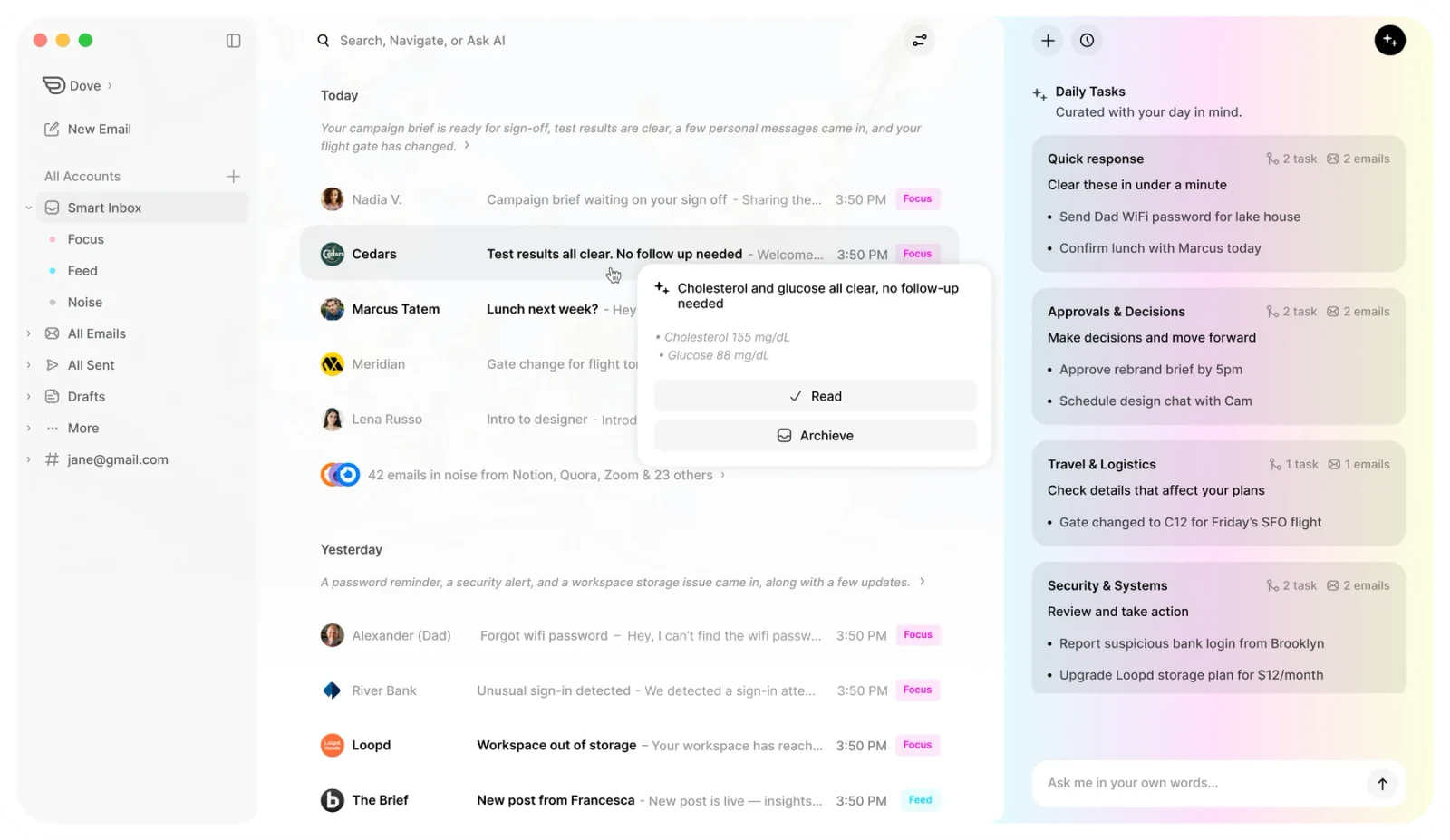
The AI is not a bolt-on feature. Dove’s Wingman analyzes entire threads, drafts contextual replies, and detects meetings to surface daily tasks. It learns how you handle email and adapts over time, so the sorting gets more accurate the longer you use it.
For Thunderbird users concerned about security, Dove runs AI-powered risk scoring on incoming messages and quarantines phishing attempts before they hit your inbox. Your data never trains external models.
Pricing: $20/month with a 7-day free trial. Cancel anytime.
Platforms: macOS, Windows, iOS, Android, Web
What Dove does well:
AI triage sorts every email automatically, so you never manually file messages
Wingman writes contextual replies based on full thread history
Daily Tasks surface meetings and action items from your email
Works with Gmail, Microsoft 365, and IMAP accounts
Risk scoring catches phishing before you see it
What Dove does not do:
No built-in calendar or contacts (relies on your existing calendar app)
No PGP or S/MIME encryption (focuses on AI threat detection instead)
No free tier beyond the 7-day trial
No Linux support
Best for: People who are overwhelmed by email volume and want AI to handle triage, prioritization, and replies across multiple accounts.
Canary Mail
Canary Mail is a privacy-first email client with built-in PGP encryption and an optional AI layer called Copilot. If you liked Thunderbird for its privacy ethos but want a modern interface and mobile sync, Canary Mail is the most natural upgrade.
Canary Mail’s SecureSend feature lets you send encrypted emails to anyone, even if the recipient does not use PGP. The AI features (smart prioritization, email summarization, suggested replies) run on-device, meaning your email data never leaves your phone or computer. These AI features are optional and can be turned off entirely if you prefer a traditional client experience.
Unlike Thunderbird, Canary Mail has full-featured apps on every major platform, including iOS. Read receipts, snooze, and unified inbox come built in rather than requiring extensions.
Pricing: Free tier available. Growth plan at $36/year. Pro+ at $100/year.
Platforms: macOS, Windows, iOS, Android
What Canary Mail does well:
PGP encryption built in, no extensions or manual key management required
On-device AI keeps your data private (AI features are optional)
SecureSend encrypts emails to any recipient
Clean, modern interface with unified inbox
Read receipts and email tracking built in
What Canary Mail does not do:
No web client
No Linux support
No built-in calendar (separate Canary Calendar app available)
AI features require the paid plan
Smaller team than Microsoft or Google, so feature releases are less frequent
Best for: Privacy-conscious users who want end-to-end encryption, a polished interface, and optional AI, all without the extension juggling Thunderbird requires.
eM Client
eM Client is the closest thing to a direct Thunderbird replacement on the desktop. It includes email, calendar, contacts, tasks, and notes in a single app, which mirrors the all-in-one approach Thunderbird users are used to (minus the extensions).
The interface is cleaner than Thunderbird’s but still dense enough to satisfy power users. PGP encryption is supported natively, and the app handles multiple accounts from Gmail, Outlook, iCloud, and any IMAP provider.
The biggest selling point is the one-time license. You pay $49.95 once and keep the app, with no monthly subscription. For Thunderbird users who valued the “free forever” model, a one-time payment is the next best thing.
Pricing: Free for up to 2 email accounts. One-time purchase of $49.95 for the Pro license.
Platforms: Windows, macOS
What eM Client does well:
Built-in calendar, contacts, tasks, and notes in one app
PGP encryption supported natively
One-time license fee, no subscription
Import tool migrates Thunderbird data directly
Handles large mailboxes and complex folder structures well
What eM Client does not do:
No mobile apps at all
No web client
No Linux support
AI features are limited and not a core focus
Free tier caps you at 2 accounts
Best for: Desktop power users who want Thunderbird’s all-in-one feature set with a more polished interface, and who do not need mobile access.
Mailspring
Mailspring is an open-source email client that focuses on design and speed. It is one of the few modern clients that supports Linux natively, making it an obvious pick for Thunderbird users on that platform.
The free tier covers the basics: multiple accounts, unified inbox, and a clean layout. The paid plan adds read receipts, link tracking, send later, and snooze. Mailspring does not try to be an all-in-one productivity suite. It handles email well and keeps the interface light.
Pricing: Free tier with core features. Pro at $8/month.
Platforms: Windows, macOS, Linux
What Mailspring does well:
Native Linux support (rare among modern email clients)
Fast, lightweight, and visually clean
Open-source core
Handles multiple accounts from any IMAP provider
Good keyboard shortcut support for power users
What Mailspring does not do:
No mobile apps
No calendar or contacts integration
No encryption support
No AI features
Limited active development (community-maintained)
Best for: Linux users and design-conscious users who want a cleaner Thunderbird alternative without paying for features they will not use.
Outlook (New)
Microsoft replaced the classic Outlook desktop app with “New Outlook,” a web-based client that runs as a native app on Windows and macOS. For Thunderbird users already on Microsoft 365, it is the path of least resistance.
New Outlook includes calendar, contacts, and a built-in AI assistant (Copilot) for drafting and summarizing emails. The free version is ad-supported but functional. The paid Microsoft 365 plan removes ads and adds 1 TB of OneDrive storage, plus access to the full Office suite.
Pricing: Free with ads. Microsoft 365 Personal starts at $6.99/month ($69.99/year).
Platforms: Windows, macOS, iOS, Android, Web
What Outlook does well:
Deep integration with Microsoft 365 (calendar, Teams, OneDrive)
Built-in Copilot AI for drafting and summarizing
Available on every platform including web
Handles enterprise Exchange accounts natively
Focused Inbox separates important email from noise
What Outlook does not do:
The free version shows ads throughout the interface
Heavier than Thunderbird, with noticeable load times
No PGP encryption (S/MIME only, requires a paid plan)
Microsoft collects usage data, which may concern privacy-focused users
IMAP account support is limited compared to dedicated third-party clients
Best for: Users already invested in the Microsoft ecosystem who want calendar, email, and productivity tools in one package.
Spike
Spike reimagines email as a conversational messaging interface. Instead of threaded messages with headers and signatures, Spike displays email as chat bubbles. For users who find traditional email overwhelming, this is either a revelation or a dealbreaker.
Beyond the chat-style inbox, Spike includes video calls, collaborative notes, task management, and team channels. It is positioned more as a team communication tool than a personal email client.
Pricing: Free for 1 account. Team plans start at $5/month per user.
Platforms: Windows, macOS, iOS, Android, Web
What Spike does well:
Conversational interface reduces email clutter
Built-in video calls, notes, and tasks
Works on every platform including web
Group channels for team communication
Priority inbox with smart sorting
What Spike does not do:
The chat-style interface does not display full email headers or formatting
No encryption support
Free tier limited to a single account
Not ideal for users who handle formal or heavily formatted emails
Smaller company with uncertain long-term roadmap
Best for: Users who want email to feel more like messaging, and teams looking for a lightweight alternative to Slack plus email.
Betterbird
Betterbird is a fork of Thunderbird, maintained by a small team that patches bugs and adds quality-of-life improvements that Mozilla has not prioritized. If you like Thunderbird but are frustrated by specific bugs or missing polish, Betterbird is the lowest-friction switch you can make.
Because it is a direct fork, all Thunderbird extensions work in Betterbird. Your existing profile, accounts, and settings transfer over with minimal effort. The differences are subtle: better multi-line tab support, improved search, and faster bug fixes.
Pricing: Free (donation-supported, open-source).
Platforms: Windows, macOS, Linux
What Betterbird does well:
All Thunderbird extensions and settings work out of the box
Patches known Thunderbird bugs faster than Mozilla
Multi-line tab view and improved card view
Same privacy model as Thunderbird
Zero cost, no ads, no data collection
What Betterbird does not do:
No mobile apps
Same dated interface as Thunderbird (it is a fork, not a redesign)
No AI features
Small volunteer team, so long-term support is uncertain
Does not solve Thunderbird’s fundamental UX limitations
Best for: Thunderbird loyalists who want a slightly better version of the same app, not a different email experience.
Vivaldi Mail
Vivaldi Mail is built directly into the Vivaldi web browser. If you already use Vivaldi for browsing, adding email means zero extra apps to install. The mail client lives in a sidebar panel or a dedicated tab, and it handles multiple IMAP and POP3 accounts.
The integration is genuinely useful: you can read email, check your calendar, and manage feeds without leaving your browser window. But it is tightly coupled to Vivaldi. If you switch browsers, you lose your email client.
Pricing: Free (included with Vivaldi browser).
Platforms: Windows, macOS, Linux
What Vivaldi Mail does well:
No extra app to install if you use Vivaldi
Built-in calendar and feed reader
Handles multiple IMAP accounts
Linux support
No cost, no ads, no tracking
What Vivaldi Mail does not do:
Only works inside Vivaldi browser
No mobile email client (Vivaldi mobile does not include mail)
No AI features
No encryption support
Limited compared to standalone email clients in features and polish
Best for: Vivaldi browser users who want basic email and calendar without installing a separate app.
How to choose the right Thunderbird alternative
The right replacement depends on what bothered you about Thunderbird in the first place.
If your main issue is AI and automation: Dove handles triage, replies, and prioritization automatically. You stop sorting email manually. If you manage multiple accounts and high volume, this is the biggest time saver on the list.
If privacy and encryption matter most: Canary Mail gives you PGP encryption, on-device optional AI, and SecureSend, all in a modern interface that works on mobile. For a deeper comparison of privacy-focused options, see our guide to the best email apps for privacy in 2026.
If you want the closest Thunderbird replacement: eM Client mirrors Thunderbird’s all-in-one approach (email, calendar, contacts, tasks) with a cleaner interface and a one-time license fee.
If you need Linux support: Mailspring, Betterbird, and Vivaldi Mail all run natively on Linux. Betterbird keeps the Thunderbird experience intact; Mailspring modernizes it.
If you want mobile sync: Dove, Canary Mail, Outlook, and Spike all have full mobile apps. eM Client, Mailspring, Betterbird, and Vivaldi Mail are desktop-only.
For platform-specific recommendations, check our guides to the best email apps for Mac, Windows, iPhone, and Android.
Detailed comparison table
Feature | Dove | Canary Mail | eM Client | Mailspring | Outlook (New) | Spike | Betterbird | Vivaldi Mail |
|---|---|---|---|---|---|---|---|---|
Pricing | $20/month | Free / $36-$100/year | Free / $49.95 one-time | Free / $8/month | Free / $6.99/month | Free / $5/month | Free | Free |
macOS | Yes | Yes | Yes | Yes | Yes | Yes | Yes | Yes |
Windows | Yes | Yes | Yes | Yes | Yes | Yes | Yes | Yes |
Linux | No | No | No | Yes | No | No | Yes | Yes |
iOS | Yes | Yes | No | No | Yes | Yes | No | No |
Android | Yes | Yes | No | No | Yes | Yes | No | No |
Web | Yes | No | No | No | Yes | Yes | No | No |
AI triage | Yes (core) | Optional | No | No | Yes (Copilot) | Basic | No | No |
Encryption | Phishing detection | PGP, SecureSend | PGP | No | S/MIME | No | Via extensions | No |
Calendar | No | Separate app | Built-in | No | Built-in | Built-in | Via extensions | Built-in |
Open-source | No | No | No | Partially | No | No | Yes | No |
Multi-account | Unlimited | Yes | 2 (free) / unlimited (paid) | Yes | Yes | 1 (free) / unlimited (paid) | Unlimited | Yes |
Frequently Asked Questions
Is Thunderbird still safe to use in 2026?
Yes. Thunderbird still receives security updates from the Mozilla Foundation, and the open-source codebase is regularly audited by the community. It is safe for everyday email. The reasons to switch are about features, design, and workflow, not security.
Can I import my Thunderbird data into another email client?
Most alternatives support IMAP, so your emails stay on the server and appear automatically when you add your accounts. eM Client has a dedicated Thunderbird import tool that migrates local folders, contacts, and settings. For clients like Dove or Canary Mail, just sign in with your email accounts and your messages sync from the server.
What is the best free alternative to Thunderbird?
Betterbird is the closest free replacement since it is a direct fork with the same features and extension support. Vivaldi Mail is another free option if you already use the Vivaldi browser. For a free tier with a modern interface, Mailspring and Spike both offer no-cost plans with limited features.
Do any Thunderbird alternatives work on Linux?
Mailspring, Betterbird, and Vivaldi Mail all support Linux natively. Betterbird uses the same codebase as Thunderbird, so the transition is seamless. Mailspring is more modern in design. Among the paid options on this list, none currently support Linux.
Which Thunderbird alternative has the best AI features?
Dove has the deepest AI integration. Its entire inbox model is built around AI triage (Focus, Noise, Done), and Wingman handles thread analysis, reply drafting, and meeting detection. Canary Mail offers optional on-device AI for prioritization and summaries. Outlook includes Microsoft Copilot for drafting and summarizing, but it requires a Microsoft 365 subscription.
Can I use a Thunderbird alternative with my existing Gmail or Outlook accounts?
Yes. Every alternative on this list works with existing email accounts. Dove, Canary Mail, eM Client, Mailspring, Spike, Betterbird, and Vivaldi Mail all support IMAP, which means they connect to Gmail, Outlook, Yahoo, and any other standard email provider. You do not need to create a new email address.
More from Dove
Recent posts

July 1, 2026
Best Airmail Alternatives in 2026
The best Airmail alternatives in 2026 compared. See platform support, pricing, strengths, and weaknesses for Dove, Canary Mail, Spark Mail, Mimestream, Edison Mail, Shortwave, Outlook, and Apple Mail.

June 30, 2026
Best Spike Alternatives in 2026
The best Spike alternatives in 2026 compared. See platforms, pricing, strengths, and weaknesses for Dove, Canary Mail, Shortwave, Spark, Missive, and Superhuman.

June 26, 2026
Best Zoho Mail alternatives in 2026
The best Zoho Mail alternatives in 2026, compared by platform, AI, pricing, strengths, and weaknesses. See how Dove, Canary Mail, Proton Mail, Fastmail, and Google Workspace stack up.