'/%3e%3c/g%3e%3c/svg%3e)

Best Email Apps for iPhone in 2026
The best iPhone email apps in 2026 compared. See platforms, pricing, what each app does well, what it does poorly, and which one fits your inbox style.
The best email app for iPhone in 2026 depends on what your inbox actually demands from you. If you want AI to triage every message so you only see what matters, Dove is the strongest pick. If privacy and on-device intelligence are non-negotiable, Canary Mail is built for that. Spark is still the default for collaborative inboxes, Apple Mail is the cleanest baseline, and Gmail or Outlook remain the obvious choices when you live inside Google Workspace or Microsoft 365.
This guide compares eight iPhone email apps across platform support, pricing, strengths, and weaknesses, so you can pick the one that fits how you actually work on mobile.
Key Takeaways
Dove is the best pick on iPhone for AI-native triage that sorts every email into Focus, Noise, and Done before you read it.
Canary Mail leads on privacy with PGP encryption, SecureSend, and optional AI that runs on-device.
Spark is still the most refined collaborative inbox if you share threads with a team.
Apple Mail is the quiet, system-integrated baseline most iPhone users underuse.
Gmail and Outlook win on platform lock-in, not iPhone experience.
Pricing on iPhone ranges from genuinely free (Apple Mail, Edison free tier) to $20 per month for Dove Pro, with most power-user clients sitting between $36 and $100 per year.
How we picked the best iPhone email apps
Picking an iPhone email app is not the same as picking a desktop client. A great iPhone inbox has to handle five things well at once:
Triage on small screens. You read mobile email between meetings, in elevators, on walks. The app needs to surface what matters in seconds.
Notification discipline. A noisy mail app is worse than no mail app. Smart notifications, threading, and quiet hours are essential.
Cross-account support. Most people have at least two accounts (work and personal). The app needs to handle Gmail, iCloud, Outlook, and IMAP without friction.
Sync without battery drain. Push notifications and background fetch should not melt your phone.
Security on the move. Mobile is where phishing and link traps hit hardest, so risk scoring and tracking protection matter more here than on desktop.
Every app below is rated against those five criteria, with explicit notes on platform reach, pricing, and the things each app does poorly so you can match the trade-offs to your inbox.
The best iPhone email apps at a glance
App | Platforms | Free tier | Paid pricing | Best for |
|---|---|---|---|---|
Dove | iOS, Android, macOS, Windows, Web | 7-day free trial | $20 / mo (Dove Pro) | AI-native triage into Focus, Noise, and Done |
Canary Mail | iOS, Android, macOS, Windows | Yes | Growth $36 / yr, Pro+ $100 / yr | Privacy-first power users who want optional AI |
Spark | iOS, Android, macOS, Windows, Web | Yes | Premium $7.99 / mo or $59.99 / yr | Shared inboxes and team collaboration |
Apple Mail | iOS, macOS, iPadOS, watchOS | Yes | iCloud+ from $0.99 / mo | Quiet, OS-integrated baseline for Apple users |
Gmail | iOS, Android, Web | Yes | Workspace from $6 / user / mo | People who live in Google Workspace |
Outlook | iOS, Android, macOS, Windows, Web | Yes | Microsoft 365 from $6.99 / mo | Microsoft 365 and Exchange-heavy workflows |
ProtonMail | iOS, Android, Web, Desktop via Bridge | Yes (1 GB) | Mail Plus from EUR 3.99 / mo | Zero-knowledge encrypted email |
Edison Mail | iOS, Android, macOS | Yes | Edison+ $14.99 / mo or $99.99 / yr | Built-in assistant for receipts, travel, and packages |
1. Dove: best AI-native email app for iPhone
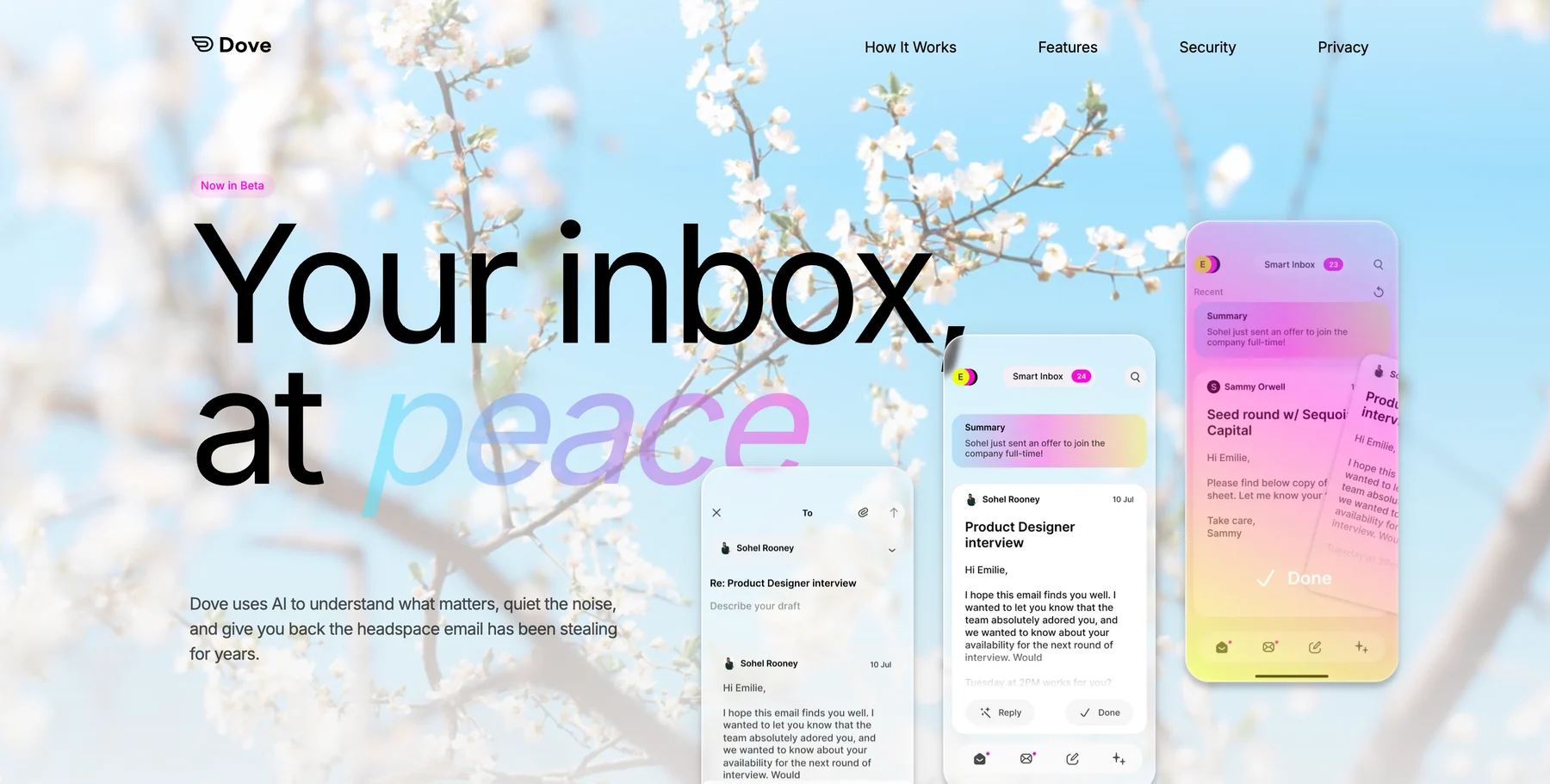
Dove is the AI-native iPhone email app from Cartasec, the Singapore team behind Canary Mail. It is built around a single idea: most inbox stress comes from the act of triaging, not from reading. So Dove handles triage for you. Every incoming email is sorted into Focus (the messages that actually need your attention), Noise (newsletters, alerts, threats, and clutter), and Done (handled and out of the way).
On iPhone, that translates into an inbox that already looks read by the time you open it. You see Focus first. Noise stays out of your notifications. Threats get a risk score (Safe, Suspicious, or Dangerous), and impersonation attempts get quarantined before they reach your lock screen.
Dove connects to your existing Gmail, Outlook, iCloud, or IMAP accounts, so you do not need a new email address to try it. Dove is officially launched on a single Pro plan with a 7-day free trial.
Platform support: iOS, Android, macOS, Windows, and Web.
Pricing: Dove Pro at $20 per month. 7-day free trial, cancel anytime. One plan covers AI triage, unlimited AI usage, daily tasks and meeting detection, multi-account support (Gmail, Microsoft, IMAP), and sync across Mac, iOS, Windows, Android, and Web.
What Dove does well:
Focus, Noise, and Done triage that runs continuously in the background
Risk scoring on every email, with phishing and impersonation quarantined into Noise
Wingman thread intelligence that catches risks buried deep in long threads
Works on top of your existing email accounts on every major platform
Smart notifications that only fire for Focus mail, not Noise
What Dove does poorly:
One plan only, so there is no cheaper tier if you only want a subset of features
No lifetime purchase option (Dove is subscription-only at $20 per month)
Not an end-to-end encrypted provider (pair with Canary Mail if you need PGP)
If you want to see the model in detail, Dove explains how its Focus, Noise, and Done triage works, and our full roundup of the best AI email apps in 2026 puts Dove in context against other AI-first clients.
2. Canary Mail: best privacy-first iPhone email app
Canary Mail is the older sibling to Dove, also from Cartasec, and it is the best pick on iPhone for people who care about privacy as much as productivity. It bundles PGP end-to-end encryption, SecureSend, and a complete modern email client. AI is available, but Canary Mail’s AI is optional and runs on-device, so your email content never leaves your phone.
SecureSend is the standout iPhone feature. It lets you send an encrypted message to anyone, even if they do not use PGP. The link is HIPAA-compliant, which is rare in a consumer email client and makes Canary Mail useful for healthcare, legal, and finance professionals on the move.
Like Dove, Canary Mail is a client, so it works with your existing Gmail, Outlook, iCloud, or IMAP accounts. No new email address required.
Platform support: iOS, Android, macOS, Windows.
Pricing: Free tier with core email. Growth at $36 per year (optional AI Copilot, advanced productivity). Pro+ at $100 per year (SecureSend, advanced security). Lifetime purchases also available.
What Canary Mail does well:
PGP end-to-end encryption built into a polished iPhone client
SecureSend for HIPAA-compliant encrypted messages to non-PGP recipients
Optional AI Copilot that processes entirely on-device
Power tools: read receipts, snooze, pin, bulk cleaner, 1-click unsubscribe, templates
Works with existing email accounts on every major platform
What Canary Mail does poorly:
No web client (you have to install the native iPhone app)
AI is optional, not architectural, so it is not as automatic as Dove’s triage
Advanced security features sit behind the Pro+ tier
No Linux support if you also want a Linux desktop client
For a deeper look at how Canary Mail compares against AI-first clients, see our roundup of the best AI email apps in 2026.
3. Spark: best collaborative inbox for iPhone
Spark, from Readdle, has been one of the most refined iPhone email clients for over a decade. Its strongest argument in 2026 is collaboration: shared inboxes, team comments inside threads, real-time collaborative drafts, and link-based email delegation. If you run a small team off a shared inbox, Spark is the most thought-through option on iPhone.
Spark has also added a generative AI assistant for drafting and summarizing, plus a Smart Inbox that groups newsletters, notifications, and pinned senders. The classic Spark experience (gestures, swipes, smart sender threading) is still the cleanest in the category.
Platform support: iOS, Android, macOS, Windows, Web.
Pricing: Free with basic features. Spark Premium at $7.99 per month or $59.99 per year (Smart Inbox, more AI, more accounts). Spark Teams plans start at around $7.99 per user per month.
What Spark does well:
Shared inboxes and threaded team comments are still best-in-class
Polished iPhone gestures and refined swipe controls
Smart Inbox groups newsletters and notifications without hiding them
Strong cross-platform sync between iPhone, iPad, and Mac
What Spark does poorly:
Sign-in routes mail metadata through Spark servers, which some privacy users dislike
Free tier has been trimmed over the years, pushing more features behind Premium
AI features feel bolted on rather than central to the inbox model
If Spark is on your shortlist, our Spark Mail alternatives guide walks through the closest iPhone replacements.
4. Apple Mail: best system-integrated baseline
Apple Mail is the one iPhone email app most people already have and the one most people underuse. The recent generations of Mail Privacy Protection, Hide My Email, and on-device categorization (Primary, Transactions, Updates, Promotions) make Apple Mail a credible default for anyone who does not need AI triage or PGP encryption.
For Apple users who want a quiet, OS-integrated baseline with strong privacy defaults, it is hard to beat the cost (zero) and the integration (every Apple surface).
Platform support: iOS, iPadOS, macOS, watchOS. No Windows, Android, or web client.
Pricing: Free with any Apple device. iCloud+ from $0.99 per month adds Hide My Email, Private Relay, and custom email domains.
What Apple Mail does well:
Pre-installed on every Apple device with zero setup
Mail Privacy Protection blocks tracking pixels and hides your IP by default
Hide My Email generates disposable relay addresses
Deep integration with Focus modes, notifications, Siri, and Shortcuts
On-device categorization keeps personal data on the phone
What Apple Mail does poorly:
Apple ecosystem only (no Windows, Android, or web)
No end-to-end encryption for email content
Limited smart features compared to AI-first clients like Dove
No PGP support without third-party plugins
Search is functional but not as strong as Gmail or Outlook search
5. Gmail: best for Google Workspace on iPhone
Gmail on iPhone is, predictably, the cleanest way to use a Google Workspace account on mobile. It carries the full Gmail experience: labels, server-side filters, strong search, smart compose, and tight integration with Google Meet, Calendar, Drive, and Tasks.
If your work life lives inside Workspace, Gmail’s iPhone app is the path of least resistance. The trade-off is the usual one: Google sees your inbox, ads are part of the model on consumer accounts, and the iPhone client is feature-for-feature Google-first.
Platform support: iOS, Android, Web. No native macOS or Windows app (use the browser).
Pricing: Free for personal Gmail. Workspace from $6 per user per month (Business Starter).
What Gmail does well:
Strongest server-side search and filter system in email
Tight integration with Google Meet, Calendar, Drive, Tasks, and Chat
Reliable push, smart compose, and nudges to reply
Workspace shared drives, aliases, and admin controls
What Gmail does poorly:
Google reads metadata to power features and ads on consumer accounts
AI features (Help me write, Gemini summaries) are improving but uneven
Stuck inside Google’s interaction model, so triage is largely manual
No native macOS or Windows app
If Gmail’s manual triage is wearing you down, our Gmail alternatives guide covers iPhone-friendly options for power users.
6. Outlook: best for Microsoft 365 and Exchange
Outlook on iPhone is the strongest mobile client for Microsoft 365, Exchange, and any organization that lives in Teams and Calendar. It includes Focused Inbox, a calendar view, Microsoft 365 file integration, and Copilot AI features for drafting and summarizing (on supported plans).
For business users tethered to Exchange, Outlook is usually the default and the right choice on iPhone. For everyone else, it is a heavier app than the iPhone alternatives.
Platform support: iOS, Android, macOS, Windows, Web.
Pricing: Free for personal Outlook. Microsoft 365 Personal from $6.99 per month (or $69.99 per year). Microsoft 365 Business Basic from $6 per user per month.
What Outlook does well:
Best-in-class Exchange and Microsoft 365 support
Focused Inbox automatically splits high-priority mail from the rest
Integrated calendar, meeting scheduling, and Teams shortcuts
Copilot AI for drafting, summarizing, and scheduling on supported plans
What Outlook does poorly:
Heavy app with a busy interface compared to iPhone-native alternatives
Microsoft routes mail metadata through its services for indexing
Copilot AI features are gated behind specific Microsoft 365 plans
Focused Inbox triage is binary (Focused or Other), not granular
Our Outlook alternatives roundup is a good companion read if Outlook on iPhone feels heavy.
7. ProtonMail: best for zero-knowledge encryption on iPhone
ProtonMail’s iPhone app delivers Swiss-based, zero-knowledge encrypted email on mobile. Messages between Proton users are end-to-end encrypted by default. Messages to non-Proton recipients can be sent as password-protected, expiring links. Proton Unlimited bundles Mail with VPN, Drive, Calendar, and Pass.
If your priority is preventing the email provider itself from reading your messages, ProtonMail is the strongest iPhone choice. The trade-off is search, integration, and feature breadth: by design, ProtonMail cannot do everything Gmail or Outlook can.
Platform support: iOS, Android, Web. Desktop access via Proton Bridge plus an IMAP-capable client like Apple Mail or Thunderbird.
Pricing: Free plan (1 GB storage, 1 address). Mail Plus from EUR 3.99 per month billed annually (15 GB, 10 aliases). Proton Unlimited at EUR 9.99 per month (500 GB, all Proton apps).
What ProtonMail does well:
Zero-knowledge encryption: Proton cannot read your stored mail
Swiss jurisdiction sits outside EU and US data-sharing agreements
Open-source apps with independent security audits
Bundled VPN, Drive, Calendar, and Pass under one subscription
What ProtonMail does poorly:
Encrypted search is limited because the index cannot live server-side
Free tier caps you at 1 GB and a single address
IMAP only works via Bridge, not directly
No native desktop app (uses Bridge plus another client)
For a broader privacy comparison, see our roundup of the best email apps for privacy in 2026.
8. Edison Mail: best built-in assistant for receipts and travel
Edison Mail is the long-running iPhone client that built its identity around a smart assistant: it surfaces packages, travel itineraries, receipts, subscriptions, and bills directly from your inbox. The free plan is generous, and OnMail (Edison’s own privacy-focused provider) is bundled into the experience.
If your iPhone inbox is mostly a stream of shipping notifications, receipts, and travel confirmations, Edison Mail’s assistant earns its keep. If your inbox is conversational and project-driven, the assistant matters less.
Platform support: iOS, Android, macOS.
Pricing: Free tier covers core mail and the basic assistant. Edison+ at $14.99 per month or $99.99 per year (advanced privacy, unlimited blocking, premium support).
What Edison Mail does well:
Strong assistant for receipts, travel, packages, subscriptions, and bills
Block sender, mass unsubscribe, and read receipt blocking built in
Bundled OnMail address for a more private inbox option
Polished iPhone interface with sensible defaults
What Edison Mail does poorly:
Edison’s data history has been controversial; review their current privacy stance before committing
Advanced privacy features sit behind Edison+
AI features are narrower than Dove or Canary Mail
macOS app lags behind the iPhone experience
What each app does well vs poorly, side by side
App | What it does well | What it does poorly |
|---|---|---|
Dove | AI triage into Focus, Noise, Done; phishing risk scoring; smart notifications | Single $20 / mo plan with no cheaper tier; not an E2E provider |
Canary Mail | PGP encryption; SecureSend; optional on-device AI; power tools | No web client; AI is optional, not central; advanced security gated by Pro+ |
Spark | Shared inboxes; team comments; refined gestures | Routes metadata through Spark; AI feels bolted on |
Apple Mail | OS integration; Privacy Protection; Hide My Email | Apple ecosystem only; no PGP; minimal smart features |
Gmail | Search and filters; Workspace integration; reliable push | Google sees the inbox; manual triage; no native desktop app |
Outlook | Exchange and Microsoft 365 support; Focused Inbox; calendar | Heavy interface; Microsoft routes metadata; Copilot plan-gated |
ProtonMail | Zero-knowledge encryption; Swiss jurisdiction; bundled VPN and Drive | Limited search; small free tier; IMAP via Bridge only |
Edison Mail | Receipts, travel, package assistant; mass unsubscribe | Privacy history was controversial; narrower AI scope |
How to choose the right iPhone email app
The honest answer is that the right app depends on what your inbox is mostly doing to you right now.
If triage is the problem: Dove sorts every email into Focus, Noise, and Done so the inbox stops demanding your attention. This is the right pick if you feel like email is eating your day.
If privacy is the problem: Canary Mail layers PGP encryption and optional on-device AI on your existing accounts. ProtonMail is the better pick if you want a new encrypted address.
If collaboration is the problem: Spark is still the most refined shared inbox on iPhone.
If you live in Workspace or Microsoft 365: Gmail and Outlook are the path of least resistance on iPhone, and the small productivity wins from a third-party client may not be worth the friction.
If you just want a quiet baseline: Apple Mail with Mail Privacy Protection and Hide My Email is genuinely good now and costs nothing.
For a broader view of the category, our full roundup of the best email apps in 2026 covers desktop and mobile together, and our guide on managing too many emails walks through the workflow side of the problem.
FAQ
What is the best email app for iPhone in 2026?
For most people, Dove is the best iPhone email app in 2026 because it handles triage for you. Every email gets sorted into Focus, Noise, or Done before you open the app, so you only see what actually needs your attention. If privacy is your priority, Canary Mail is the strongest pick on iPhone, with PGP encryption and optional on-device AI. Apple Mail is the quiet default that most iPhone users underuse.
Is Apple Mail good enough on iPhone?
Apple Mail is much better in 2026 than it used to be. Mail Privacy Protection, Hide My Email, and on-device categorization make it a credible default. Where it falls short is intelligence: Apple Mail does not triage your inbox or risk-score messages. If you mostly read and reply to a manageable volume of email, Apple Mail is fine. If your inbox is overflowing, Dove’s AI triage is the upgrade.
Which iPhone email app is best for privacy?
Canary Mail is the best privacy-first iPhone email app because it adds PGP end-to-end encryption and SecureSend on top of your existing accounts, with optional AI that runs on-device so your email never leaves your phone. ProtonMail is the strongest pick if you want a new, zero-knowledge encrypted email address rather than a privacy layer on Gmail or Outlook.
Do iPhone email apps support AI features?
Some do, in very different ways. Dove uses AI continuously and automatically: every email is risk-scored and triaged into Focus, Noise, or Done before you read it. Canary Mail offers an optional AI Copilot that runs on-device. Spark and Outlook both have generative AI assistants for drafting and summarizing. Apple Mail and ProtonMail intentionally avoid cloud AI on your content.
Can I use these iPhone email apps with my existing Gmail or Outlook account?
Yes, for most of them. Dove, Canary Mail, Spark, Apple Mail, and Edison Mail all work as clients on top of your existing Gmail, Outlook, iCloud, or IMAP accounts. You do not need a new email address. ProtonMail is the exception: it is a provider, so you sign up for a new ProtonMail address. Gmail and Outlook are tied to their own services.
Are free iPhone email apps safe to use?
The reputable ones are safe within their limits. Apple Mail is free with any Apple device. Canary Mail, Spark, ProtonMail, and Edison Mail all offer real free tiers backed by paid plans, not by advertising on your inbox content. Dove is subscription-only at $20 per month, with a 7-day free trial so you can confirm the AI triage actually works on your inbox before paying. The rule of thumb is the same on iPhone as on desktop: if a “free” email app has no clear business model, your data is likely the product.
What is the difference between Dove and Canary Mail on iPhone?
Dove and Canary Mail are both built by Cartasec, but they solve different problems. Dove is AI-native: every email is automatically triaged into Focus, Noise, or Done, and threats are quarantined before they reach you. Canary Mail is privacy-native: PGP encryption, SecureSend, and optional on-device AI sit inside a power-user email client. If your top concern is triage, choose Dove. If your top concern is encryption and control, choose Canary Mail. Some people use both: Canary Mail for sensitive accounts, Dove for high-volume inboxes.
Your iPhone inbox, finally calm
The best iPhone email app is the one that matches your actual problem. If your inbox feels infinite and noisy, Dove’s automatic Focus, Noise, and Done triage is built exactly for that. If you need privacy on the move, Canary Mail combines PGP with optional on-device AI. Spark still wins on shared inboxes, Apple Mail is a quiet baseline, and Gmail or Outlook are the obvious choices when your work account decides for you.
Whichever you pick, the worst option on iPhone is doing nothing. Inboxes do not get calmer on their own.
More from Dove
Recent posts

June 26, 2026
Best Zoho Mail alternatives in 2026
The best Zoho Mail alternatives in 2026, compared by platform, AI, pricing, strengths, and weaknesses. See how Dove, Canary Mail, Proton Mail, Fastmail, and Google Workspace stack up.
June 25, 2026
Best Proton Mail alternatives in 2026
The best Proton Mail alternatives in 2026, compared by platform, AI, pricing, strengths, and weaknesses. See how Dove, Canary Mail, Tuta, and Fastmail stack up.

June 24, 2026
Best Email Apps for Remote Workers in 2026
The best email apps for remote workers in 2026, compared by platform, AI, pricing, and how well they handle async communication. Dove, Canary Mail, Outlook, Spark, and Missive reviewed.