'/%3e%3c/g%3e%3c/svg%3e)

Best Email Apps for Windows in 2026
The best email apps for Windows in 2026, compared. Platform support, real pricing, what each one does well, and what each one does poorly, ranked for power users on Windows 11.

The best email app for Windows in 2026 depends on what you actually want your inbox to do. Dove triages every message into Focus, Noise, and Done so the noise stops reaching you. Canary Mail brings PGP encryption and optional on-device AI inside a polished native Windows client. Microsoft Outlook is still the default for anyone living inside Microsoft 365. Thunderbird, Mailbird, eM Client, Spike, and Postbox each cover a different slice of the Windows power-user market.
This guide compares eight Windows email apps on platform support, real pricing in May 2026, what each one does well, and what each one does poorly. We tested every app on Windows 11 with a mix of Microsoft 365, Gmail, and IMAP accounts.
Key Takeaways
Dove is the strongest pick if your real problem on Windows is inbox overload and threats, not slow typing. Free plan available, Pro at $20 per month with a 7-day free trial.
Canary Mail is the best privacy-first Windows client for people who want PGP encryption with optional, on-device AI layered on top of their existing accounts.
Microsoft Outlook is the safe default for Microsoft 365 environments, but the new Outlook for Windows still trails the classic version on offline reliability.
Thunderbird is the strongest free, open-source pick, especially since the 115 Supernova redesign.
Mailbird and eM Client compete for the “polished traditional client” slot. eM Client is broader, Mailbird is friendlier.
How we evaluated email apps for Windows
Windows email clients differ on more than feature lists. We focused on four things that show up in daily use on Windows 11:
What it does well. The one or two things this app is genuinely best at on a Windows desktop.
What it does poorly. Gaps, missing features, or rough edges that surface after the first week.
Platform support. Whether the app runs natively on Windows 11, ARM-based Copilot+ PCs, macOS, iOS, Android, and the web.
Pricing. Real May 2026 pricing in USD, including any free tier, trial length, and what is gated behind paid plans.
We did not include browser-only webmail like Gmail or Yahoo Mail in this list. The focus is on dedicated apps you install on Windows.
The best Windows email apps at a glance
App | What it does well | Platforms | Free tier | Paid pricing |
|---|---|---|---|---|
Dove | AI triage into Focus, Noise, Done across all your accounts | Windows, macOS, iOS, Android, Web | Yes (free plan with 10 AI actions per day) | Pro $20 per month, 7-day free trial |
Canary Mail | PGP end-to-end encryption with optional on-device AI | Windows, macOS, iOS, Android | Yes (limited features) | Pro+ around $99 per year |
Microsoft Outlook | Deep Microsoft 365 integration and calendar | Windows, macOS, iOS, Android, Web | Yes (new free Outlook for Windows) | Microsoft 365 Personal from $9.99 per month |
Thunderbird | Open-source flexibility and add-ons | Windows, macOS, Linux, Android | Yes (fully free, open-source) | Free, optional donation |
Mailbird | Friendly, customizable traditional client | Windows, Android, iOS | Limited free | Personal $39 per year, Business $59 per year |
eM Client | Multi-account power user features on Windows | Windows, macOS, iOS, Android | Yes (up to 2 accounts) | Pro $59.95 one-time, Lifetime upgrades extra |
Spike | Conversational email and team collaboration | Windows, macOS, iOS, Android, Web | Yes (Personal) | Pro $5 per user per month |
Postbox | Power-user features on top of a Thunderbird base | Windows, macOS | No | $40 one-time |
1. Dove: best AI email app for Windows in 2026
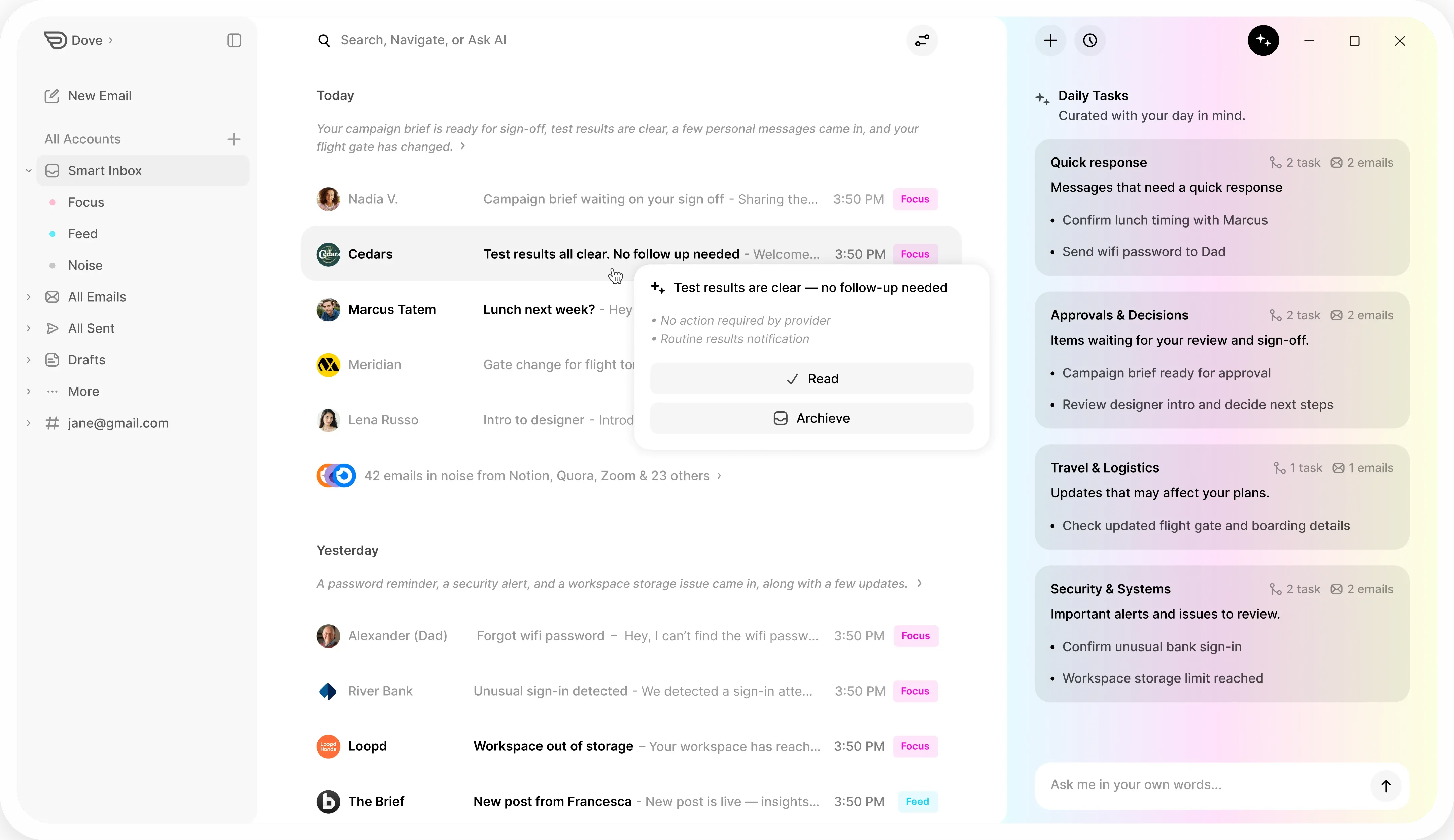
Dove is the email app I reach for first on Windows now. Instead of giving you a faster way to triage 200 messages, Dove triages them for you. Every message is sorted into Focus, Noise, or Done. Focus is what you actually need to respond to. Noise is everything you would never miss if it deleted itself. Done is the long tail of receipts, calendar invites, and notifications that just need to be filed.
The Windows app is a true native client. It connects to Gmail, Microsoft 365, and IMAP accounts and runs the same triage and AI features as the macOS, iOS, and Android apps. If you have ever switched email apps and lost half your behavior on the new platform, this is the part you will notice first.
Platform support: Windows, macOS, iOS, Android, and Web.
Pricing: Free plan with core inbox features and 10 AI actions per day across unlimited accounts. Pro at $20 per month, billed monthly, with a 7-day free trial. There are no tiers above Pro and no separate add-ons.
What it does well:
Triage runs automatically across every connected account, so a single Focus list represents your whole life, not just one mailbox.
AI summaries, drafts, and search are all unlimited on Pro, with no per-action credits.
Wingman writes replies in your style, with context from the current thread and your recent messages.
Daily tasks surface what actually has a deadline this week, separate from the firehose.
Privacy-first design. Your email is not used to train models.
What it does poorly:
Dove does not support Exchange on-premises or shared mailboxes, only modern Microsoft 365 connections.
Filters and rules are intentionally simpler than Outlook. Power users coming from elaborate Outlook rule sets will need to relearn the model.
No native Linux build today, only Windows, macOS, iOS, Android, and Web.
If your real problem on Windows is volume and triage, Dove is the simplest way to fix it. You can start a 7-day free trial and keep your existing email addresses.
2. Canary Mail: best privacy-first Windows client with optional AI
Canary Mail is the strongest pick on Windows if you want PGP encryption and AI features that run locally, without giving up a polished, modern client. Canary connects to Gmail, Outlook, iCloud, and IMAP accounts and adds end-to-end encryption with SecureSend, plus optional on-device AI for triage and writing assistance.
The Windows app has matured a lot in the last two releases. Search is fast, threading is sensible, and the keyboard layout feels native rather than ported.
Platform support: Windows, macOS, iOS, and Android.
Pricing: Free tier with limited AI usage. Growth around $20 per year. Pro+ at roughly $99 per year unlocks unlimited Copilot AI, SecureSend, and read receipts. Prices vary slightly by region and promotional window, so check the in-app store before buying.
What it does well:
PGP end-to-end encryption is built in, no separate plugin needed.
AI is optional and runs on-device for the privacy-sensitive features, so your messages do not leave your machine for those tasks.
Tracker and pixel blocking are on by default.
Strong cross-platform parity with the iOS and Android apps.
What it does poorly:
The free tier limits the AI features that make Canary fun to use.
Canary is a great client, but it is still a client. It assumes your real inbox lives somewhere else like Gmail or Microsoft 365.
There is no native Linux build.
If your priority is privacy first and AI second, Canary Mail on Windows is the cleanest option.
3. Microsoft Outlook: the Windows default for Microsoft 365 users
Outlook is still the email app most Windows users actually open every morning. The current state of Outlook on Windows in 2026 is a transition. The new Outlook for Windows is now the default install, while classic Outlook is still available for users who depend on PST files, complex rule sets, or on-premises Exchange.
Platform support: Windows, macOS, iOS, Android, and Web. The new free Outlook for Windows is included with Windows 11.
Pricing: New Outlook for Windows is free. The full Outlook desktop client is bundled with Microsoft 365 Personal from $9.99 per month or Family from $12.99 per month. Outlook for Business is included with Microsoft 365 Business Standard at $12.50 per user per month, billed annually.
What it does well:
The deepest Microsoft 365 integration on Windows. Calendar, Teams, OneDrive, and Copilot all hook in natively.
Classic Outlook still has the most powerful rules engine of any client on this list.
Strong support for shared mailboxes, delegate access, and large attachment workflows via OneDrive.
Copilot for Microsoft 365 adds drafting and summary features if you pay for the Copilot add-on.
What it does poorly:
The new Outlook for Windows still lags classic Outlook on offline use, PST support, and some add-in compatibility.
Copilot is an extra paid add-on on top of Microsoft 365, not included in the base plan.
The web wrapper feel of the new Outlook frustrates users coming from classic Outlook.
4. Mozilla Thunderbird: best free, open-source Windows email client
Thunderbird quietly became a great pick again after the 115 Supernova redesign and the ongoing Nebula update line. It is fully free, fully open-source, and supported by a non-profit that does not need to upsell you on AI credits.
Platform support: Windows, macOS, and Linux. Thunderbird for Android shipped in 2024 and is now stable.
Pricing: Free. Mozilla asks for an optional donation.
What it does well:
True multi-account support across Gmail, Microsoft 365, IMAP, POP, and self-hosted servers.
Built-in OpenPGP encryption without a separate plugin.
Huge add-on ecosystem for power users.
Calendar and contacts handled by the built-in Lightning replacement.
What it does poorly:
No first-party AI features. If you want AI triage on top of Thunderbird, you need a separate tool.
The UI is still busier than modern competitors. Supernova helped but did not fully fix it.
Mobile parity is improving but still a step behind dedicated mobile clients.
5. Mailbird: friendly traditional Windows email client
Mailbird targets Windows users who want a friendlier face on a traditional email client. It connects to Gmail, Outlook, iCloud, and IMAP accounts and adds a sidebar of integrations like WhatsApp, Slack, and Asana directly inside the app.
Platform support: Windows, with newer iOS and Android apps now in general availability.
Pricing: Personal at $39 per year. Business at $59 per year per user. Mailbird has historically run lifetime-license promotions; the current default is annual.
What it does well:
Light, customizable UI with strong theming.
Side-app integrations let you fold messaging tools into the email window.
Solid unified inbox across multiple accounts.
What it does poorly:
macOS users are out of luck, this is Windows-first.
AI features are smaller in scope than Dove or Canary Mail and require an active subscription.
Heavy users with many rules and folders will run into limits eventually.
6. eM Client: the multi-account Windows power tool
eM Client is the quiet favorite among Windows power users who manage many accounts. It supports Microsoft 365, Gmail, iCloud, Exchange, IMAP, POP, and even older protocols. The chat, calendar, and tasks panels are real, not afterthoughts.
Platform support: Windows, macOS, iOS, and Android.
Pricing: Free tier limited to two accounts and personal use. Pro at $59.95 one-time, with paid Lifetime upgrade plans available if you want guaranteed future versions.
What it does well:
Excellent multi-account handling, including legacy Exchange setups that other clients struggle with.
Built-in PGP and S/MIME support.
One-time purchase pricing for Pro is rare in 2026.
What it does poorly:
The UI is more traditional and dense than newer clients like Dove or Spike.
AI features feel bolted on rather than central.
The free tier is generous on features but capped on accounts.
7. Spike: conversational email for Windows teams
Spike rethinks email as chat. Each thread becomes a conversation view, more like a messaging app than a traditional inbox. On Windows, Spike works well for small teams who live in shared inboxes and want lighter friction than Outlook.
Platform support: Windows, macOS, iOS, Android, and Web.
Pricing: Free Personal plan. Pro at $5 per user per month, billed annually. Business and Teams plans add shared inboxes, custom domains, and admin controls.
What it does well:
Conversational view is genuinely faster for short, chat-like email.
Strong shared inbox and team chat features inside the same app.
Good cross-platform parity.
What it does poorly:
Traditional thread view is available but feels like a second-class citizen.
Heavy email power users with elaborate folder workflows will fight the conversational model.
Some AI features still require paid tiers.
8. Postbox: power-user fork of Thunderbird
Postbox is a long-standing Windows and macOS client built on top of the Thunderbird codebase. It targets users who like Thunderbird’s foundation but want a more curated UI, response templates, and quick-reply tooling baked in.
Platform support: Windows and macOS.
Pricing: $40 one-time purchase, with discounted upgrade pricing for major versions.
What it does well:
One-time purchase with no subscription pressure.
Built-in response templates, quick-reply, and tagging tools that traditional clients lack.
Familiar to Thunderbird users.
What it does poorly:
No mobile app. Postbox is desktop-only.
Smaller user base and slower release cadence than Thunderbird itself.
Limited AI features compared with Dove or Canary Mail.
How to choose the right Windows email app
The honest answer is that most people pick the wrong email app first and then live with it for years. Three quick filters narrow the choice fast on Windows:
If your real problem is volume and triage, start with Dove. The free plan is enough to see whether the Focus, Noise, and Done split fits how you actually work.
If your real problem is privacy and encrypted communication, start with Canary Mail. The optional on-device AI is a bonus, not the headline.
If your real problem is “I just need Outlook to work,” stay with Outlook and pay for Copilot for Microsoft 365 if you actually use AI features.
Free clients like Thunderbird and the new Outlook for Windows are still strong defaults. Paid niche picks like Mailbird, eM Client, Spike, and Postbox each solve a narrower problem. None of those niche picks fully replace what an AI-native client like Dove offers, but they are not trying to.
FAQ
What is the best free email app for Windows in 2026?
Mozilla Thunderbird is the strongest fully free, open-source pick on Windows. The new Outlook for Windows is also free and ships with Windows 11. If you want AI triage, Dove has a free plan that includes core inbox features and 10 AI actions per day across unlimited accounts.
Is Outlook still worth paying for on Windows?
Outlook is worth paying for if you live inside Microsoft 365, depend on classic Outlook features like PST files or complex rules, or work in an enterprise that uses Exchange. If you mainly use Gmail or IMAP, you can get a better day-to-day experience with Dove, Canary Mail, Thunderbird, or eM Client.
Does Canary Mail run AI on-device on Windows?
Yes. Canary Mail’s AI is optional and runs key features on-device on Windows, so the most privacy-sensitive AI tasks do not require sending your messages to a third-party model. Some advanced features can still use cloud models when you turn them on.
How much does Dove cost on Windows?
Dove on Windows has a free plan with core inbox features and a daily AI action allowance. The Pro plan is $20 per month, billed monthly, with a 7-day free trial. There are no separate device fees, no annual lock-in, and no extra add-ons.
Can I use Dove with my existing Gmail or Microsoft 365 account on Windows?
Yes. Dove connects to Gmail, Microsoft 365, and IMAP accounts. You do not need a new email address. Dove sits on top of your existing accounts and adds the Focus, Noise, and Done triage layer.
Which Windows email app has the best AI features in 2026?
Dove is the most AI-native Windows email app on this list, because triage and writing assistance are the product, not optional add-ons. Canary Mail is the best pick if you specifically want AI features that run on-device for privacy. Outlook with Copilot for Microsoft 365 is the best fit if you are already paying for Microsoft 365 and want AI inside the same suite.
More from Dove
Recent posts

June 26, 2026
Best Zoho Mail alternatives in 2026
The best Zoho Mail alternatives in 2026, compared by platform, AI, pricing, strengths, and weaknesses. See how Dove, Canary Mail, Proton Mail, Fastmail, and Google Workspace stack up.

June 25, 2026
Best Proton Mail alternatives in 2026
The best Proton Mail alternatives in 2026, compared by platform, AI, pricing, strengths, and weaknesses. See how Dove, Canary Mail, Tuta, and Fastmail stack up.

June 24, 2026
Best Email Apps for Remote Workers in 2026
The best email apps for remote workers in 2026, compared by platform, AI, pricing, and how well they handle async communication. Dove, Canary Mail, Outlook, Spark, and Missive reviewed.