'/%3e%3c/g%3e%3c/svg%3e)

Best Email Apps for Mac in 2026
The best email apps for Mac in 2026 compared. See platforms, pricing, what each app does well and poorly for Dove, Canary Mail, Apple Mail, Spark, Superhuman, Mimestream, Airmail, and Thunderbird.

The best email app for Mac in 2026 depends on what you want your inbox to do. Dove triages every message into Focus, Noise, and Done so you stop reacting to junk. Canary Mail keeps PGP encryption and on-device AI inside a polished native client. Apple Mail is the safe baseline, and Mimestream, Spark, Superhuman, Airmail, and Thunderbird each cover a specific slice of the market.
We tested eight Mac email apps across what each one actually does well, where each one falls short, which platforms they support, and what they cost in May 2026. This guide is for anyone who wants to stop fighting their inbox on macOS.
Key Takeaways
Dove is the strongest pick if your real problem is overload and threats, not slow typing. Pricing is $20 per month with a 7-day free trial.
Canary Mail is the best Mac client for power users who want PGP encryption and on-device AI on top of an existing email account.
Apple Mail is a fine baseline for Apple-only users, especially with Hide My Email and Mail Privacy Protection.
Mimestream is the cleanest native Gmail experience on macOS, but it is Gmail only.
Superhuman is the fastest keyboard-first client at $30 per month, but it does not run AI on-device.
How we evaluated email apps for Mac
Mac email apps differ on more than feature lists. We looked at four things that show up in daily use:
What it does well. The one or two things this app is genuinely best at on macOS.
What it does poorly. Gaps, missing features, or rough edges that show up after the first week.
Platform support. Which other devices the app works on, since most people do not only check email on a Mac.
Pricing. Published prices in May 2026, including free tiers where they exist.
For wider context, see our full roundup of the best email apps in 2026, and for an AI-first comparison, see the best AI email apps in 2026.
Best email apps for Mac at a glance
App | Platforms | Free tier | Paid pricing | Does well | Does poorly |
|---|---|---|---|---|---|
Dove | macOS, iOS, Android, Windows, Web | 7-day free trial | $20 per month (Pro) | AI triage into Focus, Noise, Done; phishing quarantine; works with Gmail, Microsoft, IMAP | Newer product, pricing tiers limited to a single Pro plan |
Canary Mail | macOS, iOS, Android, Windows | Free with core features | Growth $36 per year, Pro+ $100 per year | PGP encryption, SecureSend, on-device AI Copilot, power-user tools | No web client, no Linux, AI is opt-in rather than the foundation |
Apple Mail | macOS, iOS, iPadOS | Free with Apple devices | iCloud+ from $0.99 per month | Native macOS feel, Hide My Email, Mail Privacy Protection | Apple ecosystem only, weak smart triage, no PGP without plugins |
Mimestream | macOS, iOS (beta) | 14-day free trial | $4.99 per month or $49.99 per year | Native macOS Gmail client with full label and filter support | Gmail only, no Outlook, no IMAP |
Spark Mail | macOS, iOS, iPadOS, Android, Windows | Yes (limited) | Premium from $6 per user per month | Shared inboxes, team comments, snooze, scheduled send | Cloud sync of email metadata is opt-in but on by default |
Superhuman | macOS, Windows, iOS, Android, Web | No | $30 per month | Speed, keyboard shortcuts, split inbox, AI drafting | Expensive, Gmail and Outlook only, AI runs in the cloud |
Airmail | macOS, iOS, iPadOS | Limited free | Pro $2.99 per month or $9.99 per year | Highly customizable workflows and integrations | Inconsistent reliability, dated UI, limited support |
Thunderbird | macOS, Windows, Linux | Free, open source | Free | Open source, OpenPGP built in, works with any account | No native iOS, dated UI, no built-in AI |
1. Dove, best for AI-native triage and threat detection on Mac
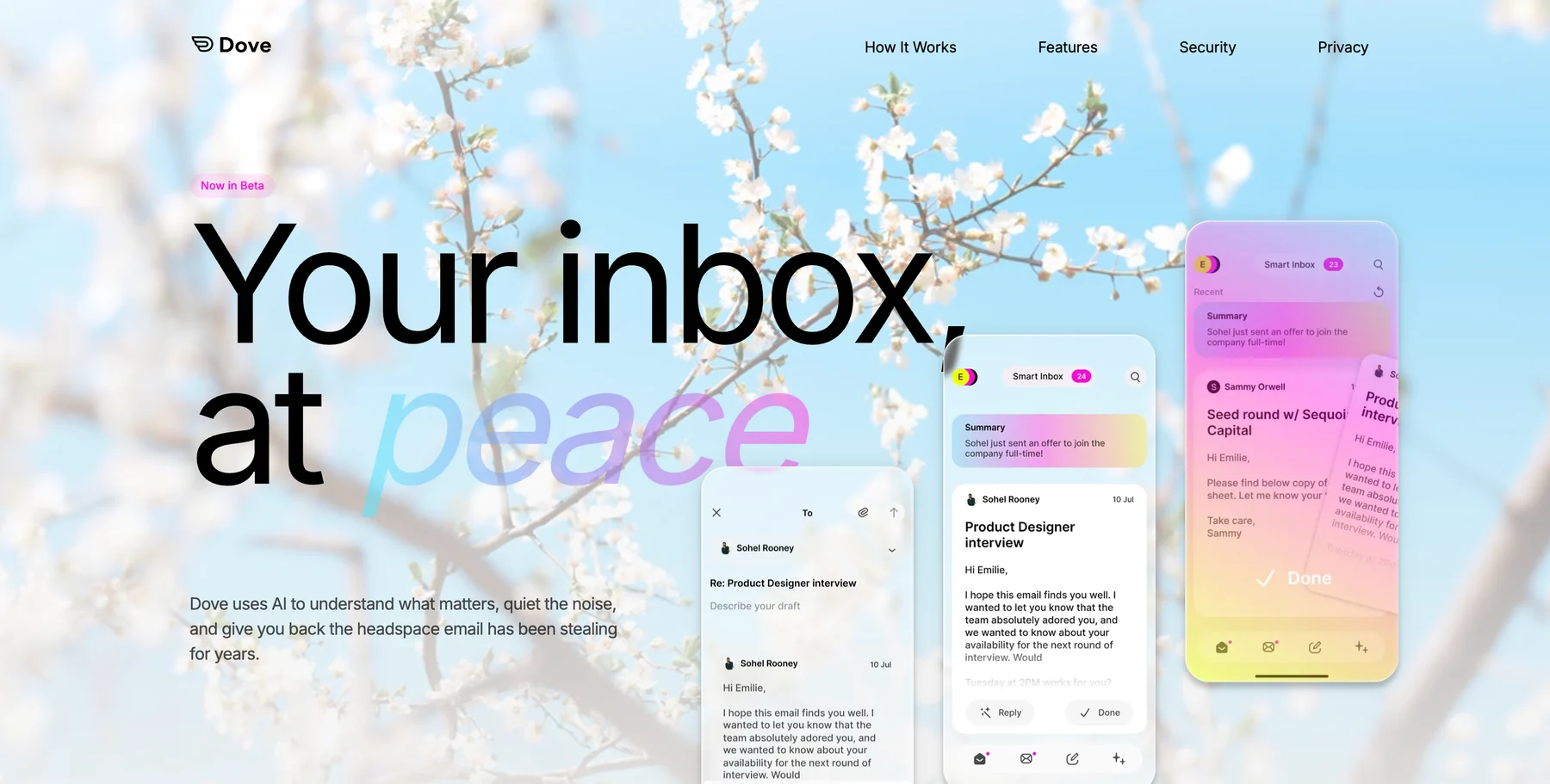
Dove is built around one idea, your inbox should not be one undifferentiated stream. Every incoming email gets a risk score and an importance score, and every message lands in Focus (needs your attention), Noise (junk, newsletters, threats), or Done (handled). Phishing attempts and impersonation attacks are quarantined automatically into Noise before you see them.
That is a meaningful split from Mac clients that treat AI as a sidebar feature. Dove’s Wingman reads thread context to flag risks buried inside long replies, and the AI keeps learning from what you reply to, what you archive, and what you ignore. The Mac app is a real native client, not a browser wrapper, and it syncs cleanly with the iOS and Web apps.
Dove is also a client, not a provider. It works with your existing Gmail, Microsoft, or IMAP account, so you do not need a new email address or a migration day.
Platform support: macOS, iOS, Android, Windows, Web.
Pricing: Pro plan at $20 per month. 7-day free trial, cancel anytime.
What Dove does well on Mac:
AI triage into Focus, Noise, and Done is the foundation, not a feature
Automatic risk scoring with phishing and impersonation detection
Wingman thread intelligence catches threats buried in long replies
Works with your existing Gmail, Microsoft, or IMAP account
Native Mac, iOS, Web, Android, and Windows clients ship from day one
What Dove does poorly on Mac:
Pricing is a single Pro tier, no cheaper consumer plan today
Not an end-to-end encrypted email provider, pair with Canary Mail for PGP if encryption is critical
Newer product, so some advanced rules and integrations are still shipping
If your real problem is volume and noise on macOS, not how fast you can type, Dove is the right starting point. Learn more about how Dove triages your inbox, or download Dove for Mac.
2. Canary Mail, best for privacy-first power users on Mac
Canary Mail is a privacy-first Mac email client from Cartasec, the same Singapore-based team behind Dove. It bundles PGP end-to-end encryption with a full-featured modern email experience, including AI Copilot that processes entirely on your device.
The standout privacy feature is SecureSend, which lets you send encrypted messages to anyone, even recipients who do not use PGP. SecureSend is HIPAA compliant, which is rare for a consumer Mac email app. Because Canary Mail is a client, not a provider, it works with your existing Gmail, Outlook, iCloud, or IMAP account.
Platform support: macOS, iOS, Android, Windows.
Pricing: Free tier with core email features. Growth plan at $36 per year (AI Copilot, advanced productivity). Pro+ at $100 per year (SecureSend, advanced security). Lifetime purchase options also available.
What Canary Mail does well on Mac:
PGP encryption built into a polished native macOS interface
SecureSend for HIPAA-compliant encrypted messaging to anyone
AI Copilot runs on-device, so your email data never leaves your Mac
Works with existing email accounts, no new address required
Power-user tools, read receipts, snooze, pin, bulk cleaner, templates, 1-click unsubscribe
What Canary Mail does poorly on Mac:
No web client, requires installing the native app
AI features are an optional add-on, not the architectural foundation
Advanced security features require the Pro+ tier
No Linux support if you also live on a Linux machine
3. Apple Mail, best baseline for Apple-only users
Apple Mail is the default macOS email client and gets a serious upgrade in 2026 with deeper Mail Privacy Protection, smarter categories, and tighter integration with Hide My Email through iCloud+. It is not an AI-native client, but for users who want a free, native, no-fuss Mac email experience that protects against tracking pixels by default, it is hard to beat.
The hard limit is the Apple ecosystem. Apple Mail does not run on Windows or Android, and it has no web client outside iCloud Mail.
Platform support: macOS, iOS, iPadOS.
Pricing: Free with any Apple device. iCloud+ starts at $0.99 per month for Hide My Email, Private Relay, and custom email domain support.
What Apple Mail does well on Mac:
Pre-installed and deeply integrated with macOS, Focus modes, and notifications
Mail Privacy Protection blocks tracking pixels and hides your IP by default
Hide My Email generates disposable relay addresses
Free for any Apple user
What Apple Mail does poorly on Mac:
Apple ecosystem only, no Windows, Android, or web client
No end-to-end encryption for email content
Limited smart features compared to AI-powered clients
No PGP support without third-party plugins
4. Mimestream, best native Mac client for Gmail
Mimestream is built specifically for Gmail on macOS. It uses Gmail’s native API rather than IMAP, which means labels, categories, search operators, and filters all behave like the Gmail web app, but with a native Mac feel.
If you live inside Gmail and want a real Mac client (not the web app in a wrapper), Mimestream is the cleanest pick. It is a young product, but the macOS experience is unusually polished.
Platform support: macOS, iOS (beta).
Pricing: 14-day free trial. $4.99 per month or $49.99 per year for the full version.
What Mimestream does well on Mac:
Native Gmail labels, categories, search, and filters
Genuinely native macOS app, fast and responsive
Multiple Gmail accounts in one window
Strong keyboard shortcut support
What Mimestream does poorly on Mac:
Gmail only, no Outlook, no iCloud, no IMAP
No Android or Windows client
iOS app is still in beta
No end-to-end encryption or PGP support
5. Spark Mail, best for shared team inboxes on Mac
Spark Mail is a long-running cross-platform email client with a strong Mac app and a focus on team email features, shared inboxes, comments on email threads, and collaborative drafts. The 2026 version adds a more capable AI assistant and tighter calendar integration.
Spark works with any email account, but its team and AI features sit on the cloud, which is a tradeoff some privacy-conscious users push back on. For teams that want to handle group inboxes inside a real Mac email client, it remains a strong option.
Platform support: macOS, iOS, iPadOS, Android, Windows.
Pricing: Free tier with limits. Premium from $6 per user per month, billed annually.
What Spark Mail does well on Mac:
Shared inboxes and team comments inside the email client
Snooze, schedule send, and templates
Full cross-platform availability with consistent UX
Calendar and meeting integration on Mac
What Spark Mail does poorly on Mac:
Cloud sync of email metadata is on by default, not opt-in
Free tier is limited, real value sits behind Premium
Newer AI features are not on-device
Heavy interface for users who want a minimal inbox
If you are evaluating Spark, see the best Spark Mail alternatives in 2026 for a side-by-side view.
6. Superhuman, best for keyboard-first speed
Superhuman is the most expensive option in this lineup, and it is unapologetic about who it is for. The product is built around speed, keyboard shortcuts, split inbox, snippets, and AI drafting. The Mac app is fast, the onboarding is hand-held, and the workflow is opinionated.
Superhuman only works on Gmail and Outlook. AI runs in the cloud, not on-device, and the price ($30 per month) is closer to a SaaS subscription than a consumer email app.
Platform support: macOS, Windows, iOS, Android, Web.
Pricing: $30 per month, billed annually. No free tier.
What Superhuman does well on Mac:
Fastest keyboard-first email experience on macOS
Split inbox, snippets, snooze, and follow-up reminders
Solid AI drafting and rewriting
Strong onboarding for new users
What Superhuman does poorly on Mac:
Expensive at $30 per month
Gmail and Outlook only, no IMAP, no iCloud
AI runs in the cloud, not on-device
Aimed at people who already love their inbox, not people drowning in it
For a side-by-side, see the best Superhuman alternatives in 2026.
7. Airmail, best for power users who want deep customization
Airmail is a long-standing Mac email client that is known for deep customization, integrations with third-party apps (Things, OmniFocus, Notion), and a wide feature set. It is the kind of client where, if you can imagine a workflow, there is probably a setting for it.
The tradeoff is consistency. Airmail’s reliability has been uneven over the years, and its UI feels older than newer challengers. For users who want to bend their email client to their exact workflow on Mac, it is still a real option.
Platform support: macOS, iOS, iPadOS.
Pricing: Limited free version. Pro at $2.99 per month or $9.99 per year.
What Airmail does well on Mac:
Deep customization for filters, swipes, and shortcuts
Strong integrations with Things, OmniFocus, Notion, and similar tools
Multiple account support across Gmail, IMAP, iCloud, and more
Affordable Pro pricing
What Airmail does poorly on Mac:
Inconsistent reliability across releases
Dated UI compared to newer Mac clients
Limited support and slower feature shipping
No real AI assistant in the modern sense
8. Thunderbird, best free, open-source client on Mac
Thunderbird is Mozilla’s free, open-source email client, and it has come a long way on macOS. OpenPGP is built in, the addon ecosystem is huge, and it works with any email provider via IMAP and SMTP. For users who care about transparency and control, Thunderbird is the most flexible option in this list.
It is also the one with the most rough edges. The macOS UI has improved but still feels less polished than commercial alternatives, and there is no first-party iOS app yet.
Platform support: macOS, Windows, Linux.
Pricing: Free and open source. Funded by donations and Mozilla.
What Thunderbird does well on Mac:
Fully open source and independently auditable
OpenPGP encryption built in, no plugins required
Works with any email provider via IMAP and SMTP
Extensive addon ecosystem for customization
What Thunderbird does poorly on Mac:
macOS UI feels less polished than commercial clients
No first-party iOS app yet
Setup requires more technical comfort than a consumer email app
No built-in AI assistant
How to choose the right Mac email app
The right choice depends on which problem you are actually trying to solve.
If your inbox is loud and you want AI to triage threats and noise, Dove is the most direct answer.
If you want PGP encryption and on-device AI in a Mac client, Canary Mail is the strongest pick.
If you only ever live on Apple devices and want zero setup, Apple Mail with iCloud+ is fine.
If you live entirely inside Gmail and want a native Mac feel, Mimestream is the cleanest option.
If you run team inboxes, Spark Mail is built for that case.
If you want raw speed and you already love email, Superhuman is the indulgence.
If you want maximum control and customization, Airmail or Thunderbird.
For wider context across categories, see the best email apps in 2026, the best AI email apps in 2026, and the best email apps for privacy in 2026.
FAQ
What is the best email app for Mac in 2026?
The best email app for Mac in 2026 depends on the problem you want to solve. For users whose inbox is too loud and whose biggest risk is phishing, Dove is the strongest pick because it triages every email into Focus, Noise, and Done and quarantines threats automatically. For users who want PGP encryption and on-device AI in a polished Mac client, Canary Mail is the better fit. For Apple-only users who want a free, native baseline, Apple Mail with iCloud+ is hard to beat.
Is Apple Mail good enough for most Mac users?
For many Mac users, Apple Mail is good enough. It is free, native, deeply integrated with macOS, and ships with Mail Privacy Protection and Hide My Email through iCloud+. The honest limits are that Apple Mail has no real AI triage, no PGP without plugins, and does not work outside the Apple ecosystem. If you want smarter triage, threat detection, or cross-platform access, you will outgrow Apple Mail.
How much does Dove cost on Mac?
Dove costs $20 per month on the Pro plan, billed monthly, with a 7-day free trial and the ability to cancel anytime. The Pro plan includes unlimited AI, daily tasks and meeting detection, support for Gmail, Microsoft, and IMAP accounts, and sync across Mac, iOS, Windows, Android, and Web.
Can I use a Mac email app with my existing Gmail or Outlook account?
Yes. Most modern Mac email apps work as clients on top of your existing email account. Dove, Canary Mail, Apple Mail, Spark, Airmail, and Thunderbird all support Gmail and Outlook, and most support IMAP. Mimestream is a Gmail-only native Mac client. Superhuman supports only Gmail and Outlook. You do not need to change your email address to switch Mac clients.
Which Mac email app has the best privacy?
For email privacy on Mac, Canary Mail is the strongest all-around pick because it offers PGP encryption, SecureSend, and on-device AI Copilot. Apple Mail covers the basics with Mail Privacy Protection and Hide My Email. Thunderbird gives you OpenPGP for free if you are comfortable configuring it. For deeper coverage across encryption, jurisdiction, and tracking protection, see the best email apps for privacy in 2026.
Do Mac email apps support AI features?
Some do. Dove uses AI to triage every message into Focus, Noise, and Done and to score risk for phishing and impersonation. Canary Mail’s AI Copilot runs on-device on macOS. Superhuman and Spark use cloud-based AI for drafting and summaries. Apple Mail, Mimestream, Airmail, and Thunderbird do not include a real AI assistant in 2026, although Apple has added smarter categorization in macOS.
What is the difference between an email client and an email provider?
An email provider hosts your mailbox and gives you an address (Gmail, Outlook, iCloud, ProtonMail). An email client is the app you use to read and send mail from that account on your Mac. Dove, Canary Mail, Apple Mail, Mimestream, Spark, Superhuman, Airmail, and Thunderbird are clients, not providers. You can switch clients without changing your email address.
Your inbox, at peace on macOS
There is no single best email app for Mac, only the best fit for the problem you are actually trying to solve. If your real issue is overload and noise, Dove triages it. If you want privacy and PGP in a Mac-native client, Canary Mail is the right call. If you only need a clean, free baseline, Apple Mail still works. The one option that does not work is doing nothing, your inbox will not fix itself.
More from Dove
Recent posts

June 26, 2026
Best Zoho Mail alternatives in 2026
The best Zoho Mail alternatives in 2026, compared by platform, AI, pricing, strengths, and weaknesses. See how Dove, Canary Mail, Proton Mail, Fastmail, and Google Workspace stack up.
June 25, 2026
Best Proton Mail alternatives in 2026
The best Proton Mail alternatives in 2026, compared by platform, AI, pricing, strengths, and weaknesses. See how Dove, Canary Mail, Tuta, and Fastmail stack up.

June 24, 2026
Best Email Apps for Remote Workers in 2026
The best email apps for remote workers in 2026, compared by platform, AI, pricing, and how well they handle async communication. Dove, Canary Mail, Outlook, Spark, and Missive reviewed.