'/%3e%3c/g%3e%3c/svg%3e)

Best Mailbird Alternatives in 2026
The best Mailbird alternatives in 2026, compared by platform support, pricing, strengths, and weaknesses. Dove, Canary Mail, eM Client, Thunderbird, and more.
June 1, 2026

Mailbird built its reputation as a clean, customizable email client for Windows, with a unified inbox, app integrations, and a layout you could tune to your taste. For a long time it was the easy recommendation for anyone who wanted something nicer than the built-in Windows Mail app.
Two things changed that for a lot of users. Mailbird moved most new buyers onto a subscription instead of the lifetime license many people originally paid for, and the app stayed desktop-first while the rest of email moved to AI triage and full mobile sync. If you manage several accounts, want your inbox sorted before you open it, or simply want predictable pricing, Mailbird can start to feel like it is holding you back.
We compared seven Mailbird alternatives across platform support, pricing, what each app does well, and where each one falls short. Whether you want AI-powered inbox management, a privacy-first client, a one-time license, or a free open-source option, this guide covers your choices.
Key takeaways
Dove is the strongest pick if you want AI to triage your inbox, draft replies, and surface tasks across every account. It costs $20 per month with a 7-day free trial.
Canary Mail is the best option for privacy-first users who want PGP encryption and optional, on-device AI in a polished modern client.
eM Client is the closest direct replacement for Mailbird’s desktop power-user feel, and it still offers a one-time license.
Thunderbird and the new Outlook are both worth a look if you want to stop paying for an email app, with very different tradeoffs.
The right alternative depends on what you actually used Mailbird for. The table below maps each tool to a strength.
Why people are leaving Mailbird
Mailbird is not a bad email client. For Windows users who want a unified inbox and a tidy interface, it still does the job. The friction shows up in a few specific areas.
The pricing model changed. Mailbird originally sold a lifetime license, then shifted most plans to a subscription. Personal plans run around $3.25 per month billed annually, and business plans around $5 per month, with a lifetime option that is harder to find and more expensive than it used to be. Users who expected to pay once and own the app forever felt the change.
It is desktop-only. Mailbird has no native mobile app. If you live on your phone for email, you are stuck checking a separate client on iOS or Android, which defeats the point of a unified inbox.
It is Windows-first. A Mac version exists now, but it arrived years after Windows and still trails it on polish and features. There is no native Linux build at all.
AI is a recent add-on, not the foundation. Mailbird added AI writing features, but they sit on top of a traditional inbox. Every message still lands with equal weight and you sort it yourself.
If any of those points sound familiar, the alternatives below address them directly.
Best Mailbird alternatives at a glance
App | Platforms | Free tier | Paid pricing | Best for | AI and encryption |
|---|---|---|---|---|---|
macOS, Windows, iOS, Android, Web | 7-day free trial | $20/month | AI-native inbox triage and automation | Built-in AI triage, AI threat detection, phishing quarantine | |
macOS, Windows, iOS, Android | Yes | Growth $36/year, Pro+ $100/year | Privacy-first users who want optional AI | PGP end-to-end encryption, optional on-device AI | |
eM Client | Windows, macOS, iOS, Android | Yes (2 accounts) | $49.95 one-time, or subscription | Desktop power users who want calendar and contacts | PGP support, optional AI assistant |
Thunderbird | Windows, macOS, Linux, Android | Free | Free (donation-supported) | Open-source fans who want full control | PGP via OpenPGP, no built-in AI |
Outlook (new) | Windows, macOS, iOS, Android, Web | Free with ads | Microsoft 365 from $6.99/month | Microsoft 365 and Windows ecosystem users | Copilot AI on paid tiers, S/MIME |
Mailspring | Windows, macOS, Linux | Yes | $8/month | Modern design on Linux or a budget | No encryption, no AI |
Spark | macOS, iOS, Android, Windows, Web | Yes | Premium from $4.99/month | Smart inbox and shared team email | Optional AI assist, no PGP |
Dove
Dove is an AI-native email client built from the ground up around automatic triage. Instead of dumping every message into one unified inbox the way Mailbird does, Dove sorts your email into three states, Focus, Noise, and Done. Focus holds the messages that actually need you. Noise catches newsletters, notifications, and low-priority threads. Done is for everything you have already handled.
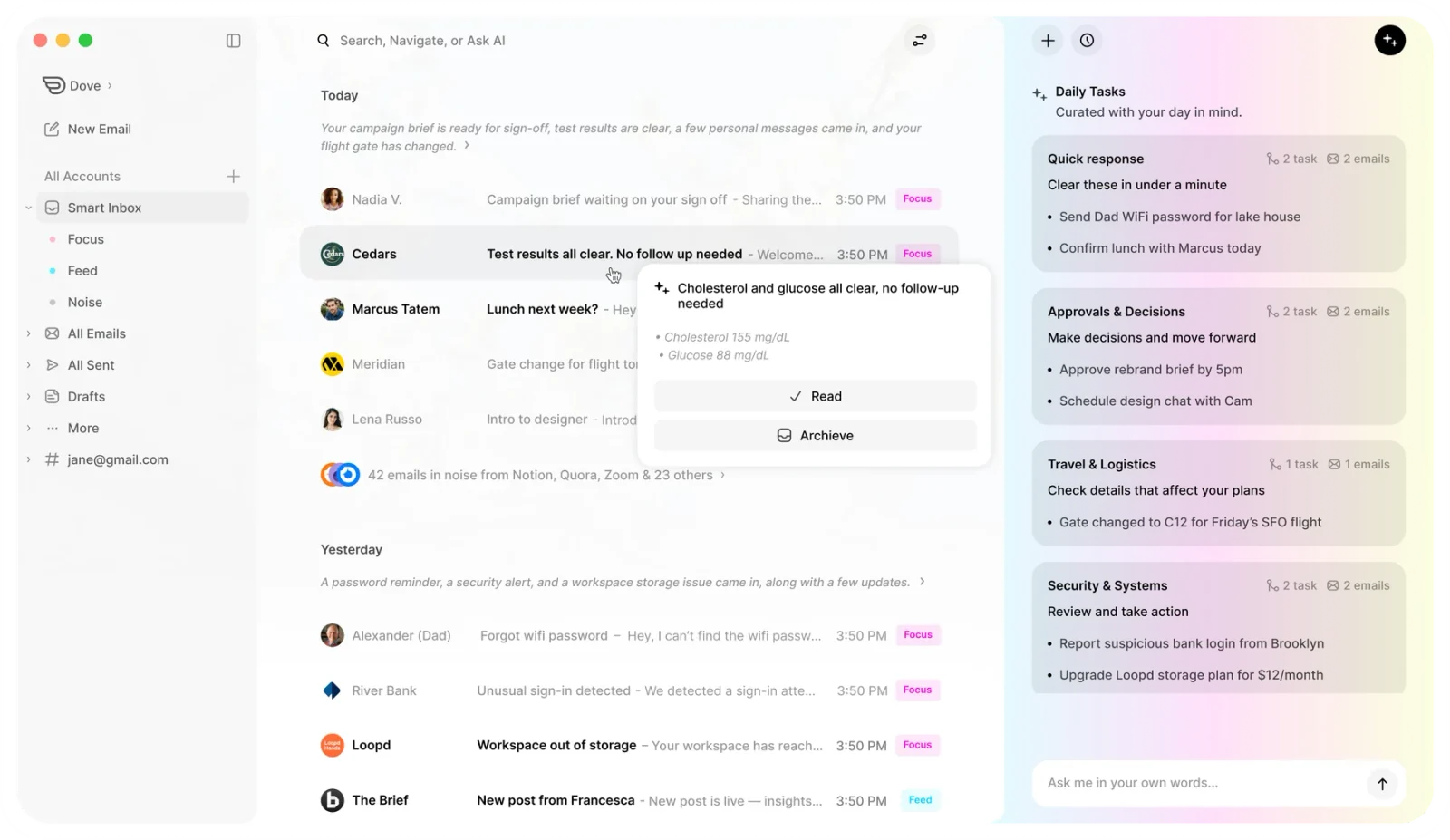
The AI is not a bolt-on writing tool. Dove’s Wingman reads entire threads, drafts contextual replies, and detects meetings to surface daily tasks. It learns how you handle email and adapts over time, so the sorting gets sharper the longer you use it. That is the core difference from Mailbird, where AI sits on top of an inbox you still manage by hand.
For anyone leaving Mailbird over security, Dove runs AI risk scoring on incoming mail and quarantines phishing attempts before they reach you. Your email is never used to train external models.
Dove also fixes Mailbird’s two biggest structural gaps. It runs on every platform including iOS, Android, and the web, so your triaged inbox follows you everywhere, and the pricing is a single predictable subscription rather than a license that quietly changes terms.
Pricing: $20 per month with a 7-day free trial. Cancel anytime.
Platforms: macOS, Windows, iOS, Android, Web
What Dove does well:
AI triage sorts every email automatically, so you never manually file messages
Wingman writes contextual replies based on full thread history
Daily Tasks surface meetings and action items pulled from your email
Works with Gmail, Microsoft 365, and IMAP accounts
Risk scoring catches phishing before you ever see it
Full apps on desktop, mobile, and web, which Mailbird never offered
What Dove does not do:
No built-in calendar or contacts, it relies on your existing calendar app
No PGP or S/MIME encryption, it focuses on AI threat detection instead
No free tier beyond the 7-day trial
No Linux support
Best for: People overwhelmed by email volume who want AI to handle triage, prioritization, and replies across multiple accounts, on any device.
Canary Mail
Canary Mail is a privacy-first email client with built-in PGP encryption and an optional AI layer called Copilot. If you liked Mailbird for its clean interface but want stronger privacy and real mobile apps, Canary Mail is a natural upgrade.
Canary Mail’s SecureSend feature lets you send encrypted email to anyone, even recipients who do not use PGP. Its AI features, including smart prioritization, summaries, and suggested replies, are optional and run on-device, so your email never leaves your machine for the AI to work. You can turn the AI off entirely and use Canary as a traditional, encrypted client if you prefer.
Unlike Mailbird, Canary Mail ships full apps on iOS and Android alongside Windows and macOS. Read receipts, snooze, and a unified inbox come built in rather than as integrations you bolt on.
Pricing: Free tier available. Growth plan at $36 per year. Pro+ at $100 per year.
Platforms: macOS, Windows, iOS, Android
What Canary Mail does well:
PGP encryption built in, with no extensions or manual key juggling
Optional on-device AI that keeps your data private
SecureSend encrypts email to any recipient
Clean modern interface with a unified inbox
Read receipts and email tracking built in
Real mobile apps, which Mailbird lacks
What Canary Mail does not do:
No web client
No Linux support
No built-in calendar, a separate Canary Calendar app is available
The AI features require a paid plan
Smaller team than Microsoft or Google, so releases are less frequent
Best for: Privacy-conscious users who want end-to-end encryption, a polished interface, and AI they can switch on or off.
eM Client
eM Client is the closest thing to a direct Mailbird replacement on the desktop. It bundles email, calendar, contacts, tasks, and notes into one app, which gives power users the all-in-one feel Mailbird never fully delivered.
The interface is clean but still dense enough for heavy users, and PGP encryption is supported natively. It handles multiple accounts from Gmail, Outlook, iCloud, and any IMAP provider, and its import tool can pull your Mailbird data across directly.
The big draw for ex-Mailbird users is that eM Client still sells a one-time license. You can pay $49.95 once for the Pro version and keep it, or choose a subscription if you prefer ongoing updates. For anyone burned by Mailbird’s pricing shift, a true one-time purchase is the next best thing.
Pricing: Free for up to 2 email accounts. One-time Pro license at $49.95, with a subscription option also available.
Platforms: Windows, macOS, iOS, Android
What eM Client does well:
Built-in calendar, contacts, tasks, and notes in one app
PGP encryption supported natively
One-time license option, no forced subscription
Import tool migrates Mailbird and other clients directly
Handles large mailboxes and complex folder structures well
What eM Client does not do:
No web client
No Linux support
AI features are limited and not a core focus
The free tier caps you at 2 accounts
The interface can feel busy for users who wanted Mailbird’s simplicity
Best for: Desktop power users who want an all-in-one client with calendar and contacts, and who value a one-time license over a subscription.
Thunderbird
Thunderbird is the free, open-source heavyweight. If your main frustration with Mailbird is paying a subscription for features you feel should be standard, Thunderbird gives you almost everything for nothing, funded by donations rather than license fees.
The 2023 Supernova redesign modernized the interface, and Thunderbird now supports calendar, contacts, OpenPGP encryption, and a deep add-on ecosystem. It released an Android app in late 2024, though there is still no iOS version. It remains the only option here with a first-class Linux build.
The tradeoff is effort. Thunderbird rewards users who want to configure things, and it has no built-in AI triage. Every message lands in your inbox with equal weight.
Pricing: Free, donation-supported.
Platforms: Windows, macOS, Linux, Android
What Thunderbird does well:
Completely free with no subscription
Open-source and privacy-respecting
Native Linux support
OpenPGP encryption built in
Large add-on ecosystem for extra features
What Thunderbird does not do:
No iOS app
No built-in AI triage or smart prioritization
The interface still feels heavier than modern clients
Many features depend on add-ons that can break after updates
Setup and customization take more time than a polished commercial client
Best for: Open-source fans and tinkerers who want full control and zero subscription cost, and who do not mind a steeper setup.
Outlook (New)
Microsoft replaced the classic Outlook desktop app with “New Outlook,” a web-based client that runs as a native app on Windows and macOS. For Mailbird users already on Microsoft 365, it is the path of least resistance.
New Outlook includes calendar, contacts, and a built-in Copilot AI for drafting and summarizing email. The free version is ad-supported but functional. A Microsoft 365 plan removes the ads, adds 1 TB of OneDrive storage, and unlocks the full Office suite.
Pricing: Free with ads. Microsoft 365 Personal starts at $6.99 per month, or $69.99 per year.
Platforms: Windows, macOS, iOS, Android, Web
What Outlook does well:
Deep integration with Microsoft 365, including calendar, Teams, and OneDrive
Built-in Copilot AI for drafting and summarizing on paid tiers
Available on every platform including the web
Handles enterprise Exchange accounts natively
Focused Inbox separates important mail from noise
What Outlook does not do:
The free version shows ads throughout the interface
Heavier than Mailbird, with noticeable load times
No PGP encryption, S/MIME only and it requires setup
Microsoft collects usage data, which may concern privacy-focused users
Third-party IMAP support is weaker than dedicated clients
Best for: Users already invested in Microsoft 365 who want email, calendar, and productivity tools in one package.
Mailspring
Mailspring is an open-source email client focused on design and speed. It is one of the few modern clients with native Linux support, which makes it an obvious pick for Mailbird users who switched to Linux and lost their client.
The free tier covers multiple accounts, a unified inbox, and a clean layout. The paid plan adds read receipts, link tracking, send later, and snooze. Mailspring keeps things light and does not try to be an all-in-one suite.
Pricing: Free tier with core features. Pro at $8 per month.
Platforms: Windows, macOS, Linux
What Mailspring does well:
Native Linux support, which is rare among modern clients
Fast, lightweight, and visually clean
Open-source core
Handles multiple accounts from any IMAP provider
Good keyboard shortcuts for power users
What Mailspring does not do:
No mobile apps
No calendar or contacts integration
No encryption support
No AI features
Development pace is slower, as it is community-maintained
Best for: Linux users and design-conscious users who want a clean, lightweight client without paying for features they will not use.
Spark
Spark turns email into a smart, collaborative inbox. Its Smart Inbox groups and prioritizes messages automatically, and its team features let you draft replies together and share threads, which Mailbird does not do.
Spark runs on macOS, iOS, Android, Windows, and the web, so unlike Mailbird it follows you to your phone. The free tier is generous, and Premium adds advanced features like more powerful smart tools and team collaboration.
Pricing: Free tier available. Premium from $4.99 per month.
Platforms: macOS, iOS, Android, Windows, Web
What Spark does well:
Smart Inbox auto-groups and prioritizes email
Real-time team collaboration on email
Cross-platform, including mobile and web
Snooze, send later, and follow-up reminders built in
Clean, approachable interface
What Spark does not do:
No PGP encryption
Some smart and team features sit behind the paid plan
Past privacy questions around how email was processed have made some users cautious
Heavier account setup than a basic client
Best for: Users who want a smart, cross-platform inbox with optional team collaboration, and who lived on Mailbird’s unified inbox but needed mobile.
How to choose the right Mailbird alternative
Start with what actually frustrated you about Mailbird, then match it to a strength above.
You want the inbox sorted before you open it. Choose Dove. AI triage into Focus, Noise, and Done is the whole point of the app.
You want privacy and encryption. Choose Canary Mail. PGP is built in and the AI is optional and on-device.
You want an all-in-one desktop client with a one-time license. Choose eM Client.
You want to stop paying entirely. Choose Thunderbird for open-source control, or the new Outlook if you are already on Microsoft 365.
You switched to Linux. Choose Thunderbird or Mailspring, the only two options here with native Linux builds.
You need mobile that Mailbird never gave you. Dove, Canary Mail, Outlook, and Spark all have real mobile apps.
If you are not sure, Dove and Canary Mail both let you try before committing, Dove with a 7-day free trial and Canary with a free tier, so you can test how each handles your real inbox.
Frequently Asked Questions
Is Mailbird being discontinued?
No. Mailbird is still actively developed and sold. The frustration most users describe is not that the app is going away, it is that the pricing moved toward subscriptions and the app stayed desktop-only while competitors added AI triage and full mobile sync.
Does Mailbird have a mobile app?
No. Mailbird is a desktop client for Windows, with a newer Mac version. There is no native iOS or Android app, so you cannot carry the same unified inbox to your phone. If mobile matters to you, Dove, Canary Mail, Outlook, and Spark all offer real mobile apps.
What is the best free Mailbird alternative?
Thunderbird is the strongest fully free option. It is open-source, donation-supported, and includes calendar, OpenPGP encryption, and an add-on ecosystem. The new Outlook also has a free, ad-supported tier if you prefer a more modern, Microsoft-integrated interface.
Can I move my Mailbird emails to another client?
In most cases, yes. Because Mailbird syncs your accounts over IMAP, your mail lives on the mail server, not only in Mailbird, so adding the same account to a new client brings your email with it. eM Client also offers a dedicated import tool that pulls your local Mailbird data across directly.
Which Mailbird alternative has the best AI?
Dove has the most capable AI because it was built around it. Triage, reply drafting, and task detection run automatically rather than as add-on tools. Canary Mail offers strong optional AI that runs on-device for privacy, and Outlook includes Copilot on its paid Microsoft 365 tiers.
Is there a Mailbird alternative for Mac?
Yes. Dove, Canary Mail, eM Client, Thunderbird, Outlook, Mailspring, and Spark all run on macOS. If you want the same clean, modern feel Mailbird offered on Windows but with full Mac support, Dove and Canary Mail are the closest matches.
More from Dove
Recent posts

July 1, 2026
Best Airmail Alternatives in 2026
The best Airmail alternatives in 2026 compared. See platform support, pricing, strengths, and weaknesses for Dove, Canary Mail, Spark Mail, Mimestream, Edison Mail, Shortwave, Outlook, and Apple Mail.

June 30, 2026
Best Spike Alternatives in 2026
The best Spike alternatives in 2026 compared. See platforms, pricing, strengths, and weaknesses for Dove, Canary Mail, Shortwave, Spark, Missive, and Superhuman.

June 26, 2026
Best Zoho Mail alternatives in 2026
The best Zoho Mail alternatives in 2026, compared by platform, AI, pricing, strengths, and weaknesses. See how Dove, Canary Mail, Proton Mail, Fastmail, and Google Workspace stack up.