'/%3e%3c/g%3e%3c/svg%3e)

How to Write Emails Faster with AI
AI email writing tools can cut your inbox time in half. Here are the exact techniques, prompts, and tools professionals use to draft replies fast.
Most professionals spend somewhere between 11 and 13 hours a week on email. A lot of that is not reading or deciding. It is the act of writing. Opening a reply window and figuring out what to say, how to phrase it, whether the tone is right.
AI can help you write emails two to three times faster than typing from scratch. The results are often cleaner and more direct, too. This guide covers how to actually do that: the techniques, the right tools, and the mistakes worth avoiding.
Key Takeaways
Giving AI clear context (recipient, goal, tone, key points) produces usable drafts on the first try
Thread analysis catches risks and action items you would miss when scanning quickly
Dove’s AI Assist lets you draft, reply, and search your inbox through a single conversation
Batching your drafting sessions saves more time than optimizing individual emails
AI handles the routine so your attention goes where it actually matters
Why Email Writing Takes So Long
When most people sit down to write an email, they do not just type. They think about how to open without sounding stiff. They re-read the thread to check what was already said. They edit the draft twice. They second-guess the sign-off.
The cognitive load adds up. Every email is a small writing task requiring context, judgment, and social calibration. Multiply that by 40, 60, or 100 emails a day and you have something that drains focus before the actual work begins.
AI does not replace your judgment. You still decide what to say. But it handles the blank-page problem, the phrasing decisions, and the structural work, which is where most of the time goes.
The Four Email Types AI Handles Best
Not every email benefits equally from AI help. These four categories see the clearest time savings.
1. Replies to straightforward requests
Someone asks a yes/no question, wants a file, or needs to schedule a call. The reply is simple but still takes a few minutes to compose without sounding abrupt. AI drafts these in seconds with the right context.
2. Follow-up emails
Follow-ups are the emails people put off most. They require recapping context, nudging without being pushy, and including a clear ask. AI handles all three consistently.
3. Thread summaries and catch-up replies
You come back after two days out and face a 14-message thread. Reading it fully takes several minutes. Asking AI to summarize and draft a catch-up reply cuts that to under 90 seconds.
4. Routine professional communication
Meeting confirmations, status updates, introductions, and check-ins. These follow predictable patterns. AI picks them up quickly and produces a usable draft on the first try.
How to Give AI Clear Instructions for Faster Email Drafting
The most common mistake with AI email tools is treating them like a magic button. Type “write an email,” get something generic, spend more time fixing it than you saved. The quality of an AI draft depends almost entirely on the quality of the instructions.
A simple framework that works: give the AI four things.
Recipient: Who is this going to? A client, a colleague, a vendor? First-time contact or ongoing relationship?
Goal: What is the email meant to do? Confirm a meeting, ask for a deadline extension, follow up on a proposal?
Tone: Professional, friendly, urgent, brief? Match the relationship and the stakes.
Key points: What must the email include? Specific numbers, dates, decisions, or context.
Here is what that looks like in practice:
“Write a short follow-up email to a freelance designer named Priya. She sent over three logo options last Thursday and I haven’t replied yet. I want to thank her, say I’m sharing the options with the team today, and expect a decision by Friday. Keep it warm but brief.”
With that input, any decent AI tool produces a usable draft immediately. Without it, you get something vague that needs heavy editing, and at that point you might as well have written it yourself.
Using AI to Read Threads, Not Just Write Them
Writing faster is only half the problem. The other half is understanding what you are replying to.
Long threads are where important information gets buried. A vendor quietly changes payment terms in paragraph four. A colleague mentioned a deadline shift three emails back. Someone flagged a risk that never got a direct response. When you are moving fast, you miss these things, and replying without catching them leads to expensive follow-up conversations.
This is where AI thread analysis changes the workflow.
You open a contract renewal thread with 11 messages across three weeks. Instead of reading the whole thing, you ask your AI assistant what the thread needs from you right now. It surfaces the relevant facts: the vendor changed the renewal window from 30 to 15 days in the last message, two questions were never answered, and the other party is waiting on a signature.
That takes 45 seconds instead of 8 minutes, and you catch something you would have missed on a fast scan.
Dove’s Wingman feature works this way. When you open a Focus email, Wingman reads the full thread and surfaces risks, gaps, and action items before you write a word.
Five Practical Techniques for Writing Emails Faster with AI
These work whether you use a dedicated AI email client or a general-purpose writing assistant.
Technique 1: Draft, then trim
Ask AI to write a complete draft, then cut it by 30%. AI tends to pad with phrases like “I hope this finds you well” and “please don’t hesitate to reach out.” Delete those. What remains is usually sharper than what you would have written from scratch.
Technique 2: Use templates with variables
For emails you send frequently (project updates, onboarding welcomes, invoice reminders), create a base prompt with variables in brackets. Something like: “Write a project update email for [CLIENT], covering [STATUS], [NEXT STEP], and [DATE]. Keep it under 100 words.”
Fill in the brackets, get a draft, send.
Technique 3: Adjust tone with one instruction
If a draft comes out too formal or too casual, do not rewrite it. Add one instruction: “Make this warmer and more direct” or “Trim this to under 50 words and make it more matter-of-fact.” AI adjusts in seconds.
Technique 4: Let AI handle the socially awkward ones
Turning down a request, following up for the fourth time, declining a meeting invite. These take the longest to write because you are managing tone as much as content. They are also the best candidates for AI drafting. You provide the facts, AI produces a draft with appropriate phrasing, and you review rather than compose.
Technique 5: Batch your drafting sessions
Instead of writing each email as it arrives, batch them. Open your AI tool, queue up five emails with their context, and work through the drafts in sequence. This reduces context-switching, which is a bigger drain than most people realize.
AI Email Assistants That Work Inside Your Inbox
Traditional AI writing tools work outside your inbox. You copy a thread, paste it into a chat window, get a draft, and copy it back. That friction adds up across a day.
A more useful model is an AI assistant that lives inside your email client and understands the full context of your inbox, not just the email you happened to paste.
Dove’s AI Assist is built this way. Instead of switching apps, you describe what you need: “Draft a reply to Marcus confirming Thursday at 3pm” or “Write a follow-up to the client about the Q2 proposal” or “What did the accounting team send me this week that needs a reply?” AI Assist can search, filter, summarize, draft, and act on your inbox from a single conversation.
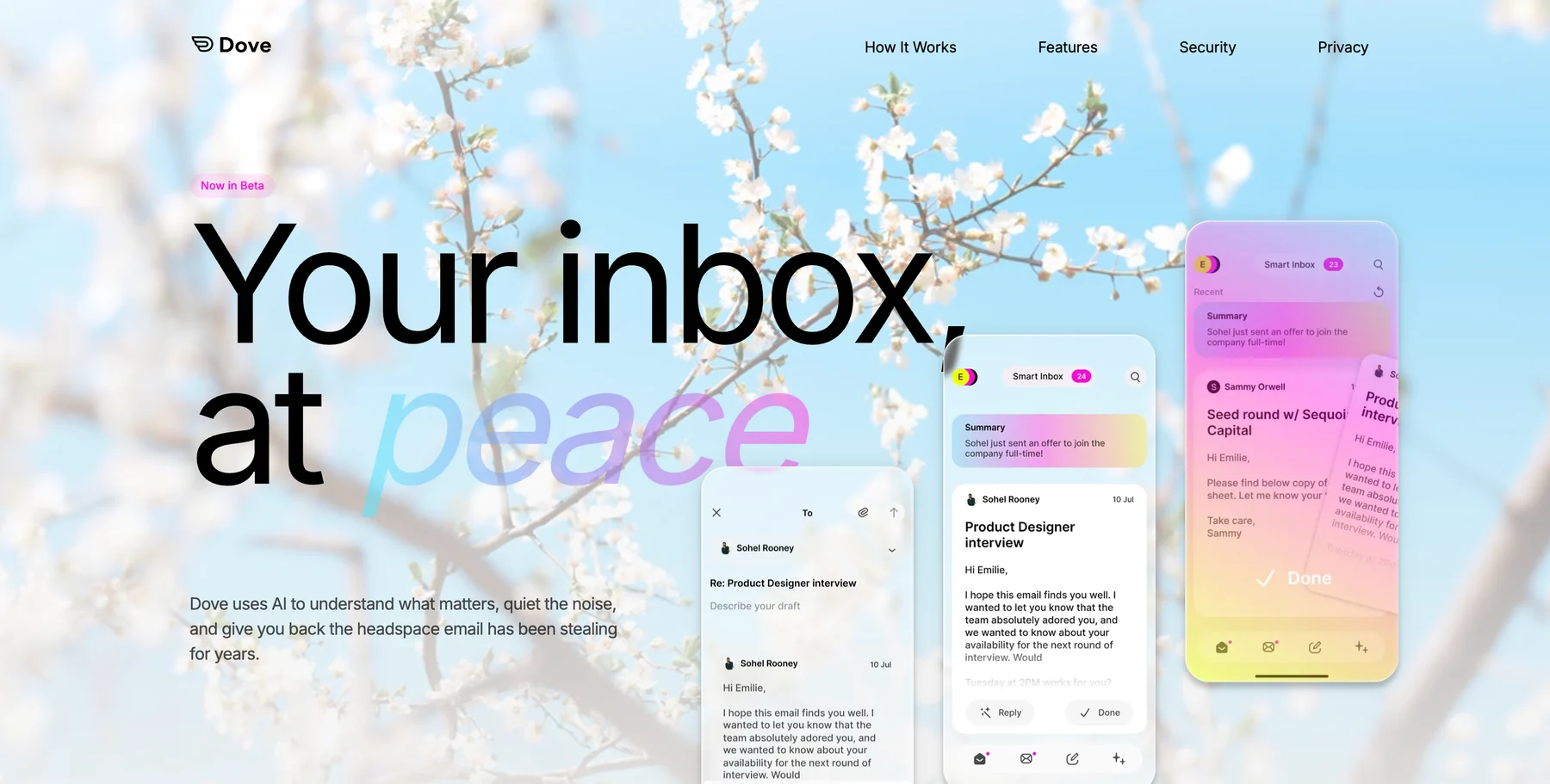
For a closer look at how AI Assist works alongside Wingman and Dove’s full workflow, explore Dove’s features.
What to Watch Out For: AI Email Mistakes
AI makes email faster. It also introduces failure modes worth knowing.
Sending without reading the draft. AI drafts are starting points. A 10-second review before sending catches cases where the AI misread the context or added something that does not fit.
Using generic drafts for nuanced situations. A difficult client relationship, sensitive feedback, a negotiation with real stakes. These are not places to send an unchanged AI draft. Use AI to get started, then edit carefully.
Skipping thread context. If you ask AI to draft a reply without sharing the thread history, it will produce something generic that may contradict what was already said. Include the relevant context when the conversation has history.
Losing your voice over time. If every email you send sounds like templated output, relationships suffer. Use AI for routine communication, not every message. Some emails are worth writing yourself.
Building an AI Email Workflow That Sticks
The professionals who save the most time with AI email tools are not the ones using the most features. They are the ones who pick a workflow and stick to it.
A straightforward version:
Morning triage (5 minutes): Open inbox. AI has already classified everything into Focus and Noise. Review Focus emails. Read thread summaries for complex threads. Note action items from the AI-extracted task list. For a closer look at how Dove handles this step, see how Dove triages your inbox.
Reply batch (20 minutes): Work through Focus emails that need replies. Use AI to draft anything that would take more than two minutes to write manually. Edit, approve, send.
Follow-up sweep (5 minutes): Ask AI which threads are waiting on your response. Draft follow-ups for anything overdue.
That is a 30-minute session that previously took 90 minutes, not because anything is being skipped, but because the sorting and drafting work happens automatically.
Before switching to this kind of workflow, one consultant described spending the first 45 minutes of every morning just clearing enough inbox space to figure out what was urgent. Client emails were buried under newsletters and automated notifications. By the time she reached the threads that mattered, her focus was already fractured. An AI-triage workflow changed that: she opens to a Focus section with three to five emails that genuinely need her attention, handles them, and moves on.
Choosing the Right AI Email Tool
There are a few categories of AI email tools, and they are not interchangeable.
General-purpose AI assistants (ChatGPT, Claude, Gemini): Flexible and capable, but require copy-pasting content back and forth. Useful for occasional drafts or complicated messages that need significant customization.
AI writing add-ons (Grammarly, Lavender): These sit on top of your existing email client and offer suggestions or drafts within the compose window. Lower friction than general-purpose tools, but limited to writing assistance only. They do not touch organization or thread context.
AI-native email clients (Dove, Shortwave): AI is built into the inbox. Triage, drafting, thread analysis, and task extraction all happen in one place. The AI email reply experience here is fundamentally different because the assistant already knows what is in your inbox. It is not working from a cold paste.
For occasional email drafting AI help, a general-purpose assistant is fine. For professionals who want to meaningfully reduce total email time, an AI-native client is the right category.
Dove is built from the ground up on this model. The three-state triage system (Focus, Noise, Done), Wingman thread intelligence, AI Assist, and Daily Tasks all work together as a single workflow. AI is not a feature added on top of a traditional inbox. It is the foundation. See Dove in action.
If you are spending more than an hour a day on email, the question is not which AI writing tool to add to your current setup. It is whether your current setup is the right starting point.
Write Emails Faster with AI: Key Takeaways
Using AI to write emails faster is not about sending more email. It is about spending less time on the email that does not deserve it.
The practical shifts are straightforward: give AI specific context instead of vague prompts, use thread analysis to catch what you would miss on a quick scan, batch your drafting sessions, and let AI handle the routine so your attention goes to the communication that actually matters.
AI drafts the words; you supply the context and the judgment
Thread analysis is as valuable as drafting help
A conversational AI assistant in your inbox beats copy-paste tools
A consistent workflow beats using every feature available
The goal is not faster email. It is reclaiming time for actual work
Ready to stop writing email and start sending it? Try Dove free and see what an AI-native inbox actually feels like. Setup takes two minutes.
FAQ
How much time can AI actually save on email writing?
Most people report saving 30 to 60 percent of their email time after switching to an AI-assisted workflow. For someone spending 90 minutes a day on email, that is 45 minutes recovered daily. The exact amount depends on email volume and how consistently the workflow is applied.
Is AI email writing safe? Will my emails get stored or read?
This depends on the tool. General-purpose AI assistants process content through their own servers and may use it for model training depending on your settings. AI-native email clients like Dove process your emails to deliver features like triage and thread analysis. Always check the privacy policy of any AI tool you use with sensitive communications. Dove’s approach is covered in detail on its security page.
Can AI write emails in my voice?
AI can get close with the right context. The more you give it (past emails you have written, tone preferences, phrases you use), the closer the draft will be. Most people do a light edit pass to personalize the output. Over time, the AI learns patterns from how you interact with its drafts.
What types of emails should I still write myself?
Emails that require genuine personal connection, sensitive relationship management, or careful negotiation should be written by hand. Also any email where the relationship matters more than the time saved. AI works best for the transactional majority of your inbox. The relational messages often earn the time investment.
Does AI email help with inbox organization, not just writing?
AI-native email clients do both. Dove’s AI triage automatically classifies every email into Focus, Noise, or Done based on content and learned behavior, so you are not just writing faster, you open a pre-organized inbox. The combination of triage and drafting is where the largest time savings actually come from.
Ready to write fewer emails and get more done? Learn how Dove works. No email migration required.
More from Dove
Recent posts
August 17, 2026
Best Email App for Multiple Accounts in 2026
Juggling more than one inbox? Here is the best email app for multiple accounts in 2026, plus two other ways to fix inbox overwhelm for good.

July 1, 2026
Best Airmail Alternatives in 2026
The best Airmail alternatives in 2026 compared. See platform support, pricing, strengths, and weaknesses for Dove, Canary Mail, Spark Mail, Mimestream, Edison Mail, Shortwave, Outlook, and Apple Mail.
June 30, 2026
Best Spike Alternatives in 2026
The best Spike alternatives in 2026 compared. See platforms, pricing, strengths, and weaknesses for Dove, Shortwave, Spark, Missive, and Superhuman.