'/%3e%3c/g%3e%3c/svg%3e)

Best Newton Mail Alternatives in 2026 (After the Shutdown)
Newton Mail shut down in 2024. Compare the 7 best replacements, including Dove, Spark, Canary Mail, and Superhuman, by AI features, pricing, and platform support.

If Newton Mail was your daily driver, losing it in July 2024 was genuinely frustrating. Not in a “I need to find a new podcast app” way, but more like losing a tool you had quietly built your whole work routine around. The read receipts, the recap reminders, the clean interface that worked identically on your Mac, iPhone, and Windows laptop. None of it was flashy, but it was dependable in a way few email apps manage.
Newton did not shut down because it was a bad product. It was a pricing problem that compounded into a sustainability problem. At $49.99 to $99.99 per year, Newton was asking for a meaningful subscription commitment from users who could get Gmail or Outlook for free. The numbers never worked, and in July 2024, the team sent the shutdown notice.
The email app landscape has changed since then. AI-native clients have arrived that do things Newton never attempted: sorting your inbox before you open it, pulling action items from threads, flagging suspicious senders by risk score. If you are finally ready to evaluate replacements properly, the options in 2026 are better than what existed when Newton was at its peak.
Key takeaways
Dove is the standout pick for former Newton users who want AI to handle inbox triage automatically. It sorts every incoming message into Focus, Noise, or Done before you open the app, and it is currently free to try in beta.
Canary Mail is the best option if privacy and encryption matter to you: PGP end-to-end encryption, on-device AI, and no cloud processing of your email content.
Spark is the most direct feature-for-feature Newton replacement: cross-platform, smart inbox, send-later, snooze, and a free tier that covers most users.
Superhuman has read receipts and a genuinely fast keyboard-driven workflow, but at $30/month it costs considerably more than Newton did.
Airmail suits Mac and iPhone users who want deep integrations with task managers. Mimestream is excellent on Mac for Gmail-only accounts. Hey is worth a look if you want a completely different email philosophy.
Why Newton Mail users are still looking for a new home
The shutdown was over a year ago, but searches for Newton Mail alternatives have not really tapered off. Part of that is timing: people who came across Newton recently and want something similar. Part of it is dissatisfaction with whatever they landed on first.
Newton did a few things well that are harder to replicate than they look:
Read receipts, actually. Newton’s read receipt implementation was reliable and worked across platforms. Several competitors offer read receipts, but the accuracy and cross-client behavior varies. Newton users know the difference.
Recap reminders. If a thread went quiet and needed a follow-up, Newton surfaced it. Most apps call this “snooze” or “remind me,” but Newton’s version was passive. It noticed the silence and nudged you, rather than requiring you to set a manual timer first.
Consistent cross-platform experience. The Mac app and the iOS app felt like the same product. The Windows version was not an afterthought. For teams that span devices, that kind of consistency is easy to take for granted until it is gone.
A note for buyers. Newton’s shutdown illustrates a real pattern: email apps need either a large free tier sustaining a paid base, or a clear enterprise anchor. Before you commit to a paid alternative, check whether the product has one of those. Spark, Canary Mail, and Superhuman all have the scale or revenue mix to weather lean years. Dove is in early beta, built by Cartasec, the Singapore team behind Canary Mail, which has a proven track record.
What to look for in a replacement: read receipts (or equivalent follow-up tooling), cross-platform consistency, a free tier that is actually useful, and AI that goes beyond surface-level summaries.
The 7 best Newton Mail alternatives in 2026
1. Dove: best for AI-powered triage
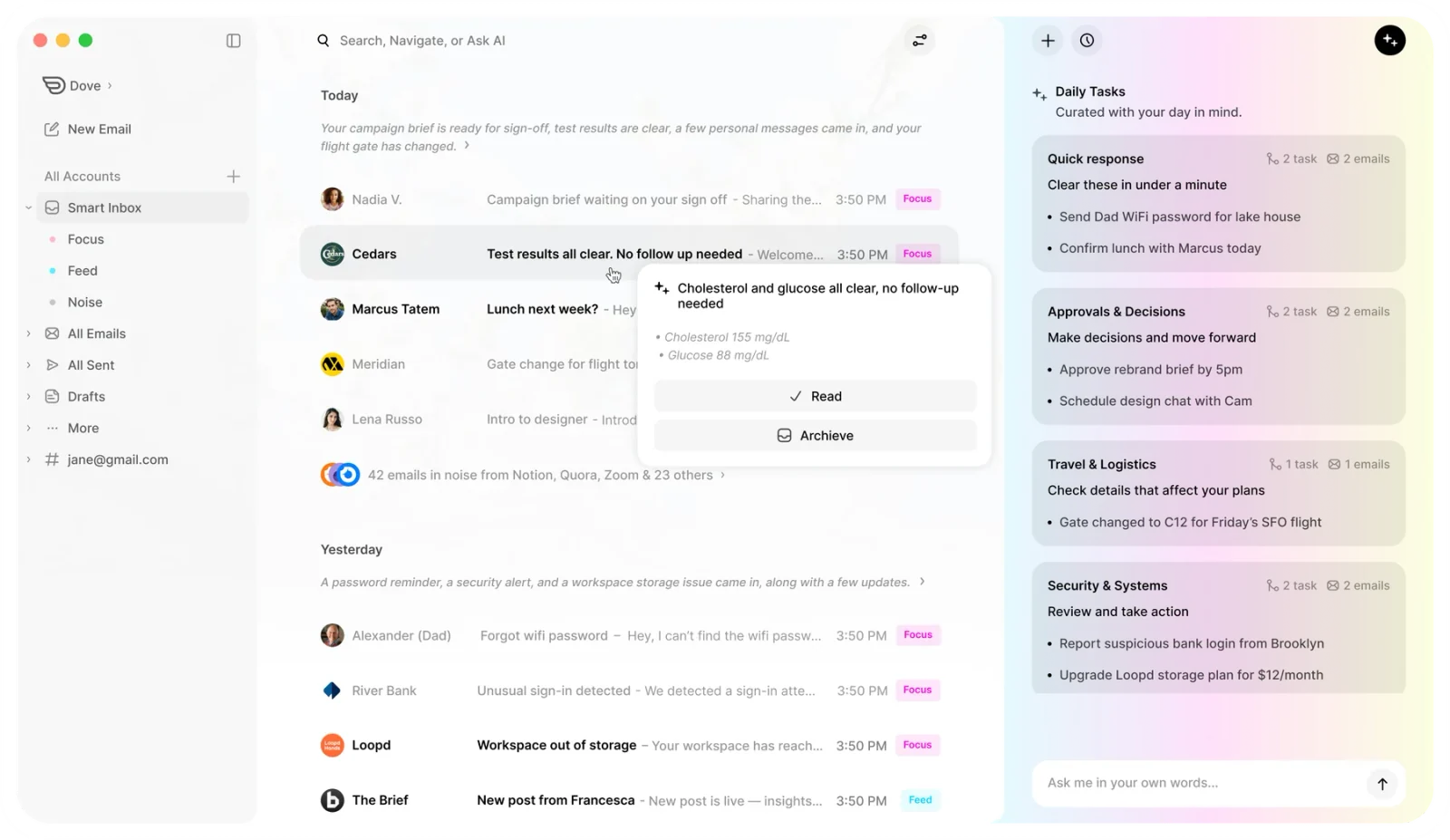
Dove is what you get when the team behind Canary Mail starts from scratch with AI as the foundation rather than a feature. Where Newton sorted your inbox by date and left the rest to you, Dove’s ambient AI watches incoming messages and routes everything into three streams: Focus (things that actually need you), Noise (newsletters, notifications, and low-priority threads), and Done (messages that are already resolved).
The difference from a conventional smart inbox is how much Dove does without you asking. You do not create rules or train a filter. The model learns from how you triage, how you reply, and what you defer, then starts anticipating it. Over the first week or two, the inbox increasingly looks the way you would have sorted it manually.
A few features worth calling out for former Newton users:
Wingman thread analysis. Open any email thread and Wingman surfaces a quick summary, the key ask, and whether anything in the thread still needs a response from you. Newton users who relied on Recap reminders will find this more proactive. Wingman works in the thread view rather than firing a separate notification later. See how Dove’s triage works for a walkthrough.
Daily Tasks extraction. Dove’s AI reads your inbox and pulls out commitments, deadlines, and to-dos into a Daily Tasks list. This is closer to what Newton’s recap tried to do, but applied across your whole inbox rather than just quiet threads.
Email security scoring. Every message gets a risk assessment. Phishing attempts and suspicious senders are flagged before you open them. Dove’s security layer is not something Newton had. It is part of why Dove exists as a separate product from Canary Mail rather than just a Canary update.
It is currently in beta and free to try, with no credit card required for early access. Pricing has not been finalized, so do not let guesses elsewhere influence your decision. Try it and see whether the workflow fits before that matters.
Best for: Former Newton users who want AI to handle triage rather than learning a new organizational system.
Platforms: iOS, Android, macOS, Windows, Web
Pricing: Free beta access, no credit card required
Not ideal if: You need PGP encryption or an enterprise-grade compliance tier (look at Canary Mail instead).
2. Canary Mail: best for privacy and security
Canary Mail has been in market since 2016, has over 2 million users, and is the most privacy-forward app on this list. If Newton’s cross-platform consistency was what you valued, Canary Mail matches it, with availability on macOS, iOS, Android, and Windows.
The core differentiator is encryption. Canary Mail has built-in PGP end-to-end encryption, SecureSend (a one-click encrypted message option for recipients who do not use PGP), and processes as much as possible on-device rather than routing your email content through cloud AI. For users in healthcare, legal, or finance, or anyone who simply does not want their inbox content analyzed on a remote server, this matters.
AI Copilot handles draft suggestions, thread summaries, and smart reply generation. It is opt-in and can be configured to run on-device, which distinguishes it from most AI email clients where cloud processing is not optional.
Canary Mail does not have the same ambient AI triage philosophy as Dove. The AI features are tools you invoke, not a background process that sorts your inbox before you arrive. That is a deliberate design choice. Users who want to stay in control of categorization tend to prefer it; users who want AI to do the sorting for them tend to prefer Dove.
Best for: Privacy-conscious users, professionals handling sensitive email, anyone who wants PGP in a modern client.
Platforms: macOS, iOS, Android, Windows
Pricing: Free tier available; Growth plan ~$36/year; Pro+ ~$100/year
Not ideal if: You want a web client or Linux support.
3. Spark: best for cross-platform teams
Spark is the name that comes up most often in Newton migration threads, and for good reason. It covers every platform Newton supported (Mac, iOS, Android, and Windows) with a consistent design across all of them. The Smart Inbox puts people and flagged messages above newsletters and notifications, which replicates the basic sorting Newton used.
Send Later, snooze, and follow-up reminders are all there. Collaborative email drafting, letting a teammate see and edit a reply before you send it, is something Newton never offered, and it is one of the reasons Spark has become the default recommendation for small teams.
The catch is that Spark’s free tier, while generous, has limits. Smart Inbox and AI features like AI Drafts are on the free plan, but the team collaboration tools and some of the finer controls sit behind Spark Business or Spark Premium, currently around $7.99 to $9.99 per user per month. For a solo user who just wants a Newton-shaped inbox, the free tier is fine. For a team, the cost adds up.
Read receipts are included. The implementation is reliable on most modern email clients, though no receipt system can guarantee confirmation across every client.
Best for: Teams wanting cross-platform coverage and collaborative drafts.
Platforms: iOS, Android, macOS, Windows, Web
Pricing: Free tier available; paid plans from ~$7.99/month per user
Not ideal if: You want AI that actively triages rather than just prioritizes.
4. Superhuman: best for speed and power users
Superhuman is the high-end option in email clients, and the pricing reflects that: $30 per month, which is more than Newton’s annual subscription within two months. If you can live with that, you get a fast keyboard-driven client, strong AI reply generation, and split inbox views.
Read receipts here are among the most detailed available. They show not just whether a message was opened, but when and on which type of device. For people who relied on Newton’s read receipts to track whether clients or colleagues had seen something important, this is the closest equivalent.
The keyboard shortcut system is exceptional. Triaging a full inbox with keyboard commands in Superhuman is meaningfully faster than doing it in any other client on this list. The AI Auto Drafts feature generates context-aware replies based on your writing style, and many users are sending with one or two edits rather than drafting from scratch.
Worth noting: Superhuman supports Gmail and Outlook accounts only. IMAP accounts from other providers are not supported. And at $30/month, many former Newton users find the jump from ~$70/year to $360/year hard to justify unless email is genuinely a productivity bottleneck.
Best for: Speed-focused power users who want the best read receipts and keyboard-first workflow.
Platforms: macOS, iOS, Android, Windows, Web
Pricing: $30/month, no free tier
Not ideal if: You use non-Gmail/Outlook accounts or cannot justify the price.
5. Airmail 5: best for Mac and iOS power users
Airmail has been around since 2013 and remains one of the deepest email clients available on Apple platforms. If your devices are Apple-only, and you chose Newton partly because it had the best iOS client you had tried, Airmail is a natural next stop.
The integration list is extensive: Todoist, Things 3, OmniFocus, Notion, Bear, Asana, Fantastical, and around 30 others. For Newton users who relied on the Connected Apps integrations with Asana, Evernote, and Trello, Airmail’s depth here is a step up.
The interface takes some adjusting. Airmail gives you more control than Newton did over almost everything (layout, swipe actions, notification behavior, custom snooze intervals) but that configurability means the default experience needs setup. Newton was polished out of the box. Airmail rewards the time you put into configuring it.
There is no Windows version and no Android version. If you used Newton across Mac, iPhone, and Windows, Airmail only covers two of those three.
Best for: Mac and iPhone users who want deep task manager integrations.
Platforms: macOS, iOS only
Pricing: One-time purchase (~$2.99 iOS, ~$9.99 macOS) or subscription option
Not ideal if: You need Windows or Android support.
6. Mimestream: best Gmail-native option on Mac
Mimestream is a macOS and iOS email client built specifically for Gmail and Google Workspace. It uses Gmail’s API rather than IMAP, which means full label support, filter management, and Gmail-specific features like Stars and Categories behave exactly as they do in the browser, wrapped in a native Mac interface that is noticeably faster.
For Newton users who are Gmail-only on Apple hardware, Mimestream is worth trying. The performance is excellent, and the app feels at home on macOS in a way that most cross-platform email clients do not.
The restrictions are real, though. No Windows, no Android, no IMAP support for non-Google accounts. Newton’s cross-platform, multi-account appeal was a central part of its value. Mimestream is the opposite of that philosophy. It does one thing well for a narrow audience.
Best for: Gmail-only users on Mac who want the best native experience.
Platforms: macOS, iOS only
Pricing: 14-day free trial; ~$4.99/month or $49.99/year
Not ideal if: You have non-Gmail accounts, use Windows, or need Android.
7. Hey Email: best if you want a completely different approach
Hey is the email client from Basecamp, and it is the most opinionated app on this list. The core concept is a Screener inbox: every new sender has to be approved before their email reaches you. Approved senders go to your Imbox. Newsletters go to The Feed. Receipts and paper trail items go to The Pile. You cannot get email from someone you have not cleared.
Where Newton polished the traditional email experience, Hey dismantles it and replaces it with something that has clearer rules. Former Newton users who are exhausted by inbox overload and open to rebuilding their workflow sometimes land on Hey and never look back. Others find the Screener model too restricting. It requires training time and does not suit users who need to be reachable without friction.
A few Newton-specific gaps worth noting: Hey does not have read receipts. The cross-platform experience is consistent, but the app feels quite different from Newton’s minimal UI. And at $99/year for personal use or $12/user/month for business, it costs more than Newton did without matching the productivity depth of Superhuman.
Best for: Users who are ready to rebuild their email workflow from scratch.
Platforms: iOS, Android, macOS, Windows, Web
Pricing: $99/year (personal); $12/user/month (business)
Not ideal if: You need read receipts, want a smooth transition from Newton, or need your existing email address.
Feature comparison
Feature | Dove | Spark | Canary Mail | Superhuman | Airmail 5 | Hey |
|---|---|---|---|---|---|---|
AI triage (automatic) | ✓ | Partial | Partial | ✓ | ✗ | ✗ |
Read receipts | ✓ | ✓ | ✓ | ✓ | ✓ | ✗ |
Cross-platform | ✓ | ✓ | ✓ | Partial | Mac/iOS only | ✓ |
Email security scoring | ✓ | ✗ | ✓ | ✗ | ✗ | ✗ |
PGP encryption | ✗ | ✗ | ✓ | ✗ | ✗ | ✗ |
Free tier | Beta (free) | ✓ | ✓ | ✗ | ✗ | ✗ |
Snooze / follow-up reminders | ✓ | ✓ | ✓ | ✓ | ✓ | Partial |
Thread summaries (AI) | ✓ | ✓ | ✓ | ✓ | ✗ | ✗ |
Task extraction from inbox | ✓ | ✗ | ✗ | ✗ | ✗ | ✗ |
Read receipt reliability varies by recipient email client. No client can guarantee delivery confirmation across all providers.
How to choose the right Newton Mail replacement
The right choice depends less on feature lists and more on which part of Newton you actually used most.
Want AI to handle your inbox sorting? Dove is the natural fit. You show up, the inbox is already sorted, and the model keeps calibrating. The Focus / Noise / Done structure is intuitive if you are used to Newton’s minimal interface, and the AI features go well beyond surface-level summaries.
Is email privacy the priority? Canary Mail. PGP encryption, on-device AI processing, and a mature product with over 2 million users. It is the only app on this list that treats end-to-end encryption as a core feature rather than a niche add-on.
Want the closest feature-for-feature Newton replacement? Spark. Cross-platform, smart inbox, snooze, send-later, read receipts, and a free tier that covers most solo users. The team collaboration features are a bonus.
Want maximum speed and read receipts and cost is not the deciding factor? Superhuman. The $30/month is steep, but the read receipt implementation, keyboard workflow, and AI drafts are genuinely best-in-class for power users who use Gmail or Outlook.
Apple-only and want deep task manager integration? Airmail. One-time purchase, extensive integrations, highly configurable.
Gmail-only on Mac? Mimestream. Native performance, full Gmail feature parity, nothing wasted.
Ready to rethink email from scratch? Hey. Opinionated, divisive, and effective for users willing to rebuild their habits around it.
Conclusion
Newton Mail’s shutdown was a reminder that the email client market is harder to sustain than it looks. Building a product that works well across four platforms, processing read receipts reliably, and charging enough to stay alive long-term is a genuine business challenge. Most apps that have tried have either narrowed their platform scope, raised prices, or shut down.
The apps that have survived and grown (Spark, Canary Mail, Superhuman) have each solved the sustainability problem differently. Dove is taking a different approach still: AI-native from day one, built by the Cartasec team with a track record from Canary Mail, and currently available free in beta.
If you have been on a stopgap since Newton closed, back on Gmail or Outlook and meaning to evaluate properly, now is as good a time as any. The options are mature, the AI features are useful rather than just marketed, and most apps let you import your accounts in under five minutes.
Try Dove free. Beta access, no credit card required, two-minute setup on any platform you use.
Frequently asked questions
Why did Newton Mail shut down?
Newton Mail shut down in July 2024 primarily due to a pricing and sustainability problem. At $49.99 to $99.99 per year, Newton was asking users to pay a meaningful subscription fee when free alternatives like Gmail and Outlook existed. The team could not acquire or retain enough paying users at that price to sustain operations across all four platforms.
What email app has read receipts like Newton?
Several alternatives offer read receipts: Superhuman (reliable and device-specific), Spark (available on free and paid plans), Canary Mail, Airmail, and Dove. Superhuman’s read receipt implementation is generally the most detailed, logging when a message was opened and on which type of device. Note that read receipts depend on the recipient’s email client; no app can guarantee tracking across all clients.
Is there a free Newton Mail alternative?
Yes. Spark has a capable free tier that covers smart inbox, send-later, snooze, and read receipts for solo users. Canary Mail has a free tier. Dove is currently free in beta. For users who want cross-platform coverage without paying, Spark’s free plan is the closest match to what Newton offered.
What is the best Newton Mail alternative for Mac?
For Mac users who want AI triage, Dove is the strongest pick. For Gmail-only Mac users who want native performance, Mimestream is excellent. For deep integrations with Apple apps and task managers, Airmail 5. For privacy and encryption, Canary Mail.
Is Superhuman worth the price as a Newton replacement?
That depends on your use case. At $30/month, Superhuman costs considerably more than Newton did. If read receipts and keyboard-driven speed are your primary needs and you use Gmail or Outlook, the productivity gains are real. If you want a cross-platform client with a clean inbox at a reasonable price, Spark or Dove are better fits.
What email app has the best AI features in 2026?
Dove is the most AI-native option. The entire inbox architecture is built around ambient AI triage rather than AI bolted onto a traditional email client. Superhuman’s AI Auto Drafts is strong for reply generation. Canary Mail’s AI Copilot is the best option if you want on-device AI processing without sending your email to a cloud. Spark’s AI features are solid but positioned more as productivity additions than foundational triage.
More from Dove
Recent posts

June 26, 2026
Best Zoho Mail alternatives in 2026
The best Zoho Mail alternatives in 2026, compared by platform, AI, pricing, strengths, and weaknesses. See how Dove, Canary Mail, Proton Mail, Fastmail, and Google Workspace stack up.

June 25, 2026
Best Proton Mail alternatives in 2026
The best Proton Mail alternatives in 2026, compared by platform, AI, pricing, strengths, and weaknesses. See how Dove, Canary Mail, Tuta, and Fastmail stack up.

June 24, 2026
Best Email Apps for Remote Workers in 2026
The best email apps for remote workers in 2026, compared by platform, AI, pricing, and how well they handle async communication. Dove, Canary Mail, Outlook, Spark, and Missive reviewed.