'/%3e%3c/g%3e%3c/svg%3e)

Best Email Apps for Startup Founders in 2026
The best email apps for startup founders in 2026 compared. See platforms, pricing, what each tool does well, and what it does poorly. Covers Dove, Superhuman, Spark Mail, Spike, Hey, Front, and Missive.

A startup founder’s inbox is not a place. It is a control surface. Investors expect a same-day reply, customers expect a same-hour reply, the team expects clarity by morning, and somewhere in the middle there is a vendor invoice, a legal redline, and a recruiter pitching the wrong candidate. Every one of those threads has a different cost if you miss it.
By 2026 the email category has split clearly into two camps for founders. There are AI-native clients that triage, summarize, and draft for you, and there are traditional clients with stronger privacy, collaboration, or speed primitives that you wire up yourself. The right pick depends on which part of your day the inbox is actually breaking.
This guide compares the eight best email apps for startup founders in 2026 on platform support, pricing, what each tool does well, and where it falls short. We tested them against the workflows founders actually run: investor updates, fundraising follow-ups, customer escalations, hiring loops, due diligence threads, and the long tail of vendor and tool noise.
Key takeaways
Dove is the best pick for founders who want AI to take real work off the inbox. It sorts every email into Focus, Noise, and Done before you open the app, drafts replies in your tone, and summarizes long investor and customer threads. It works on top of Gmail, Outlook, iCloud, and IMAP.
Superhuman is the speed benchmark for founders who run on Gmail or Outlook and treat email as a keyboard-first sport.
Spark Mail and Spike are the calmer cross-platform picks for founders who want a smart inbox without paying for a full collaboration suite.
Hey is a strong fit for founders who want a deliberate, opinionated workflow on a fresh address, with a built-in screener for new senders.
Front and Missive are the strongest team email tools when the founder is no longer the only one replying.
Pricing for serious founder tooling ranges from a $20 per month all-in AI plan (Dove) to $30 or more per seat for Superhuman, Front, and Missive.
What founders actually need from an email app
Being a founder is not one job, and a single inbox has to handle at least four overlapping workflows.
Investor and BD follow-up. A reply from a warm lead investor decays in hours, not days. Templates, snooze, send later, and reliable scheduling are the difference between a closed round and a stalled one.
Customer escalations. Early in the company life cycle, the founder is the on-call rep. Customer threads that stall in a generic inbox cost retention and word of mouth.
Team and hiring. Async team threads, reference checks, and offer negotiations all live in email. They need to be legible the next morning, not buried under newsletters.
Sensitive thread handling. Due diligence, cap table notes, board updates, term sheets, and acquisition conversations should not sit in plain text on a shared provider. Some founders need PGP, secure send, and on-device AI rather than cloud AI.
No single tool nails all four. Dove and thread, and privacy layers with AI and encryption. Front and Missive focus on the moment the company hires its second or third person who also reads founder email. Superhuman, Spark, Spike, and Hey sit in different places between speed, calm, and opinionated workflow.
The right pick depends on whether triage, sensitive content handling, or shared inbox coverage is the bottleneck. Most solo founders in 2026 are best served by pairing an AI-native client like Dove with a dedicated CRM, rather than buying one sprawling platform.
Best email apps for startup founders at a glance
App | Platforms | Free tier | Paid pricing | What it does well | What it does poorly |
|---|---|---|---|---|---|
Web, iOS, Android, macOS, Windows | Yes, free plan with up to 10 AI actions per day | $20 per month, 7-day free trial | AI triage into Focus, Noise, and Done across any account, AI Assist drafts replies in your tone, Wingman summarizes long investor and customer threads | Not a CRM, no built-in outbound sequencer, no native investor pipeline | |
Superhuman | macOS, Windows, iOS, Android, Web | No | From around $30 per month per seat | Keyboard speed, snippets, reminders, AI summaries, fast Gmail and Outlook triage | Expensive at scale, only Gmail and Outlook, no encryption layer |
Spark Mail | macOS, iOS, Android, Windows, Web | Limited free tier | Premium around $7.99 per month, annual discounts available | Cross-platform smart inbox, shared drafts, team comments, calendar | AI features lighter than Dove or Superhuman, several core features behind Premium |
Spike | Web, macOS, Windows, iOS, Android | Yes | Pro from around $6 per user per month, Business plans higher | Conversational chat-style threads, fast inbound triage, group chats with vendors and partners | Chat metaphor does not suit formal investor or board correspondence, no real outbound sequencer |
Hey | Web, macOS, Windows, iOS, Android | No, free trial only | Hey for You $99 per year, Hey for Work $12 per user per month | Opinionated screener for new senders, Imbox and The Feed split, calm by default | Requires a new @hey.com address for personal plan, not a client on top of Gmail or Outlook |
Front | Web, macOS, Windows, iOS, Android | No, free trial only | Starter around $19 per seat per month, Growth around $59 per seat per month, Scale and enterprise higher | Shared inboxes, internal comments, assignment, SLAs once the team grows | Heavy for a solo founder, paid only, the inbox itself looks like a help desk |
Missive | Web, macOS, Windows, iOS, Android | Limited free tier | Productive around $14 per user per month, Business higher | Shared inboxes with internal chat in the same view, rules engine, AI assistant on paid tiers | Steeper learning curve than Spark or Spike, AI is bolted on rather than central |
Dove and AI-native triage and privacy-first communication. The other six follow.
1. Dove, best for AI-native triage and reply drafting on any inbox
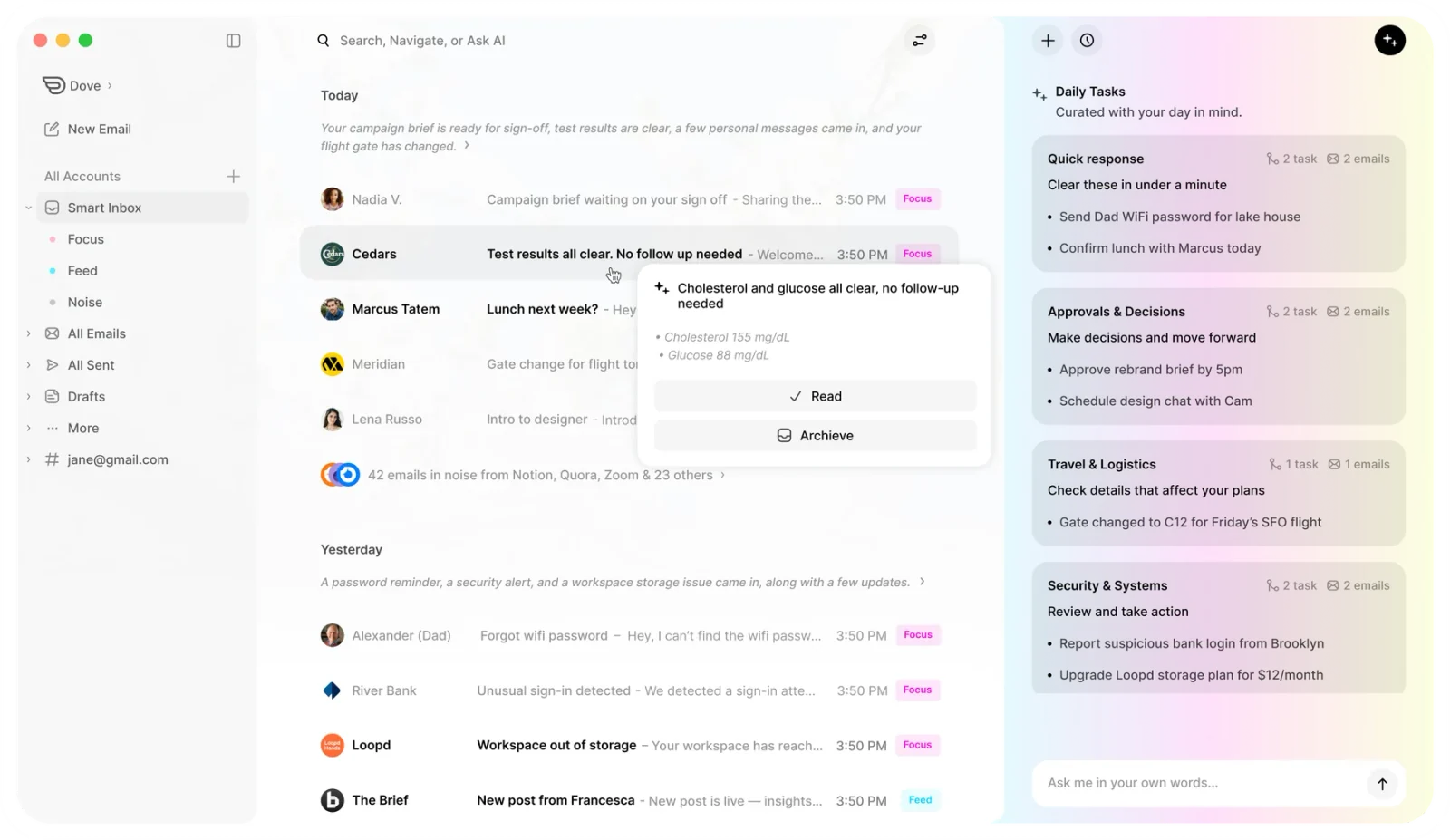
Dove is an AI-native email app from Cartasec, the Singapore team behind . Where most founder tools bolt automation onto a regular inbox, Dove rebuilds the inbox around AI from the start. Every incoming message is sorted automatically into Focus for investor replies, customer escalations, and warm BD threads that need you, Noise for newsletters, tool alerts, and likely cold pitches, and Done for confirmations, scheduling acknowledgements, and threads already handled. The first thing a founder sees in the morning is a short list of what matters, not a wall of unread.
Two features make Dove especially good for founders. Wingman reads long threads across multiple stakeholders, surfaces hidden risks, missed asks, and the next step you should take, the kind of context a plain thread summary tends to miss. AI Assist drafts replies in your tone and handles common moves like investor follow-ups, customer escalations, hiring outreach, and scheduling, so the routine work of moving the company forward stops eating the day.
Dove is a client, not an email provider. It connects on top of Gmail, Outlook, iCloud, and any IMAP account, so founders do not need a new email address and growing teams do not need to migrate. The AI works the same way regardless of which provider sits underneath, which matters when one investor uses Google Workspace and another uses Microsoft 365.
Platform support. Web, iOS, Android, macOS, Windows.
Pricing. Free plan with up to 10 AI actions per day. Paid plan at $20 per month with full AI features and a 7-day free trial.
What Dove does well
Sorts every email into Focus, Noise, and Done before you open the inbox, so warm investor replies stop getting buried under tool noise
Wingman thread intelligence catches risks, missed asks, and stalled scope conversations inside long investor and customer threads
AI Assist drafts replies in your tone, handles investor follow-ups, customer escalations, hiring outreach, and scheduling
Works across Gmail, Outlook, iCloud, and IMAP, no provider lock-in, which matters when investors and customers run different stacks
Native apps on Web, iOS, Android, macOS, and Windows, so a founder on the road reads the same inbox as a founder at the desk
What Dove does poorly
Not a CRM, you cannot run multi-step outbound investor or BD sequences inside Dove
No native investor portal or cap table view, pair with a focused tool such as Affinity, Carta, or a lightweight Notion setup
Free plan caps AI usage at 10 actions per day, an active founder will outgrow it quickly
Learn more on the Dove home page or read how Dove’s AI triage works. Dove also appears in our roundup of the best AI email apps in 2026 and our best email apps for executives guide, which shares some of the same multi-stakeholder DNA.
2. Superhuman, best for keyboard-first speed on Gmail and Outlook
Superhuman is the speed benchmark of modern email. It is built for one job, getting a Gmail or Outlook inbox to zero as fast as the keyboard will allow. Reminders, snippets, send later, scheduled messages, split inbox, and a growing set of AI features (summaries, ask-anything, write-for-me) sit on top of a UI tuned for muscle memory. For founders who already think in shortcuts and only use Gmail or Outlook, it is hard to beat.
The catch is the price and the scope. At around $30 per seat per month, Superhuman is one of the more expensive tools in this list, and the only meaningful integrations are with Google Workspace and Microsoft 365. There is no PGP layer, no shared-inbox model, and no IMAP/iCloud support, so Superhuman is a wrong fit if your stack uses anything outside of the two big providers.
Platform support. macOS, Windows, iOS, Android, Web.
Pricing. From around $30 per month per seat. No free tier.
What Superhuman does well
The fastest keyboard-driven Gmail and Outlook experience on the market
Strong reminders, snippets, snooze, send later, and read tracking
Solid AI summarization and reply drafting on supported accounts
Split inbox, important-first triage, and a clean read view
What Superhuman does poorly
Pricey at around $30 per seat per month, especially as the team grows
No support for IMAP, iCloud, or alternative providers, you must be on Gmail or Outlook
No encryption layer, not a fit for founders handling sensitive M&A or compensation threads
AI is helpful but not as foundational as Dove’s triage and drafting
3. Spark Mail, best calm cross-platform pick
Spark Mail is the closest thing to a “default” smart inbox in 2026. It runs natively across macOS, iOS, Android, Windows, and the web, and it bundles a unified inbox, smart prioritization, snooze, send later, templates, shared drafts, internal comments, and a calendar. It is opinionated enough to feel calm but flexible enough not to force a workflow on a founder.
Spark’s AI features (smart reply, summary, write-with-AI) are useful but lighter than Dove or Superhuman. Several of the more interesting features (advanced AI, deeper team collaboration, custom branding) sit behind the Premium tier. For a solo founder or a 2-3 person team that does not want to pay per seat for Superhuman or Front, Spark Premium is one of the best value picks in this list.
Platform support. macOS, iOS, Android, Windows, Web.
Pricing. Limited free tier. Premium around $7.99 per month, annual discounts available.
What Spark Mail does well
Calm, opinionated unified inbox across every major platform including the web
Shared drafts and inline team comments without going full shared-inbox
Templates, snooze, send later, and a built-in calendar
Strong free tier for solo founders who want to try before paying
What Spark Mail does poorly
AI feels bolted on rather than central, lighter than Dove or Superhuman
Some everyday features live behind Premium, including deeper AI
Not the right fit for founders who need PGP, encryption, or formal shared-inbox SLAs
4. Spike, best chat-style inbox for vendor and partner threads
Spike turns email into a chat. Threads render as conversations, group chats sit alongside one-to-one threads, and the inbox prioritizes the most active conversations the way a messaging app would. For founders who already work in Slack, WhatsApp, and Telegram with vendors and partners, Spike feels like a natural extension.
Spike includes a Magic AI assistant, voice messages, video meetings, shared notes, and tasks. It is a strong pick when most of your inbound and outbound feels conversational rather than formal. It is a weaker pick when most of your inbound is investor updates, board memos, and proposals, where the chat-style rendering can feel out of register.
Platform support. Web, macOS, Windows, iOS, Android.
Pricing. Free tier. Pro from around $6 per user per month. Business plans higher.
What Spike does well
Chat-style threads that match how founders talk to vendors, partners, and contractors
Group chats, voice notes, video, and shared notes inside the same inbox
Solid Magic AI summarization and drafting on paid tiers
What Spike does poorly
Chat metaphor does not match formal investor, board, and legal correspondence
No real outbound sequencer or BD tooling
Not built around encryption, a gap for sensitive deal threads
5. Hey, best opinionated workflow on a fresh address
Hey from 37signals is the most opinionated tool in this list. It splits inbound into the Imbox (important), The Feed (newsletters), and the Paper Trail (receipts). It screens new senders by default, so cold outreach never reaches the main view unless you allow it. It also intentionally avoids many “modern” features (no snooze on the personal plan, no third-party integrations) on the theory that they make inboxes worse.
For a founder who wants a deliberate, low-noise relationship with email and is willing to either use a new @hey.com address (personal) or migrate the company to a Hey domain (Work), it is the calmest pick here. For a founder who needs to keep an existing Gmail or Outlook address as the central hub, it is the wrong tool.
Platform support. Web, macOS, Windows, iOS, Android.
Pricing. No free tier. Free trial only. Hey for You from $99 per year. Hey for Work from $12 per user per month.
What Hey does well
Built-in screener for new senders, no cold pitches in your main inbox by default
Imbox, The Feed, and Paper Trail split keeps newsletters and receipts out of the way
Calm by design, fewer features and lower expectations of being “always on”
What Hey does poorly
Personal plan requires a new @hey.com address, not a client on top of Gmail
Limited integrations and intentionally fewer power features (snooze, rules) than competitors
No encryption layer, no native shared inbox
6. Front, best shared inbox when the team grows
Front is where most founders end up the moment they hire a second person who also reads email. It is a shared-inbox platform with internal comments, assignment, SLAs, rules, integrations with CRM and support tools, and a strong analytics layer. Multiple teammates can triage info@, sales@, or hello@ without stepping on each other, and the founder can stay looped in only on the threads that matter.
Front is heavy for a solo founder, and the inbox itself can feel more like a help-desk view than a personal client. The price (around $19 per seat per month at the entry tier and up sharply from there) reflects that it is built for teams, not individuals. Pair Front with Dove or Spark for the founder’s own personal inbox and use Front for the shared addresses.
Platform support. Web, macOS, Windows, iOS, Android.
Pricing. No free tier, free trial only. Starter around $19 per seat per month. Growth around $59 per seat per month. Scale and enterprise higher.
What Front does well
Shared inboxes with assignment, comments, and SLAs that scale with the team
Strong integrations with CRM, support, and analytics tools
Rules engine and automations cover real ops workflows
What Front does poorly
Overkill for a solo founder, the interface feels like a help desk
Per-seat pricing adds up quickly as the company grows
No encryption layer, AI features still lighter than Dove
7. Missive, best lightweight shared inbox with internal chat
Missive sits between Spark Mail and Front. It offers shared inboxes, rules, and assignment like Front, but renders internal chat right inside each thread, so the team can discuss a customer reply without ever leaving the message. It is a strong pick for early teams that want shared-inbox discipline without buying a full help-desk platform. Paid tiers include a Missive AI assistant for drafting and summarizing.
Missive’s learning curve is steeper than Spark or Spike. The shared-thread plus inline-chat model is powerful once you internalize it, but new teammates need a real onboarding pass. Founders should pilot it on one channel (support, sales, or partnerships) before rolling it across the company.
Platform support. Web, macOS, Windows, iOS, Android.
Pricing. Limited free tier. Productive around $14 per user per month. Business higher.
What Missive does well
Shared inboxes with internal chat directly inside each thread
Strong rules engine and assignment for early ops teams
Cross-platform across desktop, mobile, and web
What Missive does poorly
Steeper learning curve than Spark or Spike
AI feels bolted on rather than central
Per-seat pricing adds up quickly
How to pick the right email app as a startup founder
There is no universal best, but the choice tends to collapse to one of four founder profiles.
The solo or pre-seed founder. You are the only person reading your inbox. The bottleneck is triage and reply drafting, not collaboration. Start with Dove on your existing Gmail or Outlook account, on the free plan if you want to try it, or the $20 per month paid plan with a 7-day free trial when you are ready for full AI features.
The keyboard-speed founder on Gmail or Outlook. You think in shortcuts, you live in one of the two big providers, and your budget can absorb $30 per seat per month. Superhuman is built for you.
The founder with a small team that also reads email. You have hired one or two people who triage shared addresses. Front and Missive are the right shared-inbox tools, with Dove or Spark on the side for the founder’s personal inbox.
In every case, do not buy on the demo. Run a real week of investor follow-ups, customer escalations, and team threads through the tool before you commit. The right inbox should disappear behind the work, not show off.
FAQ
What is the best email app for startup founders in 2026?
For most founders, Dove is the best email app in 2026 because it sorts every incoming message into Focus, Noise, and Done before you open the inbox, drafts replies in your tone, and works on top of Gmail, Outlook, iCloud, and IMAP. Founders handling sensitive due diligence or M&A should pair Dove with .
Is there a free email app good enough for startup founders?
Yes. Dove offers a free plan with up to 10 AI actions per day, which is enough to evaluate the triage and reply drafting model on a real inbox. Spark Mail and Spike also have usable free tiers. For privacy-sensitive founders including PGP, before you reach paid plans. Hey, Superhuman, and Front are paid-only with trials.
How much does Dove cost in 2026?
Dove offers a free plan with up to 10 AI actions per day and a paid plan at $20 per month with full AI features. The paid plan includes a 7-day free trial. Pricing is intentionally one tier, so founders do not have to compare a confusing matrix of seats and add-ons against other clients.
Which email app is best for fundraising and investor updates?
Dove is the best email app for fundraising and investor updates because it surfaces warm investor replies in Focus, drafts follow-ups in your tone with AI Assist, and uses Wingman to summarize long threads with multiple stakeholders. Pair it with cap tables, or board memos are flying around.
Should founders use Gmail or a dedicated email app?
Gmail is fine as an underlying provider, but founders quickly outgrow the Gmail web interface for triage, follow-up tracking, and thread summarization. The pattern in 2026 is to keep Gmail (or Workspace) as the email account and run a dedicated client like Dove or Superhuman on top of it. That gives you better triage and AI without forcing a provider migration on customers and investors.
Which email app is best for founders running a privacy-sensitive startup?
Dove is a strong choice for founders running privacy-sensitive startups, including health tech, fintech, legal tech, and any company that handles confidential M&A, customer data, or unreleased research.
What email app should a 5 person startup team use?
A 5 person startup team should pair a personal inbox tool with a shared-inbox tool. The founder and individual contributors run Dove or Spark Mail on their personal inboxes. Shared addresses like hello@, sales@, or support@ live in Front or Missive so the team can assign, comment, and resolve threads without stepping on each other. As the team grows past 10 people, the shared-inbox tool becomes the more important investment.
More from Dove
Recent posts

August 17, 2026
Best Email App for Multiple Accounts in 2026
Juggling more than one inbox? Here is the best email app for multiple accounts in 2026, plus two other ways to fix inbox overwhelm for good.

July 1, 2026
Best Airmail Alternatives in 2026
The best Airmail alternatives in 2026 compared. See platform support, pricing, strengths, and weaknesses for Dove, Canary Mail, Spark Mail, Mimestream, Edison Mail, Shortwave, Outlook, and Apple Mail.

June 30, 2026
Best Spike Alternatives in 2026
The best Spike alternatives in 2026 compared. See platforms, pricing, strengths, and weaknesses for Dove, Shortwave, Spark, Missive, and Superhuman.