

How to Change the Default Mail App on Mac (Outlook, Gmail and More)
To change the default mail app on a Mac, open the Mail app, choose Mail > Settings from the menu bar, click General, and pick your app from the Default email reader menu. If your app isn't listed, choose Select and find it in your Applications folder. From then on, clicking an email link opens that app instead of Mail.
The catch: unlike the default web browser, this setting isn't in System Settings. It's inside Apple's Mail app, and Mail wants an email account set up first. If you've never used Mail, see below for the ways around that. Apple's steps are quoted from its support page, and each app's steps come from its maker's help pages, all checked on November 23, 2026.
Disclosure: Dove, which appears in the table below, is made by the team behind Canary Mail.
If you're still choosing an app, our guide to the best email app for Mac compares ten of them.
How to change the default email app on Mac
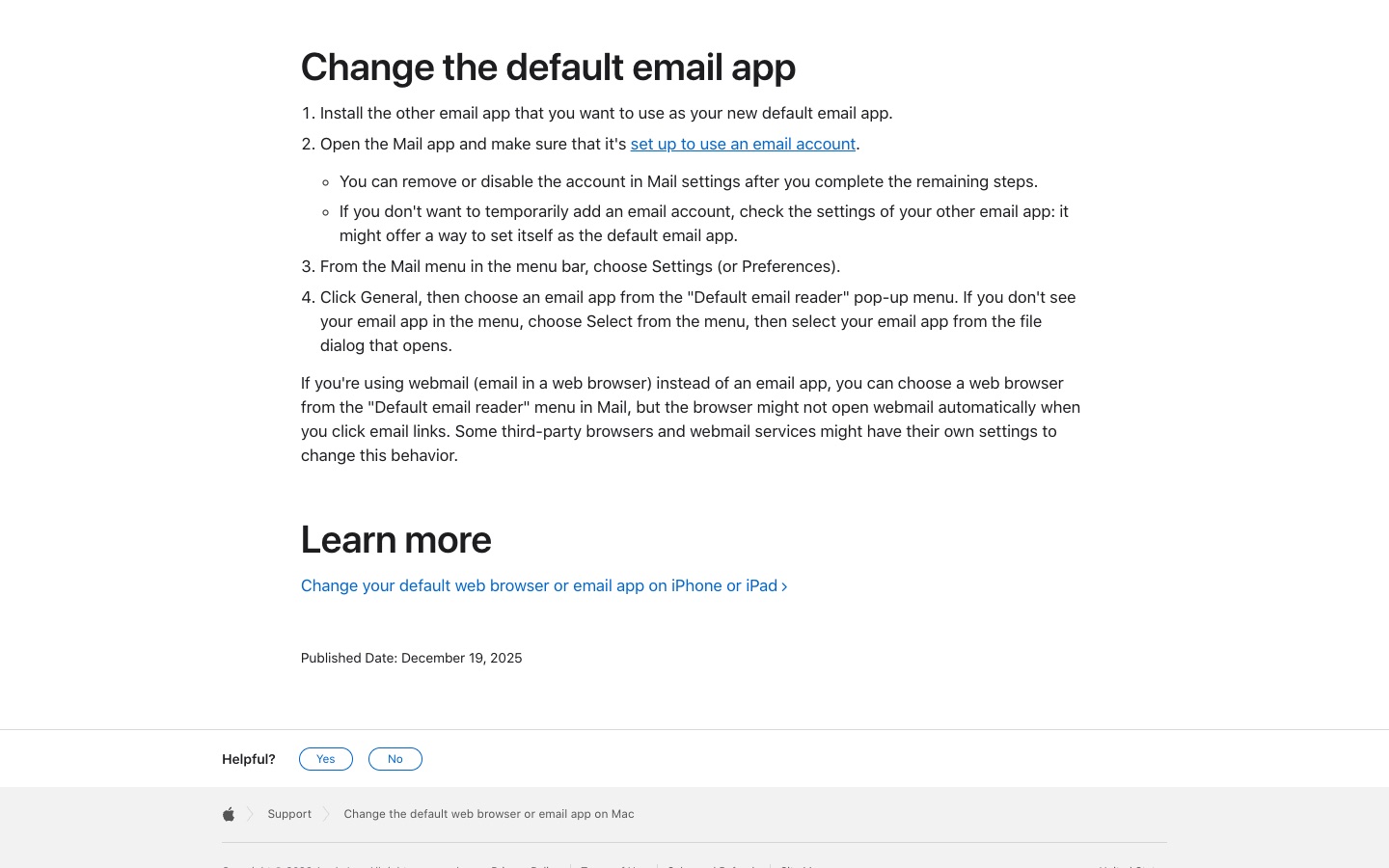
These are Apple's steps, from its page on changing the default email app:
Install the email app you want to use, such as Outlook, Spark or Mimestream.
Open Mail and make sure it's set up with an email account.
From the Mail menu at the top of the screen, choose Settings (on macOS Monterey and older it's called Preferences).
Click General.
Open the Default email reader menu and choose your app. If it isn't listed, choose Select, then pick the app in the window that opens.
Close the window. The change saves straight away.
To test it, click an email address link on any website. Your new app should open a new email.
What if the menu is greyed out or Mail has no account?
Apple's instructions start with: "Open the Mail app and make sure that it's set up to use an email account." Apple doesn't say what happens if you skip that, but users and several university IT guides report that without an account, Mail's settings are greyed out or Mail only shows its add-account window. You have three ways around it.
1. Let your new app set itself as the default. Apple suggests this first: "check the settings of your other email app: it might offer a way to set itself as the default email app." Mimestream, Proton Mail and Spark (if you downloaded it from Spark's website) can do this. See the table below.
2. Add an account to Mail, change the setting, then remove the account. Apple says: "You can remove or disable the account in Mail settings after you complete the remaining steps." Add any email account in the window Mail shows when it opens (or, if Mail already has settings open to you, in Mail > Settings > Accounts with the + button). Set the default app, then go to Mail > Settings > Accounts, select the account and click − to remove it. Salve Regina University's IT guide notes that the default you picked stays in place.
3. Use a third-party tool. Free tools such as SwiftDefaultApps or the command-line tool `duti` can change the default without Mail. They're unofficial and older, and reports are mixed on whether the change sticks on recent macOS versions. Try options 1 and 2 first.
How to set each email app as the default
Some apps have their own "make default" button, so you never open Mail. The others send you to Mail's setting.
App | Can it set itself as default? | Where to do it |
|---|---|---|
Microsoft Outlook | No | Mail > Settings > General > Default email reader > Microsoft Outlook (Microsoft's steps) |
Mimestream | Yes | Mimestream > Settings > General > Default Email Reader > Mimestream (Mimestream's help) |
Spark (from Spark's website) | Yes | Spark Settings > General > Make Spark the default email client > Make default (Spark's help) |
Spark (from the Mac App Store) | No | Mail > Settings > General > Default email reader > Spark Desktop (same Spark page) |
Proton Mail (desktop app) | Yes | It offers when you open it, or Settings > All Settings > Messages and Composing > Set as default mail application (Proton's help) |
Airmail | No | Mail > Settings > General > Default email reader > Airmail (Airmail's help) |
Dove (ours) | No | Mail > Settings > General > Default email reader > Dove |
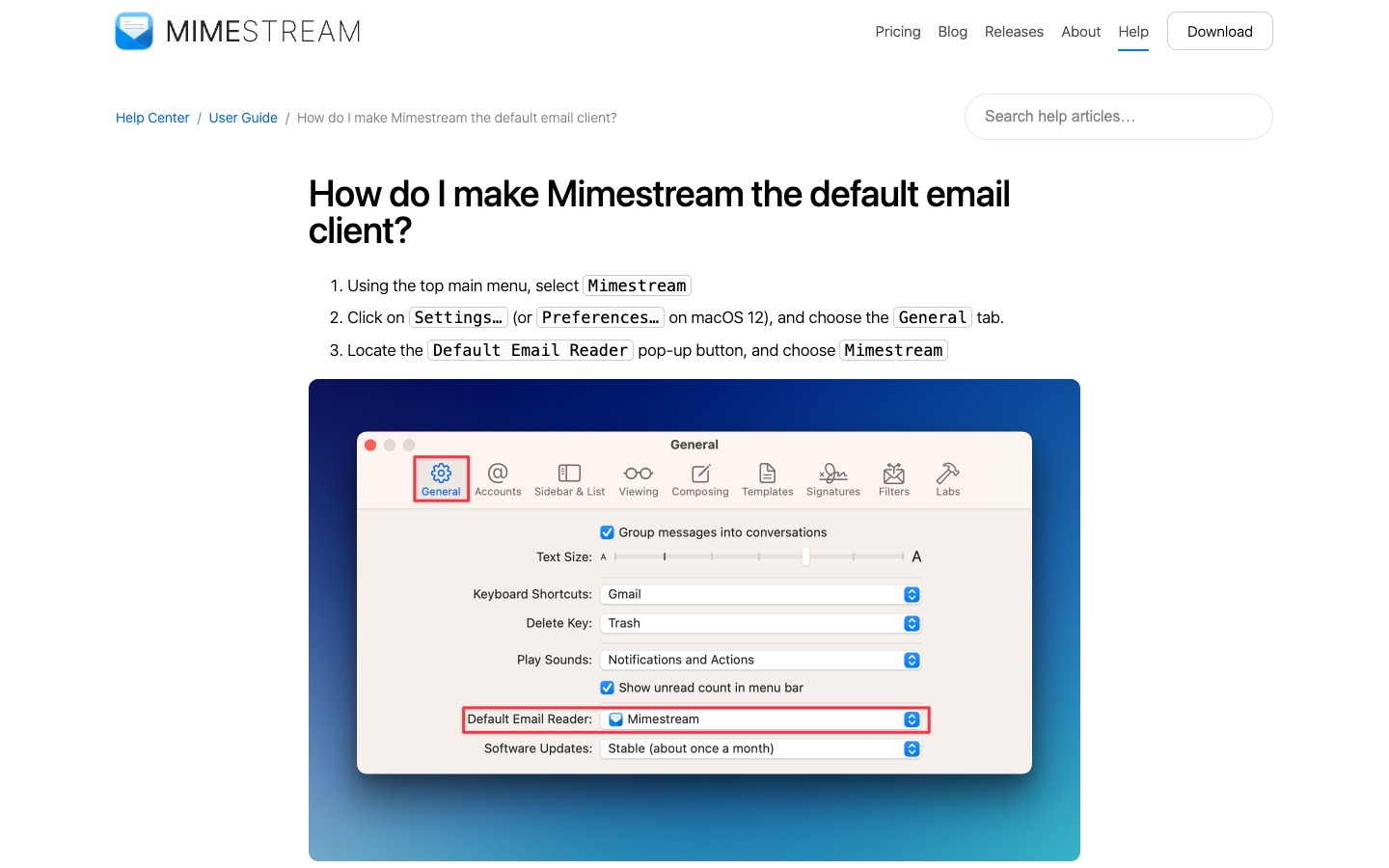
Making Outlook the default email app on Mac
Outlook for Mac has no button of its own for this. Microsoft's instructions go through Mail: open Finder > Applications, open Mail, choose Mail > Settings, and on the General tab choose Microsoft Outlook under Default email reader.
Two things confuse people here:
"Default account" is a different setting. In Outlook, Tools > Accounts lets you make one of your accounts the default. That picks which address Outlook sends from. It doesn't make Outlook your Mac's default email app.
Microsoft's "Make Outlook the default program" page is for Windows. The Mac steps are the ones above.
How to make Gmail the default email on Mac
Gmail has no Mac app, so "Gmail as the default" means opening Gmail in your browser when you click an email link. That takes two settings, one on your Mac and one in the browser. Apple warns that if you choose a browser as the default, it "might not open webmail automatically when you click email links." Google has no current help page for this on a Mac, so the browser steps below come from Chrome's and Firefox's handler settings, as university IT guides and Proton's help describe them.
In Chrome:
In Mail, go to Mail > Settings > General and choose Google Chrome as the Default email reader.
In Chrome, open Gmail. At the right of the address bar, click the diamond-shaped handler icon and allow Gmail to open all email links.
If you don't see the icon, go to `chrome://settings/content/handlers`, make sure sites can ask to handle protocols, then reload Gmail.
In Firefox: set Firefox as the Default email reader in Mail, then in Firefox go to Settings > General > Applications, find mailto and choose Gmail from the list.
In Safari: there's no built-in way. Safari doesn't support the web feature Gmail uses to register itself for email links. Use Chrome or Firefox for this, add Gmail to Mail, or use an email app that works with Gmail. Our guide to the Gmail app for Mac compares the options.
What the default email app changes, and what it doesn't
The default email app is the one your Mac opens when you click an email link (a "mailto" link) on a website, in a PDF or in another app. In Apple's words, it's "the app that opens when you click an email link."
It doesn't change:
Which address you send from. In Mail, that's Mail > Settings > Composing > Send new messages from. In Outlook, it's the default account in Tools > Accounts.
Your default browser. That's in System Settings > Desktop & Dock > Default web browser.
It may not change the Share menu either. Share > Mail in other apps can still open Apple Mail, and whether your new app shows up there depends on the app.
The default keeps switching back to Mail
If your choice doesn't stick, or the app you want isn't in the list, these general fixes usually help:
Open the app once so macOS knows about it, then set it again.
Use Select. In the Default email reader menu, choose Select and pick the app from Applications.
Update the app. An old version may not register for email links.
Reset the list of apps macOS knows about. Airmail's help page gives a Terminal command that rebuilds it, after which you set the default again. Only try this if the steps above fail.
Choosing an email app to make the default
If you're changing the default because Mail isn't working for you, our guide to the best email app for Mac compares ten apps, including Outlook, Spark, Mimestream and Apple Mail.
Dove is our email app, so take this with that in mind. Dove sorts new mail into Focus, Feed and Noise and shows what needs you in a Today view, across Gmail, Outlook, iCloud, Yahoo and IMAP accounts. It registers to open email links on a Mac, so you can choose it in Mail's Default email reader menu. Dove doesn't have its own make-default button, so you'll go through Mail as above. The free plan includes 10 AI actions a day; Pro is $20 a month or $200 a year after a 7-day trial that asks for a card (Dove's pricing).
FAQ
How do I change the default email app on my Mac?
Open Mail, choose Mail > Settings > General, and pick your app from Default email reader. If the menu is greyed out, add any account to Mail first (you can remove it afterwards), or use your app's own "make default" option if it has one.
Why can't I change the default email app on my Mac?
Usually because Mail has no email account, so its settings are greyed out. Add an account, change the setting, then remove the account. Apple says this is fine. Or use an app that can set itself as the default, such as Mimestream, Proton Mail or Spark from Spark's website.
How do I change the default app for opening email links?
It's the same setting: Default email reader in Mail's General settings. It controls which app opens when you click an email link.
How do I make Outlook my default email on Mac?
In Mail, go to Mail > Settings > General and choose Microsoft Outlook under Default email reader. Outlook's own Default Account setting only chooses which of your accounts it sends from.
Can I make Gmail my default email on Mac?
Yes, through a browser. Set Chrome or Firefox as the Default email reader in Mail, then let Gmail handle email links in that browser. Safari can't do this.
How do I change the default email address on the Mail app?
That's a different setting. In Mail, go to Mail > Settings > Composing and choose an address under Send new messages from.
Where is the default email setting in System Settings?
There isn't one. The default web browser is in System Settings > Desktop & Dock, but the default email app is only in the Mail app's settings.
More from Dove
Recent posts
November 23, 2026
Gmail App for iPhone: How to Get It, Set It Up and Fix It (2026)
Google's Gmail app is free in the App Store and needs iOS 18. Here's how to spot the real one, set it up, make it your default email app, fix notifications and sync, and decide whether Apple Mail or another app suits you better. Checked on November 23, 2026.
November 23, 2026
iPhone Mail App Not Working or Not Updating? How to Fix It
Most Mail problems on an iPhone come down to a fetch setting, a password the phone no longer has, or Low Power Mode. Find your symptom below and fix it in a few minutes, with every step checked against Apple's support pages on November 23, 2026.
November 20, 2026
Best Email App for iPhone and iPad in 2026: 10 Picks With Checked Prices
For most people, Apple Mail is the best email app on iPhone and iPad. Here's when it isn't, and the nine apps worth switching to. Prices were checked again in November 2026, and there's a section on iPad.