'/%3e%3c/g%3e%3c/svg%3e)

Best Email Apps for Freelancers in 2026
The best email apps for freelancers in 2026, compared by platform support, pricing, strengths, and weaknesses. Dove Spark, Gmail, and more.
Freelance email is its own kind of chaos. You are not managing one inbox, you are managing the front desk, the billing department, and the sales team for a business of one. Client threads, project updates, invoices, cold pitches, and the occasional “quick question” that turns into three hours of work all land in the same place, and you are the only person who can sort them.
The built-in Mail app on your phone was not designed for that. Neither was a standard Gmail tab left open all day. What freelancers actually need is an inbox that helps you triage fast, look professional across multiple client accounts, follow up without dropping balls, and do all of it on whatever device you happen to be holding.
We compared seven email apps for freelancers across platform support, pricing, what each one does well, and where it falls short. Whether you want AI to sort your inbox before you open it, encryption to keep client work confidential, or a free option that runs your custom domain, this guide covers the realistic choices for 2026.
Key takeaways
Dove is the strongest pick for freelancers juggling several client accounts who want AI to triage the inbox, draft replies, and surface tasks automatically. It costs $20 per month, with a 7-day free trial.
Spark and Spike are strong free-tier picks for solo workers who want a smarter inbox without paying upfront.
Google Workspace is the easiest way to run a professional custom-domain address if you already live in Gmail.
The right app depends on what actually slows you down. The table below maps each tool to a freelance strength.
What freelancers actually need from an email app
Before the list, it helps to name the specific problems freelance email creates, because they are different from a salaried inbox.
Multiple client accounts in one view. Most freelancers run a personal address, a business address, and sometimes a separate inbox per major client. Switching between apps or accounts all day is friction you feel by Friday.
A professional front. A custom-domain address, clean signatures, read receipts, and scheduled sends make a one-person business look established. Clients notice.
Follow-up that does not depend on memory. Unpaid invoices, unanswered proposals, and “circling back” emails are revenue. An app that reminds you to follow up is protecting your income.
Triage speed. You bill by the hour or the project, so time spent filing email is time you are not paid for. The faster the inbox sorts itself, the more billable hours you keep.
A price that fits a variable income. Freelance cash flow is lumpy. A free tier or a predictable, modest subscription beats a per-seat enterprise plan you do not need.
The apps below are ranked with those needs in mind.
Best email apps for freelancers at a glance
App | Platforms | Free tier | Paid pricing | Best for freelancers | AI and encryption |
|---|---|---|---|---|---|
macOS, Windows, iOS, Android, Web | 7-day free trial | $20/month, one plan | AI triage across multiple client inboxes | Built-in AI triage, AI threat detection, phishing quarantine | |
Spark | macOS, iOS, Android, Windows, Web | Yes | Premium from around $4.99/month | Smart inbox plus follow-up reminders | Optional AI assist, no PGP |
Spike | macOS, Windows, iOS, Android, Web | Yes | Pro from around $8/month | Conversational inbox with notes and tasks | Optional AI, no PGP |
Google Workspace | Web, iOS, Android, any IMAP client | Personal Gmail is free | From around $7 per user/month | Professional custom-domain email | Gemini AI on paid tiers, S/MIME on higher tiers |
eM Client | Windows, macOS, iOS, Android | Yes (2 accounts) | One-time license around $49.95 | All-in-one client without a subscription | PGP support, optional AI assistant |
Missive | macOS, Windows, Linux, iOS, Android, Web | Yes (limited) | From around $14 per user/month | Freelancers who collaborate with clients or VAs | AI assist, no PGP |
Dove
Dove is an AI-native email app built from the ground up around automatic triage, which is exactly the problem freelancers spend the most time on. Instead of dropping every client thread, invoice, and newsletter into one undifferentiated inbox, Dove sorts your mail into three states, Focus, Noise, and Done. Focus holds the client messages that actually need a reply. Noise catches receipts, notifications, and marketing. Done is everything you have already handled.
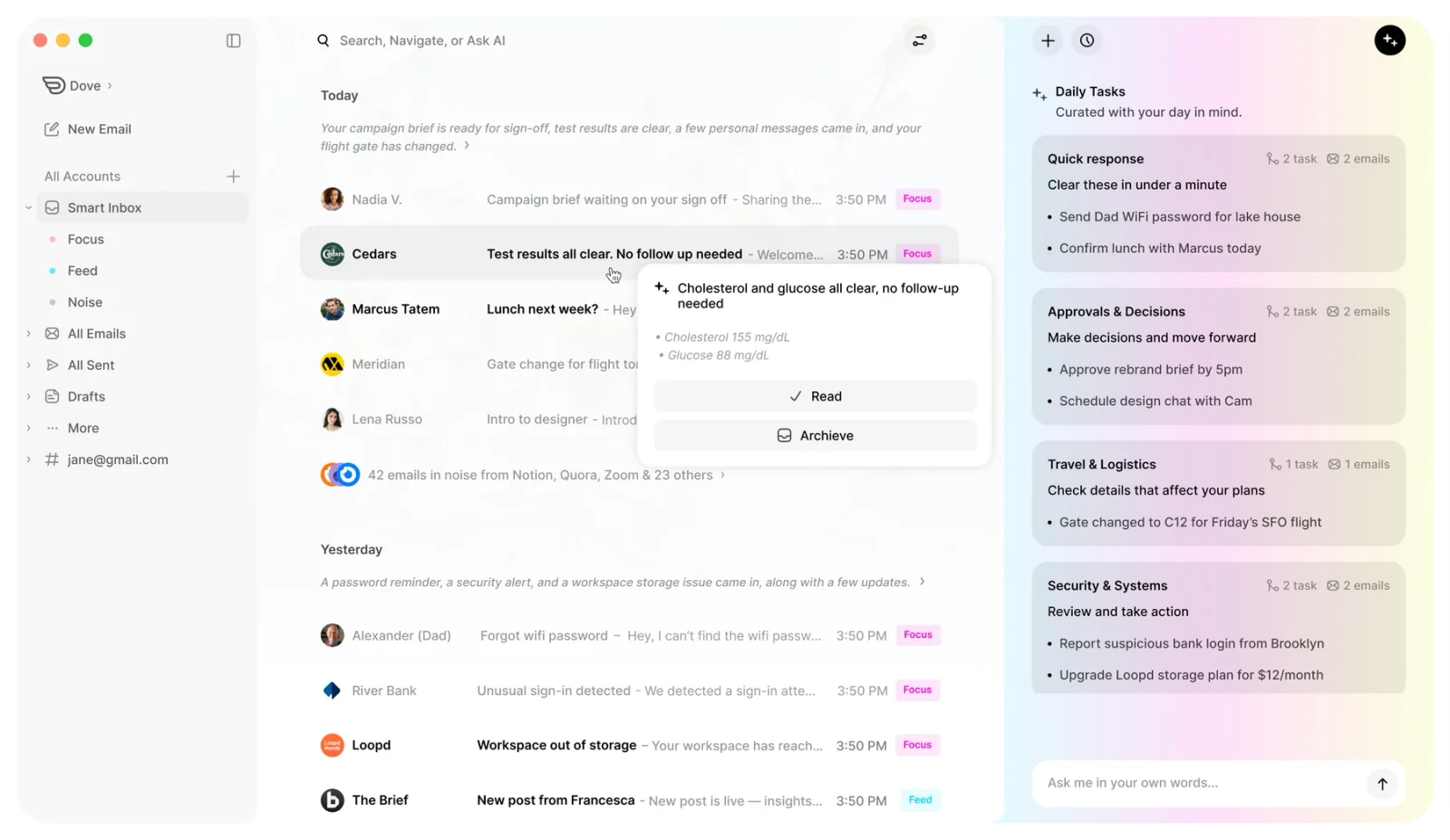
For a freelancer running several accounts, that sorting happens across all of them at once, so you see one clean priority view instead of bouncing between client inboxes. The AI is not a bolt-on writing button either. Dove’s Wingman reads entire threads, drafts contextual replies in your voice, and detects commitments so it can surface daily tasks pulled straight from your email. When a client writes “can we move the call to Thursday,” that becomes a task, not a thing you hope you remember.
Dove also runs AI risk scoring on incoming mail and quarantines phishing attempts before they reach you, which matters when a fake invoice or spoofed client email could cost you real money. Your email is never used to train external models.
It runs on macOS, Windows, iOS, Android, and the web, so your triaged inbox follows you between the laptop and the phone without losing its sorting. If you want to compare it against other AI-first options, see our roundup of the best AI email apps in 2026, and if your main pain is account sprawl, the guide to the best email apps for multiple accounts goes deeper.
Pricing: $20 per month. One plan, everything included, with a 7-day free trial and no tiers or annual commitment.
Platforms: macOS, Windows, iOS, Android, Web
What Dove does well:
AI triage sorts every account automatically, so client mail rises above the noise
Wingman drafts contextual replies based on full thread history
Daily Tasks pull commitments and deadlines out of your email
Works with Gmail, Microsoft 365, and IMAP accounts in one unified view
Risk scoring catches phishing and fake invoices before you see them
Full apps on desktop, mobile, and web
What Dove does not do:
No built-in calendar or contacts, it relies on your existing calendar app
No PGP or S/MIME encryption, it focuses on AI threat detection instead
No Linux support
Best for: Freelancers overwhelmed by client email across multiple accounts who want AI to handle triage, replies, and task tracking on any device.
Spark
Spark turns email into a smart, prioritized inbox and is one of the strongest free-tier options for freelancers. Its Smart Inbox groups and ranks messages automatically, and its follow-up reminders nudge you when a client has gone quiet on a thread you cannot afford to forget.
Send Later, snooze, and reusable templates cover the everyday freelance basics, like sending a polished proposal at 9am instead of midnight, or firing off the same onboarding email to every new client without retyping it. Spark runs on macOS, iOS, Android, Windows, and the web, and if you occasionally bring on a subcontractor, its shared draft and comment features let you write replies together.
Pricing: Free tier available. Premium from around $4.99 per month.
Platforms: macOS, iOS, Android, Windows, Web
What Spark does well:
Smart Inbox auto-groups and prioritizes email
Follow-up reminders catch stalled client threads
Send Later, snooze, and templates built in
Generous free tier that covers solo use
Cross-platform, including mobile and web
What Spark does not do:
No PGP encryption
Some smart and collaboration features sit behind the paid plan
Past privacy questions about email processing have made some users cautious
Heavier account setup than a basic client
Best for: Freelancers who want a smarter inbox, follow-up reminders, and templates without paying upfront.
Spike
Spike reformats email into a chat-style, conversational thread, which strips away the formal clutter and makes quick client back-and-forth feel faster. For solo freelancers who find traditional email heavy, that lighter feel can be the whole appeal.
Beyond email, Spike bundles notes, tasks, and collaborative docs, so a lot of freelancers use it as a light all-in-one workspace rather than juggling separate apps. Its Priority Inbox separates people from automated noise, and it runs on macOS, Windows, iOS, Android, and the web with a usable free tier.
Pricing: Free tier available. Pro from around $8 per month.
Platforms: macOS, Windows, iOS, Android, Web
What Spike does well:
Conversational, chat-style email that feels fast
Built-in notes, tasks, and collaborative docs
Priority Inbox separates real people from automated mail
Cross-platform with a free tier
Clean, low-friction interface for solo work
What Spike does not do:
No PGP encryption
The chat format does not suit formal or long-form email for everyone
Advanced features and more accounts require the paid plan
Smaller ecosystem than Google or Microsoft
Best for: Solo freelancers who want a lightweight, conversational inbox with notes and tasks in one place.
Google Workspace
Google Workspace is the most common way freelancers run a professional, custom-domain address on their own studio or business domain while keeping the familiar Gmail interface. If you already live in Gmail, this is the path of least resistance to looking like an established business rather than a personal account.
The paid plans add the custom domain, more storage, Google Meet, and Gemini AI for drafting and summarizing. Personal Gmail remains free if you do not need your own domain, and either way Gmail connects cleanly to almost every other email client, including most of the apps on this list, so you are not locked in.
Pricing: Personal Gmail is free. Workspace from around $7 per user per month for a custom domain and business features.
Platforms: Web, iOS, Android, and any IMAP client
What Google Workspace does well:
Custom-domain email that looks professional to clients
Deep integration with Drive, Calendar, and Meet
Gemini AI for drafting and summarizing on paid tiers
Huge ecosystem and reliable deliverability
Works as the account behind nearly any other email app
What Google Workspace does not do:
Standard Gmail does no real triage, every message lands with equal weight
AI features are limited to paid Workspace tiers
Google collects usage data, which may concern privacy-focused freelancers
Strong encryption (S/MIME) only on higher business tiers
Per-user pricing adds up if you add collaborators
Best for: Freelancers who want a familiar, professional custom-domain inbox and already rely on Google’s tools.
eM Client
eM Client is a desktop-first, all-in-one client that bundles email, calendar, contacts, tasks, and notes into one app. For freelancers who want everything in a single window and dislike monthly subscriptions, its standout feature is a one-time license you can buy once and keep.
It handles multiple accounts from Gmail, Outlook, iCloud, and any IMAP provider, supports PGP encryption natively, and includes templates and scheduled sends that suit client work. The free tier covers up to two accounts, which is enough for many solo freelancers running a personal and a business address.
Pricing: Free for up to 2 email accounts. One-time Pro license around $49.95, with a subscription option also available.
Platforms: Windows, macOS, iOS, Android
What eM Client does well:
Built-in calendar, contacts, tasks, and notes in one app
One-time license option, no forced subscription
PGP encryption supported natively
Handles multiple accounts and large mailboxes well
Templates and scheduled send for client communication
What eM Client does not do:
No web client
No Linux support
AI features are limited and not a core focus
The free tier caps you at 2 accounts
The interface can feel dense for users who want something minimal
Best for: Freelancers who want an all-in-one desktop client with calendar and contacts, and who prefer paying once over a subscription.
Missive
Missive started as a team email tool, but plenty of freelancers use it precisely because their work is not always solo. If you regularly loop in a client, a subcontractor, or a virtual assistant, Missive lets you assign emails, leave internal comments on a thread, and draft replies together without forwarding chains.
It also covers the solo basics well, with canned responses, scheduling, and a unified inbox across accounts. Missive runs on macOS, Windows, Linux, iOS, Android, and the web, making it the most platform-complete option here. The catch is per-user pricing, which is fine for one person but climbs once you add collaborators.
Pricing: Limited free tier. Paid plans from around $14 per user per month.
Platforms: macOS, Windows, Linux, iOS, Android, Web
What Missive does well:
Assign emails and comment internally on threads
Collaborate on replies with clients or subcontractors
Canned responses and scheduling for repeat client work
Unified inbox across multiple accounts
The widest platform support on this list, including Linux and web
What Missive does not do:
No PGP encryption
Per-user pricing gets expensive as you add people
More features than a strictly solo freelancer needs
Steeper initial setup than a simple client
Best for: Freelancers who collaborate with clients, VAs, or subcontractors and want shared inbox features without buying enterprise software.
How to choose the right email app as a freelancer
Start with the part of freelance email that actually costs you time or money, then match it to a strength above.
You drown in client mail across several accounts. Choose Dove. AI triage into Focus, Noise, and Done is the whole point, and it works across every inbox at once.
You want a smarter inbox for free. Choose Spark or Spike. Both have genuinely usable free tiers and lighter, faster inboxes than stock Gmail.
You need a professional custom-domain address. Choose Google Workspace, then pair it with one of the smarter clients above if you want better triage on top.
You hate subscriptions. Choose eM Client and buy the one-time license.
You collaborate with clients or a VA. Choose Missive for shared threads and assignments.
If you are not sure, Dove has a 7-day free trial and so you can test how each one handles your real client inbox before committing to anything.
Frequently Asked Questions
What is the best email app for freelancers in 2026?
For most freelancers, Dove is the strongest overall pick because it was built around automatic triage. It sorts client mail across every account into Focus, Noise, and Done, drafts replies, and surfaces tasks, which targets the exact problem freelancers spend the most unbilled time on. and Spark or Spike are excellent if you want a smarter inbox on a free tier.
Which email app is best for managing multiple client accounts?
Dove is built to unify multiple accounts into one triaged view, so client mail rises above newsletters and receipts no matter which inbox it arrived in. Spark, Spike, eM Client, and Missive also support multiple accounts in a single window. For a deeper comparison, see our guide to the best email apps for multiple accounts.
What is the cheapest email app for freelancers?
The cheapest realistic options are the free tiers. Spark and Spike both offer capable free plans, eM Client is free for up to two accounts, and personal Gmail is free if you do not need a custom domain. Dove costs $20 per month but includes a 7-day free trial so you can test it first, and eM Client also sells a one-time license if you want to avoid recurring costs entirely.
Do freelancers need encrypted email?
It depends on your clients. If you handle contracts, legal or medical documents, financial records, or anything under an NDA, encrypted email protects both you and the client and signals that you take confidentiality seriously. which makes it the easiest encrypted option here for non-technical freelancers and their clients.
Which email app helps me follow up on unpaid invoices and proposals?
Apps with follow-up reminders and read tracking help most. and Spark sends follow-up reminders when a thread goes quiet. Dove goes further by turning commitments and deadlines from your email into daily tasks, so a promised payment date or a “send the revised quote” note does not slip.
Can I use one app for both personal and client email?
Yes. Every app in this guide supports multiple accounts, so you can keep a personal address and one or more client or business addresses in the same inbox. Dove, Spark, Spike, and Missive go a step further by sorting or prioritizing across all of them at once, so your client work does not get buried under personal newsletters.
More from Dove
Recent posts

August 17, 2026
Best Email App for Multiple Accounts in 2026
Juggling more than one inbox? Here is the best email app for multiple accounts in 2026, plus two other ways to fix inbox overwhelm for good.
July 1, 2026
Best Airmail Alternatives in 2026
The best Airmail alternatives in 2026 compared. See platform support, pricing, strengths, and weaknesses for Dove, Canary Mail, Spark Mail, Mimestream, Edison Mail, Shortwave, Outlook, and Apple Mail.
June 30, 2026
Best Spike Alternatives in 2026
The best Spike alternatives in 2026 compared. See platforms, pricing, strengths, and weaknesses for Dove, Shortwave, Spark, Missive, and Superhuman.