'/%3e%3c/g%3e%3c/svg%3e)

Best Email Apps for Developers in 2026
The best email apps for developers in 2026, compared by platform support, AI, pricing, strengths, and weaknesses. See how Dove, Gmail, Outlook, and Superhuman handle a developer's inbox.

A developer’s inbox is busy in a weird way. It is rarely the firehose a sales rep deals with, but hardly any of it looks like normal mail. GitHub and GitLab notifications, CI and deploy alerts, on-call pages, review requests, Jira and Linear churn, package security advisories, vendor status notices, recruiter spam, and once in a while a real person asking a real question. There is genuine signal in there. It is just buried under bot mail that shows up faster than anyone can read it.
Storing all of it was never the problem. The problem is telling the pull request a teammate is stuck on apart from the forty notifications that look identical to it. Most clients give every message the same weight, so the thread that matters sinks while you skim past green checkmarks. What a developer actually wants from an email app is simple to say and rare to find: cut the bot noise, float the handful of messages that need a human, hold several accounts at once, and not get in the way of the security habits you already keep.
This guide ranks the best email apps for developers in 2026, with honest notes on platforms, pricing, and the trade-offs nobody mentions. Dove and . After that we get to the tools most engineers already have open in a tab somewhere.
Key takeaways
Dove is the pick if you want the inbox to do the triage for you: AI-native sorting into Focus, Noise, and Done, with thread analysis and task extraction so the blocking review never gets lost under CI noise.
Gmail and Outlook are what most teams already run, reliable and scriptable with filters, but noisy by default with no real triage.
Superhuman is the keyboard-first speed option for developers who live in shortcuts and will pay for raw velocity.
Match the app to your actual problem: deciding what needs a reply is a different job from simply filtering and filing mail.
What developers should look for in an email app
The thing to optimize for is not inbox volume, it is interruption cost. Every message you open that turned out not to need you is a context switch you paid for and got nothing back. So the checklist looks a little different from a normal “best inbox” list:
Triage that decides, not just filters. Filing CI alerts into a folder still leaves the deciding to you. The bar is higher: the inbox should put the review that is blocking a teammate in front of your face.
Noise control for bot mail. GitHub, CI, monitoring, and ticketing should be collapsed or quieted, not shuffled in among messages from people.
Several accounts at once. Work, personal, and usually an open-source or contractor address. Hopping between apps all day is its own tax.
Keyboard speed and automation. Shortcuts, rules, and fast search matter when email is just another tool in the workflow.
Security you do not have to think about. The phishing aimed at developers, fake package alerts and spoofed CI notices, should get flagged before you click.
With that in mind, here are the apps worth your time.
Best email apps for developers at a glance
The table below is the fast version. Each tool is covered in detail underneath, including platform support, what it does well, and where it falls short.
Email app | Platforms | AI approach | Starting price | What it does well | Where it falls short |
|---|---|---|---|---|---|
iOS, Android, macOS, Windows, Web | AI-native, triage is the foundation | Free plan (10 AI actions/day); Pro $20/month, 7-day trial | Sorts mail into Focus, Noise, and Done automatically, reads threads, extracts action items, scores messages for phishing | Newer app, smaller third-party integration list today | |
Gmail (Google Workspace) | Web, iOS, Android (desktop via browser) | Light AI in paid Workspace tiers | Free personal; Workspace from $6/user/month | Powerful filters and search, huge ecosystem, scriptable with Apps Script | Noisy by default, no real triage, weak native phishing warnings |
Outlook (Microsoft 365) | Windows, macOS, iOS, Android, Web | Copilot AI on paid Microsoft 365 | Free personal; Microsoft 365 from about $6/user/month | Strong rules engine, calendar, mature security and compliance | Cluttered UI, Focused Inbox misguesses often without training |
Superhuman | iOS, Android, macOS, Windows, Web | Built-in AI assist | From about $30/month | Keyboard-first speed, fast search, snippets, split inbox | Expensive, lighter triage than Dove, geared to high-volume senders |
Pricing is approximate and changes often, so check each provider for current rates before you commit.
1. Dove
Dove is an AI-native email app, and it lands well for a developer who already thinks about interruptions as a cost to keep down. The AI was not bolted on after the fact. It is the whole organizing idea, and it goes straight at the problem most clients skip: working out what needs a human reply versus what is one more bot notification.
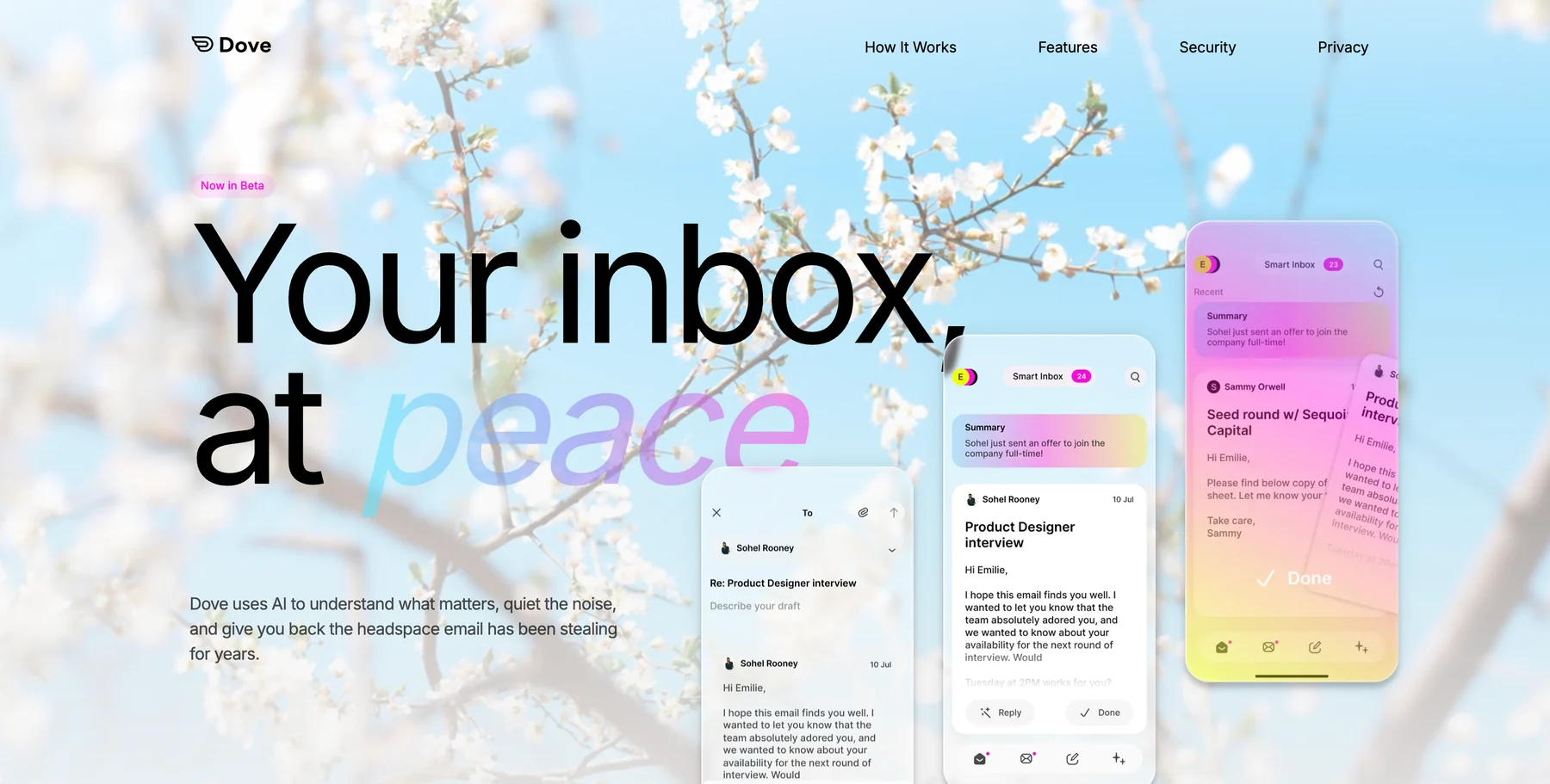
Each message lands in one of three states. Focus is the mail that needs you: a teammate blocked on a review, a security advisory for a package you actually ship, a question from a real person. Noise is what does not need you right now, the routine CI passes and the digests. Done is already handled. Open a Focus email and Wingman has already read the thread, so the buried ask, the decision that changed, or the deadline is sitting there before you type a word. AI Assist lets you search, archive, label, and draft in plain language. Every morning Daily Tasks turns your Focus mail into a ranked list of what to deal with. And Dove’s security scoring pulls phishing, including the fake package and CI notices aimed squarely at developers, before it reaches you.
For a closer look at how this kind of sorting works in practice, see our guide to building an email triage system.
Platforms: iOS, Android, macOS, Windows, and Web, with server-side classification that syncs everywhere instantly.
What it does well: Triage that actually decides, thread intelligence through Wingman, action-item extraction, built-in phishing protection, and an interface that keeps the bot noise off to the side. It runs on top of your existing Gmail, Microsoft, or IMAP account, so there is nothing to migrate.
Where it falls short: Dove is the newest name on this list and talks to fewer third-party tools so far, so it does not plug directly into your issue tracker or chat yet. A handful of the deeper power-user shortcuts are still landing.
Pricing: Dove is officially launched and still in beta. The free plan covers core inbox features with 10 AI actions per day across unlimited accounts, so you can start at no cost. Pro is $20/month with a 7-day free trial and unlocks unlimited AI, daily tasks, meeting detection, and one unified inbox across Gmail, Microsoft, and IMAP.
Best for: Developers who want the inbox to absorb the cognitive load of triage instead of handing it back in a different folder.
Try Dove on the inbox you already use.
2. Gmail (Google Workspace)
If your company runs Google, Gmail is already in front of you, and there is a real case for just staying put. It is reliable, fast to search, and endlessly scriptable. A motivated developer can build a surprising amount of automation out of filters, labels, and Apps Script, and it connects to nearly everything.
Platforms: Web, iOS, and Android, with desktop access through the browser.
What it does well: Powerful filters and search, a massive ecosystem and API surface, scripting through Apps Script, and rock-solid reliability. Most teams manage it centrally, so setup is rarely your problem.
Where it falls short: Gmail files and labels, but it does not triage. The blocking review still sits next to forty CI notifications, the built-in categories miss often enough to stop trusting them, and the native phishing warnings are not tuned for attacks aimed at engineers. You can write your own rules, sure, but now that is one more system you own and maintain.
Pricing: Free for personal accounts. Google Workspace plans start at about $6 per user per month for Business Starter, with higher tiers for more storage, security, and admin controls.
Best for: Developers who want the familiar default, are willing to maintain their own filters, and value the ecosystem and API access.
3. Outlook (Microsoft 365)
If your company runs Microsoft, Outlook is the equivalent default. It pairs email with a strong calendar, Teams, and the Office apps, and most teams hand out Microsoft 365 licenses anyway. The rules engine is genuinely powerful, and the security and compliance tooling is mature enough that regulated industries lean on it.
Platforms: Windows, macOS, iOS, Android, and Web.
What it does well: A deep rules and automation engine, a mature calendar, Teams and SharePoint integration, and enterprise-grade security and compliance that organizations trust.
Where it falls short: The interface is cluttered out of the box, and Focused Inbox guesses wrong until you train it. Copilot AI sits behind the paid Microsoft 365 tiers, and like Gmail it sorts more than it decides, so the routing logic is still yours to build and babysit.
Pricing: Free for personal accounts. Microsoft 365 Business plans start at about $6 per user per month, with higher tiers for advanced security and compliance.
Best for: Developers in Microsoft shops who rely on Teams, the Office apps, a strong calendar, and a powerful rules engine.
4. Superhuman
Superhuman is the speed play. Keyboard shortcuts, near-instant search, a deliberately stripped-down interface, all aimed at people who treat clearing email as a craft to do fast. If you already live in keybindings, the muscle memory carries over almost immediately, and the split inbox can quiet some of the notification noise.
Platforms: iOS, Android, macOS, Windows, and Web.
What it does well: Keyboard-first speed, very fast search, snippets for repeated replies, scheduled send, follow-up reminders, split inbox, and built-in AI assist for drafting. It feels fast in a way most clients do not.
Where it falls short: It is the priciest option here by a wide margin, and the triage is lighter than Dove’s full Focus, Noise, and Done sorting. It is built for people who send a lot of email, which is not most developers.
Pricing: Starts at about $30 per month, with annual billing discounts.
Best for: Developers who send a high volume of email, live in keyboard shortcuts, and will pay a premium for raw speed.
How to choose
Start with the problem you actually have. If your inbox is mostly bot noise and the one message that needs you keeps slipping through, the default work client is not going to fix that by itself. Switch to an AI-native app like Dove and let triage, thread intelligence, and task extraction do the deciding, on top of the account you already use. For more in that category, see our roundup of the best AI email apps, and if it is the sheer count getting to you, how to manage too many emails goes deeper.
If privacy comes first and you want the AI to stay optional If you are content inside Google or Microsoft and do not mind maintaining your own filters, Gmail and Outlook are fine, you just do the routing yourself. And if you send enough mail to justify the price, Superhuman is the one to beat on raw speed.
FAQ
What is the best email app for developers in 2026?
For most developers who want the noise cut and the one message that needs a reply surfaced, Dove is the strongest pick because it is AI-native: it triages every message into Focus, Noise, or Done, reads threads to surface the real ask, and builds a daily task list automatically. If privacy matters most and you want AI to stay optional with optional AI you turn on only when you want it.
Can I use these apps with my work Gmail or Outlook account?
Yes. Dove works on top of your existing Gmail, Microsoft, or IMAP account, so you keep your work address and get AI triage on top. Superhuman and . There is no migration and no change to your email address.
Does Dove cost anything?
Dove has a free plan with core inbox features and 10 AI actions per day across unlimited accounts, so you can start at no cost. Pro is $20/month with a 7-day free trial and unlocks unlimited AI, daily tasks, meeting detection, and one unified inbox across Gmail, Microsoft, and IMAP.
How do these apps handle GitHub, CI, and other automated notifications?
Dove classifies routine machine notifications as Noise and keeps Focus reserved for mail that needs a human reply, so a blocking review does not get lost under CI passes. Gmail and Outlook can file notifications with filters and rules, but you build and maintain that logic yourself, and the important message still sits in the same list. Superhuman’s split inbox can separate some categories, though it does not decide importance the way Dove does.
Which email app is best for managing multiple developer accounts?
Dove is built to hold multiple accounts in one inbox and triages them together across Gmail, Microsoft, and IMAP, so you stop switching apps between your work, personal, and open-source addresses. Superhuman and while Gmail and Outlook keep accounts more separate unless you configure forwarding.
Bottom line
If your inbox is mostly bot noise with a few messages that genuinely need you, stop scanning it by hand. Dove triages every message, reads the long threads, and pulls out the action items so a blocking review or a real security advisory never slips. with optional AI you turn on only when you want it. Gmail and Outlook are fine if you do not mind building and maintaining your own filters. And Superhuman is the premium speed option if you send enough mail to justify it.
Try Dove free, it works on top of your existing email and takes about two minutes to connect.
More from Dove
Recent posts

September 16, 2026
Dove vs Superhuman: Two Answers to the Same Inbox
Superhuman makes you faster at email. Dove does more of the email for you. Compare AI triage, platforms, providers and plans to find your fit.

August 17, 2026
Best Email App for Multiple Accounts in 2026
Juggling more than one inbox? Here is the best email app for multiple accounts in 2026, plus two other ways to fix inbox overwhelm for good.

July 1, 2026
Best Airmail Alternatives in 2026
The best Airmail alternatives in 2026 compared. See platform support, pricing, strengths, and weaknesses for Dove, Canary Mail, Spark Mail, Mimestream, Edison Mail, Shortwave, Outlook, and Apple Mail.