'/%3e%3c/g%3e%3c/svg%3e)

Best Fastmail alternatives in 2026
The best Fastmail alternatives in 2026, compared by platform, AI, pricing, strengths, and weaknesses. See how Dove, Canary Mail, Proton Mail, and Tuta stack up.

Fastmail has earned its reputation. It is quick, it respects your privacy, it comes from an independent company that makes money selling email rather than your data, and it works with any standard mail client over IMAP. If you left Gmail on principle and just wanted a clean, reliable inbox, Fastmail has probably served you well.
So why do so many Fastmail users start shopping around in 2026? Because Fastmail deliberately sat out the AI wave. It will store and sync your mail beautifully, but it will not tell you what changed in a long thread, draft a reply, pull action items into a task list, separate the urgent from the noise, or warn you about a phishing attempt before you click. There is also no dedicated desktop app, so on a laptop you either live in a browser tab or wire it into another client.
This guide ranks the best Fastmail alternatives by what they actually do, with honest notes on platforms, pricing, and trade-offs. Dove and Canary Mail come first because they are the two products our team builds and knows best, followed by the strongest privacy-focused options.
Key takeaways
Dove is the pick if you want the inbox to do the thinking: AI-native sorting into Focus, Noise, and Done, with thread analysis and a daily task list, so the mail that needs you stops getting buried.
Canary Mail is the privacy-first choice, a mature encrypted client with optional AI you switch on only when you want it, which fits Fastmail users who liked the restraint but want power-user tools.
Proton Mail and Tuta go further on encryption than Fastmail, but neither solves triage or adds real AI.
Fastmail is still excellent at fast, private, standards-based hosting, so if you never wanted software making decisions about your mail, staying put is reasonable.
Match the app to your real problem: deciding what needs a reply is a different job from delivering and storing mail well.
What to look for in a Fastmail alternative
First, be clear about what Fastmail is and is not. It is a great email host: fast, private, and happy to stay out of your way. What it does not do is think about your mail for you. Once a message lands in the inbox, you are on your own.
A strong alternative should improve on at least one of these:
Triage that decides, not just delivers. Getting mail into a folder is not the same as telling you what needs a reply today.
Help inside the message. Long threads hide changed terms, deadlines, and action items. A good tool surfaces them instead of making you reread.
Real platform coverage. You read email on a phone and a laptop, so the experience should follow you, ideally with a native desktop app and not just a browser tab.
Security, not just storage. Phishing and impersonation belong out of your way automatically, with a clear risk signal.
Privacy you can actually verify. If you are leaving Gmail on principle, encryption and an independent company still matter.
With that frame, here is how the top alternatives compare.
Quick comparison
The table below is the fast version. Each tool is covered in detail further down, including what it does well and where it falls short.
Email app | Platforms | AI approach | Starting price | What it does well | Where it falls short |
|---|---|---|---|---|---|
iOS, Android, macOS, Windows, Web | AI-native, triage is the foundation | Free plan (10 AI actions/day); Pro $20/month, 7-day trial | Automatic Focus, Noise, and Done triage, thread intelligence, task extraction, security scoring | Newest name here, smaller third-party integration list today | |
iOS, macOS, Android, Windows | Optional AI, Copilot is opt-in | Free tier (no AI); Growth $36/year, Pro+ $100/year | Privacy-first, PGP encryption, mature client, AI you can leave off | AI is an add-on, not the core; feature-dense for new users | |
Proton Mail | Web, iOS, Android, macOS, Windows, Linux | Limited, optional writing assistant | Free (1GB); Mail Plus ~$3.99/month; Unlimited ~$9.99/month | End-to-end encryption, Swiss privacy, full app lineup | Needs Bridge for IMAP desktop clients; AI help is minimal |
Tuta | Web, iOS, Android, macOS, Windows, Linux | No AI by design | Free (1GB); Revolutionary ~€3/month; Legend ~€8/month | Strong encryption including subject lines, low cost, green hosting | No IMAP or standard protocols, no AI, smaller ecosystem |
Fastmail | Web, iOS, Android (desktop via IMAP only) | No AI | Individual ~$6/month (cheaper annually), 60GB | Fast, reliable, independent, great IMAP and Masked Email | No real triage, no AI, no dedicated desktop app |
Pricing is approximate and changes often, so check each provider for current rates before you commit.
1. Dove
Dove is an AI-native email app, and it is the sharpest departure from the Fastmail model. Fastmail gives you a fast, private place to keep mail. Dove reads and sorts that mail for you, because here the AI is the foundation, not a feature bolted on after the fact.
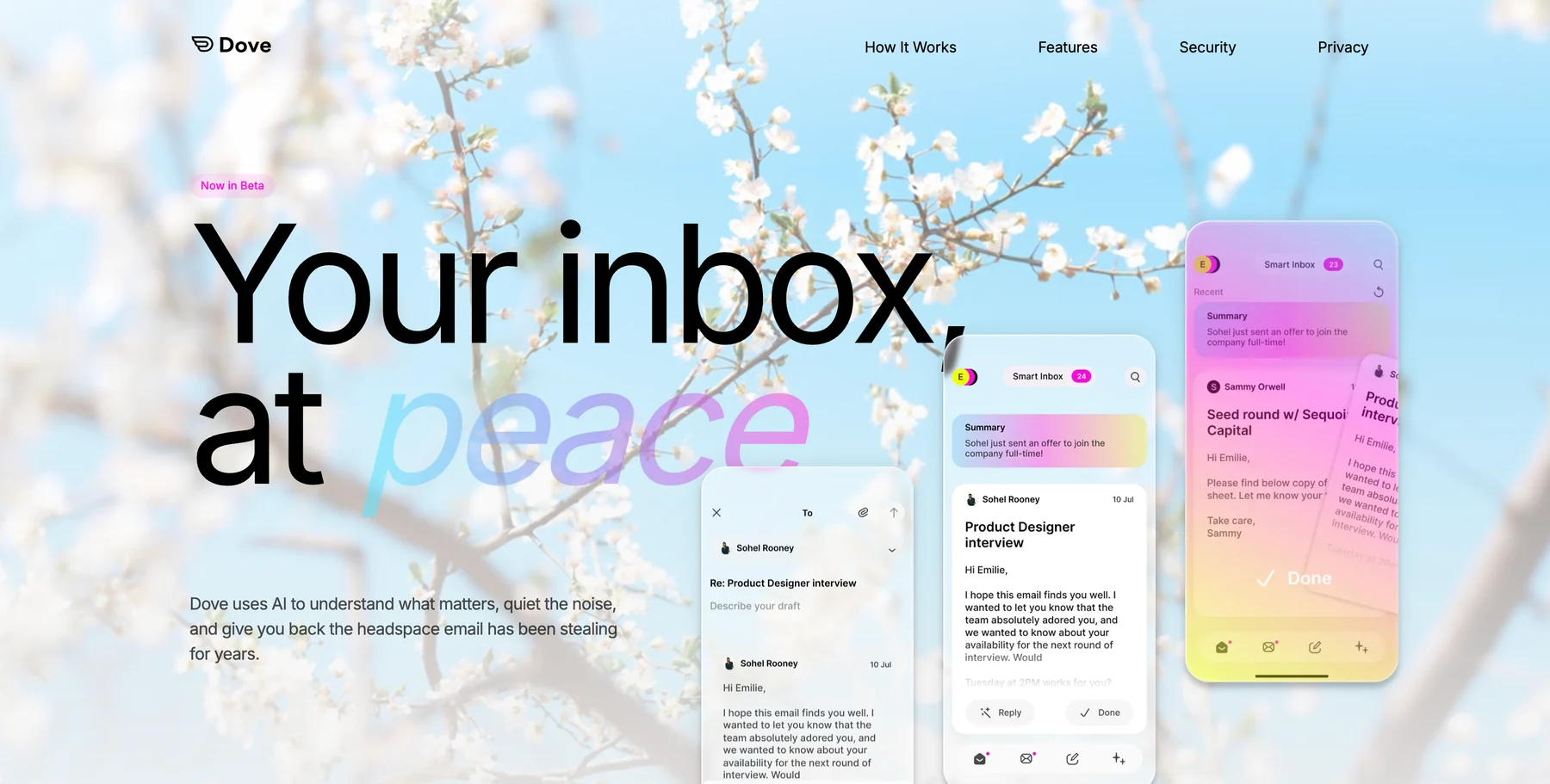
Every incoming message lands in one of three states: Focus (needs you), Noise (does not need you), or Done (already handled). There is no “maybe later” pile to babysit. Open a Focus email and Wingman reads the whole thread and points out risks, gaps, changed terms, and overdue items before you reply. AI Assist lets you talk to your inbox in plain language to search, archive, label, and draft. Every morning, Daily Tasks turns your Focus mail into a ranked to-do list, and Dove’s security scoring quarantines dangerous mail before it reaches you.
If you want a deeper look at how this style of sorting works, see our guide to the email triage system.
Platforms: iOS, Android, macOS, Windows, and Web, with server-side classification that syncs everywhere instantly. Unlike Fastmail, the desktop experience is a real native app, not a browser tab.
What it does well: Automatic triage that actually decides, thread intelligence through Wingman, task extraction, built-in security scoring, and a calm interface designed to reduce inbox dread.
Where it falls short: Dove is the newest name here, so it connects to fewer third-party tools today, and it is not built around standalone IMAP the way a traditional host is. Some classic power-user shortcuts are still being added.
Pricing: A free plan covers core inbox features with up to 10 AI actions per day across unlimited accounts. Pro is $20/month with a 7-day free trial, and it unlocks unlimited AI with no credits or caps, daily tasks, meeting detection, and one inbox for Gmail, Microsoft, and IMAP across Mac, iOS, Windows, Android, and Web.
Best for: People who want AI to carry the cognitive load of email rather than just store it neatly.
Try Dove on the inbox you already use.
2. Canary Mail
Canary Mail is the mature, privacy-first sibling to Dove, built by the same team. If your main reason for liking Fastmail is privacy and control, Canary Mail is the most natural move, because it is a full traditional email client with strong encryption and AI that stays completely optional.
Its Copilot AI is genuinely opt-in. Run Canary Mail as a fast, private, encrypted client with no AI in the loop at all, and flip on AI assist for drafting or summaries only when it earns its place. That suits people who liked Fastmail’s restraint but want deeper power-user tools and AI strictly on their own terms.
Platforms: iOS, macOS, Android, and Windows, with native apps rather than a web-only desktop experience.
What it does well: Privacy-first design with PGP encryption, HIPAA-compliant SecureSend, on-device processing, read receipts, snooze, templates, and a deep set of power-user tools. It is battle-tested with more than 2 million users.
Where it falls short: Because the AI is optional and added on top, it is not the organizing principle the way it is in Dove. The feature set can also feel dense if you only want a simple inbox.
Pricing: A free tier with no AI. Paid plans are Growth at $36/year (about $3/month) and Pro+ at $100/year, with lifetime options. Because the AI Copilot lives in the paid tiers, you only pay for AI if you actually want it.
Best for: Privacy-conscious Fastmail users who want a proven, encrypted client with optional, on-demand AI.
3. Proton Mail
If your move away from Fastmail is really about pushing privacy further, Proton Mail is the obvious pick. It is a Swiss, end-to-end encrypted service with a full lineup of apps, and it folds into a wider suite of VPN, calendar, drive, and password tools when you want them.
Platforms: Web, iOS, Android, and desktop apps for macOS, Windows, and Linux. Connecting a standard desktop mail client over IMAP requires Proton Mail Bridge, which is a paid-tier feature.
What it does well: Genuine end-to-end encryption, a strong privacy track record, a clean modern interface, and a broad app ecosystem under one account.
Where it falls short: The encryption model means standard IMAP access needs the Bridge, which is less seamless than Fastmail’s open approach. Its AI help is minimal, currently limited to an optional writing assistant, so it does not solve the triage or thread-intelligence problem.
Pricing: A free plan includes 1GB. Mail Plus is around $3.99/month and Proton Unlimited is around $9.99/month billed annually, with family plans available.
Best for: People whose top priority is encrypted, independent email and who want a whole privacy suite, not AI.
4. Tuta
Tuta, formerly Tutanota, is the most privacy-maximal option on this list. It encrypts more of the message than most rivals, including subject lines, runs on green-powered infrastructure, and is built by a German company with a strong stance on data protection.
Platforms: Web, iOS, Android, and desktop apps for macOS, Windows, and Linux.
What it does well: Very strong encryption that covers subject lines and the address book, low pricing, and a clear, no-tracking privacy philosophy.
Where it falls short: Because of its encryption model, Tuta does not support IMAP, POP, or SMTP, so you cannot use it with a third-party client at all, which is a hard stop if open protocols are exactly why you liked Fastmail. It has no AI features and a smaller ecosystem.
Pricing: A free plan includes 1GB. Revolutionary is around €3/month and Legend is around €8/month, both cheaper when billed annually.
Best for: Privacy purists who want maximum encryption and are happy to live entirely inside Tuta’s own apps.
5. Fastmail itself (and when to keep it)
It is fair to ask whether you should switch at all. If your inbox is calm, you live mostly in one account, you care about open standards, and you have no interest in AI touching your mail, Fastmail still earns its keep. Its IMAP and JMAP support is excellent, Masked Email is a genuinely handy privacy feature, and it remains one of the few independent hosts that has stayed focused and reliable year after year.
Platforms: Web and native iOS and Android apps. On the desktop there is no dedicated app, so you use the web or connect Fastmail to a client like Apple Mail or Outlook over IMAP.
What it does well: Fast, dependable hosting, real privacy without lock-in, excellent support for standard protocols, and Masked Email for throwaway addresses.
Where it falls short: It delivers and stores, and that is the whole job. No triage, no thread intelligence, no drafting, no task extraction, no security scoring, and no native desktop app. Everything past “your mail arrived” is left to you.
Pricing: The Individual plan is around $6/month (cheaper billed annually) with 60GB of storage, plus Duo and Family plans for more people.
Best for: People who want fast, private, standards-based email and do not want software making decisions about their mail.
How to choose
If you want the inbox to think for you, move to an AI-native client like Dove and let triage, thread intelligence, and task extraction replace the manual sorting habit. For more options in that category, see our roundup of the best AI email apps, and if sheer volume is your problem, our guide on how to manage too many emails goes deeper.
If privacy is your first priority but you still want a modern client and optional AI, Canary Mail is the strongest fit. If you want maximum encryption with no AI at all, Proton Mail and Tuta both deliver, with Proton offering a wider app suite and Tuta going furthest on encryption. And if you only ever wanted fast, private, standards-based hosting, Fastmail was never broken, so keeping it is a perfectly reasonable answer.
Frequently asked questions
What is the best Fastmail alternative in 2026?
For most people who want more than fast, private hosting, Dove is the strongest alternative because it is AI-native: it triages every message into Focus, Noise, or Done, reads threads for you, and extracts tasks automatically. If privacy and a proven client matter most, Canary Mail is the better fit, with optional AI you turn on only when you want it.
Why would I switch away from Fastmail?
Fastmail is excellent at delivering and storing mail privately, but it deliberately has no AI, no automatic triage, no thread intelligence, and no dedicated desktop app. People usually switch when they want the inbox to help decide what needs a reply, summarize long threads, draft messages, or build a task list, rather than just hold their email.
Does Dove cost anything?
Dove has a free plan with core inbox features and up to 10 AI actions per day across unlimited accounts. Pro is $20/month with a 7-day free trial, and it unlocks unlimited AI, daily tasks, security scoring, and sync across iOS, Android, macOS, Windows, and Web.
Is Canary Mail’s AI required to use it?
No. Canary Mail’s Copilot AI is optional. You can use Canary Mail as a fast, encrypted, privacy-first client with no AI in the loop, then enable AI assist for drafting or summaries only when it is useful. The AI lives in the paid tiers, so you only pay for it if you want it.
Which Fastmail alternatives are most private?
Proton Mail and Tuta are the most privacy-maximal, with end-to-end encryption and independent ownership, though neither solves the AI or triage problem. Canary Mail offers PGP encryption with a mature client and optional AI, which is a good middle ground for Fastmail users who want privacy plus modern features.
Which Fastmail alternative has a real desktop app?
Dove, Canary Mail, Proton Mail, and Tuta all offer native desktop apps for macOS and Windows, with Dove and Canary Mail also covering mobile. Fastmail has no dedicated desktop app, so on a laptop you use the web or connect it to a client like Apple Mail or Outlook over IMAP.
Bottom line
Fastmail does one job extremely well: fast, private, standards-based hosting from an independent company. If that is all you ever wanted, it is still hard to beat. The moment you want the inbox to actually help, though, its deliberate lack of AI starts to show. Dove is the cleanest upgrade, triaging every message into Focus, Noise, and Done, reading long threads, and pulling out tasks so nothing important slips. Canary Mail covers the same ground when privacy comes first, with optional AI you turn on only when you want it. Proton Mail and Tuta push encryption further if maximum privacy is the goal, and Fastmail itself is a fine place to stay if you would rather no software made decisions about your mail.
Try Dove free, it works on top of your existing email and takes about two minutes to connect.
More from Dove
Recent posts
June 22, 2026
Best Email Apps for Developers in 2026
The best email apps for developers in 2026, compared by platform support, AI, pricing, strengths, and weaknesses. See how Dove, Canary Mail, Gmail, Outlook, and Superhuman handle a developer's inbox.

June 19, 2026
Best Email Apps for Teachers in 2026
The best email apps for teachers in 2026, compared by platform, AI, pricing, strengths, and weaknesses. See how Dove, Canary Mail, Gmail, Outlook, and Spark stack up for the classroom inbox.

June 18, 2026
Best Email Apps for Students in 2026
The best email apps for students in 2026, compared by platform, AI, pricing, strengths, and weaknesses. See how Dove, Canary Mail, Gmail, Outlook, Spark, and Proton Mail handle deadlines, .edu accounts, and scam emails.