'/%3e%3c/g%3e%3c/svg%3e)

Best Email Apps for Lawyers in 2026
The best email apps for lawyers in 2026 compared. See platform support, pricing, encryption, strengths, and weaknesses for Dove, Outlook, Gmail, Superhuman, ProtonMail, Spark, and Front.
The best email app for a lawyer is the one that protects privilege, keeps client matters organized, and stops eating the part of the day that should be spent on actual legal work. That is a high bar. Outlook and Gmail dominate firm IT, but they were not designed for the way attorneys actually triage email between depositions, court appearances, and 6 PM partner replies.
This guide compares eight email apps that legal teams use in 2026, across platforms, pricing, encryption, what each one does well, and where each one falls short. Some are AI native, some are classic clients hardened for compliance, and some are team inboxes for case-level collaboration. The right pick depends on whether you are a solo practitioner, a partner at a 200-attorney firm, or running an in-house legal function inside a tech company.
Key Takeaways
Doveis the strongest AI native pick for lawyers who want their inbox to sort itself into Focus, Noise, and Done without learning a new email address.
Outlook and Gmail remain the safe default for firm IT, especially when retention, e-discovery, and Microsoft 365 or Google Workspace tooling are already in place.
Superhuman is the right choice when partner billable time is the most expensive resource in the room.
You do not always need a new email address. Dove Spark, and Front layer on top of your existing firm account.
What lawyers actually need from email
Email at a law firm is not a personal productivity problem. It is a privilege, retention, and trust problem with a productivity layer bolted on top. When you evaluate a client, weigh these:
Confidentiality and encryption. Privileged communications need either transport security and a trustworthy provider, or end to end encryption for the sensitive thread. PGP, S/MIME, or zero knowledge providers all qualify in different ways.
Retention and e-discovery. Many firms must keep messages for years, surface them on demand, and prove nothing was tampered with. Microsoft 365 and Google Workspace handle this through Purview and Vault. Independent clients need to play nicely with that.
Audit trail and conflict checks. Attorneys often need to show who saw what and when, and route incoming matters past a conflicts team before a reply goes out.
Triage at speed. Partners and senior counsel get hundreds of low value messages a day. The client should distinguish a court clerk from a CC chain about office snacks without you having to read every subject line.
Billable time discipline. The amount of time spent inside email is, in practice, billable. Tools that move you through email faster reclaim hours per week that compound across a year.
Platform support. Lawyers work on a desktop in chambers, an iPhone on the way to court, and an iPad on the plane. The client should be excellent on all three, not strong on one and acceptable elsewhere.
The best email apps for lawyers at a glance
App | Platforms | Encryption | Free option | Paid pricing | Best for |
|---|---|---|---|---|---|
macOS, Windows, iOS, Android, Web | TLS in transit, AI runs on your existing account | Free plan, 10 AI actions/day | $20/month, 7 day trial | AI native triage that learns how you sort matters | |
Microsoft Outlook (M365) | Windows, macOS, iOS, Android, Web | TLS, S/MIME, Purview compliance add ons | Outlook.com free | Microsoft 365 Business Standard from $12.50/user/month | Firms standardized on Microsoft 365 and Purview |
Gmail (Google Workspace) | Web, iOS, Android, third party desktop | TLS, S/MIME with Workspace Enterprise, Vault retention | Personal Gmail free | Google Workspace Business Standard from $14/user/month | Firms on Google Workspace that need Vault and shared drives |
Superhuman | macOS, Windows, iOS, Android, Web | TLS, AI features cloud based | No | From $30/month | Partners and senior counsel optimizing billable time |
ProtonMail | Web, macOS, Windows, iOS, Android | Zero knowledge end to end, Swiss jurisdiction | Yes, 1 GB | Mail Plus from $4.99/month, Proton Unlimited tier available | Practitioners who need encrypted communications with select counterparties |
Spark Mail | macOS, Windows, iOS, Android | TLS, team shared inboxes | Yes | Premium plans starting around $7.99/month per user | Small legal teams that want shared drafting on a case |
Front | Web, macOS, Windows, iOS, Android | TLS, shared inboxes, audit log | No | Starter from about $19/seat/month | Litigation teams and in house counsel running shared case inboxes |
1. Dove: best AI native email app for lawyers
Dove is built around the idea that you should not be the first line of email triage. The inbox is split into Focus, Noise, and Done so that opposing counsel, a court filing, or a client matter never sits next to a vendor newsletter. Dove sits on top of your existing Gmail or Microsoft 365 account, so there is no new address, no migration, and no change in how your firm handles retention.
For lawyers, the practical effect is that the first ten minutes of the day no longer disappear into Gmail. Privileged threads from a specific client surface together. Calendar invites and court reminders are pulled out of the noisy promotional layer. Drafts that need a partner’s review can be flagged without leaving the inbox.
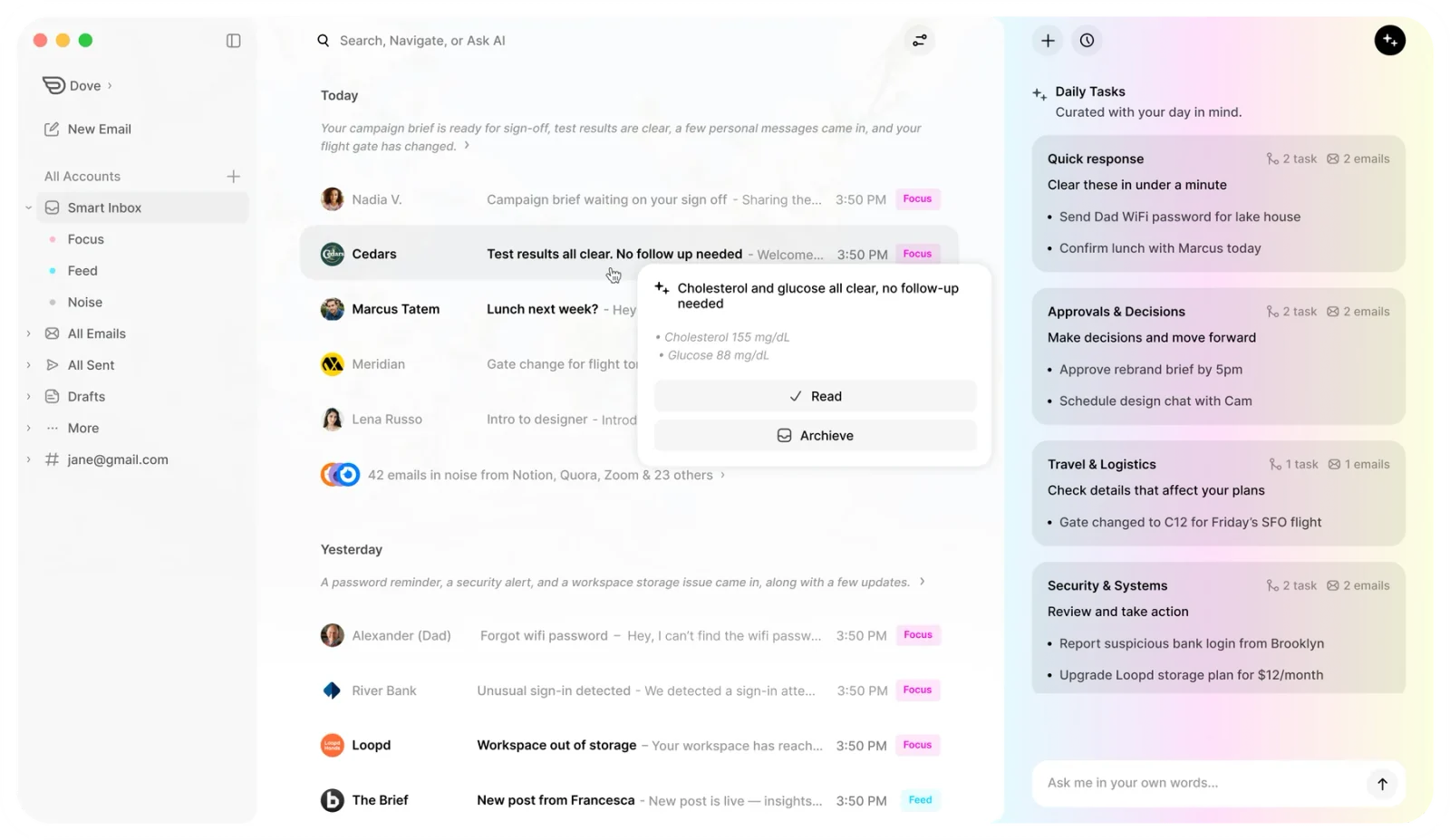
Pricing. Dove has a free plan with 10 AI actions per day. The paid plan is $20 per month and includes a 7 day trial.
Platforms. macOS, Windows, iOS, Android, and Web. The mobile apps are first class, not afterthoughts, which matters when you are reading a brief from a courthouse hallway.
What Dove does well
Three category triage that matches how lawyers actually think about email, urgent matter work, background reading, completed threads.
Wingman drafts and AI Assist help with replies without rewriting the voice partners expect on outbound communication.
Works on top of your existing firm email, so privilege, retention, and IT policies stay on the firm side.
What Dove does poorly
It is not a discovery or retention tool. If your firm requires a discovery hold or a legal vault, you still need Microsoft Purview or Google Vault under it.
Cloud AI features are a deal breaker for some bar associations that require everything on device.
Lawyers comparing Dove to other AI tools should read the best AI email apps in 2026 for a wider survey.
2. Microsoft Outlook (Microsoft 365): the firm IT default
Outlook is still the most common email client in legal because most firms are standardized on Microsoft 365. Purview gives compliance teams retention policies, sensitivity labels, eDiscovery, and audit logs. Outlook itself handles S/MIME, calendar, and document attachments well, with deep Teams and SharePoint integration.
For larger firms with a dedicated information governance function, Outlook plus Purview is often a non negotiable foundation. Other clients live on top of it, not in place of it.
Pricing. Microsoft 365 Business Standard starts at $12.50 per user per month. Outlook.com is free for personal use.
Platforms. Windows, macOS, iOS, Android, Web.
What Outlook does well
Deep compliance and retention through Microsoft Purview, used widely in regulated industries.
Excellent calendar and meeting workflow, especially with Teams.
Familiar to firm IT, opposing counsel, and clients, which reduces friction.
What Outlook does poorly
Triage is largely manual. Focused Inbox helps a little but is not a real priority system.
Mobile clients are functional, not great, particularly for heavy threads.
The AI features available through Copilot are powerful but priced as a separate seat add on.
3. Gmail (Google Workspace): the other firm default
Google Workspace is the dominant alternative to Microsoft 365 in legal, particularly at boutique firms, in house legal teams at tech companies, and any organization already standardized on Google for documents and calendars. Vault provides retention and eDiscovery. Workspace Enterprise supports S/MIME encryption and client side encryption for sensitive matters.
The Gmail client is fine. The Workspace stack underneath it is what most firms are actually choosing.
Pricing. Personal Gmail is free. Google Workspace Business Standard starts at $14 per user per month.
Platforms. Web, iOS, Android. Desktop access is via browser or third party clients.
What Gmail does well
Vault retention and eDiscovery for legal hold workflows.
Strong spam and phishing detection out of the box.
Best in class search, which matters when you are looking for a single email from 2019.
What Gmail does poorly
No first party desktop client, which some senior partners resist.
Triage in the default Gmail UI is mostly tabs and labels, not real priority sorting.
Built in Gemini features are improving but not as opinionated as Dove or Superhuman.
If your team is comparing Gmail to alternatives, the best Gmail alternatives for power users covers the territory in more detail.
4. Superhuman: speed for partners
Superhuman is the email app for lawyers whose hourly rate makes time inside email expensive. The whole product is built around keyboard speed, split inbox, snippets, and AI drafted replies that match how you actually write. Senior partners who answer hundreds of emails a day, often from a phone, are the core audience.
It is not the right pick for the whole firm. It is the right pick when the marginal hour of a senior attorney is worth more than the cost of the seat several times over.
Pricing. From $30 per month. No free tier.
Platforms. macOS, Windows, iOS, Android, Web.
What Superhuman does well
Pure speed. Keyboard shortcuts and split inbox shave real time off heavy email days.
AI drafted replies that adapt to your tone.
Excellent iOS app for partners who triage from a car or hallway.
What Superhuman does poorly
Price. $30 per user per month is not a firmwide spend for most practices.
No PGP and no on device encryption story.
Aggressive priority inbox can hide a thread you actually wanted to see.
If you are weighing Superhuman against alternatives, see the best Superhuman alternatives in 2026.
5. ProtonMail: zero knowledge encrypted email
ProtonMail is what you reach for when a specific matter needs encrypted communication, opposing counsel agrees to use it, or you are operating under a regulatory regime that effectively demands zero knowledge storage. Based in Switzerland, ProtonMail uses zero knowledge end to end encryption so the provider cannot read your stored email.
For most lawyers, ProtonMail is a second account, not the firmwide client. It pairs with a primary Outlook or Gmail setup for highly sensitive threads.
Pricing. Free tier with 1 GB. Mail Plus from $4.99 per month. Proton Unlimited bundles VPN, Drive, Calendar, and Pass.
Platforms. Web, macOS, Windows, iOS, Android. Desktop IMAP requires the Proton Bridge.
What ProtonMail does well
Zero knowledge end to end encryption with Swiss jurisdiction.
Encrypted, password protected messages to non Proton recipients.
A broader privacy ecosystem, VPN, Drive, Calendar, Pass, that can serve as a parallel privacy stack.
What ProtonMail does poorly
Less convenient for high volume daily triage compared to Dove or Superhuman.
Search and filtering are weaker than Gmail or Outlook.
Requires the Bridge for native desktop client use, which is friction for some users.
6. Spark Mail: collaborative drafting for small teams
Spark is a strong fit for small legal teams that want to draft replies together on a single client matter without bouncing Word documents around. Shared inboxes, comments on emails, and collaborative drafts let two attorneys work on the same response without merging conflicts.
Pricing. Free tier available. Premium plans start around $7.99 per user per month.
Platforms. macOS, Windows, iOS, Android.
What Spark does well
Collaborative drafting and inline comments for shared replies.
Clean cross platform clients, particularly on iOS.
Smart inbox that separates personal, transactional, and notification email.
What Spark does poorly
The collaboration features are useful for small teams, but not a substitute for a real case management system.
Privacy posture is reasonable but not encryption first.
AI features are improving but lighter than Dove or Superhuman.
If your team is comparing Spark with other team focused clients, see the best Spark Mail alternatives in 2026.
7. Front: shared inbox for case teams
Front is not a single user email app. It is a shared inbox platform built for teams that handle email together, with assignment, internal comments, and SLA tracking. For litigation teams, in house legal departments, and any practice running a contracts@ or intake@ queue, Front is the workflow most other clients quietly try to imitate.
Pricing. Starter plans start at around $19 per seat per month.
Platforms. Web, macOS, Windows, iOS, Android.
What Front does well
Real shared inbox semantics with assignment, internal notes, and audit logs.
SLA timers and reporting suited to legal intake and contracts workflows.
Integrates with Salesforce, HubSpot, Zapier, and most case management tools.
What Front does poorly
Per seat pricing adds up quickly for larger teams.
Overkill for solo practitioners or single attorney workflows.
The personal inbox experience is fine, but not the strongest single user client on this list.
How to choose the right email app for your practice
A simple decision tree, mapped to the way most firms actually buy:
Mid sized firm standardized on Microsoft 365. Keep Outlook plus Purview as the foundation. Layer Dove on top for attorneys who want triage, or Superhuman for partners.
In house legal team at a tech company. Front for the team inbox, plus Dove or Superhuman for individual attorneys.
FAQ
What is the most secure email app for lawyers?
For confidential and privileged communications, ProtonMail offers zero knowledge end to end encryption and Swiss jurisdiction. For day to day firm email, Microsoft 365 with Purview and Google Workspace with Vault remain the standard, with transport encryption and compliance grade retention.
Can lawyers use Gmail for client communication?
Yes, with Google Workspace Business Standard or higher. The personal free version of Gmail is generally not appropriate for client matter email, because it lacks Vault retention, S/MIME, and the administrative controls a firm or in house team needs.
Is Dove a good fit for law firms?
Dove is well suited for attorneys who want AI native triage on top of an existing Gmail or Microsoft 365 account. It does not replace retention, e-discovery, or PGP. It sits on top of them and removes the manual sorting work that eats into billable hours.
What is the best email app for partners who bill by the hour?
Superhuman is the most common pick for partners optimizing billable time, because it is built around keyboard speed and AI drafted replies. Dove is the alternative when the partner wants a triage layer that learns how they sort matters, rather than pure speed.
Do lawyers need a separate encrypted email account?
Often, yes. A common pattern is a primary firm account on Microsoft 365 or Google Workspace, and a secondary account on ProtonMail .
Can I use these email apps on iPhone and iPad?
Dove, Outlook, Gmail, Superhuman, ProtonMail, Spark, and Front all ship iOS apps that work on iPhone and iPad. For a deeper look at mobile, seethe best email apps for iPhone in 2026.
How much do AI email apps cost for legal teams?
For AI native clients, Dove is $20 per user per month with a free tier that includes 10 AI actions per day, and Superhuman is $30 per user per month, with AI features available at additional cost. Outlook and Gmail include AI through Copilot and Gemini, sold as separate add ons.
The bottom line
The honest answer is that no single app wins for every firm. It comes down to where your day actually leaks time. If you want the inbox to sort itself into Focus, Noise, and Done without making everyone learn a new address, Dove is the strongest AI native pick. When privilege is the first line of the brief and you want PGP with the option to switch AI off Plenty of firms will stay on Outlook or Gmail, and that is fine when retention, e-discovery, and the rest of the Microsoft 365 or Google Workspace stack already run the practice. Superhuman pays for itself when a senior partner's hour is the scarcest thing in the building, and ProtonMail is worth keeping around for the occasional matter that genuinely needs zero knowledge encryption. Start with the bottleneck that is costing you the most time, and pick the tool that fits the way your firm already works.
Try Dove free - works on top of your existing firm email, takes 2 minutes to connect.
More from Dove
Recent posts

August 17, 2026
Best Email App for Multiple Accounts in 2026
Juggling more than one inbox? Here is the best email app for multiple accounts in 2026, plus two other ways to fix inbox overwhelm for good.

July 1, 2026
Best Airmail Alternatives in 2026
The best Airmail alternatives in 2026 compared. See platform support, pricing, strengths, and weaknesses for Dove, Canary Mail, Spark Mail, Mimestream, Edison Mail, Shortwave, Outlook, and Apple Mail.
June 30, 2026
Best Spike Alternatives in 2026
The best Spike alternatives in 2026 compared. See platforms, pricing, strengths, and weaknesses for Dove, Shortwave, Spark, Missive, and Superhuman.