'/%3e%3c/g%3e%3c/svg%3e)

Best Email Apps for Sales Teams in 2026
The best email apps for sales teams in 2026 compared. See platform support, pricing, what each tool does well, and what it does poorly. Covers Dove Superhuman, Mixmax, Yesware, Streak, Spark Mail, and Spike.

Sales reps live in their inbox. A good sales email app is the difference between a pipeline that moves and one that quietly stalls behind unread threads. By 2026 the category has split into three camps. There are AI-native clients that triage and draft for you, traditional inboxes with sales tooling bolted on, and engagement platforms that automate sequences but feel less like an email app and more like a CRM.
This guide cuts through that mess. Below are the eight best email apps for sales teams in 2026, compared on platform support, pricing, what each app does well, and where each one falls short. We tested them with the workflows reps actually use, prospecting, follow-ups, scheduling, deal threads with five stakeholders, and the dreaded post-vacation catch-up.
Key takeaways
Dove is the best pick for reps who want AI to take real work off the inbox. It sorts every email into Focus, Noise, and Done before you open the app, drafts replies in your tone, and works across Gmail, Outlook, iCloud, and IMAP.
Superhuman is the speed benchmark for high-volume reps if price is not a constraint and your accounts are Gmail or Outlook.
Mixmax, Yesware, and Streak are sales-engagement tools that sit on top of Gmail, strong on sequences and tracking, less strong as a daily email app.
Spark Mail and Spike are the calmer cross-platform picks if you want a smart inbox and shared drafts without paying for a full sales platform.
Pricing for serious sales tooling ranges from a $20 per month all-in AI plan (Dove) to $30 or more per seat (Superhuman, Yesware Premium).
What sales teams actually need from an email app
“Sales email” is not one job. A good app for a sales team has to handle four overlapping workflows.
Prospecting and outreach. Templates, mail merge, send later, and link tracking so reps can hit a daily outreach quota without copy-pasting.
Reply prioritization. Inbound replies, hot leads, and warm follow-ups need to surface first. A wall of unread does not help anyone close.
Deal threads. Long threads with five stakeholders, attachments, and rolling context. The app needs to summarize and surface the asks, not just store the messages.
Pipeline visibility. Some teams want a light CRM inside the inbox. Others want clean integration with Salesforce or HubSpot. Either way, knowing the stage of a deal without leaving email matters.
No single tool nails all four. Dove and . Mixmax, Yesware, and Streak focus on outreach and pipeline. Superhuman, Spark, and Spike sit in between with strong general inbox features and lighter sales tooling.
The right pick depends on whether your team needs the inbox itself to get smarter, or the outreach layer to get more automated. Most teams need both, which is why the strongest setups in 2026 pair an AI-native client like Dove with a focused outreach tool, rather than buying a single sprawling sales platform.
Best email apps for sales teams at a glance
App | Platforms | Free tier | Paid pricing | What it does well | What it does poorly |
|---|---|---|---|---|---|
Web, iOS, Android, macOS, Windows | Yes, free plan with up to 10 AI actions per day | $20 per month, 7-day free trial | AI triage into Focus, Noise, and Done across any account, AI Assist drafts replies in your tone | Not a sequencing or CRM tool, light on outbound automation | |
Superhuman | macOS, Windows, iOS, Android, Web | No | From around $30 per month per seat | Keyboard speed, snippets, reminders, AI summaries, fast Gmail and Outlook triage | Expensive, only supports Gmail and Outlook, no full CRM or sequencer |
Mixmax | Web (Gmail), Chrome extension, iOS, Android | Limited free | Starter around $29 per user per month, paid tiers up to around $69 per user per month for Growth+CRM | Sequences, templates, link tracking, calendar links, light CRM, deep Salesforce integration | Gmail only, the inbox itself is still Gmail underneath |
Yesware | Web (Gmail and Outlook), Chrome, Outlook add-in | 14-day trial | Pro around $19 per seat per month, Premium around $45 per seat per month, Enterprise around $85 per seat per month | Mature tracking, templates, multi-channel campaigns, strong Salesforce sync | Not a standalone inbox, locks key features behind higher tiers |
Streak | Web (Gmail), Chrome extension, iOS, Android | Yes, personal free tier | Solo around $19 per user per month, Pro around $59 per user per month, Enterprise around $159 per user per month | CRM pipelines inside Gmail, deal tracking, shared inboxes, mail merge | Gmail only, no Outlook, can feel heavy if you mostly want an inbox |
Spark Mail | macOS, iOS, Android, Windows | Limited free tier | Premium around $7.99 per month, with annual discounts | Cross-platform smart inbox, shared drafts, team comments | Sales features are light, sequencing and tracking are not first-class |
Spike | Web, macOS, Windows, iOS, Android | Yes | Pro from around $6 per user per month, Business plans higher | Conversational chat-style threads, fast inbound triage | Chat metaphor does not suit every sales workflow, no sequencer |
The rest of this guide walks each app in detail. Dove and AI-native triage and privacy-first sales communication. The other six follow.
1. Dove, best for AI-native triage and reply drafting across any account
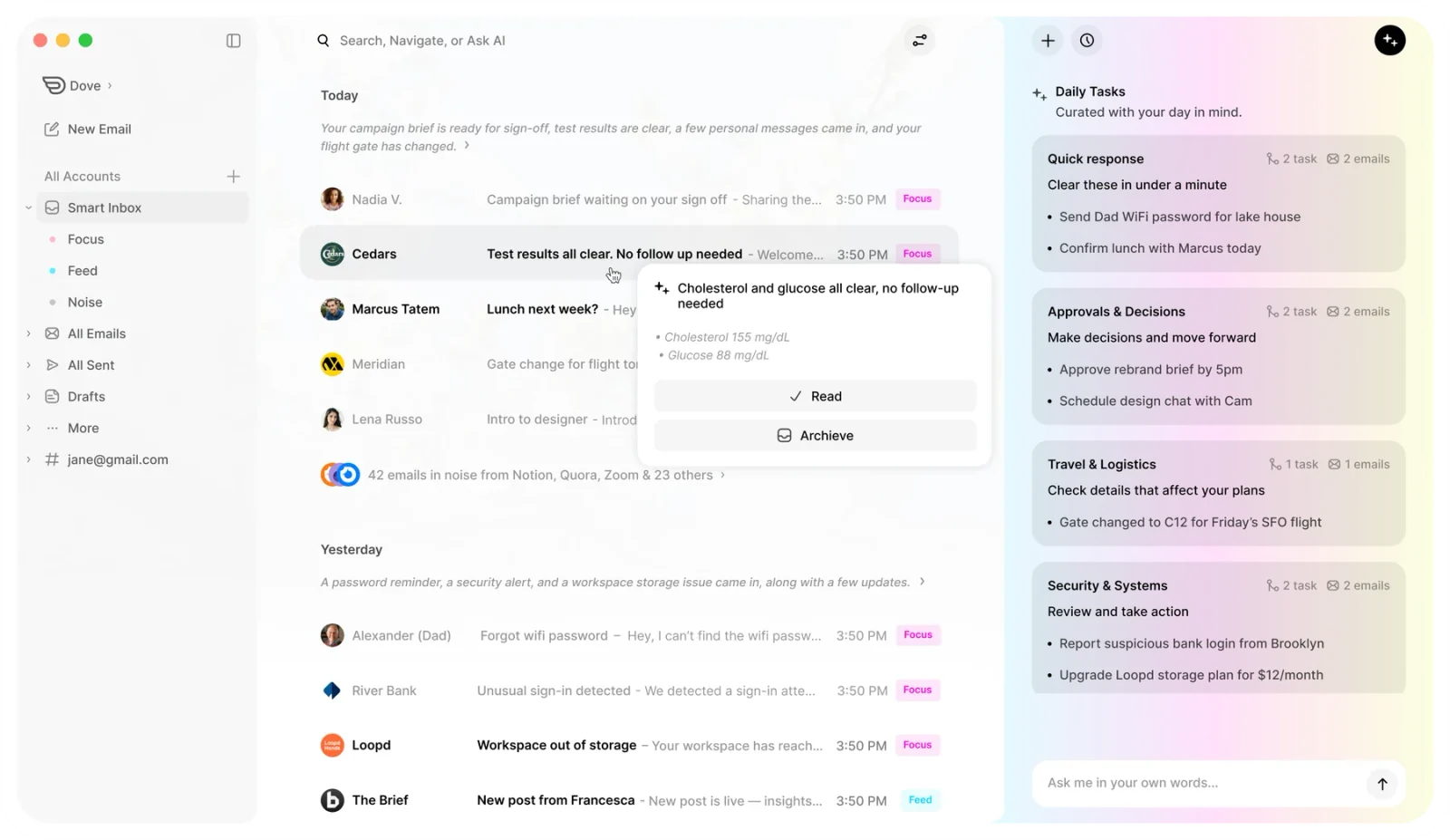
Dove is an AI-native email app from Cartasec, the Singapore team behind . Where most sales tools bolt automation onto a regular inbox, Dove rebuilds the inbox around AI from the start. Every incoming message is sorted automatically into Focus for prospects and replies that need you, Noise for newsletters, alerts, and likely threats, and Done for things already handled. The first thing a rep sees is a short list of what matters, not a wall of unread.
Two features make Dove especially good for sales work. Wingman reads long deal threads and surfaces hidden risks, missed asks, and the next step you should take, the kind of context a thread summary alone tends to miss. AI Assist drafts replies in your tone and handles common moves like scheduling, follow-ups, and unsubscribes, so the routine work of moving a conversation forward stops eating the day.
Dove is a client, not an email provider. It connects on top of Gmail, Outlook, iCloud, and any IMAP account, so reps do not need a new email address and teams do not need to migrate. The AI does not depend on which provider you use.
Platform support. Web, iOS, Android, macOS, Windows.
Pricing. Free plan with up to 10 AI actions per day. Paid plan at $20 per month with full AI features and a 7-day free trial.
What Dove does well
Sorts every email into Focus, Noise, and Done before you open the inbox, so reply prioritization happens automatically
Wingman thread intelligence catches risks, missed asks, and stalled deals inside long threads
AI Assist drafts replies in your tone and handles scheduling, follow-ups, and unsubscribes
Works across Gmail, Outlook, iCloud, and IMAP, no provider lock-in
Native apps on Web, iOS, Android, macOS, and Windows
What Dove does poorly
Not a sequencer, you cannot build multi-step outbound cadences inside Dove
No native CRM or pipeline view, pair it with a CRM like HubSpot or Salesforce
Free plan caps AI usage at 10 actions per day, heavy users will outgrow it quickly
Learn more on the Dove home page or read how Dove’s AI triage works. Dove also appears in our roundup of the best AI email apps in 2026 and the best email apps for executives.
2. Superhuman, best for high-volume reps who type fast and care about speed
Superhuman has been the premium email pitch for years and is still the speed benchmark for Gmail and Outlook power users. The 2025 refresh added stronger AI features and a noticeably better mobile app, but the heart of the product is unchanged, a keyboard-driven interface that turns triage into a rhythm. For reps who clear hundreds of messages a day, that rhythm is the value.
In 2026 Superhuman feels like a polished cousin to Dove. Both lean on AI, both target people whose income depends on the inbox, both want you out of email fast. The difference is approach. Superhuman speeds up what you already do. Dove changes what you see in the first place by triaging before you open the inbox.
Platform support. macOS, Windows, iOS, Android, Web.
Pricing. No free tier. From around $30 per month per seat.
What Superhuman does well
Best-in-class keyboard shortcuts and triage flow
Strong native apps on macOS, Windows, iOS, and Android
AI summaries, reminders, and Instant Reply integrated into the keyboard workflow
Gmail and Outlook both supported
What Superhuman does poorly
No free tier, the price is a real commitment per seat
Only supports Gmail and Outlook accounts, no iCloud, no plain IMAP
Speed depends on you learning the shortcuts, the value drops for casual users
AI helps but does not change the inbox shape the way Dove does
No sequencing or CRM, you still need a separate outbound tool
For a side-by-side, see our Superhuman alternatives roundup.
3. Mixmax, best for Gmail teams that want sequences and light CRM in one place
Mixmax is the most established sales-engagement tool that still feels like an email app. It layers on top of Gmail with templates, mail merge, sequences, link and open tracking, one-click meeting booking, and a light CRM. For Gmail-only teams that want to centralize prospecting and follow-ups without buying a full platform, it is one of the cleanest options on the market.
The tradeoff is that Mixmax inherits the Gmail interface. You get a powerful sales layer on top, but the core inbox is still Gmail. Reps who want a smarter inbox shape, not just a smarter outbound layer, will feel that.
Platform support. Web (Gmail), Chrome extension, iOS, Android.
Pricing. Limited free tier. Starter around $29 per user per month. Paid tiers go up to around $69 per user per month for the Growth+CRM plan. Enterprise pricing is custom.
What Mixmax does well
Multi-step sequences with conditional logic
Templates with variables, mail merge, send later, and email tracking
One-click meeting links and round-robin scheduling
Light built-in CRM with pipelines, plus deep Salesforce integration
Live polls, surveys, and embedded calendar inside outbound messages
What Mixmax does poorly
Gmail only, no Outlook support
Mobile experience is weaker than the desktop and Chrome layer
The underlying inbox is still Gmail, so triage does not get smarter
Higher tiers add up fast for larger teams
4. Yesware, best for Gmail and Outlook reps inside a Salesforce-heavy team
Yesware is the other mature sales-engagement tool, with a Salesforce-shaped product personality. It runs as a Chrome extension on Gmail and as an Outlook add-in, so unlike Mixmax it handles both major email worlds. The strengths are template management, multi-channel campaigns, attachment tracking, and an opinionated Salesforce sync that many enterprise sales orgs already rely on.
Yesware is less of an inbox replacement than the AI-native clients. You keep using Gmail or Outlook, and Yesware adds the tracking, templates, and reporting around it. That is exactly what some teams want and exactly what others find frustrating.
Platform support. Web (Gmail and Outlook), Chrome, Outlook add-in.
Pricing. 14-day trial. Pro around $19 per seat per month. Premium around $45 per seat per month. Enterprise around $85 per seat per month.
What Yesware does well
Mature email tracking with open and click history per recipient
Multi-channel campaigns with email, call, and LinkedIn steps
Strong Salesforce sync, including activity capture and reporting
Works inside both Gmail and Outlook
Attachment tracking shows which parts of a proposal got read
What Yesware does poorly
Not a standalone email app, you still need Gmail or Outlook underneath
Key features like Salesforce sync are gated to higher tiers
Reporting can feel dated next to newer engagement tools
No AI triage on the inbox itself
5. Streak, best for tracking deals as a pipeline inside Gmail
Streak takes a different angle. Instead of sitting next to Gmail as an outbound layer, it turns Gmail itself into a CRM. Threads become deal cards. Cards live on pipelines, and pipelines live inside the same Gmail tab the rep already uses. For small sales teams and founder-led sales motions, this is a genuinely useful idea, you do not have to keep two systems in sync because they are the same system.
The tradeoff is Gmail-only, and that the CRM-in-Gmail metaphor can feel heavy if all you really want is an email app. Teams that already live in Salesforce or HubSpot may find Streak duplicates work rather than simplifying it.
Platform support. Web (Gmail), Chrome extension, iOS, Android.
Pricing. Free personal tier with limited pipelines. Solo around $19 per user per month. Pro around $59 per user per month. Enterprise around $159 per user per month.
What Streak does well
Full CRM pipelines inside Gmail, no context switching
Mail merge, send later, view tracking, and snippets
Shared inboxes for support and team sales mailboxes
Magic columns auto-populate fields like last contact date and email opens
Strong onboarding for founder-led sales teams
What Streak does poorly
Gmail only, no Outlook, no other clients
The CRM-in-Gmail metaphor can feel cluttered for reps who mostly want to read mail
Performance can slow down on accounts with very large pipelines
Less suited to teams already standardized on Salesforce or HubSpot
6. Spark Mail, best for cross-platform smart inbox and shared drafts
Spark Mail has been the “easy recommendation” for years because it offers a clean smart inbox on every major platform. Spark 3 raised prices and moved more features behind a paywall, but it is still one of the most reliable cross-platform email apps you can pick, and small sales teams use it for one specific feature, shared drafts. Two reps can co-write a reply to a key prospect without forwarding the thread or pasting copy into Slack.
The smart inbox groups newsletters, transactions, and personal messages automatically. It is not as ambient as Dove’s Focus, Noise, and Done split, but it cuts the noise enough that many reps find it calming after years of Gmail.
Platform support. macOS, iOS, Android, Windows.
Pricing. Limited free tier. Premium around $7.99 per month, with discounts on annual plans.
What Spark does well
Cross-platform smart inbox that works on Mac, iOS, Android, and Windows
Shared drafts and team comments for lightweight collaboration
Templates, send later, snooze, and follow-up reminders
Clean mobile experience for reps who triage on phone
What Spark does poorly
Sales-specific features like sequencing and per-recipient tracking are not first-class
Some core features moved behind Premium in Spark 3
AI features are present but lighter than Dove or Superhuman
Account-bound features can be confusing when reps switch between machines
For a deeper dive, see our Spark Mail alternatives roundup.
7. Spike, best for chat-style sales conversations on inbound
Spike turns email into something closer to a chat app. Threads stack as conversations, replies feel like messages, and the visual weight of email goes down significantly. For inbound-heavy sales workflows, where reps spend the day responding to short questions from existing leads, that feel is genuinely faster.
The same metaphor can feel wrong for traditional outbound. If your team writes long, structured proposals and tracks formal sequences, Spike is probably not the central tool. But as a calmer secondary inbox for inbound triage, or as the main app for founder-led, conversational sales, it punches above its weight.
Platform support. Web, macOS, Windows, iOS, Android.
Pricing. Free tier. Pro from around $6 per user per month. Business plans higher.
What Spike does well
Chat-style email threads keep inbound triage fast
Strong cross-platform experience, including web
Built-in voice and video notes
Collaborative notes and group chats for small teams
What Spike does poorly
The chat metaphor does not suit long formal threads
No sequencer, no real outbound automation
AI features are lighter than Dove, Superhuman, or Shortwave
Less suited to teams that need formal Salesforce or HubSpot sync
How to choose the right sales email app
Your priority | The right pick |
|---|---|
AI sorts the inbox and drafts replies for me | Dove |
Keyboard-driven speed for high-volume reps | Superhuman |
Sequences and light CRM in Gmail | Mixmax |
Tracking and Salesforce sync in Gmail or Outlook | Yesware |
CRM pipelines inside Gmail itself | Streak |
Cross-platform inbox with shared drafts | Spark Mail |
Chat-style inbound triage | Spike |
A short shortcut. If your team’s bottleneck is the inbox itself, hot leads buried in noise, deal threads that pile up, replies that take too long, start with Dove. If the bottleneck is outbound volume and pipeline reporting, layer Mixmax or Yesware on top of Gmail or Outlook. If the bottleneck is sensitive data and compliance, lead with . Most teams in 2026 end up with a two-app stack, an AI-native client like Dove for the daily inbox plus a focused outbound tool for sequences and reporting, rather than a single sprawling sales platform.
For broader context, see our roundup of the best email apps in 2026, the best AI email apps in 2026, and the best email apps for small business.
FAQ
What is the best email app for sales teams in 2026?
Dove is the best email app for sales teams that want AI to take real work off the inbox. It sorts every email into Focus, Noise, and Done before you open the app, drafts replies in your tone with AI Assist, and surfaces missed asks inside long deal threads through Wingman. Dove works on top of Gmail, Outlook, iCloud, and IMAP, so reps do not need a new address and teams do not need to migrate. .
Do I need a CRM if I use one of these email apps?
In most cases, yes. Dove Superhuman, Spark Mail, and Spike are email clients with strong reply tooling, not full CRMs, so reporting and forecasting still live in Salesforce, HubSpot, or a similar tool. Streak and Mixmax include built-in CRM features that can replace a dedicated CRM for small teams, and Yesware integrates tightly with Salesforce for larger teams. The strongest 2026 stacks pair an AI-native client like Dove with a CRM rather than expecting one tool to do both.
What is the cheapest sales email app worth using?
If you are early-stage and price-sensitive, Dove’s free plan with up to 10 AI actions per day is the strongest free tier in the category. Spark Mail and Spike also have free tiers that cover basic sales workflows. Once you need full AI features, Dove at $20 per month is significantly cheaper than Superhuman, Mixmax, or Yesware Premium. Streak and Mixmax have free tiers but lock most of their value behind paid plans.
Which sales email app has the best Gmail support?
Mixmax, Streak, and Yesware are all built directly on top of Gmail and have the deepest Gmail-specific tooling. If you are Gmail-only and want sequences plus a light CRM, Mixmax or Streak are the natural picks. If you also use Outlook, switch to Yesware, Superhuman, Dove, or all of which support both providers, with Dove and .
Which sales email apps support Outlook?
Yesware, Superhuman, Dove. Mixmax and Streak are Gmail only. For mixed Gmail and Outlook teams, Dove and without forcing the team into a Gmail-centric workflow.
Do I need a new email address to switch?
For Dove, Superhuman, Mixmax, Yesware, Streak, Spark Mail, and Spike, no. All of them work as clients or extensions on top of your existing Gmail, Outlook, iCloud, or IMAP address. You can switch your daily email app without touching your domain, signature, or DNS, which makes it easy to trial a new tool for a week before rolling it out across the team.
Does Dove integrate with Salesforce or HubSpot?
Dove is focused on the inbox itself, AI triage, drafting, and thread intelligence, rather than CRM sync. For Salesforce and HubSpot integration, most teams in 2026 either log activity from the CRM side directly or pair Dove with a sales-engagement layer like Mixmax or Yesware for tracking and reporting. See how Dove’s AI works for the inbox side of the picture.
Your pipeline, your inbox
Sales reps already have enough tools. The right move in 2026 is not to add another sprawling platform, it is to pick the right combination, an AI-native email client that makes the inbox itself smarter, plus a focused outbound layer if your motion needs sequences and pipeline reporting.
If that sounds like your team, start with Dove for the inbox and add a sequencer only if outbound volume demands it. If your deals carry sensitive attachments and compliance pressure, lead with . Either way, the pattern is the same, fewer tools doing more important work.
Try Dove free, 7-day trial, takes 2 minutes to connect your inbox.
More from Dove
Recent posts

August 17, 2026
Best Email App for Multiple Accounts in 2026
Juggling more than one inbox? Here is the best email app for multiple accounts in 2026, plus two other ways to fix inbox overwhelm for good.

July 1, 2026
Best Airmail Alternatives in 2026
The best Airmail alternatives in 2026 compared. See platform support, pricing, strengths, and weaknesses for Dove, Canary Mail, Spark Mail, Mimestream, Edison Mail, Shortwave, Outlook, and Apple Mail.

June 30, 2026
Best Spike Alternatives in 2026
The best Spike alternatives in 2026 compared. See platforms, pricing, strengths, and weaknesses for Dove, Shortwave, Spark, Missive, and Superhuman.