'/%3e%3c/g%3e%3c/svg%3e)

Best Email Apps for Small Business in 2026
The best email apps for small business in 2026 compared. See platforms, pricing, strengths, and weaknesses for Dove Outlook, Spark, Zoho Mail, Superhuman, Fastmail, and Thunderbird.

Running a small business means your inbox is full of client proposals, vendor invoices, team updates, and marketing noise all mixed together. Most default email apps were built for personal use. They treat a newsletter the same as a contract renewal. When you are a team of one or ten, every missed email costs real money.
The best email apps for small business in 2026 help you separate what matters from what does not, reply faster, and keep sensitive business communication secure. We compared eight email clients on the features that actually matter to small business owners and lean teams: AI triage, security, pricing per seat, platform coverage, and how well each tool scales from a solo founder to a growing team.
Key takeaways
Doveis the best choice if inbox overload and phishing risk are your biggest problems. Its AI sorts every message into Focus, Noise, and Done before you open the inbox. Pricing is $20 per month with a 7-day free trial.
Zoho Mail offers the most affordable per-seat pricing for small teams that want custom domain email, calendar, and productivity tools in one workspace. Free for up to 5 users.
Thunderbird is the best free option with no subscription, no tracking, and unlimited account support.
Outlook is the natural fit if your business already uses Microsoft 365 for documents, meetings, and collaboration.
The right email app depends on whether your priority is AI triage, privacy, cost per seat, or ecosystem integration. The comparison table below maps each tool to its strength.
What to look for in a small business email app
Picking an email app for your business is not the same as picking one for personal use. You need to think about cost per seat, security for sensitive client data, and whether the tool will still work when your team doubles in size. Here is what matters most.
AI triage and smart sorting. When you receive 200 messages a day and half of them are vendor newsletters, you need the inbox to sort itself. AI triage separates urgent client emails from noise without manual rules. For a broader look at AI-powered options, see the best AI email apps in 2026.
Security and encryption. Small businesses are a top target for phishing because they often lack dedicated IT staff. End-to-end encryption, phishing detection, and link scanning protect your team and your clients.
Pricing per seat. A $25 per month app is fine for a solo founder but adds up quickly at five or ten seats. Look at the total annual cost for your team size, not just the headline price.
Platform coverage. Your team might use Macs at the office, Windows at home, and iPhones on the road. An app that only covers one platform forces people to use a fallback for everything else.
Custom domain and account support. Most small businesses use a custom domain (you@yourcompany.com) through Google Workspace, Microsoft 365, or an independent provider. The email client needs to work cleanly with whatever provider you use.
Scalability. A tool that works for three people should still work for fifteen without a painful migration. Team features like shared inboxes, delegation, and collaborative drafts matter as your headcount grows.
For a broader comparison that is not focused on business use, see our full roundup of the best email apps in 2026.
Best email apps for small business at a glance
App | Platforms | Free tier | Paid pricing | Best for |
|---|---|---|---|---|
Dove | Web, iOS, Android, macOS, Windows | 7-day free trial | $20/month | AI triage and phishing protection |
Outlook (new) | Windows, macOS, iOS, Android, Web | Yes (basic) | Microsoft 365 from $6/user/month | Microsoft ecosystem teams |
Spark Mail | macOS, iOS, Android, Windows, Web | Yes | Premium ~$6/user/month | Team collaboration and shared inboxes |
Zoho Mail | Web, iOS, Android | Yes (up to 5 users) | Mail Lite from $1/user/month | Budget-friendly custom domain email |
Superhuman | macOS, Windows, iOS, Android, Web | No (30-day trial) | Starter $25/month | Speed-obsessed founders |
Fastmail | Web, iOS, Android | 30-day trial | Standard $3/user/month | Independent email hosting |
Thunderbird | macOS, Windows, Linux | Yes (free, open-source) | Free | Zero-cost desktop email |
What each app does well and poorly
App | What it does well | What it does poorly |
|---|---|---|
Dove | AI auto-sorts all accounts into Focus, Noise, and Done. Built-in phishing detection. Daily tasks view keeps you on track. | No PGP encryption. Newer app with a smaller plugin ecosystem. |
Outlook (new) | Deep Microsoft 365 integration. Copilot AI for subscribers. Broad platform coverage. | Heavy and resource-intensive. AI features require a premium 365 plan. |
Spark Mail | Shared inboxes, team comments on threads, collaborative drafts, gated inbox. | Free tier is limited. Analytics and advanced features locked behind Premium. |
Zoho Mail | Custom domain email free for up to 5 users. Full workspace with calendar, tasks, and notes. Part of the Zoho ecosystem. | Mobile apps feel basic. Desktop client is web-only. Advanced features need Workplace plan. |
Superhuman | Fastest email experience available. Keyboard-first workflow. AI triage and drafting. | $25 per month per seat is expensive for teams. Gmail and Microsoft 365 only. No free tier. |
Fastmail | Privacy-focused hosting with no ads and no tracking. Custom domain included. Calendar and contacts. | No built-in AI features. IMAP-only so no Exchange support. Smaller feature set than competitors. |
Thunderbird | Free and open-source. Works with any provider. OpenPGP built in. Unlimited accounts. | No official mobile app yet. UI looks dated. No AI features. Requires manual setup. |
1. Dove: best for AI triage and phishing protection
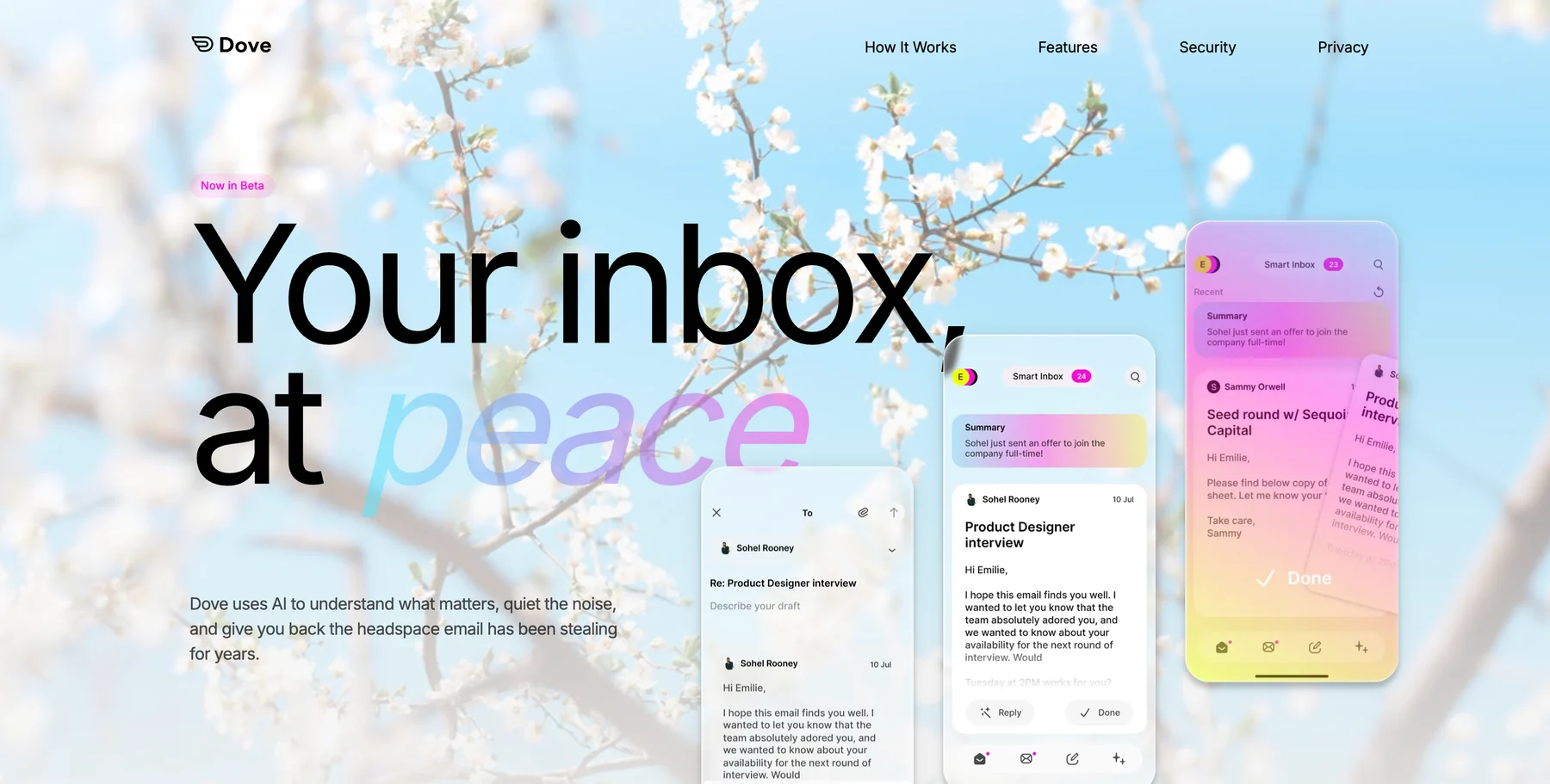
Dove is built around the idea that your inbox should be sorted before you open it. Its ambient AI watches how you read, reply, and archive messages over time, then automatically routes every incoming email into one of three lanes: Focus (needs your attention), Noise (safe to ignore or batch-read), and Done (already handled). For a small business owner who gets pulled into a dozen different threads before lunch, this means the first thing you see every morning is the handful of messages that actually matter.
Phishing detection is built into every plan. Dove scans links and sender patterns to flag suspicious messages before you click anything. For small businesses without a dedicated security team, this is a meaningful layer of protection. You can learn more about staying safe in our guide to protecting yourself from phishing emails.
The Daily Tasks view pulls action items out of your email and presents them as a simple to-do list. Instead of hunting through threads to remember what you promised a client, you get a clear list each morning. If you want to go deeper on building a triage workflow around this kind of tool, see how to build an email triage system that actually sticks.
Platform support: Web, iOS, Android, macOS, Windows.
Pricing: $20 per month with a 7-day free trial.
Strengths:
AI triage into Focus, Noise, and Done works across all connected accounts
Built-in phishing and link scanning on every plan
Daily Tasks view turns emails into actionable to-dos
Works on every major platform including web
Weaknesses:
No PGP or end-to-end encryption for message content
Newer app, so the third-party integration library is still growing
Single pricing tier at $20 per month may feel steep for very small budgets
2. Outlook (new): best for Microsoft 365 businesses
The redesigned Outlook app is the obvious choice if your business already pays for Microsoft 365. Calendar, contacts, Teams integration, and OneDrive file sharing all live inside one window. Copilot AI is available for Microsoft 365 subscribers and can draft replies, summarize long threads, and surface action items.
The free version gives you a functional email client that works with Gmail, Yahoo, and iCloud accounts alongside Microsoft accounts. But the real value for small businesses comes from the paid Microsoft 365 plans, where Outlook becomes the hub for your entire productivity stack.
The downside is weight. Outlook is a large application with a lot of surface area, and it can feel sluggish on older hardware. If you are not using the rest of the Microsoft ecosystem, you are paying for features you do not need. If Outlook does not fit, see the best Outlook alternatives for your team.
Platform support: Windows, macOS, iOS, Android, Web.
Pricing: Free basic client. Microsoft 365 Business Basic from $6 per user per month.
Strengths:
Tight integration with Teams, OneDrive, SharePoint, and the full Microsoft 365 suite
Copilot AI for drafting, summarizing, and prioritizing (365 subscribers)
Available on every major platform including web
Free tier works with non-Microsoft accounts
Weaknesses:
Resource-heavy on desktop, especially on older machines
AI features require a premium Microsoft 365 subscription
Interface complexity can overwhelm small teams that only need basic email
3. Spark Mail: best for team email and collaboration
Spark Mail is built for teams that need to work inside email together. Shared inboxes let multiple people see and respond to the same mailbox without forwarding chains. You can leave internal comments on any email thread, and collaborative drafts let your team write and review a response before it goes out.
The Smart Inbox feature groups messages into categories (Personal, Notifications, Newsletters) and surfaces what it thinks you need to see first. For small businesses, the gated inbox option is useful: it only notifies you about emails from contacts you have actually communicated with before, silencing everything else until you are ready to review it.
The free tier covers personal use but limits team features. Premium unlocks shared inboxes, priority email support, and advanced analytics. If Spark is not quite right, see the best Spark Mail alternatives.
Platform support: macOS, iOS, Android, Windows, Web.
Pricing: Free tier available. Premium from approximately $6 per user per month.
Strengths:
Shared inboxes and team comments built into the app
Collaborative drafts for reviewing replies before sending
Gated inbox reduces notification noise
Available on all major platforms including web
Weaknesses:
Free tier is quite limited for business use
Analytics and advanced team features are locked behind Premium
Smart Inbox categorization can misfile messages, requiring manual correction
4. Zoho Mail: best for budget-friendly custom domain email
Zoho Mail is hard to beat on price. The free tier gives you custom domain email for up to five users with 5 GB per user. The paid Mail Lite plan starts at $1 per user per month and adds more storage, multiple domains, and email routing. If you are a small business that wants a professional email address without paying Google Workspace or Microsoft 365 prices, Zoho Mail is the most affordable way to get there.
Beyond email, Zoho Mail is part of the broader Zoho ecosystem. You can connect it to Zoho CRM, Zoho Invoice, and dozens of other Zoho tools without third-party integrations. Calendar, tasks, notes, and bookmarks are included in the mail interface. For a small business that wants an all-in-one workspace on a tight budget, the value is strong.
The tradeoff is that Zoho Mail is primarily a web app. The mobile apps work but feel less polished than dedicated clients like . There is no native desktop app, so you are using a browser tab or the mobile app. AI features exist but are not as mature as what Dove or Outlook offer.
Platform support: Web, iOS, Android. No native desktop client.
Pricing: Free for up to 5 users with custom domain. Mail Lite from $1 per user per month. Workplace (with full suite) from $3 per user per month.
Strengths:
Free custom domain email for up to 5 users
Cheapest per-seat pricing among paid plans
Full workspace with calendar, tasks, and notes included
Integrates with the broader Zoho ecosystem (CRM, invoicing, etc.)
Weaknesses:
No native desktop app, browser-only on desktop
Mobile apps feel less polished than competitors
AI features are basic compared to Dove or Outlook
Interface can feel cluttered with all the Zoho integrations
5. Superhuman: best for speed-obsessed founders
Superhuman is the fastest email client available. Every interaction, from opening a message to archiving a thread, is optimized for keyboard shortcuts and minimal latency. The split inbox groups messages by category (VIP, starred, everything else), and AI triage surfaces what needs your attention first.
For a solo founder or a very small executive team, Superhuman can genuinely save hours per week. AI-powered drafting helps you respond faster, and the “remind me” feature ensures nothing slips through the cracks. The onboarding process includes a personalized walkthrough, which helps you actually use the shortcuts instead of ignoring them.
The problem is cost. At $25 per month per seat on the Starter plan and $30 per month on the Business plan, Superhuman is one of the most expensive email clients on the market. For a team of five, that is $125 to $150 per month. It also only works with Gmail and Microsoft 365 accounts. If the price is a barrier, see the best Superhuman alternatives.
Platform support: macOS, Windows, iOS, Android, Web.
Pricing: No free tier. 30-day trial on Starter plan. Starter at $25 per month. Business at $30 per month.
Strengths:
Fastest email experience with keyboard-first design
AI triage and AI-powered draft replies
Split inbox and “remind me” features keep nothing slipping through
Available on all major platforms
Weaknesses:
$25 to $30 per month per seat is expensive for teams
Only supports Gmail and Microsoft 365 accounts
No free tier beyond the 30-day trial
Overkill for teams that do not process high email volume
6. Fastmail: best for independent email hosting
Fastmail is an email provider and client in one. Unlike most apps on this list that connect to your existing Gmail or Microsoft 365 account, Fastmail hosts your email directly. Custom domain support is included on the Standard plan, so you get you@yourcompany.com without needing a separate provider.
Fastmail is based in Australia and has a strong privacy stance: no ads, no tracking, no data mining. Calendar and contacts are included, and the web interface is fast and clean. For a small business that wants to own its email infrastructure without relying on Google or Microsoft, Fastmail is one of the few independent alternatives that still feels modern.
The limitation is features. Fastmail does not have built-in AI triage, collaborative drafts, or team inbox features. It is a solid, reliable email host with a clean client, but it lacks the productivity layer that tools like Dove or Spark provide. You can use Fastmail as your provider and pair it with a separate client via IMAP if you want the best of both worlds.
Platform support: Web, iOS, Android. Works with any IMAP-compatible desktop client.
Pricing: 30-day free trial. Standard at $3 per user per month. Professional at $5 per user per month (includes custom domain).
Strengths:
Independent email hosting with custom domain included
Strong privacy: no ads, no tracking, no data mining
Calendar and contacts built in
Clean, fast web interface
Weaknesses:
No built-in AI features
No native desktop app (web-only plus IMAP for desktop clients)
No team collaboration features like shared inboxes or comments
IMAP-only, so no Exchange or ActiveSync support
7. Thunderbird: best free email client for small business
Thunderbird is the free option that keeps showing up for a reason. It is open-source, runs on macOS, Windows, and Linux, and works with any email provider that supports IMAP or POP3. You can add as many accounts as you want with no subscription and no account limits.
OpenPGP encryption is built in, so you can send and receive encrypted email without installing extra plugins. The interface is functional but has not been modernized at the same pace as commercial clients. Setup requires more manual configuration than apps like Dove or which auto-detect settings for most providers.
Thunderbird is best suited for small businesses that need a zero-cost desktop client and are comfortable with a tool that values function over polish. There is no official mobile app yet, though Thunderbird for Android is in active development and expected later in 2026.
Platform support: macOS, Windows, Linux. No official mobile app yet (Android version in development).
Pricing: Free and open-source. No paid tiers.
Strengths:
Completely free with no subscription and no account limits
Works with any email provider (IMAP, POP3, Gmail, Microsoft 365)
OpenPGP encryption built in
Available on macOS, Windows, and Linux
Weaknesses:
No official mobile app yet
Interface looks dated compared to modern clients
No AI features for triage or drafting
Requires manual setup and configuration for most accounts
How to choose the right email app for your small business
The right pick depends on the biggest problem your business faces with email right now.
If your main problem is… | Choose | Why |
|---|---|---|
Inbox overload and missing important emails | Dove | AI triage separates Focus from Noise across all accounts |
Already using Microsoft 365 | Outlook (new) | Native integration with Teams, OneDrive, and Copilot |
Needing to collaborate on email as a team | Spark Mail | Shared inboxes, team comments, and collaborative drafts |
Very tight budget with custom domain needs | Zoho Mail | Free for up to 5 users, $1 per user per month after that |
Processing hundreds of emails per day solo | Superhuman | Fastest client with keyboard-first workflow |
Wanting to own your email infrastructure | Fastmail | Independent hosting with custom domain, no big-tech dependency |
Needing a free desktop client with no strings | Thunderbird | Open-source, unlimited accounts, zero cost |
If you are a solo founder or a team under five, start with the problem that costs you the most time or risk. For most small businesses, that is either inbox overload (whereDoveor Superhuman help most) or security gaps (whereleads with its optional on-device AI and built-in encryption).
If budget is the primary constraint, Zoho Mail and Thunderbird both offer strong free tiers that can carry a business until revenue justifies a paid tool.
For tips on getting more out of whatever tool you choose, see 12 email productivity tips that actually work in 2026. And if inbox volume is the root issue, how to manage too many emails is a good companion read.
FAQ
What is the best email app for a small business in 2026?
It depends on your top priority.Doveis the best overall pick for small businesses because its AI triage sorts every message into Focus, Noise, and Done before you open the inbox, which saves hours of manual sorting each week. It costs $20 per month with a 7-day free trial. If privacy and encryption are more important,is the better fit with PGP encryption and optional on-device AI starting at $3 per month.
Is there a free email app good enough for small business?
Yes. Thunderbird is completely free, open-source, and works with any email provider. It supports unlimited accounts and has OpenPGP encryption built in. Zoho Mail also offers a free tier with custom domain email for up to 5 users, which is enough for many early-stage businesses. Both are solid starting points before you need the AI and security features of a paid tool.
Do small businesses need a separate email app from their email provider?
Not always, but usually yes. Gmail and Outlook web interfaces work fine for basic email, but they lack the AI triage, encryption, and team collaboration features that dedicated clients offer. A tool like Dove adds an intelligence layer on top of your existing Gmail or Microsoft 365 account, while . You keep your provider and upgrade the experience.
Which email app is best for a small team that collaborates on email?
Spark Mail is the strongest option for team collaboration. Shared inboxes, internal thread comments, and collaborative drafts are all built in. If your team also uses Microsoft 365 for documents and meetings, Outlook may be the better fit because everything stays inside one ecosystem.
How much should a small business pay for an email app?
It depends on team size. For a solo founder, $20 per month for Dove or $25 per month for Superhuman is reasonable if email is a significant part of your workday. For a team of five to ten, per-seat pricing matters more. Zoho Mail at $1 per user per month and Fastmail at $3 to $5 per user per month are the most budget-friendly options. Thunderbird is free.
Can I use Dove with my existing business email provider?
Yes. Dove connects to Gmail, Microsoft 365, and standard IMAP accounts. You keep your existing email address and provider. Dove adds the AI triage, phishing protection, and Daily Tasks view on top. There is no need to migrate your email or change your domain settings.
Can I manage multiple business email accounts in one app?
Yes. Most apps on this list support multiple accounts in a unified inbox. Dove, Spark, Outlook, and Thunderbird all let you connect several accounts and switch between them or view everything in one stream. For a detailed comparison, see the best email apps for managing multiple accounts .
More from Dove
Recent posts

August 17, 2026
Best Email App for Multiple Accounts in 2026
Juggling more than one inbox? Here is the best email app for multiple accounts in 2026, plus two other ways to fix inbox overwhelm for good.

July 1, 2026
Best Airmail Alternatives in 2026
The best Airmail alternatives in 2026 compared. See platform support, pricing, strengths, and weaknesses for Dove, Canary Mail, Spark Mail, Mimestream, Edison Mail, Shortwave, Outlook, and Apple Mail.

June 30, 2026
Best Spike Alternatives in 2026
The best Spike alternatives in 2026 compared. See platforms, pricing, strengths, and weaknesses for Dove, Shortwave, Spark, Missive, and Superhuman.