'/%3e%3c/g%3e%3c/svg%3e)

Superhuman Pricing in 2026: Plans, Free Trial and What You Actually Pay
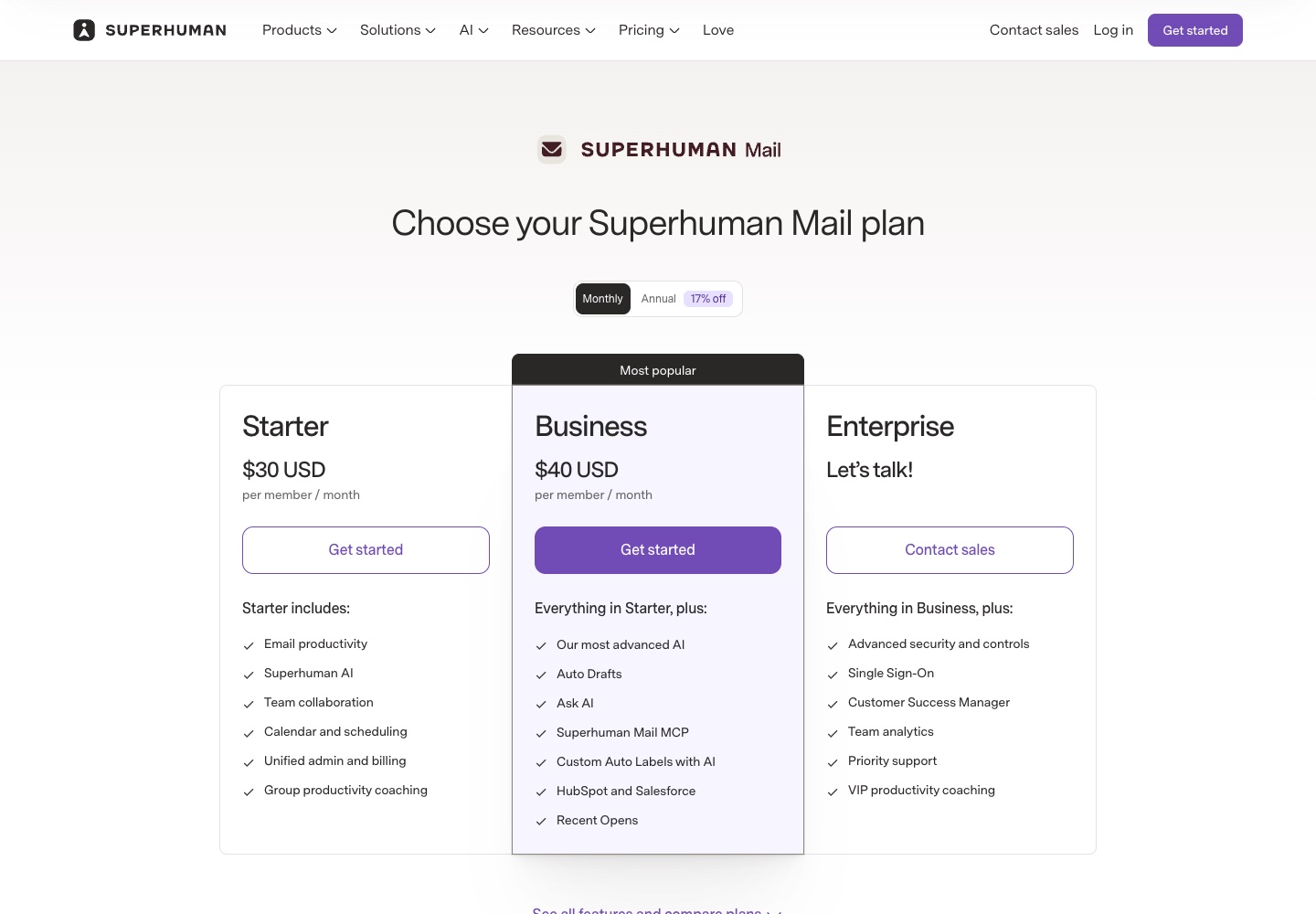
Superhuman Mail costs $30 a month for Starter or $40 a month for Business, per person. Billed yearly, that drops to $25 or $33 a month ($300 or $396 a year). Enterprise is custom-priced. There's no free plan and no published free trial.
Disclosure: Dove is made by the team behind Canary Mail, and both appear below as cheaper options. Every Superhuman price and policy here comes from Superhuman's own site and help center.
Superhuman pricing at a glance
Prices are per person per month in US dollars, from Superhuman's Mail plans page, checked on October 7, 2026.
Plan | Billed monthly | Billed yearly (per month) | Per year, billed yearly | Who it's for |
|---|---|---|---|---|
Starter | $30 | $25 | $300 | One person or a small team who wants speed, Split Inbox and the core AI |
Business | $40 | $33 | $396 | Anyone who wants Auto Drafts, Ask AI or CRM integrations |
Enterprise | Contact sales | Contact sales | Custom | Larger companies that need SSO, admin controls and a success manager |
Starter and Business are capped at 25 seats each; Enterprise has no cap. The yearly prices are the "17% off" option on the same page.
What each Superhuman plan includes
Superhuman's plan cards only list headlines, so this comes from the full comparison table further down the same page.
Starter: $30 a month, or $25 billed yearly
Starter is the whole email app. You get:
Email productivity: Split Inbox, Snippets, Remind Me, Snooze, unsubscribe and block, read statuses, Send Later, Undo Send and offline support.
Superhuman AI: Write with AI, Instant Reply, Auto Summarize, Auto Labels, Auto Archive, Auto Reminders, autocorrect and autocomplete.
Calendar and scheduling: share availability, booking links, Zoom, Google Meet and Microsoft Teams links, and creating events from email.
Team features: shared conversations, comments, shared drafts, team snippets and team read statuses.
Support: group productivity coaching, public webinars and email support.
Business: $40 a month, or $33 billed yearly
Business adds the AI that Superhuman leads its marketing with:
Auto Drafts, which writes replies before you open the email, and Ask AI, which answers questions about your inbox.
Voice and Tone Match, Personalization and a Knowledge Base, so the drafts sound like you.
Custom Auto Labels with AI, and the Superhuman Mail MCP for connecting your mail to other AI tools.
For sales teams: Smart Send, Recent Opens, and HubSpot, Salesforce and Pipedrive integrations.
Private group coaching and private webinars.
Enterprise: custom pricing
Enterprise adds single sign-on, user provisioning (SCIM), bring-your-own-key encryption, audit logs, phishing reporting, advanced admin controls, a dedicated customer success manager and priority support. Superhuman doesn't publish a price; its help center says to email its sales team.
Starter or Business: which one do you need?
It mostly comes down to one thing: do you want Superhuman to write for you?
If you mostly want to get through mail faster with keyboard shortcuts, Split Inbox and reminders, Starter has all of it. Its AI still drafts when you ask (Write with AI), suggests short replies (Instant Reply) and summarizes threads.
If you want drafts waiting for you before you open an email, that's Auto Drafts, and it's Business only. So is Ask AI. That's $10 a month more on monthly billing, or $8 more billed yearly. Business is also the plan for sales teams who need CRM integrations or the Recent Opens feed.
Monthly vs annual billing
Yearly billing saves about 17%, and you pay the full year up front. The plan renews on the date you signed up. Superhuman's Annual Plan help article says existing monthly customers can switch by emailing hello@superhuman.com, and the invoice is prorated.
What a year costs:
Plan | Billed yearly | Billed monthly (12 payments) | You save yearly |
|---|---|---|---|
Starter, 1 person | $300 | $360 | $60 |
Business, 1 person | $396 | $480 | $84 |
Starter, 5 people | $1,500 | $1,800 | $300 |
Business, 5 people | $1,980 | $2,400 | $420 |
The five-person Business figures are at list price. Another Superhuman pricing page shows "15% off for teams of 5+" on yearly Business and a discount for five or more accounts on monthly Business, so a team that size should pay less. It doesn't say how much the monthly discount is.
One more cost: Superhuman isn't an email provider. It runs on top of a Gmail or Outlook account, so if you use it for work, you're still paying for Google Workspace or Microsoft 365 underneath.
Is there a free version or free trial of Superhuman?
No free plan. Neither Mail pricing page offers a free tier.
No published free trial either. Superhuman's billing FAQ says, "We don't currently offer discounts or free trials for the Superhuman suite," and the Mail plans page goes straight to "Get started." Older articles describe a 7-day trial with a mandatory onboarding call. That isn't what Superhuman's site offers today.
There are two ways around paying full price at the start:
Startups: the Superhuman Mail for Startups programme gives 12 months of Business free, for up to five people. Your company must have raised no more than $10 million, have fewer than 50 employees, be linked to one of Superhuman's approved startup partners, and not already be a Mail customer.
Partner and referral links: perk programmes and some deal sites advertise a free first month or more through their own links. Superhuman doesn't publish these terms, so check what the checkout page actually charges before you enter a card.
If you want to try before you pay, several of the alternatives below have free plans or trials.
Discounts: students, nonprofits, startups and teams
Students and nonprofits: Superhuman's Pricing Plans article says to email hello@superhuman.com to ask about student and nonprofit pricing for Mail. No discount is published, and the suite has none.
Startups: 12 months of Business free, if you qualify (above).
Teams of five or more: 15% off yearly Business, and an unstated discount on monthly Business.
Superhuman suite: Mail with Grammarly, Docs and Go
Grammarly bought Superhuman in 2025, and on October 29, 2025 the parent company renamed itself Superhuman. The email app became Superhuman Mail. The company now sells a suite of Mail, Grammarly, Superhuman Docs (formerly Coda) and the Go assistant, according to its Superhuman Suite help article.
Suite pricing, in US dollars per person per month:
Suite plan | Billed monthly | Billed yearly | Includes Mail? |
|---|---|---|---|
Free | $0 | $0 | No (Grammarly, Docs, Go) |
Pro | $15 | $12 | No (Grammarly, Docs, Go) |
Business | $40 | $33 | Yes, with Business features |
Enterprise | Custom | Custom | Yes |
The suite page shows prices in local currency depending on where you are. These are the US dollar prices it shows in the US, and Superhuman's help center separately confirms Pro at $12 a month billed yearly.
What this means:
Grammarly on its own, or the suite's Pro tier, doesn't get you Mail. Mail appears only from the suite's Business tier.
If you'd pay for Mail Business anyway, the suite costs the same ($33 or $40) and adds Grammarly, Docs and Go. If Starter is enough for you, Mail on its own is $8 to $10 a month cheaper.
You can still buy Mail on its own, at superhuman.com/plans/mail.
Moving an existing subscription has limits. Individual Mail subscribers can switch to Suite Business and get a prorated refund for the old plan, but Mail discounts don't carry over. Existing Mail team subscriptions can't move to the suite yet.
How to cancel Superhuman and get a refund
From Superhuman's cancellation article:
On your own plan: press Cmd+K on a Mac or Ctrl+K on Windows, then choose Cancel Subscription. Or sign in at superhuman.com/admin.
On a team: ask your admin. You can also use Cmd+K or Ctrl+K, then Billing Support, and Superhuman's team will cancel and remove you.
On a contract: go through your customer success manager.
Refunds. If you cancel a yearly Mail plan, you keep access until the end of the year you paid for. Or, per the Annual Plan article, Superhuman can refund the rest of the year if you email hello@superhuman.com, though you lose access straight away. A separate help article in Superhuman's Grammarly billing section says refunds are issued only where the law requires them, and App Store purchases are refunded through Apple. For a suite or Grammarly charge, that stricter rule may be the one that applies, so ask support before you count on a refund.
Before you cancel, copy out your Snippets. Your mail, labels and folders stay in Gmail or Outlook, because Superhuman works on top of your provider.
Cheaper Superhuman alternatives
If the price is the problem, here are four options with prices checked on October 7, 2026, on each vendor's site. Our guide to Superhuman alternatives covers ten, with platforms, privacy and one downside each, and Superhuman vs Spark compares the two most-mentioned options head to head.
Product | Price | Free option | Works with |
|---|---|---|---|
Superhuman Mail | $30 or $40 a month; $300 or $396 a year | None | Gmail, Outlook |
Dove (ours) | $20 a month or $200 a year | Free plan, 10 AI actions a day; 7-day trial (card required) | Gmail, Outlook, iCloud, Yahoo, IMAP |
Plus $10 a month or $99 a year; Pro $20 a month or $199 a year | Free plan | Gmail, Outlook, iCloud, Yahoo, IMAP | |
$4.99 a month or $49.99 a year | 14-day trial | Gmail only, Mac only | |
Canary Mail (ours) | Growth $36 a year; Pro+ $100 a year | Free plan | Gmail, Outlook, iCloud, Yahoo and more |
Dove is the AI-first option here: on the paid plan it sorts mail into Focus, Feed and Noise, and it drafts replies in your style and answers questions about your inbox, on Mac, Windows, iPhone, Android and the web. At $200 a year, it's about half of Superhuman Business billed yearly. Its real downside is that it's new, so its track record and its integrations are thin next to Superhuman's. It also has no end-to-end or PGP encryption; Canary Mail does. We compare the two head to head in Dove vs Superhuman.
Is Superhuman worth the price?
For some people, yes.
Superhuman is built for people who live in their inbox at a desktop. Nearly every action has a keyboard shortcut, Split Inbox keeps important mail apart from the rest, and reminders, snooze, read statuses and Send Later are all on the cheapest plan. Superhuman says its users save four hours a week. That's the vendor's own number, and nobody has checked it independently. Still, if you handle hundreds of emails a day, shaving seconds off each one adds up. Sales teams get HubSpot, Salesforce and Pipedrive integrations and the Recent Opens feed on Business.
It's harder to justify if:
You want AI to do the writing. The drafting that Superhuman advertises is on the $40 plan, not the $30 one.
You pay for it yourself and get moderate email. $360 to $480 a year is a lot to pay for getting through mail a little faster.
You have mail outside Gmail and Outlook. iCloud, Yahoo and other IMAP accounts can't be added.
You want to try before you pay. There's no free plan or published trial.
If you sit in Gmail or Outlook all day and want keyboard speed, Superhuman is still one of the best at it, and the price is the price. If you'd rather see less email, or you want AI help without paying $40 a month for it, the alternatives above are cheaper.
Our full Superhuman review covers the rest of the verdict, and the best AI email apps guide compares Superhuman's price with the alternatives.
FAQ
How much does Superhuman cost per month?
Starter is $30 a month and Business is $40 a month on monthly billing. Billed yearly, they're $25 and $33 a month, which is $300 and $396 a year. Enterprise pricing is custom.
Is there a free version of Superhuman?
No. Superhuman Mail has no free plan. The Superhuman suite has a free tier, but it covers Grammarly, Docs and Go, not Mail.
Does Superhuman have a free trial?
Not one it publishes. Its billing FAQ says it doesn't offer free trials for the suite, and the Mail plans page has no trial. Eligible startups can get 12 months of Business free through Superhuman's startups programme.
What's the difference between Superhuman Starter and Business?
Business adds Auto Drafts, Ask AI, Voice and Tone Match, a Knowledge Base, Custom Auto Labels with AI, the Mail MCP, Recent Opens, Smart Send, and HubSpot, Salesforce and Pipedrive integrations. Everything else, including Split Inbox and the basic AI writing tools, is on both.
Is Superhuman included with Grammarly?
Only on the suite's Business and Enterprise tiers. The suite's Pro tier, at $12 a month billed yearly, includes Grammarly, Docs and Go but not Mail, and an existing Grammarly subscription doesn't come with Mail either.
Does Superhuman offer a student or nonprofit discount?
It doesn't publish one. Superhuman's help center says to email hello@superhuman.com to ask about student and nonprofit pricing for Mail, and says there are no discounts on the suite.
How do I cancel Superhuman?
Press Cmd+K (Mac) or Ctrl+K (Windows) and choose Cancel Subscription, or sign in at superhuman.com/admin. Team members ask their admin, and contract customers go through their customer success manager.
More from Dove
Recent posts
October 13, 2026
Outlook Alternatives in 2026: 9 Email Apps for Every Device
Microsoft isn't shutting Outlook down, but Windows Mail is gone and the old Outlook for Mac loses work accounts this month. Here's what's changing, and nine Outlook alternatives for Windows, Mac, iPhone and Android, with prices checked on October 13, 2026.
October 13, 2026
Gmail Alternatives in 2026: A New Provider, or Just a Better App
Leaving Google entirely means picking a new email provider. If you only dislike the Gmail app, you can keep your address and change the app instead. Both routes are covered below, with every price checked on October 13, 2026.
October 12, 2026
AI Email Assistant for Gmail in 2026: Gemini, Add-ons and What They Cost
Gmail already has a free AI assistant, at least in the US. Here's what Gemini does on each plan, how to switch it on or off, and when an add-on like Fyxer, Cora or Inbox Zero is worth paying for.