'/%3e%3c/g%3e%3c/svg%3e)

Fyxer AI Review (2026): New Pricing, Credits, Privacy and Alternatives
The short answer: Fyxer is an AI assistant that works inside the Gmail or Outlook inbox you already use. It sorts incoming mail into categories, writes reply drafts in your tone for you to check and send, and takes notes in your meetings. It's aimed at professionals and small teams who spend their day in email and calendar. Since September 2026 it has four plans: Free ($0), Pro at $49 a month or $37 a month billed yearly, Team at $99 a month or $64 billed yearly, and Enterprise at a custom price. Each plan includes a monthly allowance of credits, which the AI uses up as it works. The catch: sorting and automatic drafts, the features most people want Fyxer for, start at Pro.
Disclosure: Dove is made by the team behind Canary Mail; Dove appears below as an alternative. We haven't run a long-term test of Fyxer, so this is a researched review. Every price, limit and policy here comes from Fyxer's own pricing page, help center, docs and privacy policy, checked on October 12, 2026. Most Fyxer reviews that rank today were written by competitors, and nearly all of them still quote the old plans.
Fyxer is one of several ways to add AI to the inbox you keep. Our guide to the best AI email assistants compares it with Google's and Microsoft's built-in AI and the other add-ons.
Fyxer at a glance
Fyxer | |
|---|---|
What it is | An AI assistant that runs inside your Gmail or Outlook account, not a new email app |
Price | Free $0. Pro $49 a month, or $37 billed yearly. Team $99, or $64 billed yearly. Enterprise custom |
Usage limits | Monthly credits: 400 on Free, 3,000 per paid member on Pro, 6,000 per member (pooled) on Team |
Trial | 14 days, on the Team plan |
Email providers | Gmail (personal and Google Workspace) and Outlook on Microsoft 365 / Exchange Online |
Sends email for you? | No. It writes drafts and you send them |
Trains on your mail? | Yes, its own models, unless you opt out |
Best for | Professionals and small teams on Gmail or Microsoft 365 with a lot of email and meetings |
What Fyxer does
Fyxer connects to your mailbox and calendar and works in the background. You keep reading mail in Gmail or Outlook, where its labels and drafts appear; briefings, chat and settings live in a browser-based Dashboard.
Sorting your inbox
Fyxer files every new email into one of five fixed categories: To respond, FYI, Notification, To follow up and Marketing. Its docs say you can't rename or remove them. In Gmail they're color-coded labels, and the mail stays in your inbox. In Outlook they're categories, and mail in the categories you switch on moves out of the inbox into folders. Fyxer says it "never deletes, hides, or permanently removes emails." In Outlook it only scans your Inbox and Sent Items.
Drafting replies in your voice
When a message needs an answer, Fyxer writes a draft in your tone and puts it in the thread and your Drafts folder. It writes in most major languages and matches the language of the latest message. If someone asks for a meeting, the draft can offer times when you're free.
Taking meeting notes
The notetaker joins the Google Meet, Microsoft Teams and Zoom calls you let it into. It summarizes the call, keeps a list of what people promised, and drafts a follow-up email. Fyxer's homepage puts it as "You just review and hit send." Free plan notes are audio only.
Never sending on its own
Fyxer's pricing FAQ is plain about this: "Fyxer drafts replies in your inbox, and you decide what gets sent." It doesn't delete mail either. Its other features (briefings, a list of sent mail still waiting on a reply, chat, scheduled routines called Flows, and Slack, Teams and ChatGPT integrations) report back to you rather than act in your name.
Fyxer pricing (checked October 12, 2026)
Prices are per person per month in US dollars, from Fyxer's pricing page.
Plan | Billed monthly | Billed yearly (per month) | Per year, billed yearly | Credits a month | What you get |
|---|---|---|---|---|---|
Free | $0 | $0 | $0 | 400 | Daily dashboard briefing, weekly email briefing, audio meeting notes, 3 personal spaces. No sorting, no automatic drafts |
Pro | $49 | $37 | $444 | 3,000 per paid member | Replies drafted in your tone, automatic labeling, meeting recording and follow-ups, follow-up list, Flows |
Team | $99 | $64 | $768 | 6,000 per paid member, pooled | Everything in Pro, plus several inboxes at once, shared spaces, follow-up owners and team reporting |
Enterprise | Talk to sales | Annual contract | Custom | Set by contract | SSO, SCIM, audit logs, regional data storage, HIPAA |
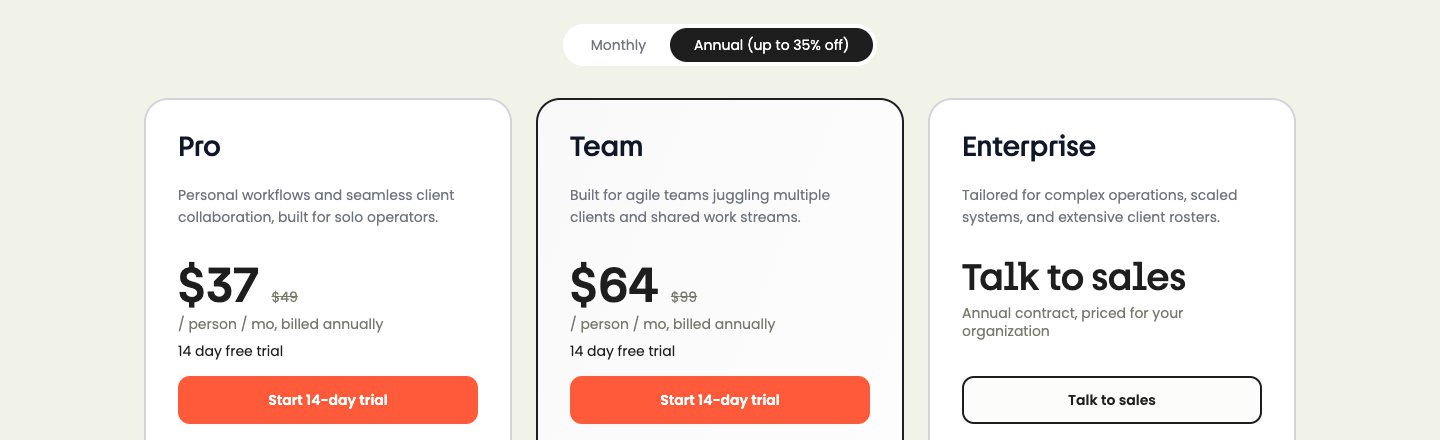
Yearly billing saves 25% on Pro and 35% on Team; the "up to 35% off" on the toggle only applies to Team. Fyxer shows per-month figures only, so the yearly totals above are our arithmetic.
A seat is "one paid member, however many inboxes or calendars they connect." But the comparison table ticks "Several inboxes at once" only for Team and Enterprise. If you're one person with two inboxes, check whether Pro covers you before you buy. Paid plans also come with free Viewers, who can see shared work without a seat.
Fyxer changed its plans in September 2026
Fyxer's help center says that "In September 2026, Fyxer introduced new plans and pricing." The old plans, Starter and Professional, are now legacy plans. Existing customers can keep them, and "There's currently no deadline by which existing customers must move to the updated plans." To try the new features you have to accept Fyxer's updated terms, "even if you later revert to your old plan and pricing" (new plans for existing customers). Fyxer doesn't publish the old prices on its own pages. If a review quotes Starter or Professional prices, it's describing plans new customers can't buy.
How the credits work
Credits are how Fyxer meters its AI. From its help article How credits and usage work:
Action | Credits |
|---|---|
Sorting and labeling an incoming email | 0.2 (5 emails per credit) |
Drafting a reply | 0 ("Included in paid seats") |
Recording a meeting | 1 per minute (60 an hour), video or audio |
Running a Flow | 5 per run |
A chat message | Varies; Fyxer's own pages give different figures |
So if Pro's 3,000 credits went only on sorting, they'd cover 15,000 emails a month. Spent only on meetings, they'd cover about 50 hours of recording. Most people will use a mix. The Free plan's 400 credits come to about 6 hours 40 minutes of audio notes, or roughly 20 chat messages by the pricing page's own estimate.
When you run out:
On Free, metered features pause until next month, and you can't top up.
On Pro and Team, credits are unlimited for the first three months as a launch offer. After that, Fyxer warns you at 80% and 100% of your allowance, and "some features may pause" while it gets in touch about a bigger plan. You can buy extra credits once the offer ends; Fyxer doesn't publish the price.
Unused credits don't roll over, whether you pay monthly or yearly.
Since drafts are free, the meter matters most if you record a lot of meetings or lean on chat and Flows.
Free trial and billing: what's clear and what isn't
What's clear: new sign-ups get Fyxer's Team plan free for 14 days, with every Team feature, according to the pricing FAQ. The homepage calls it a "14-day free trial with your work email." On Outlook, Fyxer's docs suggest getting your IT admin's approval before you start, "to avoid using up trial time."
Two things aren't clear, because Fyxer's own pages disagree:
Does Pro have a trial? The Pro card says "14 day free trial" and has a "Start 14-day trial" button. The FAQ answer for Pro says "There's no free trial." The safe assumption is that you're trialling Team, whichever button you press.
What happens when the trial ends? The pricing FAQ says "When your trial ends you move to the Free plan, unless you choose to pay." A help center article says "At the end of the trial, your account automatically converts to a paid plan unless you cancel," with billing based on the plan, seats and billing cycle you picked. The same article advises: "Set your own reminder to avoid surprises."
Until Fyxer sorts this out, assume you'll be charged. Put a reminder in your calendar for day 13, and cancel from Dashboard → Admin settings → Billing if you don't want to pay. Anyone else in your workspace when the trial ends is counted in the first charge.
Refunds
Fyxer's refund policy gives a full refund if you ask within 7 days of your first charge on a monthly plan, or within 30 days on a yearly plan. After that, requests are looked at case by case, with no promise. You ask by emailing support@fyxer.com.
Does Fyxer work with Gmail and Outlook?
Yes, and only those two.
Gmail: personal Gmail accounts and Google Workspace.
Outlook: cloud-hosted Microsoft accounts (Microsoft 365 and Exchange Online), in Outlook for Windows, Outlook on the web and the new Outlook for Mac. Fyxer says on-premise and hybrid Exchange aren't supported, and older Outlook versions may not show its categories.
Fyxer's docs don't mention iCloud, Yahoo or other IMAP accounts, and they don't say whether personal Outlook.com addresses work. If your mail is there, ask Fyxer before you pay.
We couldn't find a Fyxer mobile app; its docs suggest bookmarking the Dashboard on your phone. The labels and drafts are written into your Gmail or Outlook account, though, so you'll see them in your usual mail app on any device.
Is Fyxer safe? What it does with your email
Fyxer reads your email, calendar and meeting audio. It has to, to sort, draft and take notes. The details are in its privacy policy (effective September 29, 2026) and its sub-processor list.
It trains its own AI models on your content by default. Section 5.5 says: "We use content to train and improve our own AI models," so that drafting, sorting and transcription get better. Before training, it swaps names and email addresses for codes and strips out sensitive data such as health or religion. You can opt out at any time from the Dashboard, but "We cannot remove content from models already built." For business customers, training depends on their agreement with Fyxer. Enterprise content isn't used for training across customers, and Fyxer's docs say the opt-out is on by default on Enterprise.
Outside AI providers can't train on your data. Fyxer says it doesn't let them use it to train "their own general or foundation models." Live requests go to "our main model provider under a zero-retention arrangement." Content set aside for Fyxer's own training may sit with the training provider for up to 90 days.
OpenAI is the only language-model provider on the sub-processor list (dated September 9, 2026), listed for "API connectivity to large language models." AssemblyAI handles speech-to-text, Recall.ai runs the meeting bot and ElevenLabs does voice. Hosting is on Google Cloud in the EEA; the Microsoft integration uses Microsoft's US cloud.
Staff can see your mail in limited cases. The policy says "authorized staff may access specific content" to investigate a fault, a security incident or misuse, or when you ask.
No selling, no ads. "We do not sell your content, use it to build advertising profiles, or make it public."
Fyxer shows SOC 2, ISO 27001, GDPR, CASA Tier 2 and HIPAA badges (HIPAA on Enterprise). The company is Fyxer AI Limited, in London.
So, is it safe? It's a real, certified company with a detailed policy, and it never sends or deletes mail. The thing to know is the training default. Fyxer's line that "Your data is never used to train third-party models" is true, but narrower than it sounds: Fyxer trains its own models on your mail unless you opt out. If that bothers you, switch it off on day one.
What's good about Fyxer
It works where you already are. No new app to learn and no mail to move.
It won't send or delete anything by itself, which makes it a low-risk first AI tool.
Drafts don't use credits on paid plans.
Meeting notes are included, with follow-up drafts, so you may not need a separate notetaker.
Its privacy documents are detailed, with a real opt-out and a published sub-processor list.
What's not so good
Pro is expensive for one person, and the useful part isn't free. Sorting and automatic drafts start at $49 a month, or $444 a year billed yearly. That's more than Superhuman Mail's Starter plan ($30 a month).
Credits are one more meter to watch. After the three-month launch offer, a lot of meeting recording or chat can drain your allowance, and Fyxer doesn't publish the top-up price.
Its own pages contradict each other about the Pro trial and about what happens when the trial ends. With billing that may start automatically, that's not reassuring.
Gmail and Microsoft 365 only, with no mobile app and five fixed categories you can't rename.
It trains its own models on your mail by default. You can opt out, but you have to know to.
Who should use Fyxer
Fyxer suits you if you're on Gmail, Google Workspace or Microsoft 365 and don't want to change email apps; you get a lot of mail that needs replies and would rather edit a draft than write from scratch; and you have enough meetings that bundled notes and follow-ups save you buying another tool.
Look elsewhere if you already pay for Google AI or Microsoft 365 (try that AI first), if your mail is on iCloud, Yahoo or IMAP, or if all you want is a tidier inbox. A sorting-only tool costs a fraction of $49.
Fyxer alternatives
Our guide to the best AI email assistants covers more.
Gemini in Gmail or Copilot in Outlook, if you already pay for them. Gmail made some AI free in January 2026 (Help me write and Suggested Replies in the US, and thread summaries for everyone). More comes with Google AI Plus at $4.99 a month or Pro at $19.99. Copilot comes with Microsoft 365 Personal at $9.99 a month, not Basic, and on Family only the subscription owner gets it. Both write and summarize for less; Fyxer's automatic sorting and meeting notes are what you'd pay extra for.
Inbox Zero, if you want rules you control. It labels, archives and drafts in Gmail or Outlook based on rules you write in plain English, from $20 a month, or $18 billed yearly, with a 7-day trial and no free plan. Unlike Fyxer, it can send or forward mail if you build a rule that does, so test your rules.
SaneBox, if you only want sorting. It moves unimportant mail out of your inbox by reading headers only, works with almost any provider including IMAP, and starts at $3.49 a month. It doesn't draft or take notes.
Superhuman, if you want a faster email app. Superhuman Mail replaces your email app instead of adding to it, with keyboard shortcuts and AI on Gmail and Microsoft 365. Starter is $30 a month, or $25 billed yearly; Auto Drafts needs Business, at $40 or $33 billed yearly. There's no free plan or trial. See our Superhuman pricing guide.
If you already pay for Google or Microsoft, our guides to AI in Gmail and Outlook explain what Gemini and Copilot already include.
Fyxer vs Superhuman
These two get compared a lot, but they do different jobs. Fyxer is an add-on: you keep Gmail or Outlook, and it sorts, drafts and takes meeting notes in the background. Superhuman is a new email app on top of the same accounts, built for speed. Both draft replies in your voice, Fyxer from Pro and Superhuman only on Business. Fyxer Pro costs more than Superhuman Business ($49 vs $40 monthly, $37 vs $33 yearly) but includes meeting notes. Superhuman has native apps for Mac, Windows, iPhone and Android, and pays off if you'll learn its shortcuts.
Our Superhuman review covers Superhuman in more depth.
Or switch to an app built around AI: Dove
If you'd change email apps rather than add a tool, Dove is ours, from the team behind Canary Mail. It sorts mail into Focus, Feed and Noise, drafts replies in your style, and answers questions about your inbox. It costs $20 a month or $200 a year, has a free plan with 10 AI actions a day, and has a 7-day trial that asks for a card. It works with Gmail, Google Workspace, Outlook, Microsoft 365, iCloud, Yahoo and IMAP, on Mac, Windows, iPhone, iPad, Android and the web. Email content is stored locally when possible. It has no PGP or end-to-end encryption.
Its real downside is that it's new, so its track record and integrations are thin next to Fyxer's. It has no meeting notetaker either, and that's where Fyxer is clearly stronger. Our guide to the best AI email apps compares Dove with the other apps you can switch to.
FAQ
Is Fyxer AI any good?
At what it sets out to do, yes: it sorts, drafts in your tone and takes meeting notes inside Gmail or Outlook, and never sends without you. Whether it's worth it comes down to price. Sorting and drafts start at $49 a month ($37 billed yearly), which is a lot for one person who won't use the meeting notes.
Is Fyxer AI safe to use?
It's a certified UK company that never sends or deletes mail on its own, and outside AI providers (OpenAI is the only language-model provider it lists) can't train on your data. But Fyxer does train its own models on your email by default. You can opt out from the Dashboard, but content already used in a model can't be taken back out.
Is Fyxer AI free?
There's a Free plan at $0 with 400 credits a month. It covers daily and weekly briefings, audio meeting notes and a few personal spaces, but no automatic sorting or reply drafts; those start on Pro. New sign-ups also get a 14-day free trial of the Team plan.
How much does Fyxer AI cost per month?
Pro is $49 per person a month, or $37 a month billed yearly. Team is $99, or $64 billed yearly. Enterprise is a custom annual contract. These are the plans Fyxer introduced in September 2026; reviews quoting "Starter" and "Professional" prices are describing legacy plans.
What is better than Fyxer?
It depends on what you need. If you already pay for Google AI or Microsoft 365, Gemini or Copilot may be enough. SaneBox is far cheaper if you only want sorting, and Inbox Zero suits people who want rules they control. If you'd switch email apps, Superhuman is faster by keyboard, and Dove (ours) costs $20 a month and also works with iCloud, Yahoo and IMAP.
More from Dove
Recent posts
October 13, 2026
Outlook Alternatives in 2026: 9 Email Apps for Every Device
Microsoft isn't shutting Outlook down, but Windows Mail is gone and the old Outlook for Mac loses work accounts this month. Here's what's changing, and nine Outlook alternatives for Windows, Mac, iPhone and Android, with prices checked on October 13, 2026.
October 13, 2026
Gmail Alternatives in 2026: A New Provider, or Just a Better App
Leaving Google entirely means picking a new email provider. If you only dislike the Gmail app, you can keep your address and change the app instead. Both routes are covered below, with every price checked on October 13, 2026.
October 12, 2026
AI Email Assistant for Gmail in 2026: Gemini, Add-ons and What They Cost
Gmail already has a free AI assistant, at least in the US. Here's what Gemini does on each plan, how to switch it on or off, and when an add-on like Fyxer, Cora or Inbox Zero is worth paying for.