'/%3e%3c/g%3e%3c/svg%3e)

Best Email Apps for Consultants in 2026
The best email apps for consultants in 2026 compared. See platform support, pricing, what each tool does well, and what it does poorly. Covers Dove, Superhuman, Front, Spark Mail, Spike, Hey, and Mailbird.

A consultant’s inbox is not one inbox. It is several, layered on top of each other. There is the active client running a workshop next week, the prospect who replied to a proposal three days ago, the partner introducing a new account, the former client who came back with a follow-on scope, and a long tail of vendor updates, newsletters, and tool alerts. Each thread has a different deadline, a different rate, and a different tolerance for a slow reply.
The right email app cannot do the work for you, but it can stop the inbox from quietly losing the warm reply that turns into a six-figure engagement. By 2026, the consulting category has split into two camps. There are AI-native tools that triage, summarize, and draft for you, and there are traditional clients with stronger collaboration, privacy, or speed features that you wire up yourself.
This guide compares the eight best email apps for consultants in 2026 on platform support, pricing, what each tool does well, and where it falls short. We tested them with the workflows independent consultants and boutique firms actually run, proposal follow-ups, client deliverables, partner introductions, scheduling, and the post-engagement long tail.
Key takeaways
Dove is the best pick for consultants who want AI to take real work off the inbox. It sorts every email into Focus, Noise, and Done before you open the app, drafts replies in your tone, summarizes long client threads, and works on top of Gmail, Outlook, iCloud, and IMAP.
Superhuman is the speed benchmark if price is not a constraint and your client accounts are Gmail or Outlook.
Front is the strongest shared-inbox tool for small consulting firms with assistants or junior consultants triaging on behalf of partners.
Spark Mail and Spike are the calmer cross-platform picks if you want a smart inbox without paying for a full collaboration suite.
Hey is a strong fit for solo consultants who want a deliberate, opinionated email workflow on a fresh address.
Mailbird is the best traditional Windows-first client for consultants who live in Outlook and want a nicer shell on top.
Pricing for serious consulting tooling ranges from a $20 per month all-in AI plan (Dove) to $30 or more per seat (Superhuman, Front).
What consultants actually need from an email app
Consulting is not one job, and a good email app has to handle four overlapping workflows.
Multi-client triage. A reply from an active client paying retainer is worth more than a newsletter. The inbox has to surface client threads first, not last, and keep separate clients legible inside one address.
Proposal and BD follow-up. Warm replies to proposals decay fast. Templates, snooze, send later, and reliable scheduling are the difference between a closed engagement and a lost one.
Sensitive thread handling. Strategy memos, salary discussions, board updates, and NDAs should not sit unencrypted on a provider’s servers. Some consultants need PGP, secure send, and on-device AI rather than cloud AI.
Async client communication. Long threads with multiple stakeholders, attached decks, and rescheduled meetings need to be summarized so the next reply does not require reading 14 messages from scratch.
No single tool nails all four. Dove and thread, and privacy layers with AI and encryption. Front focuses on shared inboxes for small firms. Superhuman, Spark, Spike, Hey, and Mailbird sit in different places between speed, calm, and traditional polish.
The right pick depends on whether the inbox itself, the proposal pipeline, or the privacy posture is the bottleneck. Most independent consultants in 2026 are best served by pairing an AI-native client like Dove with a dedicated proposal or CRM tool, rather than buying one sprawling platform.
Best email apps for consultants at a glance
App | Platforms | Free tier | Paid pricing | What it does well | What it does poorly |
|---|---|---|---|---|---|
Web, iOS, Android, macOS, Windows | Yes, free plan with up to 10 AI actions per day | $20 per month, 7-day free trial | AI triage into Focus, Noise, and Done across any account, AI Assist drafts client replies in your tone, Wingman summarizes long threads | Not a CRM or proposal tool, light on outbound sequences | |
Superhuman | macOS, Windows, iOS, Android, Web | No | From around $30 per month per seat | Keyboard speed, snippets, reminders, AI summaries, fast Gmail and Outlook triage | Expensive, only supports Gmail and Outlook, no encryption layer |
Front | Web, macOS, Windows, iOS, Android | No, free trial only | Starter around $19 per seat per month, Growth around $59 per seat per month, Scale and enterprise higher | Shared inboxes, internal comments, assignment, SLAs for small consulting firms | Heavy for a solo consultant, paid only, the inbox itself looks like a help desk |
Spark Mail | macOS, iOS, Android, Windows, Web | Limited free tier | Premium around $7.99 per month, annual discounts available | Cross-platform smart inbox, shared drafts, team comments, calendar | AI features lighter than Dove or Superhuman, some core features behind Premium |
Spike | Web, macOS, Windows, iOS, Android | Yes | Pro from around $6 per user per month, Business plans higher | Conversational chat-style threads, fast inbound triage, group chats with clients | Chat metaphor does not suit formal proposals, no real outbound sequencer |
Hey | Web, macOS, Windows, iOS, Android | No, free trial only | Hey for You $99 per year, Hey for Work $12 per user per month | Opinionated screener for new senders, Imbox and The Feed split, calm by default | Requires a new @hey.com address for personal plan, not a client on top of Gmail or Outlook |
Mailbird | Windows, macOS, iOS, Android | Limited free tier | Premium from around $3.25 per month annual, Business plans higher | Unified inbox across many providers, integrations with calendar and chat tools, classic Windows feel | Light on AI, no PGP encryption, less polished on macOS than on Windows |
The rest of this guide walks each app in detail. Dove and AI-native triage and privacy-first communication. The other six follow.
1. Dove, best for AI-native triage and reply drafting on any inbox
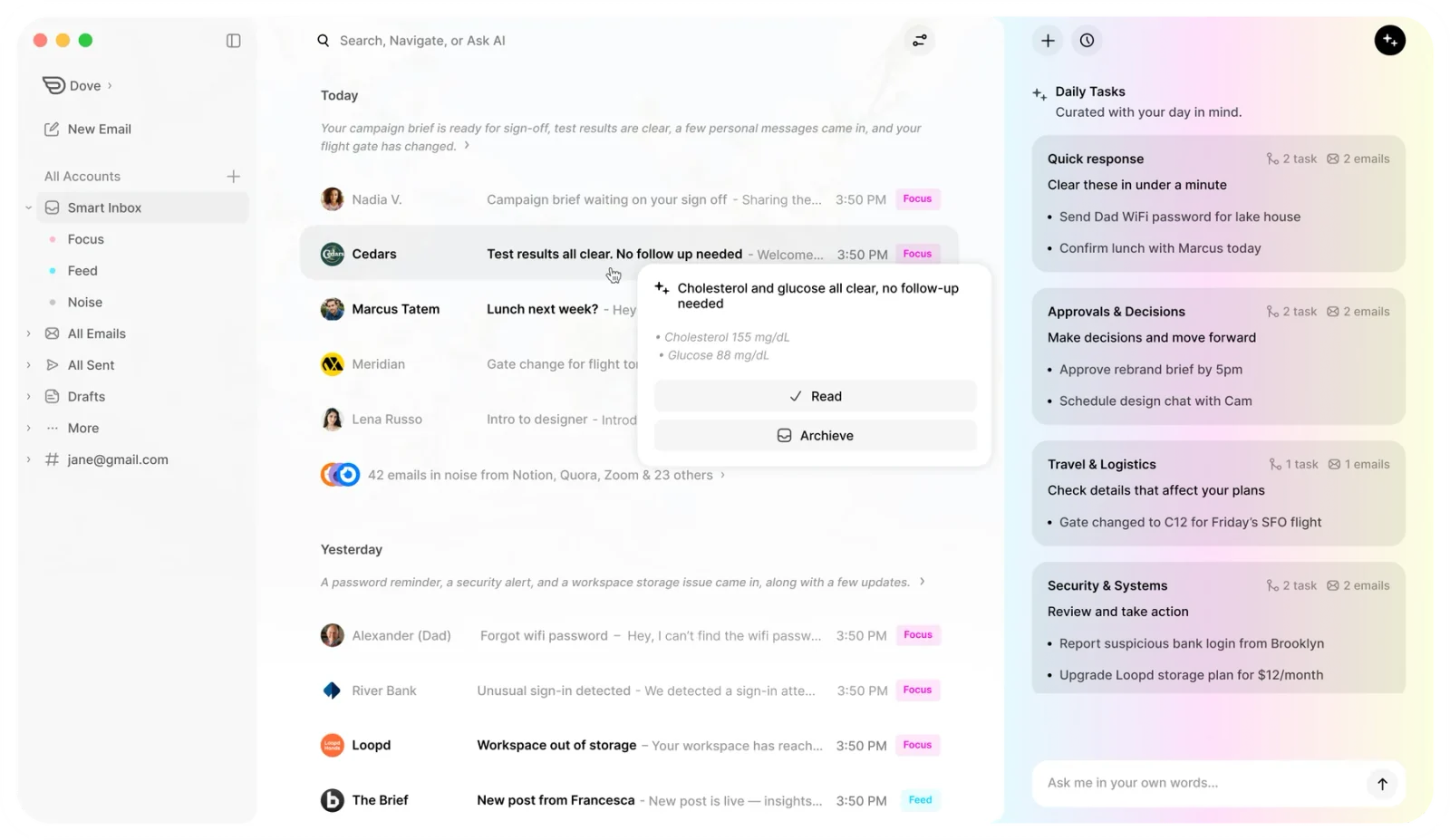
Dove is an AI-native email app from Cartasec, the Singapore team behind . Where most consulting tools bolt automation onto a regular inbox, Dove rebuilds the inbox around AI from the start. Every incoming message is sorted automatically into Focus for client replies and warm prospect threads that need you, Noise for newsletters, tool alerts, and likely cold pitches, and Done for confirmations, scheduling acknowledgements, and threads already handled. The first thing a consultant sees in the morning is a short list of what matters, not a wall of unread.
Two features make Dove especially good for consulting work. Wingman reads long threads across multiple client stakeholders, surfaces hidden risks, missed asks, and the next step you should take, the kind of context a thread summary alone tends to miss. AI Assist drafts replies in your tone and handles common moves like scheduling, follow-ups, scope clarifications, and post-engagement check-ins, so the routine work of moving a client forward stops eating the day.
Dove is a client, not an email provider. It connects on top of Gmail, Outlook, iCloud, and any IMAP account, so consultants do not need a new email address and small firms do not need to migrate. The AI works the same way regardless of which provider sits underneath, which matters when one client uses Google Workspace and another uses Microsoft 365.
Platform support. Web, iOS, Android, macOS, Windows.
Pricing. Free plan with up to 10 AI actions per day. Paid plan at $20 per month with full AI features and a 7-day free trial.
What Dove does well
Sorts every email into Focus, Noise, and Done before you open the inbox, so warm client replies stop getting buried under tool noise
Wingman thread intelligence catches risks, missed asks, and stalled scope conversations inside long client threads
AI Assist drafts replies in your tone, handles scheduling, follow-ups, scope clarifications, and post-engagement notes
Works across Gmail, Outlook, iCloud, and IMAP, no provider lock-in, which matters when clients run different stacks
Native apps on Web, iOS, Android, macOS, and Windows, so consulting on the road works the same as consulting from the desk
What Dove does poorly
Not a CRM or proposal platform, you cannot build multi-step outbound BD sequences inside Dove
No native client portal, scope tracker, or invoicing, pair with HubSpot, Pipedrive, Notion, or a focused CRM
Free plan caps AI usage at 10 actions per day, busy consultants will outgrow it quickly
Learn more on the Dove home page or read how Dove’s AI triage works. Dove also appears in our roundup of the best AI email apps in 2026 and our guide to the best email apps for freelancers, which shares a lot of the same multi-client DNA.
2. Superhuman, best for keyboard-speed Gmail and Outlook consultants
Superhuman is the keyboard-driven inbox that made fast email a category. For a consultant whose accounts are all Gmail or Outlook and who can absorb the price, it remains one of the fastest ways to move through email in 2026. Snippets, reminders, split inbox, undo send, and a keyboard shortcut for almost every action add up to a real time savings on high-volume days.
The newer AI features in Superhuman, summaries, auto-drafts, and instant replies, are competent but more bolted-on than what Dove offers as the foundation of the product. For a consultant whose bottleneck is keystrokes rather than triage, that is fine. For one whose bottleneck is deciding which 10 of 200 emails actually matter today, an AI-native client gets there faster.
Platform support. macOS, Windows, iOS, Android, Web.
Pricing. From around $30 per month per seat. No free tier.
What Superhuman does well
The fastest keyboard-driven inbox in the category
Strong snippets, reminders, and split inbox for power users
Undo send, follow-up reminders, and read statuses out of the box
Polished, focused UI that rewards muscle memory
Solid AI summaries and quick replies on top of the speed layer
What Superhuman does poorly
Expensive at around $30 per seat per month, multiple times the price of Dove
Only supports Gmail and Outlook, no iCloud, no IMAP
No PGP encryption, sensitive consulting work needs another layer
AI is good but not the core of the product, you still pick the work yourself
No real CRM, proposal, or shared-inbox features
For a deeper comparison, see our Superhuman alternatives guide.
3. Front, best for small consulting firms with shared inboxes
Front is a shared-inbox tool for small teams that need more than a personal email client. For a boutique consulting firm where a managing partner has an assistant triaging on their behalf, or where a small delivery pod handles client@ aliases together, Front is genuinely good. Internal comments, assignment, SLAs, and a calmer queue model make collaborative client communication faster than forwarding chains and BCC.
For a solo consultant, Front is overkill. The product is built around team workflows and team pricing, and the inbox itself can read more like a help-desk queue than a personal mail client. The point at which Front starts to make sense is around two or three people sharing client communication, not earlier.
Platform support. Web, macOS, Windows, iOS, Android.
Pricing. No permanent free tier. Starter around $19 per seat per month, Growth around $59 per seat per month, Scale and enterprise higher.
What Front does well
True shared inboxes with assignment, internal comments, and SLAs
Strong integrations with CRM, Slack, calendar, and helpdesk tools
Good analytics on response time and team load
Useful for boutique firms with assistant or pod-based delivery
What Front does poorly
Heavy for a solo consultant, the team metaphor leaks through everywhere
No permanent free tier, paid only
Per-seat pricing adds up fast across a small firm
AI is improving but lighter than Dove or Superhuman
Inbox UI reads more like a help desk than a personal email client
4. Spark Mail, best for cross-platform consultants on a budget
Spark Mail covers the cross-platform basics very well. The smart inbox separates personal, newsletters, and notifications by default, the calendar integration is clean, and shared drafts plus team comments give a small consulting team some collaboration without paying for Front. Spark 3 added more AI features, but the core value is still the calm, well-designed cross-platform client.
For consultants who jump between a Mac, a Windows machine at a client site, an iPad on the road, and an Android phone in the field, Spark remains one of the smoother experiences in the category. The trade-off is that the AI and recruiting-grade features are lighter than Dove, and some of the polish moved behind a Premium plan in recent versions.
Platform support. macOS, iOS, Android, Windows, Web.
Pricing. Limited free tier. Premium around $7.99 per month with annual discounts available.
What Spark does well
Genuinely strong cross-platform experience, including web
Smart inbox separates the daily client mail from newsletters and alerts
Shared drafts and team comments for small consulting pods
Solid calendar integration and natural-language scheduling
Cleaner UI than most traditional clients
What Spark does poorly
AI features are present but lighter than Dove or Superhuman
Some previously free features moved into Premium in Spark 3
Account-bound features can be confusing when you switch machines
No PGP encryption inside the client
No real CRM or proposal tracking
For a deeper dive, see our Spark Mail alternatives roundup.
5. Spike, best for chat-style client conversations
Spike turns email into something closer to a chat app. Threads stack as conversations, replies feel like messages, and the visual weight of email drops significantly. For consultants whose day is mostly short check-ins, quick approvals, and inbound client questions, that feel is genuinely faster. Group chats and collaborative notes give a small team a Slack-like layer without leaving the inbox.
The same metaphor can feel wrong for long formal threads, signed proposals, or NDA-laden engagements. If your day is mostly multi-stakeholder strategy threads with decks attached, Spike is probably not the central tool. As a calmer secondary inbox for inbound client conversation, or as the main app for advisory-style consulting where the work is mostly relational, it punches above its weight.
Platform support. Web, macOS, Windows, iOS, Android.
Pricing. Free tier. Pro from around $6 per user per month. Business plans higher.
What Spike does well
Chat-style threads keep inbound client triage fast
Strong cross-platform experience, including web
Built-in voice and video notes for asynchronous client check-ins
Group chats and collaborative notes for small consulting pods
Friendly free tier for trying the model
What Spike does poorly
The chat metaphor does not suit long formal threads, signed scopes, or NDAs
No real outbound sequencer or BD tooling
AI features are lighter than Dove, Superhuman, or Shortwave
Less suited to consultants whose work is dense, document-heavy threads
6. Hey, best for solo consultants who want an opinionated inbox
Hey from 37signals is the most opinionated email product on this list. It throws out the unread count, splits incoming mail into the Imbox, The Feed, and the Paper Trail, and forces every new sender through a screener before they can land in the main view. For solo consultants who want their inbox to feel calmer by default and are willing to commit to a new @hey.com address, that opinionated model can be a real productivity unlock.
The trade-off is real. Hey for You is a fresh email account on a new domain, not a client on top of Gmail or Outlook, so you cannot drop it on existing client threads without changing your address. Hey for Work supports custom domains, which makes it more realistic for a boutique firm, but the price climbs and the workflow change is still significant. For consultants who already have an established client-facing address, the cost of migration is the friction.
Platform support. Web, macOS, Windows, iOS, Android.
Pricing. No free tier. Hey for You $99 per year. Hey for Work $12 per user per month with custom domain support.
What Hey does well
Screener for new senders, the inbox is calmer by default
Strong philosophical clarity, Imbox, The Feed, and Paper Trail are useful frames
Polished, deliberate UI without unread anxiety
Reply Later, Set Aside, and Focus and Reply are genuinely useful patterns
What Hey does poorly
Personal plan requires a new @hey.com address, the migration cost is real
Not a client on top of Gmail or Outlook, you live inside Hey
No PGP encryption
AI features are limited compared to Dove and Superhuman
Opinionated by design, which is a feature for some and a wall for others
For a deeper comparison, see our Hey email alternatives guide.
7. Mailbird, best for Windows-first consultants in Outlook
Mailbird is the classic Windows-first email client. It connects to Gmail, Outlook, iCloud, IMAP, and Exchange, and bundles in chat tools, calendar, and contacts behind a clean unified inbox. For a consultant who lives in Windows, runs Outlook at most client sites, and wants a single shell across personal and client accounts, Mailbird remains a sensible pick.
The Mailbird offering on macOS has caught up but still lags the Windows experience, and the product is light on AI relative to Dove or Superhuman. There is also no PGP encryption inside the client, which limits its fit for sensitive engagements.
Platform support. Windows, macOS, iOS, Android.
Pricing. Limited free tier. Premium from around $3.25 per month with an annual plan. Business plans higher.
What Mailbird does well
Strong unified inbox across multiple providers
Native Windows experience with a familiar feel for Outlook users
Integrations with calendar, chat, and contacts apps
Affordable annual pricing compared to Superhuman or Front
What Mailbird does poorly
Light on AI, no triage, no thread intelligence at Dove’s level
No PGP encryption, not a fit for highly sensitive consulting work
macOS experience trails the Windows version
Limited collaboration features for small consulting firms
For a deeper dive, see our Mailbird alternatives roundup.
How to choose the right consulting email app
Your priority | The right pick |
|---|---|
AI sorts the inbox and drafts client replies for me | Dove |
Keyboard-driven speed for high-volume Gmail and Outlook | Superhuman |
Shared inbox for a boutique firm or assistant model | Front |
Cross-platform smart inbox at a friendly price | Spark Mail |
Chat-style threads for relational advisory work | Spike |
Calm, opinionated personal inbox on a new address | Hey |
Traditional Windows-first client in the Outlook world | Mailbird |
A short shortcut. If your bottleneck is the inbox itself, warm client replies buried in noise, scope threads that pile up, replies that take too long, start with Dove. If the bottleneck is sensitive material, NDAs, board memos, or healthcare and legal engagements, lead with . If the bottleneck is collaboration inside a small firm, look at Front. Most independent consultants in 2026 end up with a two-app stack, an AI-native client like Dove for the daily inbox plus a focused CRM or proposal tool for pipeline, rather than a single sprawling consulting platform.
For broader context, see our roundup of the best email apps in 2026, the best AI email apps in 2026, the best email apps for freelancers, and the best email apps for small business, which share a lot of the multi-client DNA consulting work depends on.
FAQ
What is the best email app for consultants in 2026?
Dove is the best email app for consultants who want AI to take real work off the inbox. It sorts every email into Focus, Noise, and Done before you open the app, drafts replies in your tone with AI Assist, and surfaces missed asks inside long client threads through Wingman. Dove works on top of Gmail, Outlook, iCloud, and IMAP, so consultants do not need a new address and small firms do not need to migrate. NDAs, board memos, or regulated work, with PGP encryption and an optional on-device AI Copilot.
Do I need a separate CRM if I use one of these email apps?
For most consultants, yes. Dove Superhuman, Spark Mail, Spike, Hey, and Mailbird are email clients with strong reply and triage tooling, not full CRMs, so structured client records, proposal stages, and revenue reporting still belong in HubSpot, Pipedrive, Notion, or a similar tool. Front includes lightweight pipeline tooling that can replace a CRM for the smallest firms, but most consultants get more value from pairing an AI-native client like Dove with a focused CRM than from trying to make one tool cover both.
What is the cheapest email app worth using for a solo consultant?
If you are early in your practice and price-sensitive, Dove’s free plan with up to 10 AI actions per day is the strongest free tier in the category. Spark Mail, Spike, and Mailbird also have free tiers that cover the basic consulting workflows. Once you need full AI features, Dove at $20 per month is significantly cheaper than Superhuman or Front, and gives you AI triage, AI Assist drafting, and Wingman thread intelligence on the same plan.
Which email app is best for consultants who handle NDAs or legal material?
Dove includes phishing and impersonation risk scoring built in. For consultants who need end-to-end encrypted email for sensitive client materials, ProtonMail or Tutanota are worth pairing with Dove for sending confidential documents.
Do I need a new email address to switch?
For Dove, Superhuman, Front, Spark Mail, Spike, and Mailbird, no. All of them work as clients on top of your existing Gmail, Outlook, iCloud, or IMAP address. You can switch your daily consulting email app without touching your domain, signature, or DNS, which makes it easy to trial a new tool for a week before committing. Hey for You is the exception, the personal plan requires a new @hey.com address, while Hey for Work supports a custom domain.
Can I use these apps across multiple client accounts in one inbox?
Yes, with caveats. Dove, Spark Mail, Spike, and Mailbird all support multiple accounts inside one unified inbox, which is exactly the model most independent consultants need when they have a personal address, a firm address, and one or two client-issued mailboxes. Superhuman and Hey are more single-account in feel. Front is multi-account by design but built for shared rather than personal use.
Does Dove work on Windows?
Yes. Dove has native apps on Web, iOS, Android, macOS, and Windows. The Windows app gives consultants the same Focus, Noise, and Done triage, the same AI Assist drafting, and the same Wingman thread intelligence as the macOS app, so a Windows-first consultant gets the full AI-native experience without compromise.
Your clients, your inbox
Consultants already have enough tools. The right move in 2026 is not to add another sprawling platform, it is to pick the right combination, an AI-native email client that makes the inbox itself smarter, plus a focused CRM or proposal layer if your pipeline needs it.
If that sounds like your practice, start with Dove for the inbox and add a CRM only if pipeline reporting demands it. If your engagements carry NDAs, board memos, or regulated material, lead with . Either way, the pattern is the same, fewer tools doing more important work.
Try Dove free, 7-day trial, takes 2 minutes to connect your inbox.
More from Dove
Recent posts

August 17, 2026
Best Email App for Multiple Accounts in 2026
Juggling more than one inbox? Here is the best email app for multiple accounts in 2026, plus two other ways to fix inbox overwhelm for good.
July 1, 2026
Best Airmail Alternatives in 2026
The best Airmail alternatives in 2026 compared. See platform support, pricing, strengths, and weaknesses for Dove, Canary Mail, Spark Mail, Mimestream, Edison Mail, Shortwave, Outlook, and Apple Mail.
June 30, 2026
Best Spike Alternatives in 2026
The best Spike alternatives in 2026 compared. See platforms, pricing, strengths, and weaknesses for Dove, Shortwave, Spark, Missive, and Superhuman.